
Jap Vocab Anki Mcp Server
What is Jap Vocab Anki Mcp Server
The jap-vocab-anki-mcp-server is a Model Context Protocol server designed for programmatically interacting with Anki decks, specifically tailored for Japanese language learning.
Use cases
Use cases include generating fill-in-the-blank exercises for vocabulary practice, converting sentences into structured formats for Anki cards, and updating cards with contextual sample sentences to improve understanding.
How to use
To use the jap-vocab-anki-mcp-server, interact with it through the standardized interface to list decks, view cards, add new cards, and review them using spaced repetition techniques.
Key features
Key features include listing available decks, viewing and adding cards, reviewing cards with spaced repetition, importing Japanese vocabulary with readings and meanings, adding sample sentences to cards, and tracking review history and learning progress.
Where to use
This server is primarily used in language learning environments, particularly for learners of Japanese who want to enhance their vocabulary and comprehension.
Clients Supporting MCP
The following are the main client software that supports the Model Context Protocol. Click the link to visit the official website for more information.





Overview
What is Jap Vocab Anki Mcp Server
The jap-vocab-anki-mcp-server is a Model Context Protocol server designed for programmatically interacting with Anki decks, specifically tailored for Japanese language learning.
Use cases
Use cases include generating fill-in-the-blank exercises for vocabulary practice, converting sentences into structured formats for Anki cards, and updating cards with contextual sample sentences to improve understanding.
How to use
To use the jap-vocab-anki-mcp-server, interact with it through the standardized interface to list decks, view cards, add new cards, and review them using spaced repetition techniques.
Key features
Key features include listing available decks, viewing and adding cards, reviewing cards with spaced repetition, importing Japanese vocabulary with readings and meanings, adding sample sentences to cards, and tracking review history and learning progress.
Where to use
This server is primarily used in language learning environments, particularly for learners of Japanese who want to enhance their vocabulary and comprehension.
Clients Supporting MCP
The following are the main client software that supports the Model Context Protocol. Click the link to visit the official website for more information.
Content
Japanese Vocab Anki MCP Server
A Model Context Protocol server implementation for interacting with Anki decks programmatically. This server allows Language Models to interact with Anki through a standardized interface, with special support for Japanese language learning.
This is vibe-coded with Cursor with Claude 3.5 Sonnet.
Features
- List available decks
- View cards in decks
- Add new cards
- Review cards with spaced repetition
- Import Japanese vocabulary with readings and meanings
- Add sample sentences to Japanese vocabulary cards
- Track review history and learning progress
End-to-End Example: Japanese Vocabulary Study with Claude
Here’s a complete workflow showing how to use Claude to enhance your Japanese vocabulary cards with sample sentences.
Step 1: Generate Fill-in-the-Blank Exercises
First, ask Claude to create practice exercises using the study_japanese_vocab_prompt:
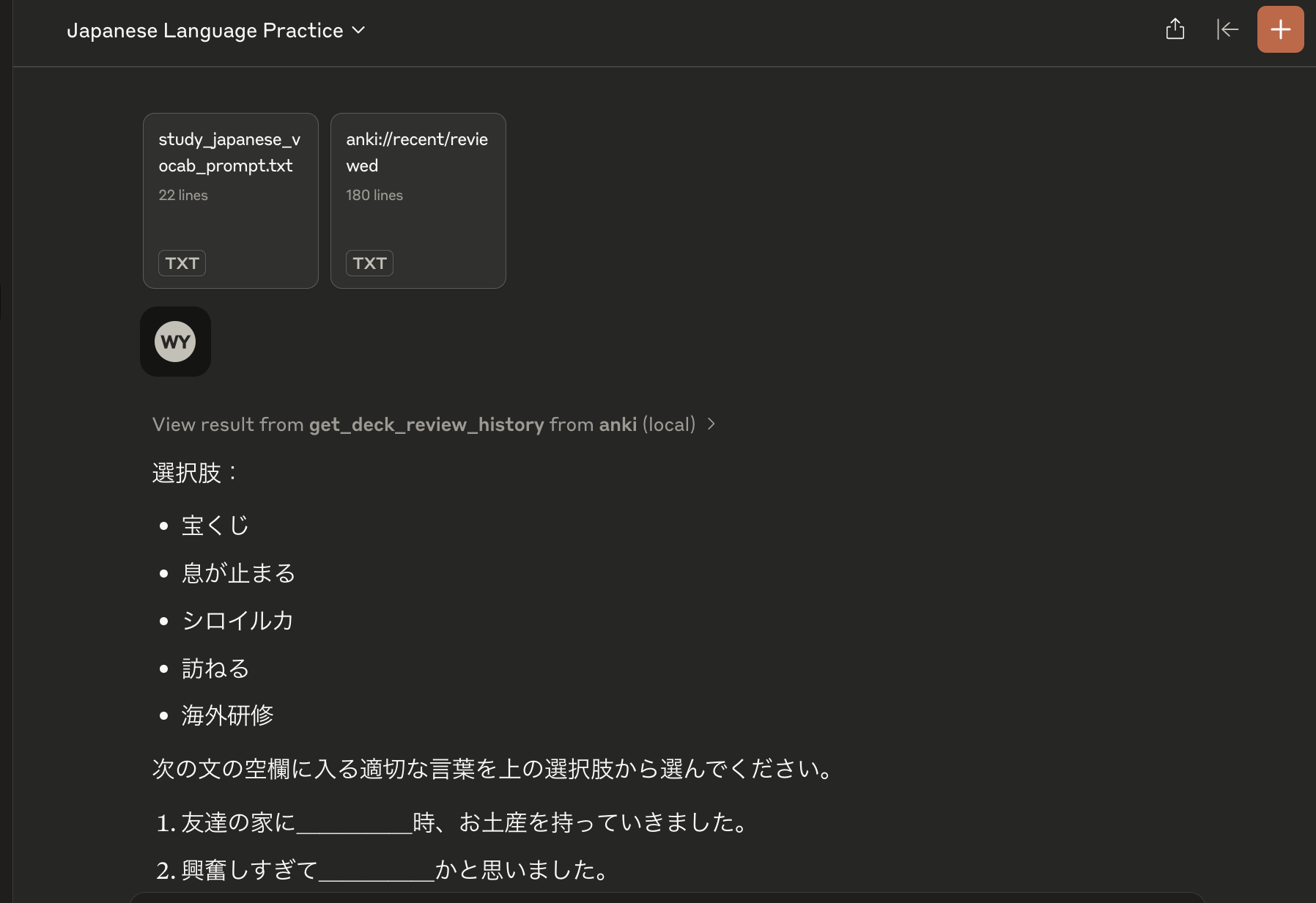
Claude will look through your recently reviewed vocabulary and create contextual sentences with blanks to test your understanding.
Step 2: Convert to Sample Sentences
Next, use the vocab_sentences_json_prompt to convert these sentences into a structured format:
Claude will transform the sentences into a JSON dictionary mapping each vocabulary word to its sample sentences.
Step 3: Update Anki Cards
Finally, use the update_notes_with_sentences tool to add these sentences to your Anki cards:
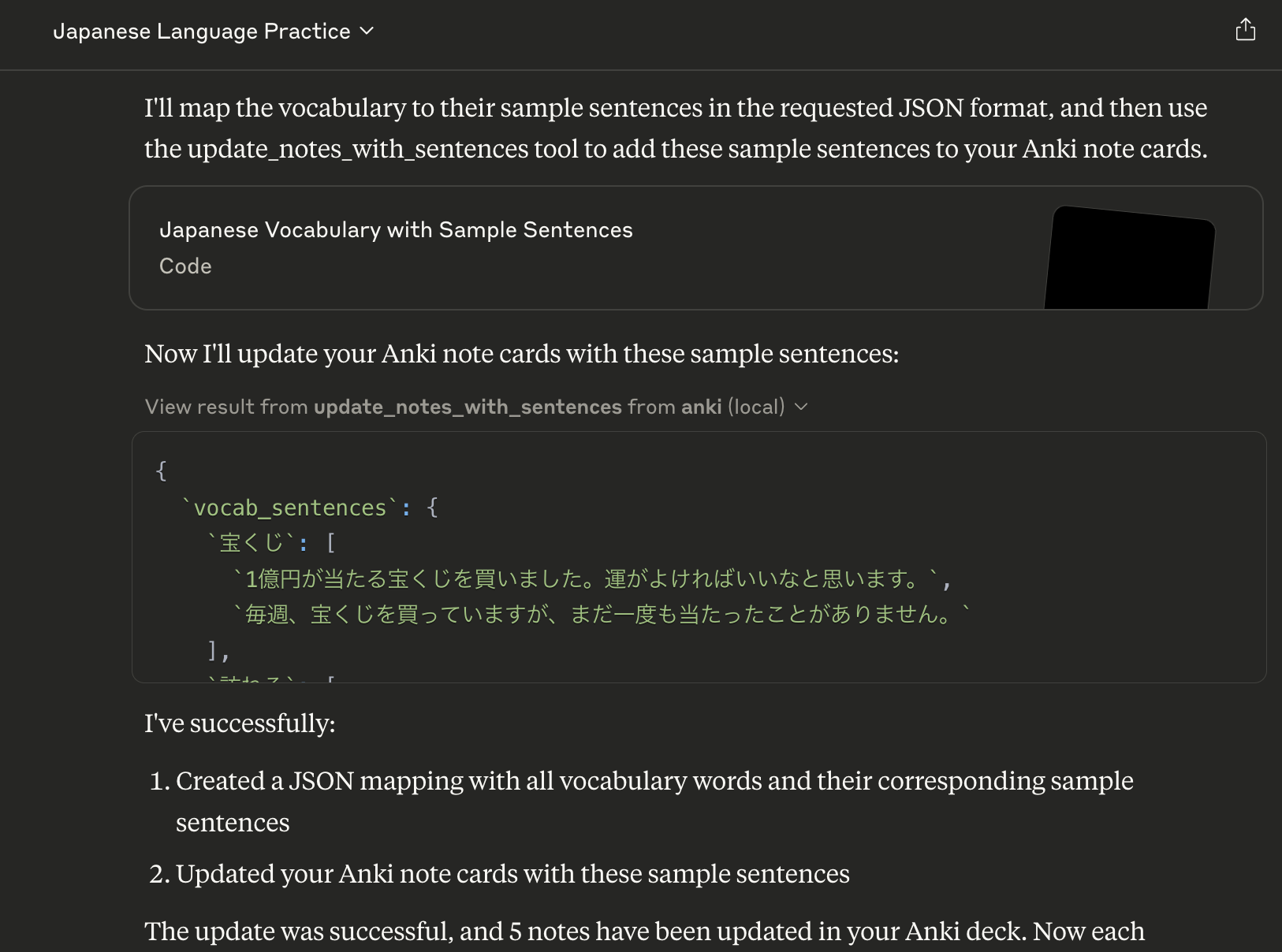
The sentences will be added to the reading field of each vocabulary card, providing more context for your studies.
Results in Anki
After the update, your cards will include the new sample sentences:
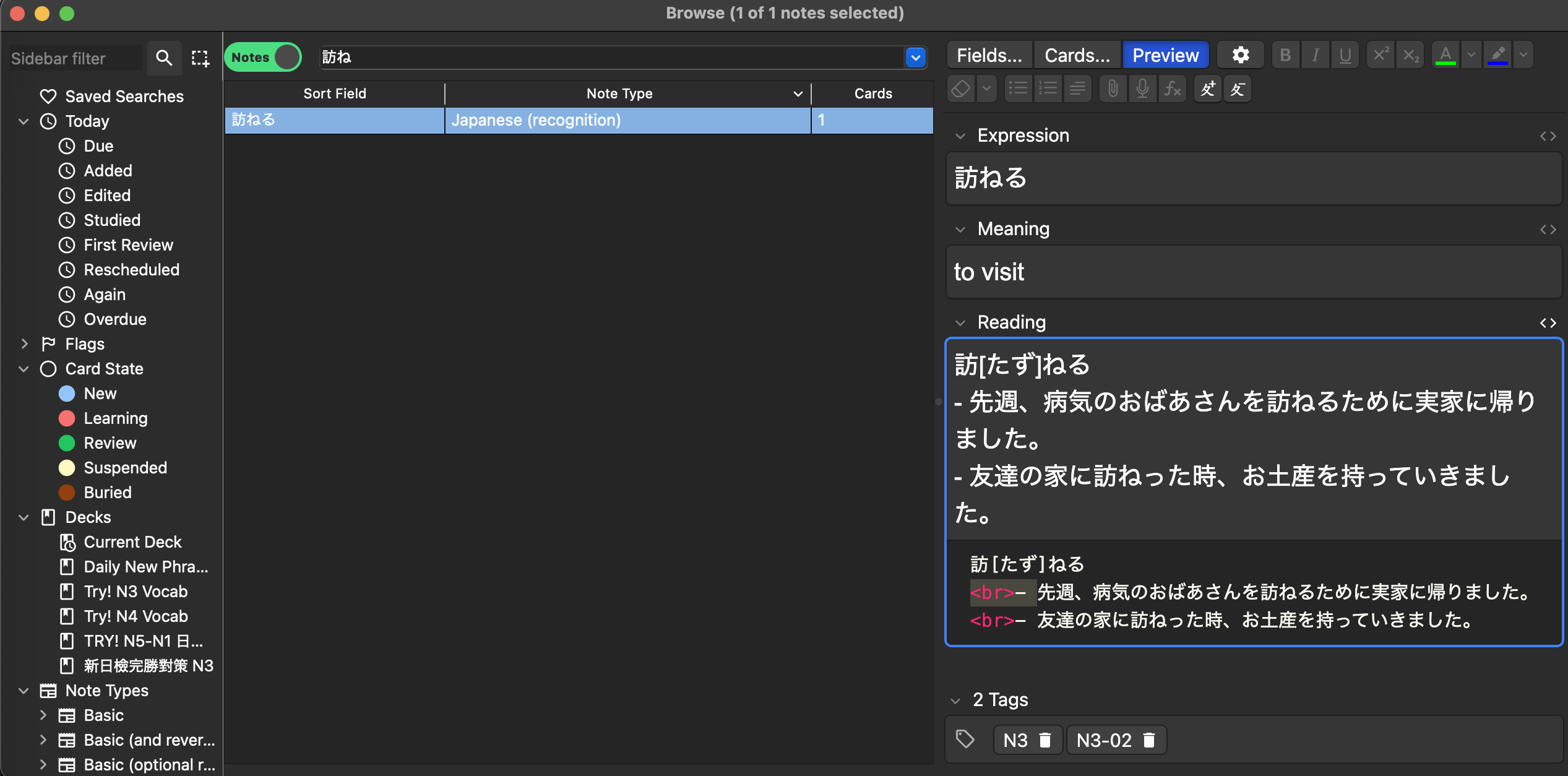
This workflow helps you:
- Practice vocabulary in context through fill-in-the-blank exercises
- Add natural example sentences to your cards
- Build a more comprehensive understanding of each word’s usage
Installation
- Clone this repository:
git clone https://github.com/vionwinnie/jap-vocab-anki-mcp-server.git
cd jap-vocab-anki-mcp-server
Usage
-
Make sure Anki is not running (to avoid database locks)
-
Set the path to your Anki collection (optional):
export ANKI_COLLECTION_PATH="/path/to/your/collection.anki2"
- Run the server:
python -m anki_mcp.server
Available Resources
anki://decks- List all available Anki decksanki://deck/{deck_name}/cards- List all cards in a specific deckanki://recent/reviewed- View cards reviewed in the last 24 hoursanki://recent/learned- View cards learned (graduated from new) in the last 24 hours
Available Tools
Basic Card Management
add_card(deck_name: str, front: str, back: str)- Add a new card to a deckreview_card(card_id: int, ease: int)- Review a card with a specific ease (1-4)get_card_history(card_id: int)- Get detailed review history for a specific card
Japanese Vocabulary Features
import_japanese_vocab(csv_path: str, deck_name: str, tags: str = None)- Import Japanese vocabulary from CSVupdate_notes_with_sentences(vocab_sentences: Dict[str, List[str]], deck_name: str = "Try! N3 Vocab")- Add sample sentences to vocabulary notes
Review History
get_deck_review_history(deck_name: str)- Get review history for all cards in a deck within the past 24 hours
Available Prompts
create_deck_prompt(deck_name: str)- Get help creating a new deckreview_history_prompt()- Get help analyzing review historystudy_japanese_vocab_prompt()- Get help with Japanese vocabulary studyvocab_sentences_json_prompt()- Generate JSON dictionary mapping vocab to sample sentences
Japanese Note Type Requirements
The server expects a note type called “Japanese (recognition)” with the following fields:
- Expression (Japanese word)
- Meaning (English meaning)
- Reading (with furigana and sample sentences)
License
MIT License
Dev Tools Supporting MCP
The following are the main code editors that support the Model Context Protocol. Click the link to visit the official website for more information.







