
Json Mcp
What is Json Mcp
json-mcp is a Model Context Protocol (MCP) server that allows large language models (LLMs) to interact with JSON files by enabling operations such as splitting, merging, and querying specific data based on conditions.
Use cases
Common use cases for json-mcp include splitting a large JSON file into smaller parts, merging smaller JSON parts into a single file, and finding specific data within JSON files based on defined conditions.
How to use
To use json-mcp, you can install it globally via npm or use npx to run the latest version. After installation, you can configure it in your environment, such as VS Code, to work seamlessly with tools like GitHub Copilot.
Key features
Key features of json-mcp include being fast and lightweight, as well as being friendly for LLMs, which enhances the efficiency of data manipulation tasks.
Where to use
json-mcp can be used in various fields that require data processing and manipulation, particularly in software development, data analysis, and machine learning applications.
Clients Supporting MCP
The following are the main client software that supports the Model Context Protocol. Click the link to visit the official website for more information.





Overview
What is Json Mcp
json-mcp is a Model Context Protocol (MCP) server that allows large language models (LLMs) to interact with JSON files by enabling operations such as splitting, merging, and querying specific data based on conditions.
Use cases
Common use cases for json-mcp include splitting a large JSON file into smaller parts, merging smaller JSON parts into a single file, and finding specific data within JSON files based on defined conditions.
How to use
To use json-mcp, you can install it globally via npm or use npx to run the latest version. After installation, you can configure it in your environment, such as VS Code, to work seamlessly with tools like GitHub Copilot.
Key features
Key features of json-mcp include being fast and lightweight, as well as being friendly for LLMs, which enhances the efficiency of data manipulation tasks.
Where to use
json-mcp can be used in various fields that require data processing and manipulation, particularly in software development, data analysis, and machine learning applications.
Clients Supporting MCP
The following are the main client software that supports the Model Context Protocol. Click the link to visit the official website for more information.
Content
JSON MCP
The Model Context Protocol (MCP) server empowers LLMs to efficiently interact with JSON files. With JSON MCP, you can split, merge, and find specific data, validate within JSON files based on defined conditions.
🌟 Key Features
✅ Fast and lightweight
✅ LLM-friendly functionality
🎥 Demo
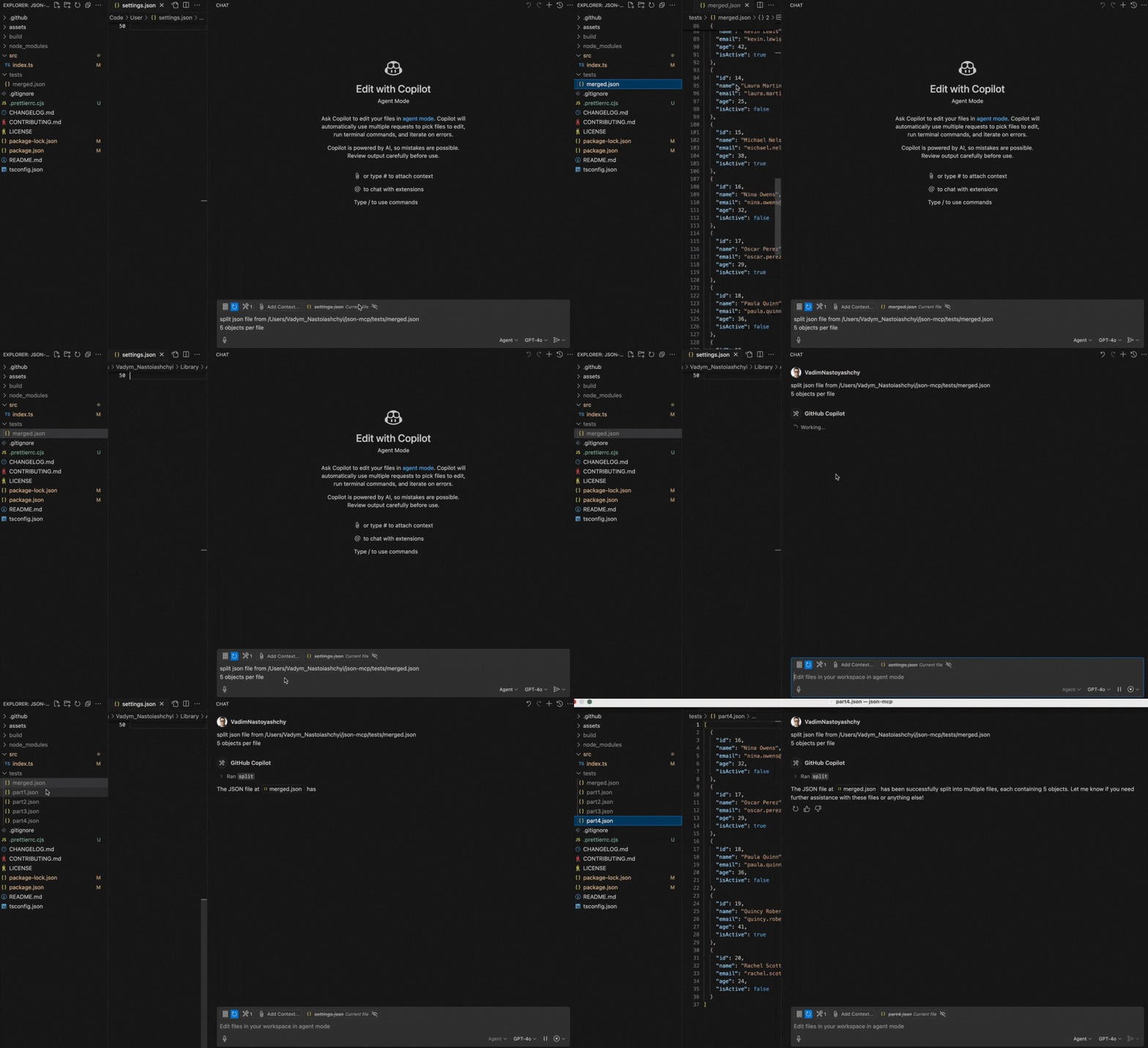
Below is a demo showcasing the split functionality:
🔧 Use Cases (Tools)
1. split
Split a JSON file into a specified number of objects.
Note: The file path must be provided.
Prompt Example:
Split JSON file from /Users/json-mcp/tests/merged.json
5 objects per file
2. merge
Merge JSON files into a one JSON file
Note: The folder path should be provided
Prompt Example:
Merge json files from /Users/json-mcp/tests
⚙️ Configuration

VS Code Manual Configuration
To configure the JSON MCP server manually in VS Code, update the User Settings (JSON) file:
{
  "mcp": {
    "servers": {
      "json-mcp-server": {
        "command": "npx",
        "args": [
          "json-mcp-server@latest"
        ]
      }
    }
  }
}
Installation in VS Code
You can install the JSON MCP server using the VS Code CLI:
# For VS Code
code --add-mcp '{"name":"json-mcp-server","command":"npx","args": ["json-mcp-server@latest"]}'
After installation, the JSON MCP server will be available for use with your GitHub Copilot agent in VS Code.
Claude Desktop
To install json-mcp for Claude Desktop automatically via Smithery:
npx -y @smithery/cli install @VadimNastoyashchy/json-mcp --client claude
⚙️ Installation Server
Install globally
npm install -g json-mcp-server@latest
Run after global installation
json-mcp-server
Using npx with latest version (recommended)
npx json-mcp-server@latest
Dev Tools Supporting MCP
The following are the main code editors that support the Model Context Protocol. Click the link to visit the official website for more information.







