
Json Query Mcp
What is Json Query Mcp
json-query-mcp is an MCP server designed for querying large JSON files. It provides tools for AI agents to efficiently work with extensive JSON data, particularly useful for models implementing the Model Context Protocol.
Use cases
Use cases include extracting specific data from large JSON files, generating TypeScript interfaces from JSON Swagger definitions, and facilitating AI agents in retrieving relevant information from extensive datasets.
How to use
To use json-query-mcp, run the command ‘npx json-query-mcp’. For installation, add the server configuration to your cursor mcp json file, specifying the command and local path to the repository.
Key features
Key features include querying JSON files using JSONPath expressions, searching for keys similar to a query string, and searching for values similar to a query string.
Where to use
json-query-mcp is applicable in fields that require handling large JSON datasets, such as data analysis, AI model training, and application development involving complex data structures.
Clients Supporting MCP
The following are the main client software that supports the Model Context Protocol. Click the link to visit the official website for more information.





Overview
What is Json Query Mcp
json-query-mcp is an MCP server designed for querying large JSON files. It provides tools for AI agents to efficiently work with extensive JSON data, particularly useful for models implementing the Model Context Protocol.
Use cases
Use cases include extracting specific data from large JSON files, generating TypeScript interfaces from JSON Swagger definitions, and facilitating AI agents in retrieving relevant information from extensive datasets.
How to use
To use json-query-mcp, run the command ‘npx json-query-mcp’. For installation, add the server configuration to your cursor mcp json file, specifying the command and local path to the repository.
Key features
Key features include querying JSON files using JSONPath expressions, searching for keys similar to a query string, and searching for values similar to a query string.
Where to use
json-query-mcp is applicable in fields that require handling large JSON datasets, such as data analysis, AI model training, and application development involving complex data structures.
Clients Supporting MCP
The following are the main client software that supports the Model Context Protocol. Click the link to visit the official website for more information.
Content
JSON Query MCP
A Model Context Protocol (MCP) server for querying large JSON files.
This server provides tools for working with large JSON data that can be used by LLM models implementing the Model Context Protocol.
Features
- Query JSON files using JSONPath expressions
- Search for keys similar to a query string
- Search for values similar to a query string
Example
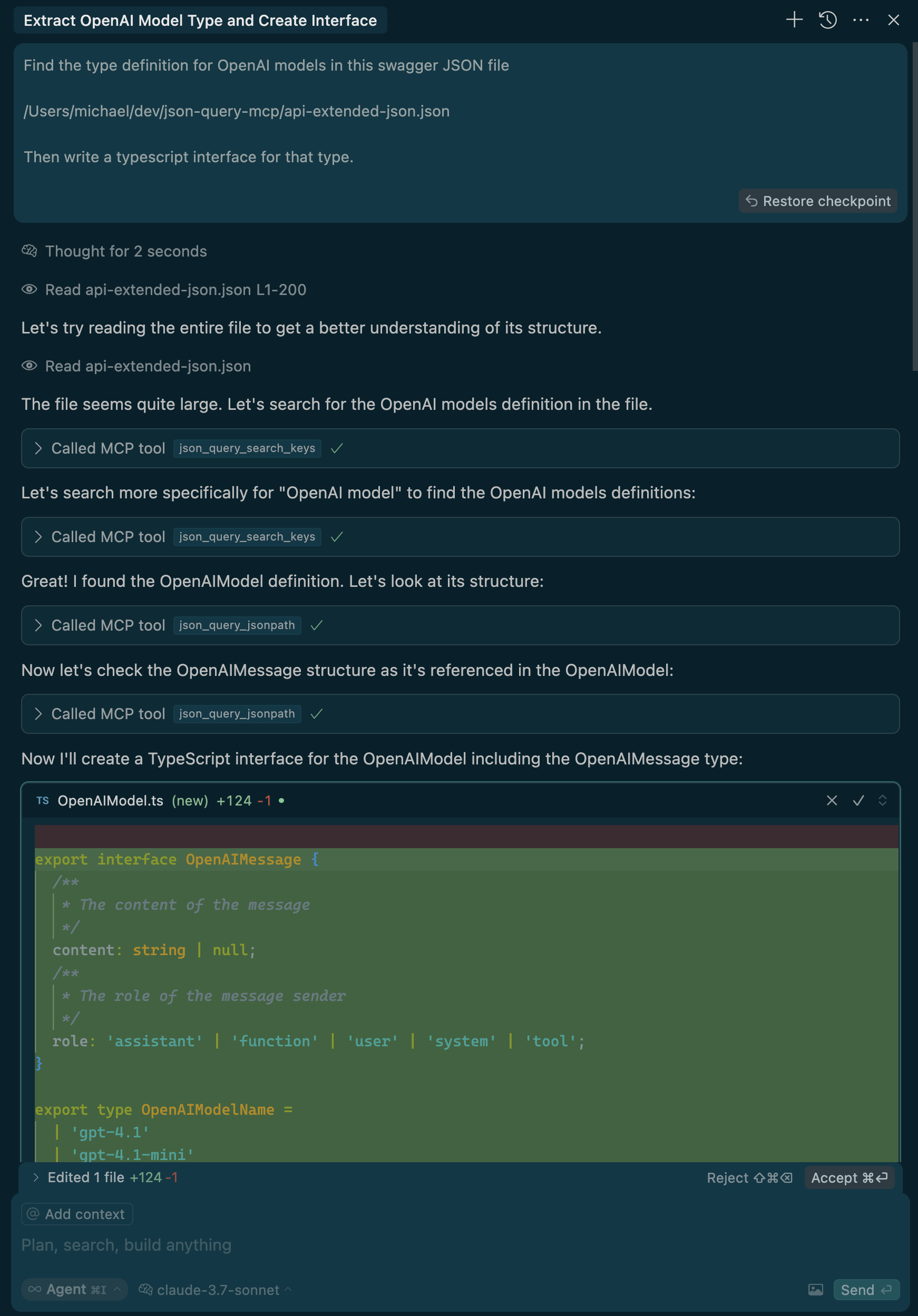
Here is an example of the Cursor Agent using the tool to read a a very large (>1M character) JSON Swagger
definition, and extracting a small portion to write a typescript interface.
Usage
npx json-query-mcp
Installation in Cursor
Add the following to your cursor mcp json
(on macOS this is /Users/$USER/.cursor/mcp.json)
{
  "mcpServers": {
    ... other mcp servers
    "json-query": {
      "command": "npx",
      "args": [<local path to this repo>],
    },
  }
}
Development
# Run in development mode
npm run dev

# Run tests
npm test

# Format code
npm run format

# Lint code
npm run lint

# Fix lints
npm run fix
License
MIT
Dev Tools Supporting MCP
The following are the main code editors that support the Model Context Protocol. Click the link to visit the official website for more information.







