
K8s Interactive Mcp
What is K8s Interactive Mcp
k8s-interactive-mcp is a MCP server that allows users to run Kubernetes commands using a specified kubeconfig path and provides interpretations of those commands.
Use cases
Use cases for k8s-interactive-mcp include managing Kubernetes clusters, automating deployment processes, debugging Kubernetes commands, and providing interactive command execution for developers and system administrators.
How to use
To use k8s-interactive-mcp, first install the necessary dependencies using ‘npm install’. Then build the server with ‘npm run build’. For development purposes, you can use ‘npm run watch’ for auto-rebuilding. To configure it with Claude Desktop, add the server configuration to the appropriate JSON file based on your operating system.
Key features
Key features of k8s-interactive-mcp include the ability to run kubectl commands through MCP tools, flexible command line piping, automatic checks for kubectl installation, support for custom kubeconfig paths, and robust error handling with helpful messages.
Where to use
k8s-interactive-mcp is suitable for environments where Kubernetes management is necessary, such as cloud-native applications, DevOps practices, and container orchestration.
Clients Supporting MCP
The following are the main client software that supports the Model Context Protocol. Click the link to visit the official website for more information.





Overview
What is K8s Interactive Mcp
k8s-interactive-mcp is a MCP server that allows users to run Kubernetes commands using a specified kubeconfig path and provides interpretations of those commands.
Use cases
Use cases for k8s-interactive-mcp include managing Kubernetes clusters, automating deployment processes, debugging Kubernetes commands, and providing interactive command execution for developers and system administrators.
How to use
To use k8s-interactive-mcp, first install the necessary dependencies using ‘npm install’. Then build the server with ‘npm run build’. For development purposes, you can use ‘npm run watch’ for auto-rebuilding. To configure it with Claude Desktop, add the server configuration to the appropriate JSON file based on your operating system.
Key features
Key features of k8s-interactive-mcp include the ability to run kubectl commands through MCP tools, flexible command line piping, automatic checks for kubectl installation, support for custom kubeconfig paths, and robust error handling with helpful messages.
Where to use
k8s-interactive-mcp is suitable for environments where Kubernetes management is necessary, such as cloud-native applications, DevOps practices, and container orchestration.
Clients Supporting MCP
The following are the main client software that supports the Model Context Protocol. Click the link to visit the official website for more information.
Content
k8s-interactive-mcp
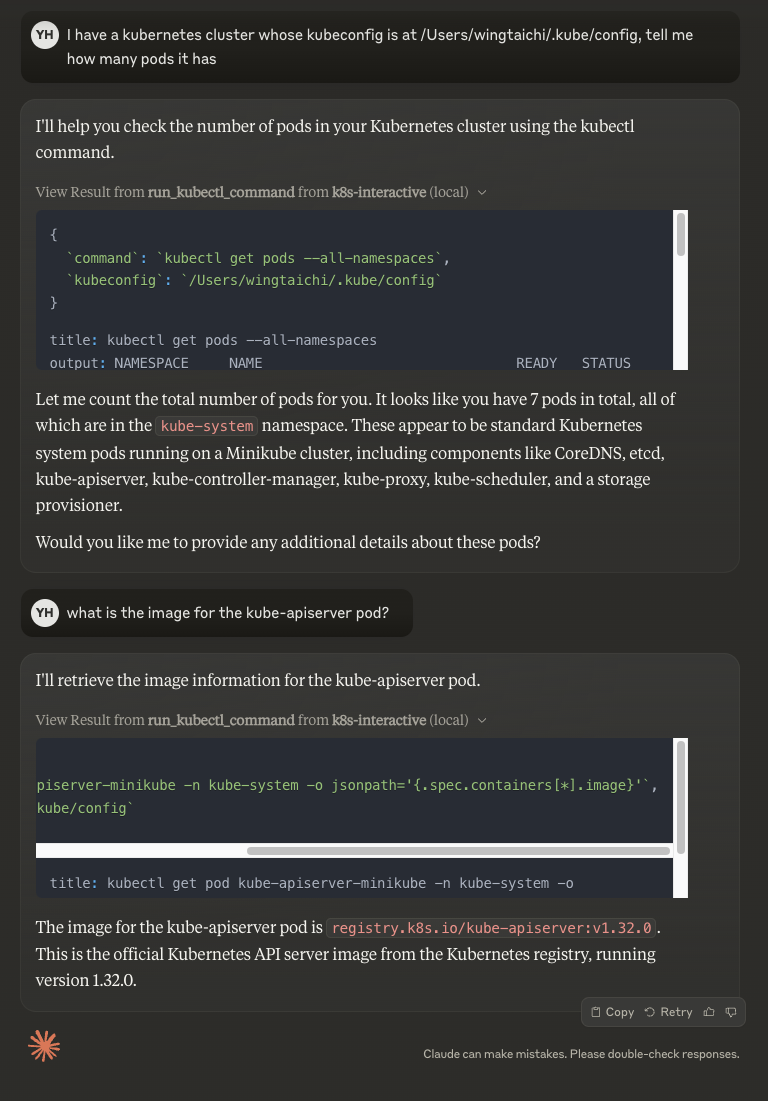
A MCP server that can run Kubernetes commands with a given kubeconfig path and provide interpretation of the commands.
Result
Features
- Run kubectl commands through MCP tools
- Flexible command line piping
- Automatic kubectl installation check
- Support for custom kubeconfig paths
- Error handling and helpful messages
Usage
- Install dependencies:
npm install
Build the server:
npm run build
For development with auto-rebuild:
npm run watch
Installation
To use with Claude Desktop, add the server config:
On MacOS: ~/Library/Application Support/Claude/claude_desktop_config.json
On Windows: %APPDATA%/Claude/claude_desktop_config.json
{
  "mcpServers": {
    "k8s-interactive": {
      "command": "/path/to/k8s-interactive/build/index.js"
    }
  }
}
Debugging
Since MCP servers communicate over stdio, debugging can be challenging. We recommend using the MCP Inspector, which is available as a package script:
npm run inspector
The Inspector will provide a URL to access debugging tools in your browser.
Dev Tools Supporting MCP
The following are the main code editors that support the Model Context Protocol. Click the link to visit the official website for more information.







