
K8s Log Browser Mcp
What is K8s Log Browser Mcp
k8s-log-browser-mcp is a specialized MCP server designed to fetch Kubernetes pod logs that are indexed in OpenSearch. It centralizes logging using Fluent Bit’s Kubernetes filter and OpenSearch with a logstash format, allowing for efficient log retrieval and management.
Use cases
Use cases for k8s-log-browser-mcp include monitoring and troubleshooting Kubernetes applications, analyzing log data for performance optimization, and ensuring compliance by maintaining a centralized log repository.
How to use
To use k8s-log-browser-mcp, launch the transport using the command: npx -y @smadappa/k8s-log-browser-mcp --host=<OPENSEARCH_URL> --username=<OPENSEARCH_USERNAME> --password=<OPENSEARCH_PASSWORD_BASE64_ENCODED>. You can also configure it in your MCP settings and use the MCP Inspector for additional functionalities.
Key features
Key features of k8s-log-browser-mcp include centralized logging, SQL query support for OpenSearch, pagination via cursors, and the ability to filter logs by namespace and pod name prefix. It is still under active development, with plans for improved pagination and security features.
Where to use
k8s-log-browser-mcp is suitable for environments that utilize Kubernetes for container orchestration and require centralized logging solutions. It is particularly useful in DevOps, cloud-native applications, and microservices architectures.
Clients Supporting MCP
The following are the main client software that supports the Model Context Protocol. Click the link to visit the official website for more information.





Overview
What is K8s Log Browser Mcp
k8s-log-browser-mcp is a specialized MCP server designed to fetch Kubernetes pod logs that are indexed in OpenSearch. It centralizes logging using Fluent Bit’s Kubernetes filter and OpenSearch with a logstash format, allowing for efficient log retrieval and management.
Use cases
Use cases for k8s-log-browser-mcp include monitoring and troubleshooting Kubernetes applications, analyzing log data for performance optimization, and ensuring compliance by maintaining a centralized log repository.
How to use
To use k8s-log-browser-mcp, launch the transport using the command: npx -y @smadappa/k8s-log-browser-mcp --host=<OPENSEARCH_URL> --username=<OPENSEARCH_USERNAME> --password=<OPENSEARCH_PASSWORD_BASE64_ENCODED>. You can also configure it in your MCP settings and use the MCP Inspector for additional functionalities.
Key features
Key features of k8s-log-browser-mcp include centralized logging, SQL query support for OpenSearch, pagination via cursors, and the ability to filter logs by namespace and pod name prefix. It is still under active development, with plans for improved pagination and security features.
Where to use
k8s-log-browser-mcp is suitable for environments that utilize Kubernetes for container orchestration and require centralized logging solutions. It is particularly useful in DevOps, cloud-native applications, and microservices architectures.
Clients Supporting MCP
The following are the main client software that supports the Model Context Protocol. Click the link to visit the official website for more information.
Content
k8s-log-browser-mcp
An opinionated mcp server that exposes pod logs indexed in opensearch search over MCP. This relies on the assumption that logging is centralized using fluentbit’s kubernetes filter and opensearch with logstash format and per namespace index.
Queries opensearch via SQL plugin endpoint and uses cursors for pagination support.
Logstash_Format On
Logstash_Prefix logstash
Logstash_Prefix_Key $kubernetes['namespace_name']
[!WARNING]
Still Under Active Development, use at your own risk.
Todo:
- Switch to JDBC for better pagination support and parametrization
- Deal with SQL injection
- Use tokens for auth instead of user credentials
- Filter by log level, build number and revision number
- Add support for Kubernetes events
Usage
Launch the transport
npx -y @smadappa/k8s-log-browser-mcp --host=<OPENSEARCH_URL> --username=<OPENSEARCH_USERNAME> --password=<OPENSEARCH_PASSWORD_BASE64_ENCODED>
Claude Settings
MCP Inspector
npx @modelcontextprotocol/inspector npx -y @smadappa/k8s-log-browser-mcp --host=<opensearch-url> --username=<opensearch-username> --password=<opensearch-password-base64-encoded>
Tools
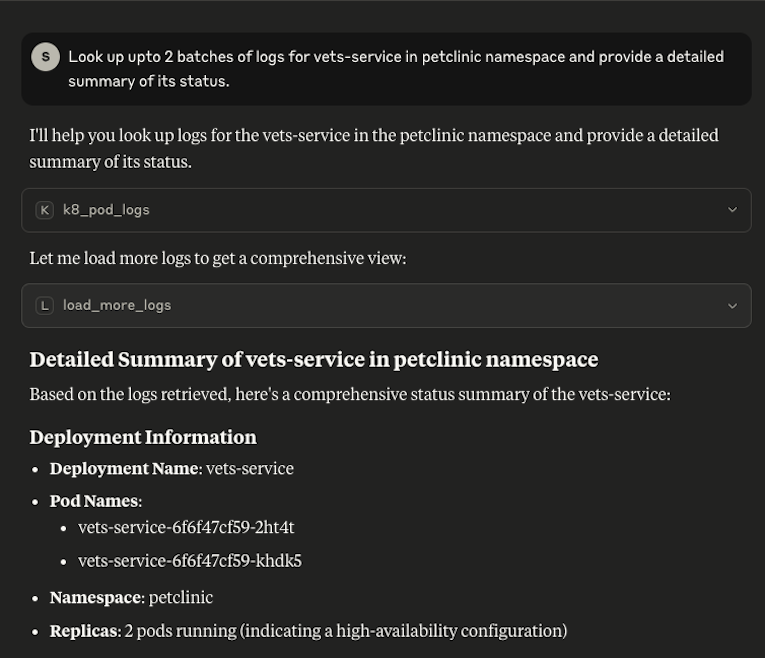
k8_pod_logs
Readonly tool that searches logs by a pod name prefix in opensearch. Returns the output as text with xml tags as delimiter between blocks
Inputs:
- namespace: The kubernetes namespace
- podNamePrefix: The kubernetes pod name. Fetches logs for all pods that start with the name. Include full pod name for logs from ‘a’ pod or just prefix for all pods of the deployment
Outputs:
Logs in an opinionated format
Example:
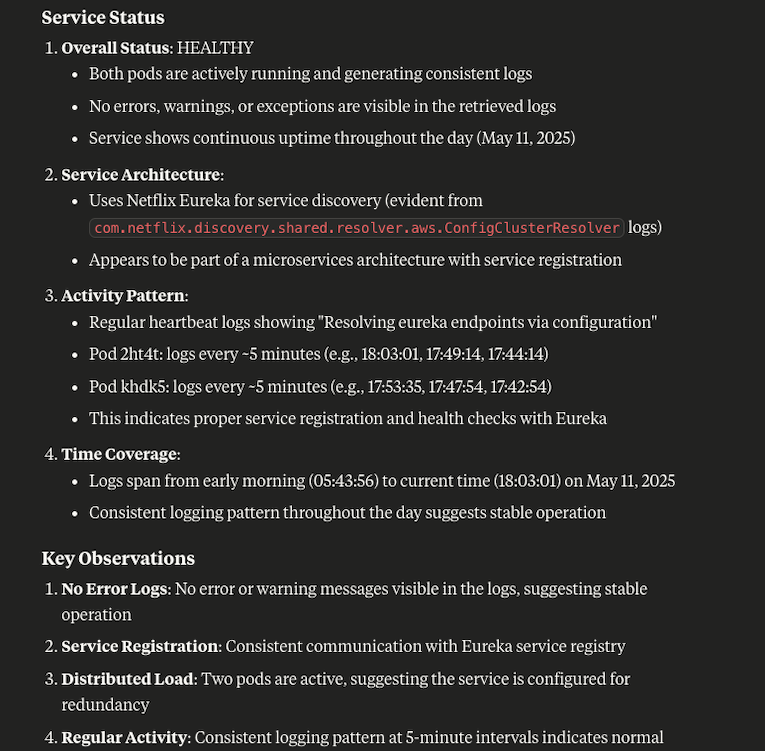
Most recent 50/50 lines retrived from opensearch below:
<query>
select kubernetes,log_processed from petclinic-* where kubernetes.pod_name like 'vets-service%' and not isnull(log_processed.message) order by `log_processed.@timestamp` desc
</query>
<format>
[pod_name] [timestamp] [log_level] [logger_name] [message]
</format>
<results>
vets-service-6f6f47cf59-2ht4t 2025-05-11 18:03:01.491936637 INFO com.netflix.discovery.shared.resolver.aws.ConfigClusterResolver Resolving eureka endpoints via configuration
vets-service-6f6f47cf59-khdk5 2025-05-11 17:53:35.793299878 INFO com.netflix.discovery.shared.resolver.aws.ConfigClusterResolver Resolving eureka endpoints via configuration
..............
</results>
<load-more>There are more logs, request the 'load_more_logs' with the below cursor:
253604f3-0ef5-455e-b835-3d2db071ea3b
If you are done looking up, close the search context using the clear-cursor tool.
</load-more>
load_more_logs
Readonly tool that loads next page of an ongoing search. Uses cursors from opensearch. Request should be issued within 5 minutes of the previous search. We rewrite the cursor to be a uuid, LLMs did not
do well with reproducing the actual cursor from opensearch to the subsequent tool call in limited testing.
Inputs:
- cursor: The cursor to load more logs for an existing search
Outputs:
Logs in the same format as k8_pod_logs tool.
Demo
Dev Tools Supporting MCP
The following are the main code editors that support the Model Context Protocol. Click the link to visit the official website for more information.







