
Kdebug Mcp
What is Kdebug Mcp
KDebug is a Kubernetes debugging tool that allows users to interact with their Kubernetes clusters through Claude AI, utilizing the Model Control Protocol (MCP) to execute commands on their behalf.
Use cases
Use cases for KDebug include troubleshooting application issues in Kubernetes, monitoring cluster health, automating commands through AI, and simplifying the debugging process for users unfamiliar with Kubernetes CLI.
How to use
To use KDebug, install it by downloading the pre-built binary or building from source. Configure Claude to use KDebug by editing the MCP configuration file and ensuring your Kubernetes context is set up correctly.
Key features
Key features of KDebug include inspecting Kubernetes resources (pods, services, deployments), viewing pod logs, checking node status, monitoring events, and more, all through conversational AI.
Where to use
KDebug is primarily used in cloud-native environments where Kubernetes is deployed, making it suitable for DevOps teams, system administrators, and developers who need to manage and debug Kubernetes clusters.
Clients Supporting MCP
The following are the main client software that supports the Model Context Protocol. Click the link to visit the official website for more information.





Overview
What is Kdebug Mcp
KDebug is a Kubernetes debugging tool that allows users to interact with their Kubernetes clusters through Claude AI, utilizing the Model Control Protocol (MCP) to execute commands on their behalf.
Use cases
Use cases for KDebug include troubleshooting application issues in Kubernetes, monitoring cluster health, automating commands through AI, and simplifying the debugging process for users unfamiliar with Kubernetes CLI.
How to use
To use KDebug, install it by downloading the pre-built binary or building from source. Configure Claude to use KDebug by editing the MCP configuration file and ensuring your Kubernetes context is set up correctly.
Key features
Key features of KDebug include inspecting Kubernetes resources (pods, services, deployments), viewing pod logs, checking node status, monitoring events, and more, all through conversational AI.
Where to use
KDebug is primarily used in cloud-native environments where Kubernetes is deployed, making it suitable for DevOps teams, system administrators, and developers who need to manage and debug Kubernetes clusters.
Clients Supporting MCP
The following are the main client software that supports the Model Context Protocol. Click the link to visit the official website for more information.
Content
KDebug - Kubernetes Debugging MCP Server
KDebug is a Kubernetes debugging tool that allows you to interact with your Kubernetes clusters through Claude AI. It uses the Model Control Protocol (MCP) to enable Claude to execute Kubernetes commands on your behalf.
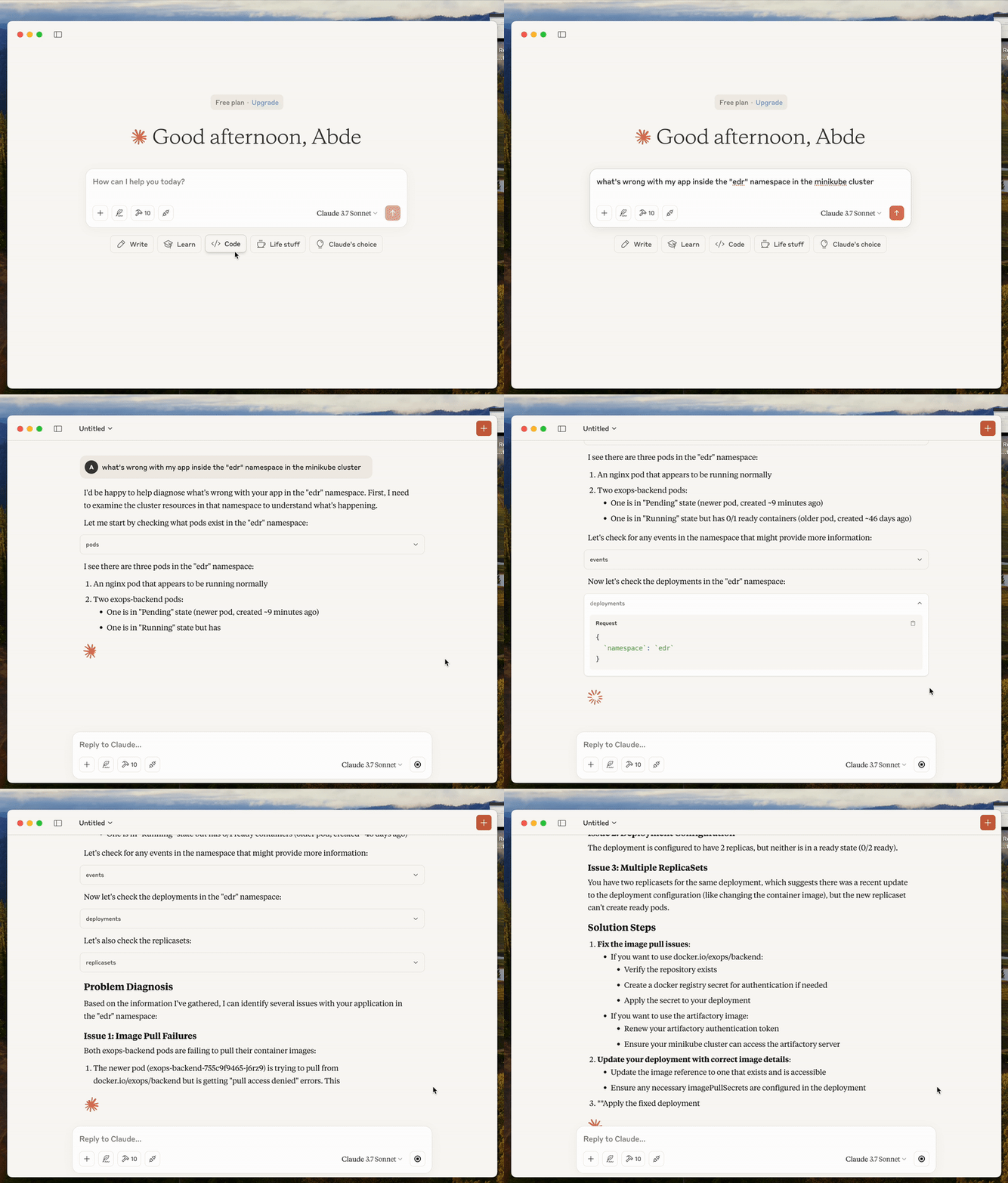
Overview
This tool allows you to:
- Inspect Kubernetes resources (pods, services, deployments, etc.)
- View pod logs
- Check node status
- Monitor events
- And more, all through conversational AI
Installation
Prerequisites
- Go 1.18+ (if building from source)
- Kubernetes cluster access configured (
~/.kube/config) - Claude client with MCP support
Option 1: Download pre-built binary
- Go to the GitHub releases page:
https://github.com/soub4i/kdebug-mcp/releases
-
Download the latest release for your platform (macOS, Linux, Windows)
-
Make the binary executable:
chmod +x kdebug-mcp
- Move the binary to a location in your PATH:
mv kdebug-mcp /usr/local/bin/kdebug-mcp
# or
mv kdebug-mcp ~/bin/kdebug-mcp  # If you have ~/bin in your PATH
Option 2: Build from source
- Clone the repository:
git clone https://github.com/soub4i/kdebug-mcp.git
cd kdebug-mcp
- Build the binary:
go build -o bin/server ./cmd/server/main.go
Configuration
Configure Claude to use KDebug
Create or edit the Claude MCP configuration file located at:
- macOS:
~/Library/Application Support/com.anthropic.claude/config.json - Linux:
~/.config/com.anthropic.claude/config.json - Windows:
%APPDATA%\com.anthropic.claude\config.json
Add the following configuration:
{
  "mcpServers": {
    "kdebug": {
      "command": "/path/to/kdebug-mcp/bin/server"
    }
  }
}
Replace /path/to/kdebug-mcp/bin/server with the actual path to your KDebug binary.
Kubernetes Context
KDebug uses your current Kubernetes context from ~/.kube/config. Make sure your Kubernetes configuration is properly set up.
To switch contexts, you can use:
kubectl config use-context <context-name>
Usage
- Start Claude and make sure it’s connected to your KDebug MCP server
- In your conversation with Claude, ask about your Kubernetes resources
Example prompts:
- “what’s wrong with my cluster.context: minikube. namespace: default.”
- “Show me all pods in the default namespace”
- “What services are running in the kube-system namespace?”
- “Get the logs from pod xyz in namespace abc”
- “List all nodes in my cluster”
- “Check for recent events in the default namespace”
Available Commands
KDebug provides access to the following Kubernetes resources:
nodes: List all nodes in the clusterpods: List pods in a namespace or get a specific podpodLogs: Get logs from a specific podservices: List services in a namespace or get a specific servicedeployments: List deployments in a namespace or get a specific deploymentstatefulsets: List stateful sets in a namespace or get a specific stateful setreplicasets: List replica sets in a namespace or get a specific replica setdaemonsets: List daemon sets in a namespace or get a specific daemon setevents: List events in a namespace or related to a specific resource
Troubleshooting
Common Issues
-
Claude can’t connect to KDebug
- Check that the path in your Claude MCP configuration is correct
- Ensure the KDebug binary is executable
-
Permission errors
- Make sure your Kubernetes configuration (
~/.kube/config) has the necessary permissions - Try running
kubectl get podsto verify your Kubernetes access
- Make sure your Kubernetes configuration (
-
Context switching
- If you have multiple Kubernetes contexts, Claude will ask which context to use
- Ensure you have access to the context you’re trying to use
Security Considerations
KDebug executes Kubernetes commands with the permissions of your current user. Be mindful that Claude will have the same access to your Kubernetes cluster as you do through your configured kubectl context.
Contributing
Contributions are welcome! Please feel free to submit a Pull Request.
License
This project is licensed under the MIT License - see the LICENSE file for details.
Dev Tools Supporting MCP
The following are the main code editors that support the Model Context Protocol. Click the link to visit the official website for more information.







