
Kibana Mcp
What is Kibana Mcp
The Kibana MCP Server is a Model Context Protocol (MCP) server designed to enhance Kibana Security by allowing management of alerts, rules, and exceptions through AI assistants. It provides a way for users to interact with their security environment in a more automated and intelligent manner.
Use cases
The MCP server can be utilized for various security tasks, including fetching security alerts, tagging alerts for easier organization, modifying the statuses of alerts, searching and managing detection rules, and creating and linking exception lists. It aims to streamline security operations and improve incident response efficiency.
How to use
To use the MCP server, clone the repository, build the Docker image, and configure the MCP client with either environment variables or direct credentials for accessing Kibana. Users can then run the server in a Docker container and utilize the available tools to manage security alerts and rules effectively.
Key features
Key features of the Kibana MCP Server include tools for fetching and managing security alerts, adjusting their statuses, searching for detection rules, and handling exceptions. It supports both API key and username/password authentication methods, allowing flexibility for users when configuring access.
Where to use
The Kibana MCP Server is primarily intended for use in cybersecurity operations, specifically within environments using Kibana for security monitoring and management. It is suitable for enterprises looking to automate alert management and enhance their security incident response workflows.
Clients Supporting MCP
The following are the main client software that supports the Model Context Protocol. Click the link to visit the official website for more information.





Overview
What is Kibana Mcp
The Kibana MCP Server is a Model Context Protocol (MCP) server designed to enhance Kibana Security by allowing management of alerts, rules, and exceptions through AI assistants. It provides a way for users to interact with their security environment in a more automated and intelligent manner.
Use cases
The MCP server can be utilized for various security tasks, including fetching security alerts, tagging alerts for easier organization, modifying the statuses of alerts, searching and managing detection rules, and creating and linking exception lists. It aims to streamline security operations and improve incident response efficiency.
How to use
To use the MCP server, clone the repository, build the Docker image, and configure the MCP client with either environment variables or direct credentials for accessing Kibana. Users can then run the server in a Docker container and utilize the available tools to manage security alerts and rules effectively.
Key features
Key features of the Kibana MCP Server include tools for fetching and managing security alerts, adjusting their statuses, searching for detection rules, and handling exceptions. It supports both API key and username/password authentication methods, allowing flexibility for users when configuring access.
Where to use
The Kibana MCP Server is primarily intended for use in cybersecurity operations, specifically within environments using Kibana for security monitoring and management. It is suitable for enterprises looking to automate alert management and enhance their security incident response workflows.
Clients Supporting MCP
The following are the main client software that supports the Model Context Protocol. Click the link to visit the official website for more information.
Content
Kibana MCP Server
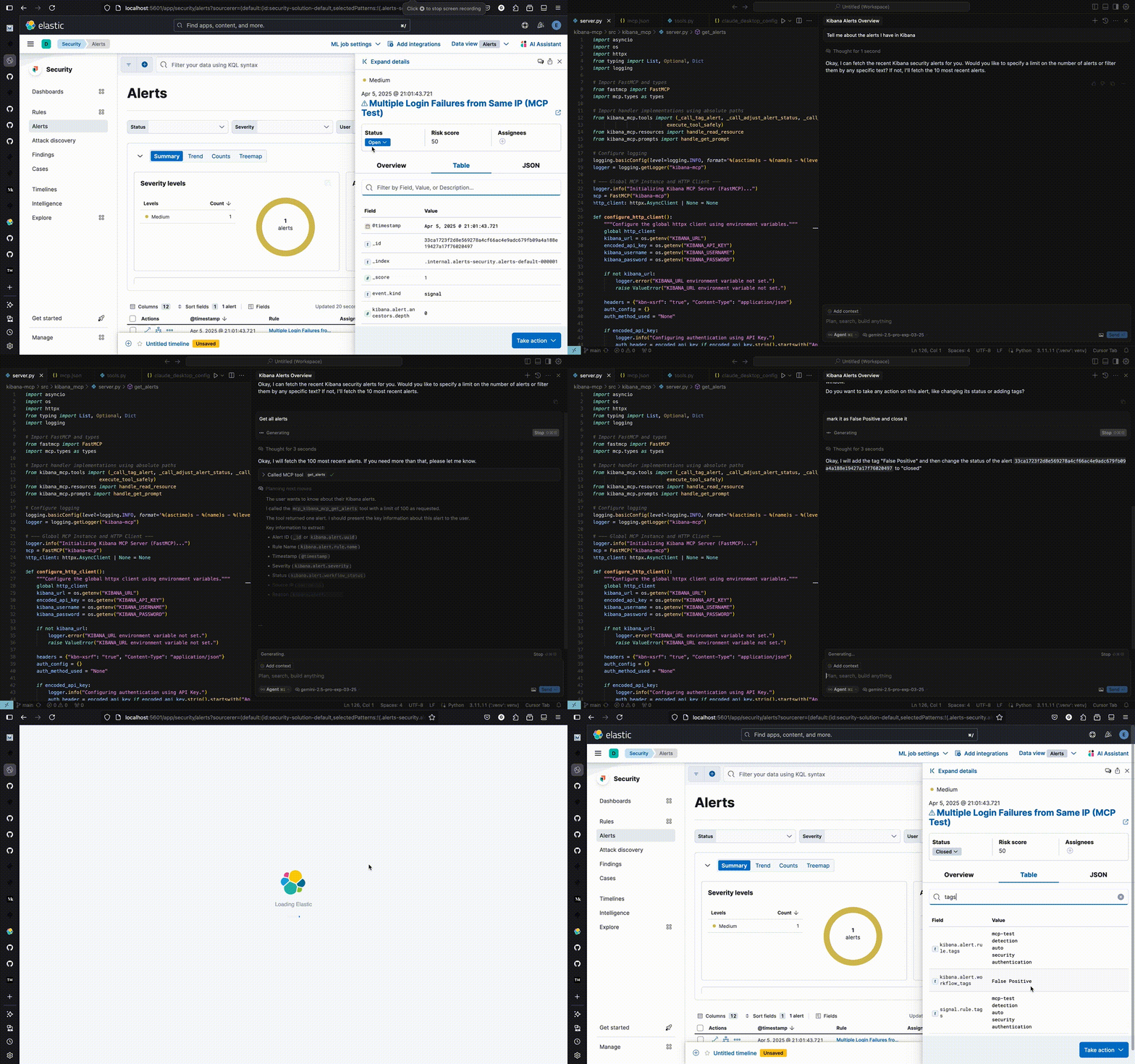
Model Context Protocol (MCP) server for Kibana Security - manage alerts, rules, and exceptions via AI assistants.
Quick Start
1. Clone and Build
git clone https://github.com/ggilligan12/kibana-mcp.git
cd kibana-mcp
docker build -t kibana-mcp .
2. Configure MCP Client
Add to your MCP client config (Claude Desktop, Cursor, etc.):
Option A: Using Environment Variables (Recommended)
First, set your credentials:
export KIBANA_URL="https://your-kibana.example.com:5601"

# Option 1: API Key (recommended)
export KIBANA_API_KEY="your_base64_api_key"

# Option 2: Username/Password
# export KIBANA_USERNAME="your_username"
# export KIBANA_PASSWORD="your_password"
Then add to your MCP config:
{
  "mcpServers": {
    "kibana-mcp": {
      "command": "docker",
      "args": [
        "run",
        "-i",
        "--rm",
        "--network",
        "host",
        "-e",
        "KIBANA_URL",
        "-e",
        "KIBANA_API_KEY",
        "kibana-mcp"
      ]
    }
  }
}
For username/password, use:
{
  "mcpServers": {
    "kibana-mcp": {
      "command": "docker",
      "args": [
        "run",
        "-i",
        "--rm",
        "--network",
        "host",
        "-e",
        "KIBANA_URL",
        "-e",
        "KIBANA_USERNAME",
        "-e",
        "KIBANA_PASSWORD",
        "kibana-mcp"
      ]
    }
  }
}
Option B: Direct Credentials (Easier for Claude Desktop)
Using API Key:
{
  "mcpServers": {
    "kibana-mcp": {
      "command": "docker",
      "args": [
        "run",
        "-i",
        "--rm",
        "--network",
        "host",
        "-e",
        "KIBANA_URL=https://your-kibana.example.com:5601",
        "-e",
        "KIBANA_API_KEY=your_base64_api_key",
        "kibana-mcp"
      ]
    }
  }
}
Using Username/Password:
{
  "mcpServers": {
    "kibana-mcp": {
      "command": "docker",
      "args": [
        "run",
        "-i",
        "--rm",
        "--network",
        "host",
        "-e",
        "KIBANA_URL=https://your-kibana.example.com:5601",
        "-e",
        "KIBANA_USERNAME=your_username",
        "-e",
        "KIBANA_PASSWORD=your_password",
        "kibana-mcp"
      ]
    }
  }
}
Note: Option B is less secure but more convenient for tools like Claude Desktop where environment variables are harder to manage.
Available Tools
get_alerts- Fetch security alertstag_alert- Add tags to alertsadjust_alert_status- Change alert status (open/acknowledged/closed)find_rules- Search detection rulesget_rule_exceptions- Get rule exception itemsadd_rule_exception_items- Add exceptions to rulescreate_exception_list- Create new exception listsassociate_shared_exception_list- Link exception lists to rules
Local Development
# Install dependencies
uv sync

# Set environment variables (see above)

# Run locally
uv run kibana-mcp
Test Environment
# Start local Kibana/Elasticsearch with test data
pip install -r testing/requirements-dev.txt
./testing/quickstart-test-env.sh

# Access at http://localhost:5601 (elastic/elastic)
Dev Tools Supporting MCP
The following are the main code editors that support the Model Context Protocol. Click the link to visit the official website for more information.







