
Kickstart Mcp
What is Kickstart Mcp
kickstart-mcp is an interactive tutorial designed to help users learn the Model Context Protocol (MCP) by guiding them through the process of setting up MCP hosts and building their own servers and clients.
Use cases
Use cases for kickstart-mcp include training sessions for new developers, workshops on MCP implementation, and individual learning paths for those interested in server and client development using MCP.
How to use
To use kickstart-mcp, start the tutorial by running ‘uvx kickstart-mcp’. Follow the interactive prompts to select your MCP host, complete tutorial steps, and verify your progress.
Key features
Key features include interactive tutorials for MCP setup and development, step-by-step guides for different MCP hosts (Claude, Cursor, Custom), comprehensive coverage of MCP concepts, built-in verification for each tutorial step, and cross-platform support (macOS, Windows).
Where to use
kickstart-mcp can be used in educational settings for teaching MCP concepts, in software development for creating MCP servers and clients, and by developers looking to enhance their understanding of the Model Context Protocol.
Clients Supporting MCP
The following are the main client software that supports the Model Context Protocol. Click the link to visit the official website for more information.





Overview
What is Kickstart Mcp
kickstart-mcp is an interactive tutorial designed to help users learn the Model Context Protocol (MCP) by guiding them through the process of setting up MCP hosts and building their own servers and clients.
Use cases
Use cases for kickstart-mcp include training sessions for new developers, workshops on MCP implementation, and individual learning paths for those interested in server and client development using MCP.
How to use
To use kickstart-mcp, start the tutorial by running ‘uvx kickstart-mcp’. Follow the interactive prompts to select your MCP host, complete tutorial steps, and verify your progress.
Key features
Key features include interactive tutorials for MCP setup and development, step-by-step guides for different MCP hosts (Claude, Cursor, Custom), comprehensive coverage of MCP concepts, built-in verification for each tutorial step, and cross-platform support (macOS, Windows).
Where to use
kickstart-mcp can be used in educational settings for teaching MCP concepts, in software development for creating MCP servers and clients, and by developers looking to enhance their understanding of the Model Context Protocol.
Clients Supporting MCP
The following are the main client software that supports the Model Context Protocol. Click the link to visit the official website for more information.
Content
kickstart-mcp
An interactive tutorial for learning Model Context Protocol (MCP). From setting up MCP hosts to building your own servers and clients, we’ll guide you through every step of your MCP journey.
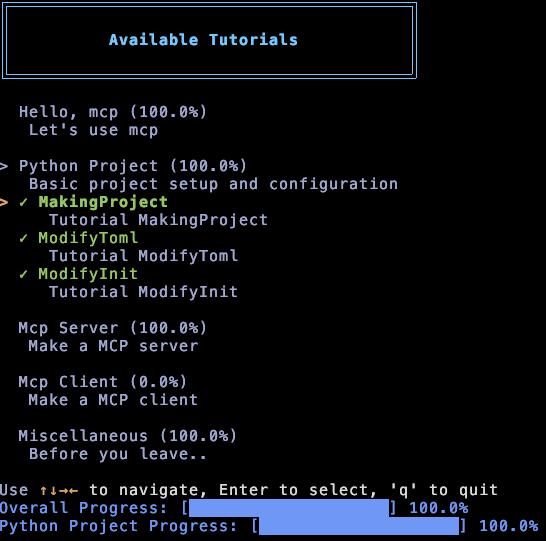
Features
- Interactive tutorials for MCP setup and development
- Step-by-step guides for different MCP hosts (Claude, Cursor, Custom)
- Comprehensive coverage of MCP concepts:
- Host configuration
- Server development
- Client implementation
- Built-in verification for each tutorial step
- Cross-platform support (macOS, Windows)
Dependencies
For package management, we recommend using UV:
brew install uv
The build tool used in the instructions is Hatch, so you’ll need to install it as well:
brew install hatch
Installation
Quick Start (Recommended)
uvx kickstart-mcp -l ko
Since v0.1.0, you can use the -l option to specify your preferred language.
Currently supported languages:
| Code | Language |
|---|---|
| en | English |
| ko | Korean |
| zh | Chinese |
| ja | Japanese |
Development Installation
# Clone the repository
git clone https://github.com/nolleh/kickstart-mcp.git
cd kickstart-mcp

# Install dependencies and run
uv run kickstart-mcp
Usage
-
Start the tutorial:
uvx kickstart-mcp -
Follow the interactive prompts to:
- Choose your preferred MCP host
- Complete each tutorial step
- Verify your progress
- Learn MCP concepts hands-on
While it’s recommended to follow the tutorials in order, if you want to quickly learn server development,
you can start with FastMcp in the McpServer tutorial.
Contributing
Contributions are welcome! Please feel free to submit a Pull Request.
License
This project is licensed under the MIT License - see the LICENSE file for details.
Feedback
Have feedback or suggestions? Visit our GitHub repository to:
- Open an issue
- Submit a pull request
- Start a discussion
Dev Tools Supporting MCP
The following are the main code editors that support the Model Context Protocol. Click the link to visit the official website for more information.







