
Kit
What is Kit
Kit is a visual testing tool designed specifically for MCP servers, providing a suite of tools for testing and debugging.
Use cases
Use cases include debugging MCP server interactions, testing various configurations and models, and analyzing request-response patterns during development.
How to use
To use Kit, you can run the command npx muppet-kit inspector in your terminal to access the inspector tool.
Key features
Key features include an Explorer for discovering MCP server capabilities, a Playground for testing different LLMs (coming soon), Tracing for monitoring requests and responses, and a History feature to view session interactions.
Where to use
Kit is used in software development and testing environments where MCP servers are deployed, particularly in applications involving AI and machine learning.
Clients Supporting MCP
The following are the main client software that supports the Model Context Protocol. Click the link to visit the official website for more information.





Overview
What is Kit
Kit is a visual testing tool designed specifically for MCP servers, providing a suite of tools for testing and debugging.
Use cases
Use cases include debugging MCP server interactions, testing various configurations and models, and analyzing request-response patterns during development.
How to use
To use Kit, you can run the command npx muppet-kit inspector in your terminal to access the inspector tool.
Key features
Key features include an Explorer for discovering MCP server capabilities, a Playground for testing different LLMs (coming soon), Tracing for monitoring requests and responses, and a History feature to view session interactions.
Where to use
Kit is used in software development and testing environments where MCP servers are deployed, particularly in applications involving AI and machine learning.
Clients Supporting MCP
The following are the main client software that supports the Model Context Protocol. Click the link to visit the official website for more information.
Content
Muppet Kit
It is a collection of tools for testing and debugging MCPs.
Inspector
It is a devtool for testing and debugging MCPs servers.
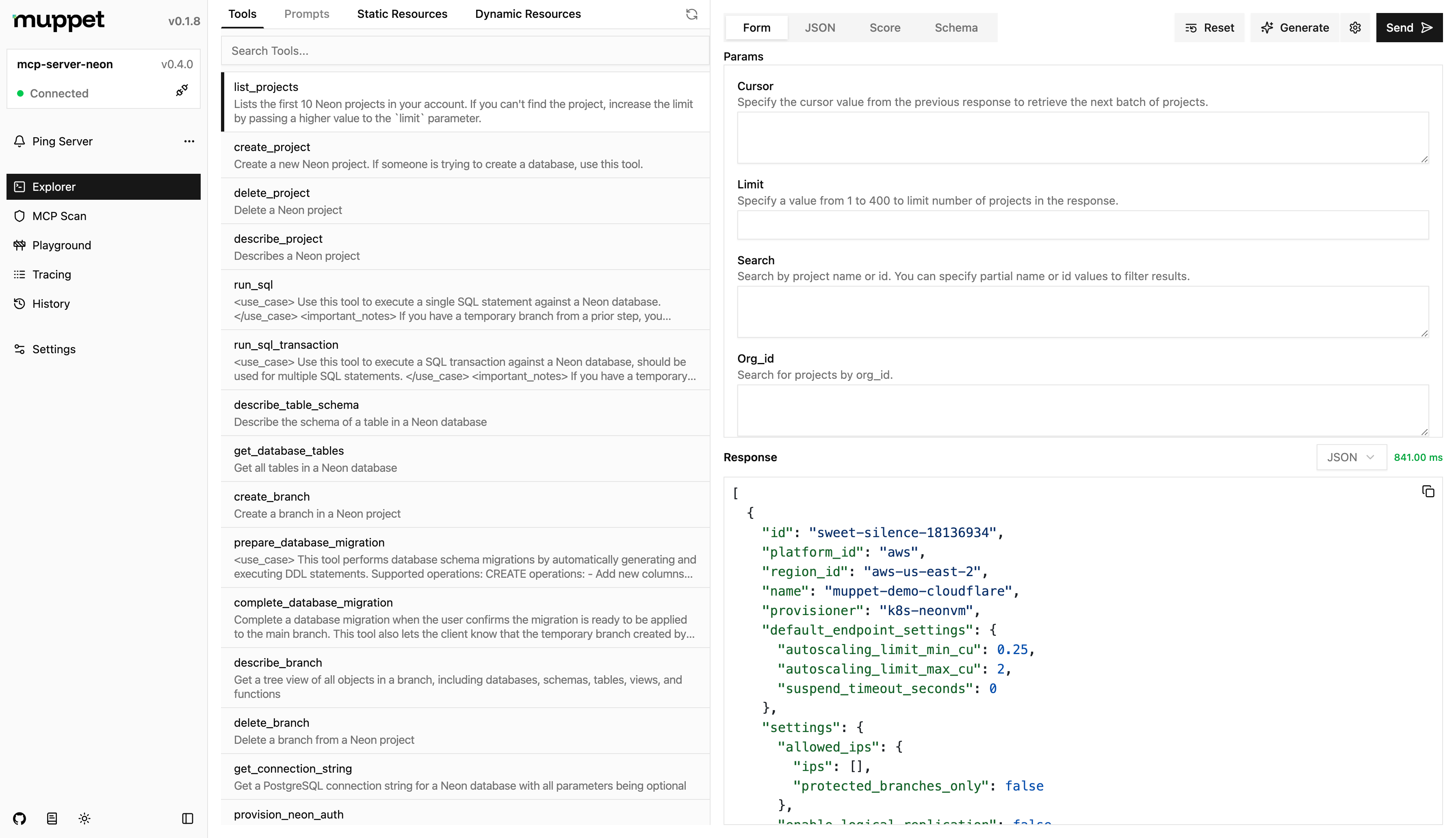
Usage
npx muppet-kit inspector
Features
- Explorer - Explore the MCP server’s capabilities, while leveraging AI to assist you.
- Playground - Test the MCP server with different LLMs and configurations.
- MCP Scan - Scan the MCP server for vulnerabilities and security issues.
- Tracing - Trace the requests and responses between the client and server. Tunneling is also supported for connecting to remote clients.
- History - View the history of requests and responses between the client and server for the current session.
Configuration
You can configure the inspector by creating a muppet.config.js/muppet.config.ts file in the root of your project. The configuration file should export an object with the following properties:
import { defineInspectorConfig } from "muppet-kit";
import { ngrok } from "muppet-kit/tunnel";
import { openai } from "@ai-sdk/openai";

export default defineInspectorConfig({
  // ...
  models: [openai("gpt-4.1-nano")],
  // You can either pass the API key here or have it in .env as NGROK_API_KEY
  tunneling: ngrok(),
});
Credits
The idea for this project was inspired by the official MCP Inspector and their amazing work.
Dev Tools Supporting MCP
The following are the main code editors that support the Model Context Protocol. Click the link to visit the official website for more information.







