
Korea Weather
What is Korea Weather
The Korea Weather MCP Server is built upon the Korea Meteorological Administration’s short-term weather forecast API, designed to collect and deliver weather information to MCP clients like Claude and Cursor via the MCP protocol. This server facilitates easy integration of weather data into various application services.
Use cases
This server can be utilized in applications where real-time weather updates are critical, such as travel planning, outdoor event scheduling, agriculture monitoring, or any service needing localized weather information. Examples include fetching current weather for airports, planning outdoor activities based on forecasted conditions, and supporting users in making informed decisions about weather-sensitive tasks.
How to use
Users can set up the Korea Weather MCP Server easily through Smithery by securing an API key from the Korea Meteorological Administration and running a specific command. Alternatively, the server can be cloned from GitHub and executed locally, where configurations must be adjusted in the MCP client settings to connect properly. The client then simply requires a restart to start using the service.
Key features
The server integrates directly with the Korea Meteorological Administration’s short-term forecast API to provide timely weather information and supports delivery in MCP format, facilitating usage in various MCP clients. It allows users to inquire about the current weather, upcoming conditions, and whether specific activities like car washing or travel plans are advisable based on predicted weather.
Where to use
The Korea Weather MCP Server can be employed on desktop applications that support MCP protocols, such as Claude Desktop and Cursor. The service is particularly useful for developing dynamic applications focused on weather-related functionalities, assisting developers in creating responsive user experiences around weather data.
Clients Supporting MCP
The following are the main client software that supports the Model Context Protocol. Click the link to visit the official website for more information.





Overview
What is Korea Weather
The Korea Weather MCP Server is built upon the Korea Meteorological Administration’s short-term weather forecast API, designed to collect and deliver weather information to MCP clients like Claude and Cursor via the MCP protocol. This server facilitates easy integration of weather data into various application services.
Use cases
This server can be utilized in applications where real-time weather updates are critical, such as travel planning, outdoor event scheduling, agriculture monitoring, or any service needing localized weather information. Examples include fetching current weather for airports, planning outdoor activities based on forecasted conditions, and supporting users in making informed decisions about weather-sensitive tasks.
How to use
Users can set up the Korea Weather MCP Server easily through Smithery by securing an API key from the Korea Meteorological Administration and running a specific command. Alternatively, the server can be cloned from GitHub and executed locally, where configurations must be adjusted in the MCP client settings to connect properly. The client then simply requires a restart to start using the service.
Key features
The server integrates directly with the Korea Meteorological Administration’s short-term forecast API to provide timely weather information and supports delivery in MCP format, facilitating usage in various MCP clients. It allows users to inquire about the current weather, upcoming conditions, and whether specific activities like car washing or travel plans are advisable based on predicted weather.
Where to use
The Korea Weather MCP Server can be employed on desktop applications that support MCP protocols, such as Claude Desktop and Cursor. The service is particularly useful for developing dynamic applications focused on weather-related functionalities, assisting developers in creating responsive user experiences around weather data.
Clients Supporting MCP
The following are the main client software that supports the Model Context Protocol. Click the link to visit the official website for more information.
Content
Korea Weather MCP Server
본 MCP 서버는 기상청 단기예보 조회서비스 API를 기반으로 동작하는 MCP 서버입니다.
소개
Korea Weather MCP Server는 기상청의 날씨 정보를 수집하여, MCP 프로토콜을 통해 Claude나 Cursor와 같은 MCP 클라이언트(Host)에 제공합니다.
이 서버는 기상 정보를 활용하는 다양한 응용 서비스에 쉽게 연동될 수 있습니다.
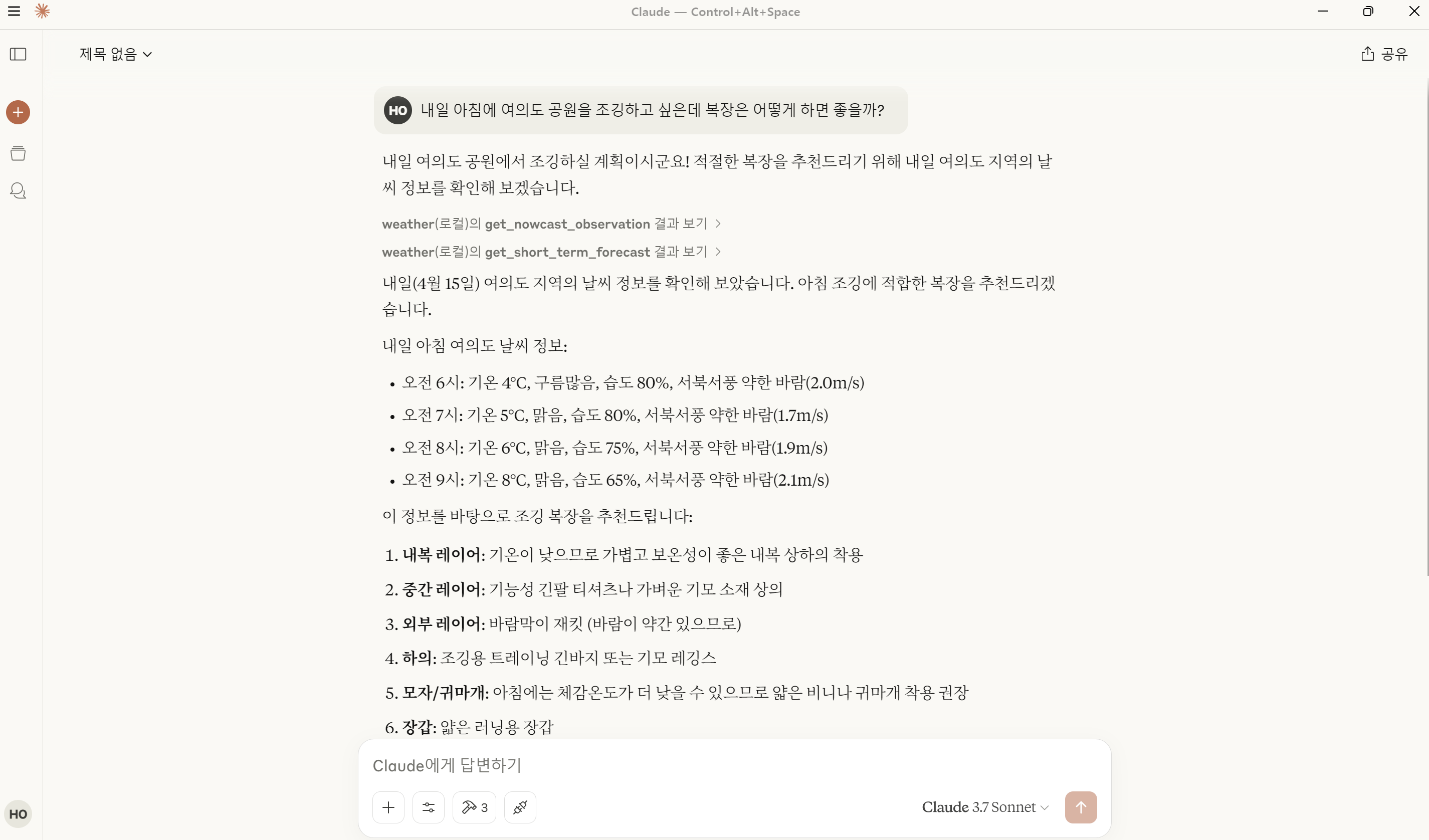
주요 기능
- 기상청 단기예보 API 연동
- MCP 형식의 기상 정보 제공
설치 및 사용 방법
Smithery를 이용한 간편 설치
- data.go.kr에서 기상청 단기예보 API를 신청하고 API 키를 발급받습니다.
- 다음 명령어를 사용해 Smithery에서 서버를 설치하고 Claude Desktop에 등록합니다.
설치 과정에서 API 키 입력을 요구하면 발급받은 키를 입력합니다.npx -y @smithery/cli install @ohhan777/korea_weather --client claude - Claude Desktop을 재시작하여 사용하면 됩니다.
Github에서 직접 설치하는 방법
-
data.go.kr에서 기상청 단기예보 API 활용 신청 후 API 키를 발급받습니다.
-
github에서 소스코드를 다운받아 실행해봅니다.
git clone https://github.com/ohhan777/korea_weather.git cd korea_weather uv run korea_weather.py -
MCP 클라이언트(Host)에 서버를 등록합니다.
-
Claude Desktop의 설정 파일은 보통 아래 경로에 위치합니다.
C:\Users\[사용자 이름]\AppData\Roaming\Claude\claude_desktop_config.json
(파일이 없다면 새로 생성) -
Cursor의 경우: 상단의 톱니바퀴 아이콘(⚙️) → MCP → Add new global MCP server 선택
아래 예시와 같은 형식으로 설정 파일을 작성합니다. (디렉토리 경로와 API 키는 환경에 맞게 수정)
{ "mcpServers": { "korea_weather": { "command": "uv", "args": [ "--directory", "C:\\ai\\PyProjects\\korea_weather", "run", "korea_weather.py" ], "env": { "KOREA_WEATHER_API_KEY": "Input Your API Key Here!" } } } } -
프롬프트 예제
>> 제주 국제 공항 현재 날씨를 알려줘.
>> 내일 오후에 서울 남대문에 놀러가려고 하는데 우산을 챙겨야할까?
>> 오늘 오후에 세차하기에 괜찮은 날씨일까?
의존성
pyproject.toml 참고
라이선스
본 프로젝트는 내부 시험용으로 개발되었으며, 별도의 라이선스 규정 없이 자유롭게 배포 및 수정이 가능합니다.
문의
개발자: 한국항공우주연구원 오한 ([email protected])
Dev Tools Supporting MCP
The following are the main code editors that support the Model Context Protocol. Click the link to visit the official website for more information.







