
Label Studio Mcp Server
What is Label Studio Mcp Server
Label Studio MCP Server is a Model Context Protocol (MCP) server that facilitates interaction with a Label Studio instance through the label-studio-sdk. It allows users to manage labeling projects, tasks, and predictions programmatically using natural language or structured calls.
Use cases
Use cases include automating the creation of labeling projects, querying the status of tasks in a project, adding predictions from machine learning models to tasks, and updating labeling templates dynamically.
How to use
To use the Label Studio MCP Server, first ensure you have a running Label Studio instance and obtain an API key. Install the server by cloning the repository, setting up a Python environment, and configuring the server with the Label Studio URL and API key. You can then make requests to manage projects and tasks.
Key features
Key features include project management (create, update, list projects), task management (import tasks, list tasks, retrieve annotations), prediction integration (add model predictions to tasks), and SDK integration (utilizes the official label-studio-sdk for communication).
Where to use
Label Studio MCP Server can be used in fields such as data annotation, machine learning model training, and any application requiring structured data labeling and management.
Clients Supporting MCP
The following are the main client software that supports the Model Context Protocol. Click the link to visit the official website for more information.





Overview
What is Label Studio Mcp Server
Label Studio MCP Server is a Model Context Protocol (MCP) server that facilitates interaction with a Label Studio instance through the label-studio-sdk. It allows users to manage labeling projects, tasks, and predictions programmatically using natural language or structured calls.
Use cases
Use cases include automating the creation of labeling projects, querying the status of tasks in a project, adding predictions from machine learning models to tasks, and updating labeling templates dynamically.
How to use
To use the Label Studio MCP Server, first ensure you have a running Label Studio instance and obtain an API key. Install the server by cloning the repository, setting up a Python environment, and configuring the server with the Label Studio URL and API key. You can then make requests to manage projects and tasks.
Key features
Key features include project management (create, update, list projects), task management (import tasks, list tasks, retrieve annotations), prediction integration (add model predictions to tasks), and SDK integration (utilizes the official label-studio-sdk for communication).
Where to use
Label Studio MCP Server can be used in fields such as data annotation, machine learning model training, and any application requiring structured data labeling and management.
Clients Supporting MCP
The following are the main client software that supports the Model Context Protocol. Click the link to visit the official website for more information.
Content
Label Studio MCP Server
Overview
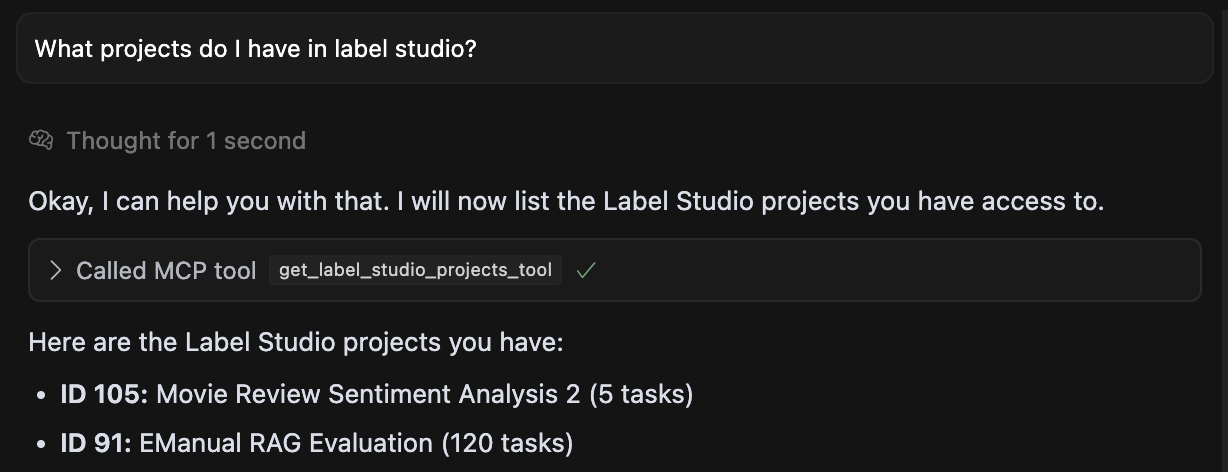
This project provides a Model Context Protocol (MCP) server that allows interaction with a Label Studio instance using the label-studio-sdk. It enables programmatic management of labeling projects, tasks, and predictions via natural language or structured calls from MCP clients. Using this MCP Server, you can make requests like:
- “Create a project in label studio with this data …”
- “How many tasks are labeled in my RAG review project?”
- “Add predictions for my tasks.”
- “Update my labeling template to include a comment box.”
Features
- Project Management: Create, update, list, and view details/configurations of Label Studio projects.
- Task Management: Import tasks from files, list tasks within projects, and retrieve task data/annotations.
- Prediction Integration: Add model predictions to specific tasks.
- SDK Integration: Leverages the official
label-studio-sdkfor communication.
Prerequisites
- Running Label Studio Instance: You need a running instance of Label Studio accessible from where this MCP server will run.
- API Key: Obtain an API key from your user account settings in Label Studio.
Configuration
The MCP server requires the URL and API key for your Label Studio instance. If launching the server via an MCP client configuration file, you can specify the environment variables directly within the server definition. This is often preferred for client-managed servers.
Add the following JSON entry to your claude_desktop_config.json file or Cursor MCP settings:
Tools
The MCP server exposes the following tools:
Project Management
get_label_studio_projects_tool(): Lists available projects (ID, title, task count).get_label_studio_project_details_tool(project_id: int): Retrieves detailed information for a specific project.get_label_studio_project_config_tool(project_id: int): Fetches the XML labeling configuration for a project.create_label_studio_project_tool(title: str, label_config: str, ...): Creates a new project with a title, XML config, and optional settings. Returns project details including a URL.update_label_studio_project_config_tool(project_id: int, new_label_config: str): Updates the XML labeling configuration for an existing project.
Task Management
list_label_studio_project_tasks_tool(project_id: int): Lists task IDs within a project (up to 100).get_label_studio_task_data_tool(project_id: int, task_id: int): Retrieves the data payload for a specific task.get_label_studio_task_annotations_tool(project_id: int, task_id: int): Fetches existing annotations for a specific task.import_label_studio_project_tasks_tool(project_id: int, tasks_file_path: str): Imports tasks from a JSON file (containing a list of task objects) into a project. Returns import summary and project URL.
Predictions
create_label_studio_prediction_tool(task_id: int, result: List[Dict[str, Any]], ...): Creates a prediction for a specific task. Requires the prediction result as a list of dictionaries matching the Label Studio format. Optionalmodel_versionandscore.
Example Use Case
- Create a new project using
create_label_studio_project_tool. - Prepare a JSON file (
tasks.json) with task data. - Import tasks using
import_label_studio_project_tasks_tool, providing the project ID from step 1 and the path totasks.json. - List task IDs using
list_label_studio_project_tasks_tool. - Get data for a specific task using
get_label_studio_task_data_tool. - Generate a prediction result structure (list of dicts).
- Add the prediction using
create_label_studio_prediction_tool.
Contact
For questions or support, reach out via GitHub Issues.
Dev Tools Supporting MCP
The following are the main code editors that support the Model Context Protocol. Click the link to visit the official website for more information.







