
Langchain Box Mcp Adapter
What is Langchain Box Mcp Adapter
langchain-box-mcp-adapter is a sample project that implements the Langchain MCP adapter for the Box MCP server, showcasing integration of Langchain with Box MCP using tools and agents.
Use cases
Use cases include developing AI-driven customer service agents, creating interactive chat applications, and implementing automated workflows that require integration with Box MCP functionalities.
How to use
To use langchain-box-mcp-adapter, clone the repository, install the dependencies, set up the .env file with necessary credentials, ensure the MCP server is accessible, and run the simple client using ‘uv run src/simple_client.py’.
Key features
Key features include Langchain integration with the ChatOpenAI model, communication with the Box MCP server via stdio transport, dynamic tool loading, creation of a React-style agent for user interactions, and a rich console output with markdown rendering.
Where to use
langchain-box-mcp-adapter can be used in fields requiring AI interactions, such as customer support, chatbots, and any application needing dynamic tool integration with a Box MCP server.
Clients Supporting MCP
The following are the main client software that supports the Model Context Protocol. Click the link to visit the official website for more information.





Overview
What is Langchain Box Mcp Adapter
langchain-box-mcp-adapter is a sample project that implements the Langchain MCP adapter for the Box MCP server, showcasing integration of Langchain with Box MCP using tools and agents.
Use cases
Use cases include developing AI-driven customer service agents, creating interactive chat applications, and implementing automated workflows that require integration with Box MCP functionalities.
How to use
To use langchain-box-mcp-adapter, clone the repository, install the dependencies, set up the .env file with necessary credentials, ensure the MCP server is accessible, and run the simple client using ‘uv run src/simple_client.py’.
Key features
Key features include Langchain integration with the ChatOpenAI model, communication with the Box MCP server via stdio transport, dynamic tool loading, creation of a React-style agent for user interactions, and a rich console output with markdown rendering.
Where to use
langchain-box-mcp-adapter can be used in fields requiring AI interactions, such as customer support, chatbots, and any application needing dynamic tool integration with a Box MCP server.
Clients Supporting MCP
The following are the main client software that supports the Model Context Protocol. Click the link to visit the official website for more information.
Content
langchain-box-mcp-adapter
This sample project implements the Langchain MCP adapter to the Box MCP server. It demonstrates how to integrate Langchain with a Box MCP server using tools and agents.
Features
- Langchain Integration: Utilizes Langchain’s
ChatOpenAImodel for AI interactions. - MCP Server Communication: Connects to the Box MCP server using
stdiotransport. - Tool Loading: Dynamically loads tools from the MCP server.
- Agent Creation: Creates a React-style agent for handling user prompts and tool interactions.
- Rich Console Output: Provides a user-friendly console interface with markdown rendering and typewriter effects.
Requirements
- Python 3.13 or higher
- Dependencies listed in
pyproject.toml:langchain-mcp-adapters>=0.0.8langchain-openai>=0.3.12langgraph>=0.3.29rich>=14.0.0
Setup
-
Clone the repository:
git clone <repository-url> cd langchain-box-mcp-adapter -
Install dependencies:
uv sync -
Create a
.envfile in the root of the project and fill in the information.
LANGSMITH_TRACING = "true"
LANGSMITH_API_KEY =
OPENAI_API_KEY =

BOX_CLIENT_ID = ""
BOX_CLIENT_SECRET = ""
BOX_SUBJECT_TYPE = "user"
BOX_SUBJECT_ID = ""
-
Ensure the MCP server is set up and accessible at the specified path in the project.
-
Update the StdioServerParameters in src/simple_client.py or src/graph.py with the correct path to your MCP server script.
    server_params = StdioServerParameters(
        command="uv",
        args=[
            "--directory",
            "/your/absolute/path/to/the/mcp/server/mcp-server-box",
            "run",
            "src/mcp_server_box.py",
        ],
    )
Usage
Running the Simple Client
To run the simple client:
uv run src/simple_client.py
This will start a console-based application where you can interact with the AI agent. Enter prompts, and the agent will respond using tools and AI capabilities.
Running the Graph-Based Agent (LangGraph)
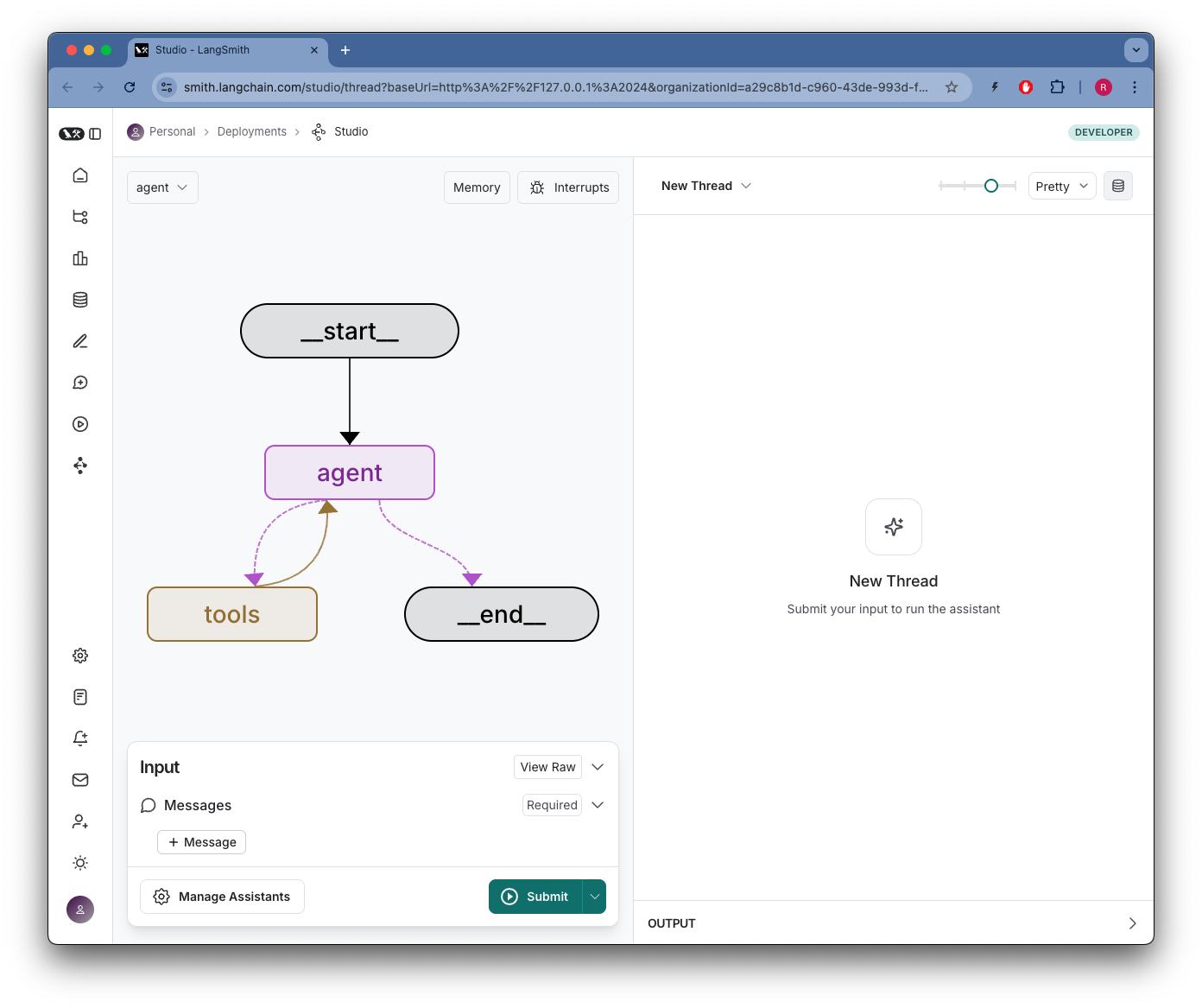
The graph-based agent can be used by invoking the make_graph function in src/graph.py. This is useful for more complex workflows.
uv run langgraph dev --config src/langgraph.json
You should see something like:
Project Structure
- src/simple_client.py: Main entry point for the simple client.
- src/graph.py: Contains the graph-based agent setup.
- src/console_utils/console_app.py: Utility functions for console interactions.
- src/langgraph.json: Configuration for the LangGraph integration.
License
This project is licensed under the MIT License. See the LICENSE file for details.
Contributing
Contributions are welcome! Please open an issue or submit a pull request for any improvements or bug fixes.
Dev Tools Supporting MCP
The following are the main code editors that support the Model Context Protocol. Click the link to visit the official website for more information.







