
Laravel Loop Filament
What is Laravel Loop Filament
laravel-loop-filament is an extension for Laravel Loop that exposes Filament Resources as an MCP server, allowing AI assistants and MCP clients to interact with these resources for data listing, querying, and executing actions.
Use cases
Use cases include building admin panels where AI can assist in data management, automating data queries, and performing bulk actions on resources in a controlled environment.
How to use
To use laravel-loop-filament, first ensure Laravel Loop is installed. Then, install the package via Composer and register the Filament toolkit in your application, specifying which resources to expose and their access modes.
Key features
Key features include listing available Filament Resources, describing resource structures, querying resource data with optional filters, and executing bulk actions on resources in ReadWrite mode.
Where to use
laravel-loop-filament can be used in web applications that utilize Laravel and Filament for resource management, particularly in scenarios requiring interaction with AI assistants or MCP clients.
Clients Supporting MCP
The following are the main client software that supports the Model Context Protocol. Click the link to visit the official website for more information.





Overview
What is Laravel Loop Filament
laravel-loop-filament is an extension for Laravel Loop that exposes Filament Resources as an MCP server, allowing AI assistants and MCP clients to interact with these resources for data listing, querying, and executing actions.
Use cases
Use cases include building admin panels where AI can assist in data management, automating data queries, and performing bulk actions on resources in a controlled environment.
How to use
To use laravel-loop-filament, first ensure Laravel Loop is installed. Then, install the package via Composer and register the Filament toolkit in your application, specifying which resources to expose and their access modes.
Key features
Key features include listing available Filament Resources, describing resource structures, querying resource data with optional filters, and executing bulk actions on resources in ReadWrite mode.
Where to use
laravel-loop-filament can be used in web applications that utilize Laravel and Filament for resource management, particularly in scenarios requiring interaction with AI assistants or MCP clients.
Clients Supporting MCP
The following are the main client software that supports the Model Context Protocol. Click the link to visit the official website for more information.
Content
Filament MCP Server - Laravel Loop
[!IMPORTANT]
This is a beta version and is not recommended for production use yet.
The Laravel Loop Filament MCP Server is an extension for Laravel Loop that exposes your Filament Resources as an MCP server. This allows AI assistants and MCP clients to interact with your Filament Resources for data listing, querying, and (optionally) actions.
What It Does
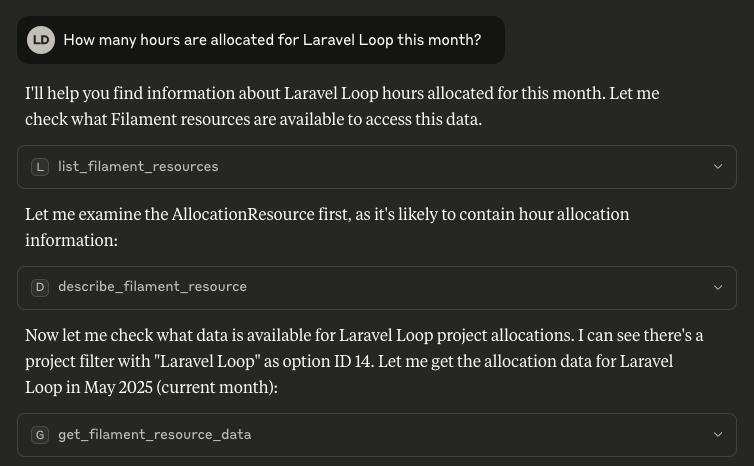
Exposes your Filament Resources as MCP tools. There are 4 tools available:
list_filament_resources: Lists all available Filament Resources to the MCP client.describe_filament_resource: Describes the structure, fields, columns, filters, and relationships for a given resource to the MCP client.get_filament_resource_data: Queries data for a resource, with optional filters.execute_filament_resource_action: Executes a bulk action on a resource (only in ReadWrite mode).
Installation
-
Make sure you have Laravel Loop installed and configured.
-
Install the package:
composer require kirschbaum-development/laravel-loop-filament
- Register the Filament toolkit in your application. This is typically done in a service provider (e.g., AppServiceProvider):
use Kirschbaum\Loop\Loop;
use Kirschbaum\Loop\Filament\FilamentToolkit;

Loop::toolkit(FilamentToolkit::make());
By default, it exposes all your Filament resources. You can control which resources are exposed with the resources parameter.
use Kirschbaum\Loop\Loop;
use Kirschbaum\Loop\Filament\FilamentToolkit;

Loop::toolkit(FilamentToolkit::make(resources: [
    \App\Filament\Resources\UserResource::class,
    \App\Filament\Resources\PostResource::class,
]));
By default, the toolkit is in read-only mode. To expose the bulk actions of your Filament resources, you can register the tool with ReadWrite model.
use Kirschbaum\Loop\Loop;
use Kirschbaum\Loop\Filament\FilamentToolkit;
use Kirschbaum\Loop\Enums\Mode;

Loop::toolkit(
    FilamentToolkit::make(mode: Mode::ReadWrite)
);
Usage
After registering the toolkit, you have to connect Laravel Loop to a MCP client, and the tools will be available.
Security
If you discover any security related issues, please email [email protected] instead of using the issue tracker.
Sponsorship
Development of this package is sponsored by Kirschbaum Development Group, a developer driven company focused on problem solving, team building, and community. Learn more about us or join us!
License
The MIT License (MIT). Please see License File for more information.
Dev Tools Supporting MCP
The following are the main code editors that support the Model Context Protocol. Click the link to visit the official website for more information.







