
Lark Tools Mcp
What is Lark Tools Mcp
lark-tools-mcp is an MCP server that provides operations related to Feishu for AI encoding agents, enabling functionalities such as reading documents, sending messages, contract approvals, and data processing.
Use cases
Use cases for lark-tools-mcp include automating document management, facilitating communication through message sending, streamlining contract approval processes, and enhancing data processing workflows.
How to use
To use lark-tools-mcp, create a Feishu application and obtain the necessary token. Authorize the application with document permissions, then configure the .env file with your app_id and app_secret. Finally, run the MCP server and integrate it with cursor to allow AI to assist in reading and organizing content from Feishu documents.
Key features
Key features include integration with Feishu for document reading, message sending, contract approval, and data processing. The server supports AI-driven interactions, allowing for unexpected combinations of tasks.
Where to use
undefined
Clients Supporting MCP
The following are the main client software that supports the Model Context Protocol. Click the link to visit the official website for more information.





Overview
What is Lark Tools Mcp
lark-tools-mcp is an MCP server that provides operations related to Feishu for AI encoding agents, enabling functionalities such as reading documents, sending messages, contract approvals, and data processing.
Use cases
Use cases for lark-tools-mcp include automating document management, facilitating communication through message sending, streamlining contract approval processes, and enhancing data processing workflows.
How to use
To use lark-tools-mcp, create a Feishu application and obtain the necessary token. Authorize the application with document permissions, then configure the .env file with your app_id and app_secret. Finally, run the MCP server and integrate it with cursor to allow AI to assist in reading and organizing content from Feishu documents.
Key features
Key features include integration with Feishu for document reading, message sending, contract approval, and data processing. The server supports AI-driven interactions, allowing for unexpected combinations of tasks.
Where to use
undefined
Clients Supporting MCP
The following are the main client software that supports the Model Context Protocol. Click the link to visit the official website for more information.
Content
lark-tools-mcp
MCP server provides Feishu related operations to AI encoding agents such as cursor
飞书MCP插件
通过打通飞书与cursor,向LLM提供读取文档、发送消息、合同审批、数据处理…
可能会有意想不到的组合方式
创建自建应用
MCP服务运行基于token,需要创建一个应用并做发布 https://open.feishu.cn/document/server-docs/api-call-guide/terminolog
然后对应用进行文档授权,这一步较为繁琐,参考文档,选择合适的方案:https://open.feishu.cn/document/uAjLw4CM/ugTN1YjL4UTN24CO1UjN/trouble-shooting/how-to-add-permissions-to-app
运行服务
- 拷贝 .env.example 为 .env 文件
- 修改 .env 文件中的 FEISHU_APP_ID 为飞书自建应用的 app_id
- 修改 .env 文件中的 FEISHU_APP_SECRET 为飞书自建应用的 app_secret
- 运行 MCP Server
yarn install
yarn start - Add MCP to cursor
- Agent 模式下,输入飞书文档链接,让AI帮你阅读与整理内容
效果
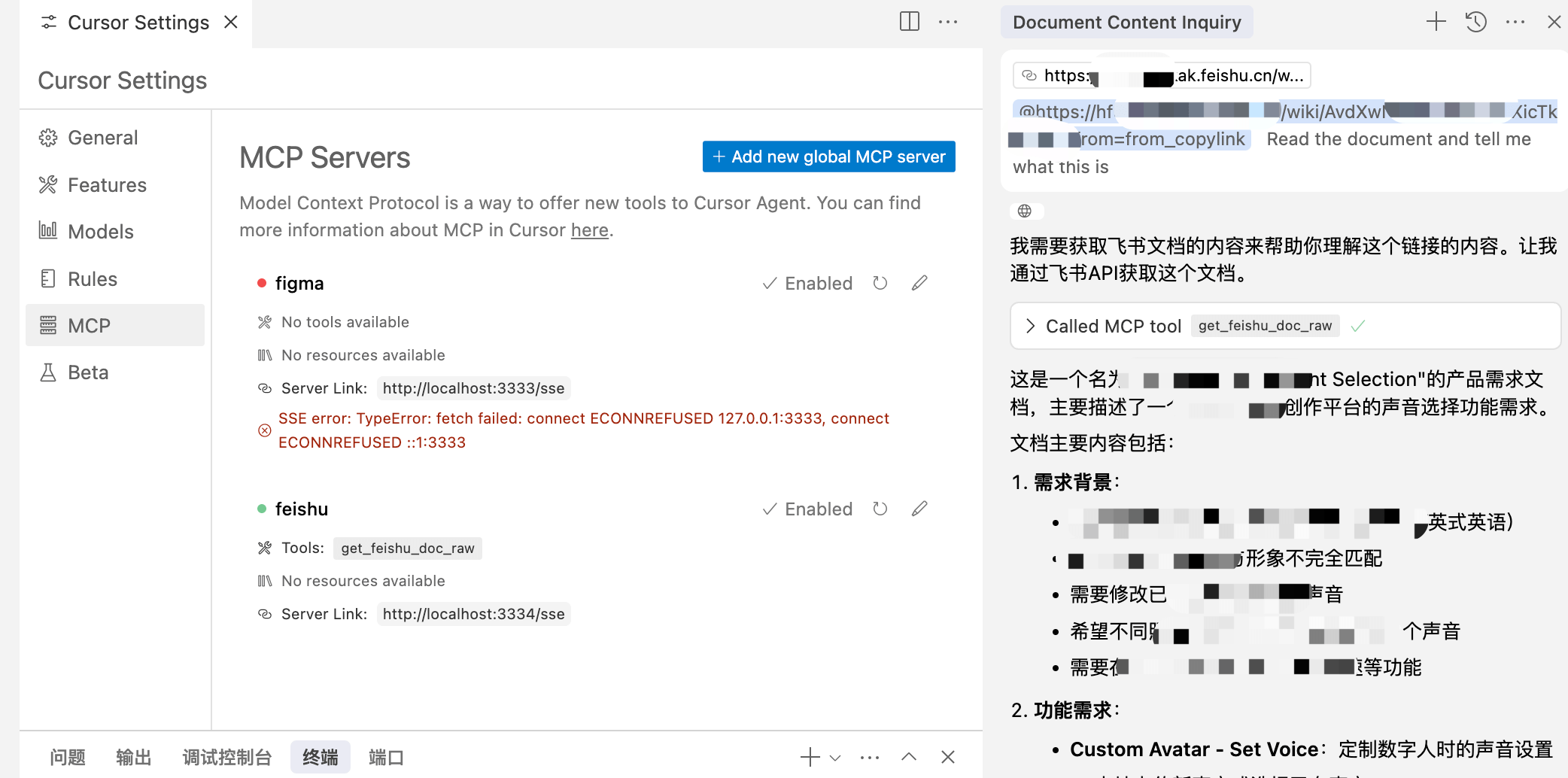
tools
get_feishu_doc
获取飞书文档信息(纯文本)
Dev Tools Supporting MCP
The following are the main code editors that support the Model Context Protocol. Click the link to visit the official website for more information.







