
Larkrs Mcp Server
What is Larkrs Mcp Server
larkrs-mcp-server is a service based on MCP that provides integration with the Lark API, allowing AI models to easily interact with Lark services.
Use cases
Use cases include automating data entry into Lark, integrating AI-driven workflows with Lark services, and enhancing productivity tools that leverage Lark’s capabilities.
How to use
To use larkrs-mcp-server, clone the project from GitHub, build it using Cargo, and configure your environment variables according to the provided example. Then, run the server to validate your Lark identity.
Key features
Key features include multi-dimensional table support for reading metadata and content, and batch record creation. Currently, it supports STDIO mode for communication, suitable for CLI environments and integration with other applications.
Where to use
larkrs-mcp-server is suitable for applications that require integration with Lark services, particularly in environments that utilize AI models for data interaction.
Clients Supporting MCP
The following are the main client software that supports the Model Context Protocol. Click the link to visit the official website for more information.





Overview
What is Larkrs Mcp Server
larkrs-mcp-server is a service based on MCP that provides integration with the Lark API, allowing AI models to easily interact with Lark services.
Use cases
Use cases include automating data entry into Lark, integrating AI-driven workflows with Lark services, and enhancing productivity tools that leverage Lark’s capabilities.
How to use
To use larkrs-mcp-server, clone the project from GitHub, build it using Cargo, and configure your environment variables according to the provided example. Then, run the server to validate your Lark identity.
Key features
Key features include multi-dimensional table support for reading metadata and content, and batch record creation. Currently, it supports STDIO mode for communication, suitable for CLI environments and integration with other applications.
Where to use
larkrs-mcp-server is suitable for applications that require integration with Lark services, particularly in environments that utilize AI models for data interaction.
Clients Supporting MCP
The following are the main client software that supports the Model Context Protocol. Click the link to visit the official website for more information.
Content
Lark rs MCP
飞书MCP服务器是一个基于MCP的服务,提供飞书API集成,使AI模型能够轻松与飞书服务交互。
功能特点
- 多维表格: 读取多维表格元数据和内容, 提供批量创建记录的功能
- 多模式支持: 目前仅支持STDIO模式
- STDIO:通过标准输入/输出通信,适用于CLI环境和集成到其他应用
配置
目前仅支持验证chatwise中的运行情况
首先将本项目克隆到本地:
cd /path/to/your/project
git clone https://github.com/your-repo/larkrs-mcp.git
然后使用 cargo build 编译项目:
cd larkrs-mcp
cargo build
将编译产物的路径直接复制到MCP client的命令中, 例如:
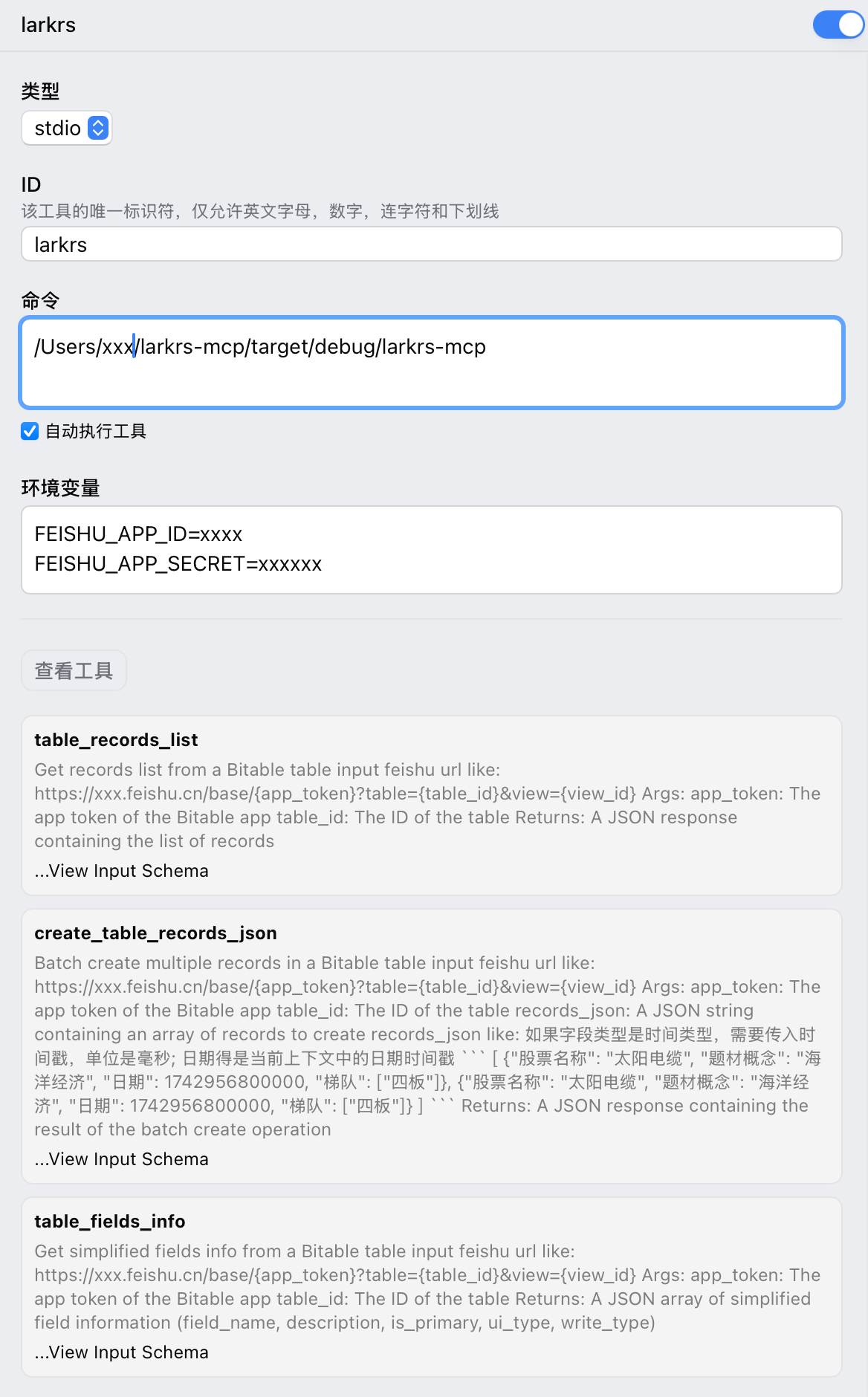
在运行时,按照 .env.example 的格式书写你的环境变量,用于验证飞书身份。
Dev Tools Supporting MCP
The following are the main code editors that support the Model Context Protocol. Click the link to visit the official website for more information.







