
Last9 Mcp Server
What is Last9 Mcp Server
last9-mcp-server is an implementation of the Model Context Protocol (MCP) designed for Last9, allowing AI agents to query data effectively.
Use cases
Use cases include integrating with AI applications like Claude and Cursor to enhance their data interaction capabilities, enabling users to efficiently access and manage data through AI agents.
How to use
To use last9-mcp-server, install it via Homebrew by tapping the Last9 repository and running the installation command. Configure your application (Claude or Cursor) to connect to the MCP server using the provided authentication token and API URL.
Key features
Key features include the ability to retrieve a list of exceptions and obtain a service graph for an endpoint, enhancing data querying capabilities for AI applications.
Where to use
last9-mcp-server is applicable in fields that require data querying and management, particularly in AI-driven applications and services that utilize the Last9 platform.
Clients Supporting MCP
The following are the main client software that supports the Model Context Protocol. Click the link to visit the official website for more information.





Overview
What is Last9 Mcp Server
last9-mcp-server is an implementation of the Model Context Protocol (MCP) designed for Last9, allowing AI agents to query data effectively.
Use cases
Use cases include integrating with AI applications like Claude and Cursor to enhance their data interaction capabilities, enabling users to efficiently access and manage data through AI agents.
How to use
To use last9-mcp-server, install it via Homebrew by tapping the Last9 repository and running the installation command. Configure your application (Claude or Cursor) to connect to the MCP server using the provided authentication token and API URL.
Key features
Key features include the ability to retrieve a list of exceptions and obtain a service graph for an endpoint, enhancing data querying capabilities for AI applications.
Where to use
last9-mcp-server is applicable in fields that require data querying and management, particularly in AI-driven applications and services that utilize the Last9 platform.
Clients Supporting MCP
The following are the main client software that supports the Model Context Protocol. Click the link to visit the official website for more information.
Content
Last9 MCP Server
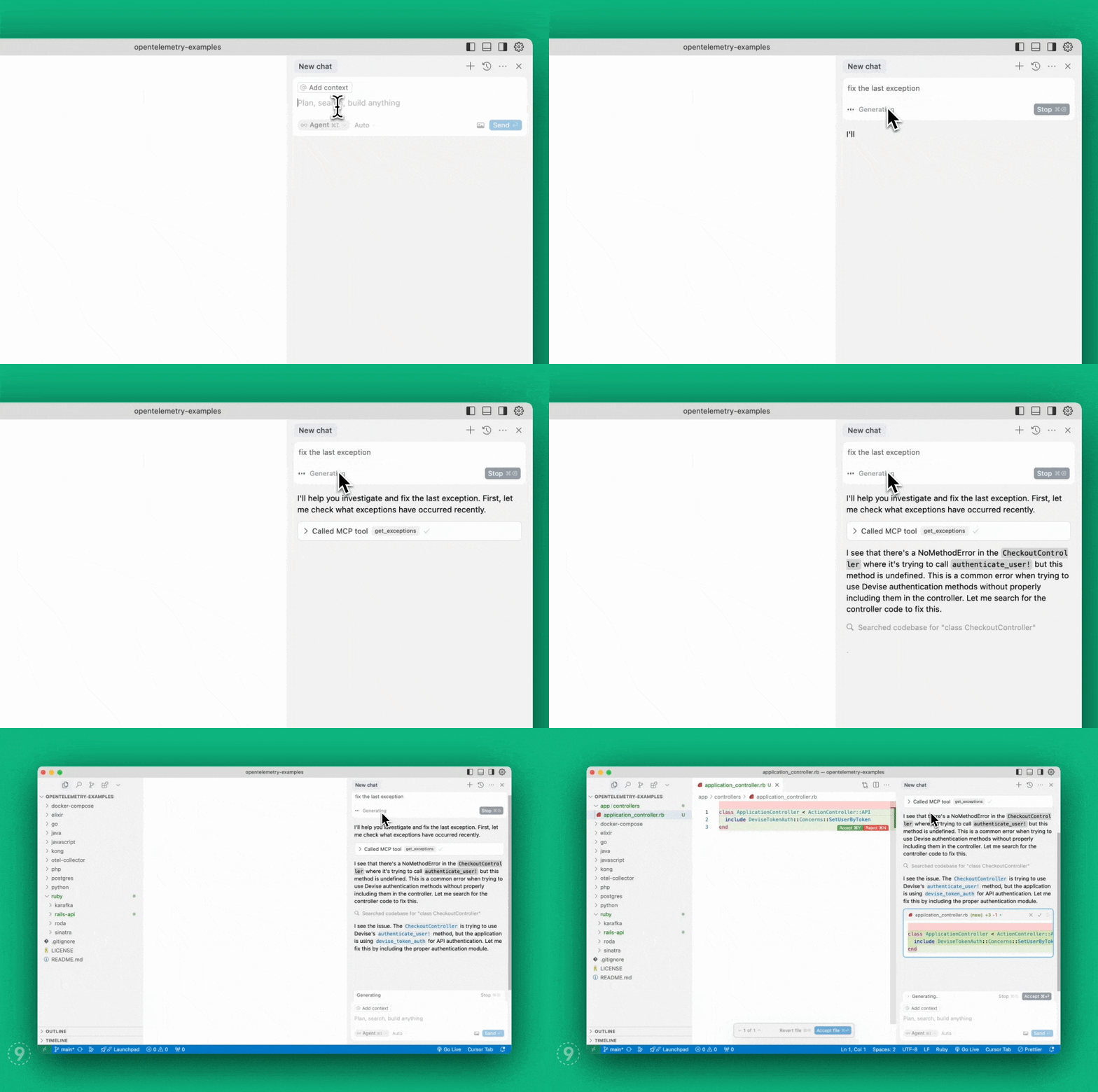
A Model Context Protocol server
implementation for Last9 that enables AI agents to
seamlessly bring real-time production context — logs, metrics, and traces — into
your local environment to auto-fix code faster.
- View demo
- Read our
announcement blog post
Status
Works with Claude desktop app, or Cursor, Windsurf, and VSCode (Github Copilot)
IDEs. Implements the following MCP
tools:
get_exceptions: Get the list of exceptions.get_service_graph: Get service graph for an endpoint from the exception.get_logs: Get logs filtered by service name and/or severity level.get_drop_rules: Get drop rules for logs that determine what logs get
filtered out at Last9 Control Planeadd_drop_rule: Create a drop rule for logs at
Last9 Control Plane
Tools Documentation
get_exceptions
Retrieves server-side exceptions over a specified time range.
Parameters:
limit(integer, optional): Maximum number of exceptions to return.
Default: 20.lookback_minutes(integer, recommended): Number of minutes to look back from
now. Default: 60. Examples: 60, 30, 15.start_time_iso(string, optional): Start time in ISO format (YYYY-MM-DD
HH:MM:SS). Leave empty to use lookback_minutes.end_time_iso(string, optional): End time in ISO format (YYYY-MM-DD
HH:MM:SS). Leave empty to default to current time.span_name(string, optional): Name of the span to filter by.
get_service_graph
Gets the upstream and downstream services for a given span name, along with the
throughput for each service.
Parameters:
span_name(string, required): Name of the span to get dependencies for.lookback_minutes(integer, recommended): Number of minutes to look back from
now. Default: 60. Examples: 60, 30, 15.start_time_iso(string, optional): Start time in ISO format (YYYY-MM-DD
HH:MM:SS). Leave empty to use lookback_minutes.
get_logs
Gets logs filtered by optional service name and/or severity level within a
specified time range.
Parameters:
service(string, optional): Name of the service to get logs for.severity(string, optional): Severity of the logs to get.lookback_minutes(integer, recommended): Number of minutes to look back from
now. Default: 60. Examples: 60, 30, 15.start_time_iso(string, optional): Start time in ISO format (YYYY-MM-DD
HH:MM:SS). Leave empty to use lookback_minutes.end_time_iso(string, optional): End time in ISO format (YYYY-MM-DD
HH:MM:SS). Leave empty to default to current time.limit(integer, optional): Maximum number of logs to return. Default: 20.
get_drop_rules
Gets drop rules for logs, which determine what logs get filtered out from
reaching Last9.
add_drop_rule
Adds a new drop rule to filter out specific logs at
Last9 Control Plane
Parameters:
name(string, required): Name of the drop rule.filters(array, required): List of filter conditions to apply. Each filter
has:key(string, required): The key to filter on. Only attributes and
resource.attributes keys are supported. For resource attributes, use format:
resource.attributes[key_name] and for log attributes, use format:
attributes[key_name] Double quotes in key names must be escaped.value(string, required): The value to filter against.operator(string, required): The operator used for filtering. Valid
values:- “equals”
- “not_equals”
conjunction(string, required): The logical conjunction between filters.
Valid values:- “and”
Installation
You can install the Last9 Observability MCP server using either:
Homebrew
# Add the Last9 tap
brew tap last9/tap

# Install the Last9 MCP CLI
brew install last9-mcp
NPM
# Install globally
npm install -g @last9/mcp-server

# Or run directly with npx
npx @last9/mcp-server
Configuration
Environment Variables
The Last9 MCP server requires the following environment variables:
LAST9_BASE_URL: (required) Last9 API URL from
OTel integrationLAST9_AUTH_TOKEN: (required) Authentication token for Last9 MCP server from
OTel integrationLAST9_REFRESH_TOKEN: (required) Refresh Token with Write permissions, needed
for accessing control plane APIs from
API Access
Usage with Claude Desktop
Configure the Claude app to use the MCP server:
- Open the Claude Desktop app, go to Settings, then Developer
- Click Edit Config
- Open the
claude_desktop_config.jsonfile - Copy and paste the server config to your existing file, then save
- Restart Claude
{
  "mcpServers": {
    "last9": {
      "command": "/opt/homebrew/bin/last9-mcp",
      "env": {
        "LAST9_BASE_URL": "<last9_otlp_host>",
        "LAST9_AUTH_TOKEN": "<last9_otlp_auth_token>",
        "LAST9_REFRESH_TOKEN": "<last9_write_refresh_token>"
      }
    }
  }
}
Usage with Cursor
Configure Cursor to use the MCP server:
- Open Cursor, go to Settings, then Cursor Settings
- Select MCP on the left
- Click Add “New Global MCP Server” at the top right
- Copy and paste the server config to your existing file, then save
- Restart Cursor
{
  "mcpServers": {
    "last9": {
      "command": "/opt/homebrew/bin/last9-mcp",
      "env": {
        "LAST9_BASE_URL": "<last9_otlp_host>",
        "LAST9_AUTH_TOKEN": "<last9_otlp_auth_token>",
        "LAST9_REFRESH_TOKEN": "<last9_write_refresh_token>"
      }
    }
  }
}
Usage with Windsurf
Configure Windsurf to use the MCP server:
- Open Windsurf, go to Settings, then Developer
- Click Edit Config
- Open the
windsurf_config.jsonfile - Copy and paste the server config to your existing file, then save
- Restart Windsurf
{
  "mcpServers": {
    "last9": {
      "command": "/opt/homebrew/bin/last9-mcp",
      "env": {
        "LAST9_BASE_URL": "<last9_otlp_host>",
        "LAST9_AUTH_TOKEN": "<last9_otlp_auth_token>",
        "LAST9_REFRESH_TOKEN": "<last9_write_refresh_token>"
      }
    }
  }
}
Usage with VS Code
Note: MCP support in VS Code is available starting v1.99 and is currently in
preview. For advanced configuration options and alternative setup methods,
view the VS Code MCP documentation.
- Open VS Code, go to Settings, select the User tab, then Features, then Chat
- Click “Edit settings.json”
- Copy and paste the server config to your existing file, then save
- Restart VS Code
{
  "mcp": {
    "servers": {
      "last9": {
        "type": "stdio",
        "command": "/opt/homebrew/bin/last9-mcp",
        "env": {
          "LAST9_BASE_URL": "<last9_otlp_host>",
          "LAST9_AUTH_TOKEN": "<last9_otlp_auth_token>",
          "LAST9_REFRESH_TOKEN": "<last9_write_refresh_token>"
        }
      }
    }
  }
}
Badges
Dev Tools Supporting MCP
The following are the main code editors that support the Model Context Protocol. Click the link to visit the official website for more information.







