
Ledger Mcp Server
What is Ledger Mcp Server
The ledger-mcp-server is a specialized MCP Server designed for accessing and managing ledger files through the Claude interface. It provides tools for users to interact with their financial data efficiently.
Use cases
Use cases for the ledger-mcp-server include managing personal budgets, tracking business expenses, generating financial reports, and maintaining a clear record of transactions for various accounts.
How to use
To use the ledger-mcp-server, install it via the command ‘uv pip install ledger-service’. Configure it in the Claude Desktop’s config file, specifying the server command and arguments. You can then utilize tools like ‘list-accounts’, ‘account-balance’, and ‘account-register’ to manage your ledger.
Key features
Key features of the ledger-mcp-server include: 1) ‘list-accounts’ to view all accounts for a specified year, 2) ‘account-balance’ to retrieve the balance of a specific account, and 3) ‘account-register’ to display the transaction history for an account.
Where to use
The ledger-mcp-server is suitable for personal finance management, small business accounting, and any application that requires efficient ledger file management and transaction tracking.
Clients Supporting MCP
The following are the main client software that supports the Model Context Protocol. Click the link to visit the official website for more information.





Overview
What is Ledger Mcp Server
The ledger-mcp-server is a specialized MCP Server designed for accessing and managing ledger files through the Claude interface. It provides tools for users to interact with their financial data efficiently.
Use cases
Use cases for the ledger-mcp-server include managing personal budgets, tracking business expenses, generating financial reports, and maintaining a clear record of transactions for various accounts.
How to use
To use the ledger-mcp-server, install it via the command ‘uv pip install ledger-service’. Configure it in the Claude Desktop’s config file, specifying the server command and arguments. You can then utilize tools like ‘list-accounts’, ‘account-balance’, and ‘account-register’ to manage your ledger.
Key features
Key features of the ledger-mcp-server include: 1) ‘list-accounts’ to view all accounts for a specified year, 2) ‘account-balance’ to retrieve the balance of a specific account, and 3) ‘account-register’ to display the transaction history for an account.
Where to use
The ledger-mcp-server is suitable for personal finance management, small business accounting, and any application that requires efficient ledger file management and transaction tracking.
Clients Supporting MCP
The following are the main client software that supports the Model Context Protocol. Click the link to visit the official website for more information.
Content
ledger-service MCP server
MCP Server for accessing and managing ledger files through Claude.
Components
Tools
The server implements three tools for ledger management:
-
list-accounts: Lists all accounts in the ledger
- Takes “year” as a required argument
- Returns formatted list of all available accounts
-
account-balance: Gets the balance for a specific account
- Takes “year” and “account” as required arguments
- Returns the current balance for the specified account
-
account-register: Shows the transaction register for an account
- Takes “year” and “account” as required arguments
- Returns detailed transaction history for the specified account
Installation
Prerequisites
- Python 3.13 or higher
uvpackage manager- Node.js and npm (for debugging)
Install from PyPI
uv pip install ledger-service
Debugging
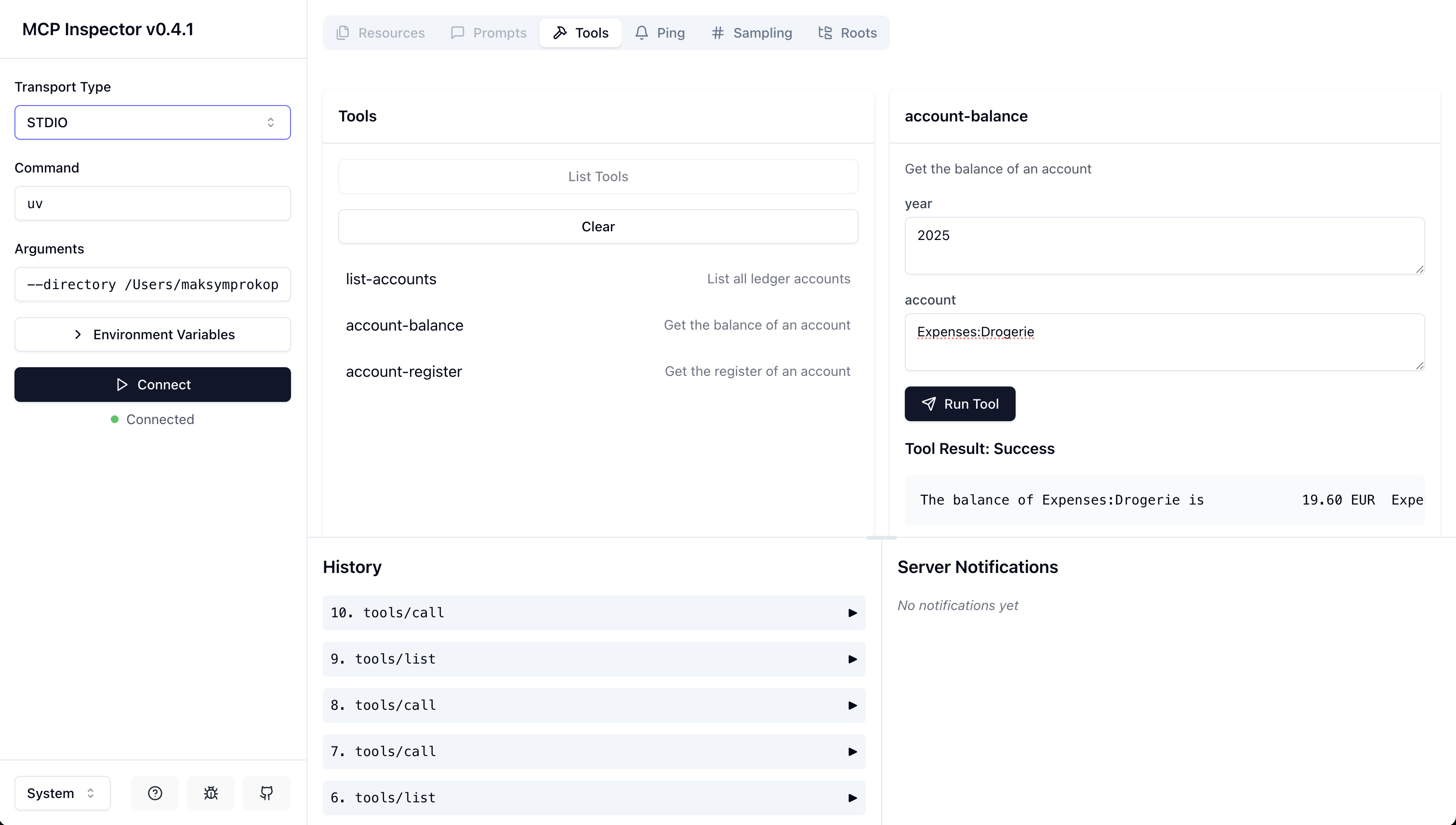
Using the inspector to debug the server:
npx @modelcontextprotocol/inspector \
  uv \
  --directory /path/to/ledger-service \
  run \
  ledger-service
Configure Claude Desktop
Add the server configuration to Claude Desktop’s config file:
On MacOS: ~/Library/Application\ Support/Claude/claude_desktop_config.json
On Windows: %APPDATA%/Claude/claude_desktop_config.json
Development Configuration
Production Configuration
Development
Local Setup
- Clone the repository
- Create and activate a virtual environment
- Install dependencies:
The base path can be configured by modifying the LEDGER_BASE_PATH constant in server.py.
License
GNU GENERAL PUBLIC LICENSE Version 3, 29 June 2007
Dev Tools Supporting MCP
The following are the main code editors that support the Model Context Protocol. Click the link to visit the official website for more information.







