
Line Bot Mcp Sse
What is Line Bot Mcp Sse
line-bot-mcp-sse is a server implementation of the Model Context Protocol (MCP) that integrates the LINE Messaging API, allowing AI agents to connect with LINE Official Accounts.
Use cases
Use cases include sending notifications, promotional messages, and personalized interactions with users through the LINE platform.
How to use
To use line-bot-mcp-sse, set up the server by following the instructions in the repository. You can utilize various tools to send messages to users or broadcast messages to all followers of your LINE Official Account.
Key features
Key features include the ability to push simple text messages, customizable flex messages, and broadcast messages to all users who have followed your LINE Official Account.
Where to use
line-bot-mcp-sse can be used in customer service, marketing campaigns, and any application where interaction with users via LINE is beneficial.
Clients Supporting MCP
The following are the main client software that supports the Model Context Protocol. Click the link to visit the official website for more information.





Overview
What is Line Bot Mcp Sse
line-bot-mcp-sse is a server implementation of the Model Context Protocol (MCP) that integrates the LINE Messaging API, allowing AI agents to connect with LINE Official Accounts.
Use cases
Use cases include sending notifications, promotional messages, and personalized interactions with users through the LINE platform.
How to use
To use line-bot-mcp-sse, set up the server by following the instructions in the repository. You can utilize various tools to send messages to users or broadcast messages to all followers of your LINE Official Account.
Key features
Key features include the ability to push simple text messages, customizable flex messages, and broadcast messages to all users who have followed your LINE Official Account.
Where to use
line-bot-mcp-sse can be used in customer service, marketing campaigns, and any application where interaction with users via LINE is beneficial.
Clients Supporting MCP
The following are the main client software that supports the Model Context Protocol. Click the link to visit the official website for more information.
Content
LINE Bot MCP Server SSE
Original repository: https://github.com/line/line-bot-mcp-server
Model Context Protocol (MCP) server implementation that integrates the LINE Messaging API to connect an AI Agent to the LINE Official Account.
[!NOTE]
This repository is provided as a preview version. While we offer it for experimental purposes, please be aware that it may not include complete functionality or comprehensive support.
Tools
- push_text_message
- Push a simple text message to a user via LINE.
- Inputs:
user_id(string?): The user ID to receive a message. Defaults to DESTINATION_USER_ID.message.text(string): The plain text content to send to the user.
- push_flex_message
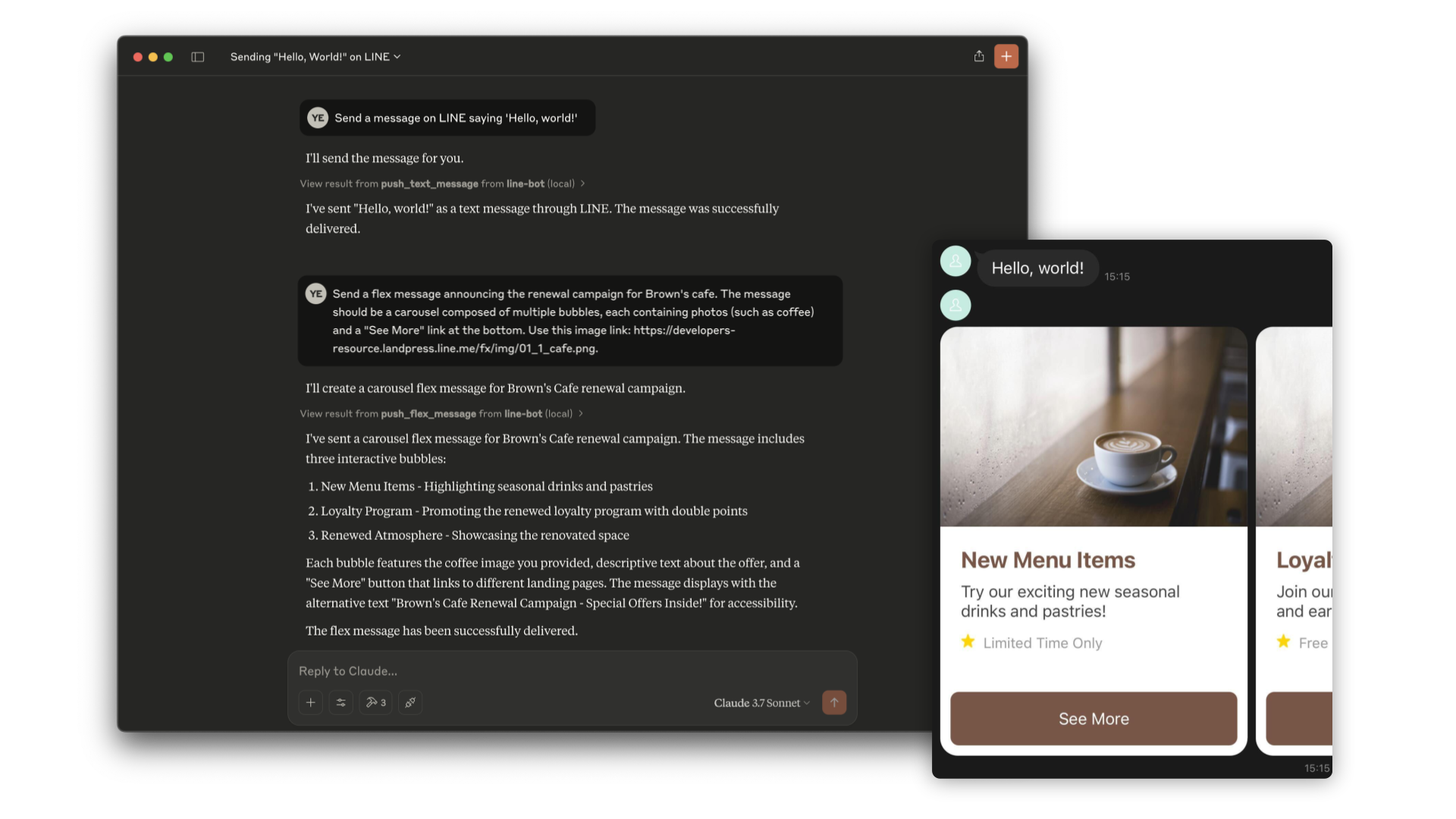
- Push a highly customizable flex message to a user via LINE.
- Inputs:
user_id(string?): The user ID to receive a message. Defaults to DESTINATION_USER_ID.message.altText(string): Alternative text shown when flex message cannot be displayed.message.content(any): The content of the flex message. This is a JSON object that defines the layout and components of the message.message.contents.type(enum): Type of the container. ‘bubble’ for single container, ‘carousel’ for multiple swipeable bubbles.
- broadcast_text_message
- Broadcast a simple text message via LINE to all users who have followed your LINE Official Account.
- Inputs:
message.text(string): The plain text content to send to the users.
- broadcast_flex_message
- Broadcast a highly customizable flex message to a user via LINE to all users who have added your LINE Official Account.
- Inputs:
message.altText(string): Alternative text shown when flex message cannot be displayed.message.content(any): The content of the flex message. This is a JSON object that defines the layout and components of the message.message.contents.type(enum): Type of the container. ‘bubble’ for single container, ‘carousel’ for multiple swipeable bubbles.
- reply_text_message
- Reply to a specific message with a simple text message via LINE.
- Inputs:
replyToken(string): The reply token received from a webhook event.message.text(string): The plain text content to send to the user.
- reply_flex_message
- Reply to a specific message with a highly customizable flex message to LINE.
- Inputs:
replyToken(string): The reply token received from a webhook event.message.altText(string): Alternative text shown when flex message cannot be displayed.message.content(any): The content of the flex message. This is a JSON object that defines the layout and components of the message.message.contents.type(enum): Type of the container. ‘bubble’ for single container, ‘carousel’ for multiple swipeable bubbles.
- get_profile
- Get detailed profile information of a LINE user including display name, profile picture URL, status message and language.
- Inputs:
user_id(string?): The ID of the user whose profile you want to retrieve. Defaults to DESTINATION_USER_ID.
Installation
Step 1: Install line-bot-mcp-sse
requirements:
- Node.js v20 or later
Clone this repository:
git clone https://github.com/BigWattanachai/line-bot-mcp-sse.git
Install the necessary dependencies and build line-bot-mcp-sse when using Node.js. This step is not required when using Docker:
cd line-bot-mcp-sse && npm install && npm run build
Step 2: Create LINE Official Account
This MCP server utilizes a LINE Official Account. If you do not have one, please create it by following this instructions.
If you have a LINE Official Account, enable the Messaging API for your LINE Official Account by following this instructions.
Step 3: Configure AI Agent
Please add the following configuration for an AI Agent like Claude Desktop or Cline.
Set the environment variables or arguments as follows:
mcpServers.args: (required) The path toline-bot-mcp-sse.CHANNEL_ACCESS_TOKEN: (required) Channel Access Token. You can confirm this by following this instructions.DESTINATION_USER_ID: (optional) The default user ID of the recipient. You can confirm this by following this instructions.
Option 1: Use Node
{
  "mcpServers": {
    "line-bot": {
      "command": "node",
      "args": [
        "PATH/TO/line-bot-mcp-sse/dist/index.js"
      ],
      "env": {
        "CHANNEL_ACCESS_TOKEN": "FILL_HERE",
        "DESTINATION_USER_ID": "FILL_HERE"
      }
    }
  }
}
Option 2: Use Docker
Build the Docker image first:
docker build -t line/line-bot-mcp-sse .
{
  "mcpServers": {
    "line-bot": {
      "command": "docker",
      "args": [
        "run",
        "-i",
        "--rm",
        "-e",
        "CHANNEL_ACCESS_TOKEN",
        "-e",
        "DESTINATION_USER_ID",
        "line/line-bot-mcp-sse"
      ],
      "env": {
        "CHANNEL_ACCESS_TOKEN": "FILL_HERE",
        "DESTINATION_USER_ID": "FILL_HERE"
      }
    }
  }
}
Deployment
For detailed deployment instructions, see DEPLOYMENT.md.
Quick Start
- Clone the repository
- Install dependencies:
npm install - Build the project:
npm run build - Run the server:
export CHANNEL_ACCESS_TOKEN="your_channel_access_token"
export DESTINATION_USER_ID="your_user_id"

./run.sh
Docker Deployment
You can also use Docker to deploy the server:
# Using docker-compose
docker-compose up -d

# Or using Docker directly with the simple Dockerfile
docker build -t line-bot-mcp-sse -f Dockerfile .
docker run -p 8000:8000 \
  -e CHANNEL_ACCESS_TOKEN="your_channel_access_token" \
  -e DESTINATION_USER_ID="your_user_id" \
  line-bot-mcp-sse
Code of Conduct
This project uses the Contributor Covenant Code of Conduct, version 2.1,
licensed under CC BY 4.0.
See https://github.com/EthicalSource/contributor_covenant/blob/release/LICENSE.md
Dev Tools Supporting MCP
The following are the main code editors that support the Model Context Protocol. Click the link to visit the official website for more information.







