
Local Api Mcp Python
What is Local Api Mcp Python
local-api-mcp-python is a Model Context Protocol server designed for the AdsPower LocalAPI, enabling large language models (LLMs) to interact with web browsers, create new browser instances, and manage browser fingerprint configurations.
Use cases
Use cases include automating browser tasks, creating custom browsing environments for testing, and enhancing data collection processes through automated interactions with web pages.
How to use
To use local-api-mcp-python, set up your environment by installing the required dependencies and configuring the server in the Claude Desktop application. Follow the installation instructions for your operating system and add the server configuration to the Claude desktop config file.
Key features
Key features include the ability to create and manage browser instances, update browser fingerprint configurations, and seamless integration with LLMs for enhanced browsing capabilities.
Where to use
local-api-mcp-python can be used in fields such as web automation, data scraping, and any application requiring browser interaction through LLMs.
Clients Supporting MCP
The following are the main client software that supports the Model Context Protocol. Click the link to visit the official website for more information.





Overview
What is Local Api Mcp Python
local-api-mcp-python is a Model Context Protocol server designed for the AdsPower LocalAPI, enabling large language models (LLMs) to interact with web browsers, create new browser instances, and manage browser fingerprint configurations.
Use cases
Use cases include automating browser tasks, creating custom browsing environments for testing, and enhancing data collection processes through automated interactions with web pages.
How to use
To use local-api-mcp-python, set up your environment by installing the required dependencies and configuring the server in the Claude Desktop application. Follow the installation instructions for your operating system and add the server configuration to the Claude desktop config file.
Key features
Key features include the ability to create and manage browser instances, update browser fingerprint configurations, and seamless integration with LLMs for enhanced browsing capabilities.
Where to use
local-api-mcp-python can be used in fields such as web automation, data scraping, and any application requiring browser interaction through LLMs.
Clients Supporting MCP
The following are the main client software that supports the Model Context Protocol. Click the link to visit the official website for more information.
Content
AdsPower LocalAPI MCP Server Python
A Model Context Protocol server that AdsPower browser LocalAPI. This server enables LLMs to interact with start browser, create browser, update browser fingerprint config …
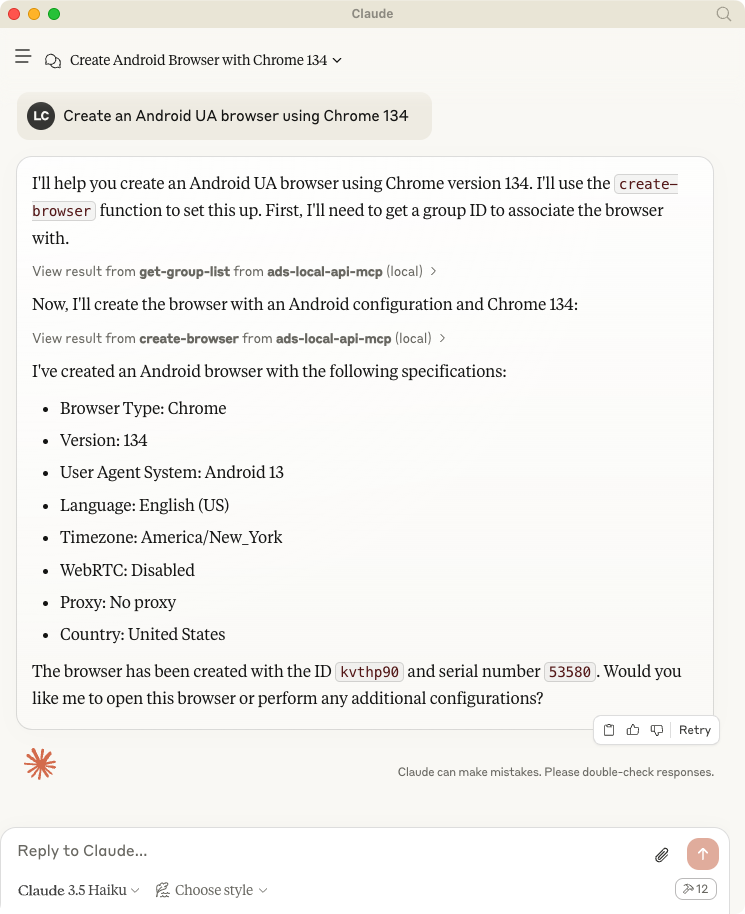
Usage with Claude Desktop
Talk to LLMs to create browser: Create an Android UA browser using Chrome 134
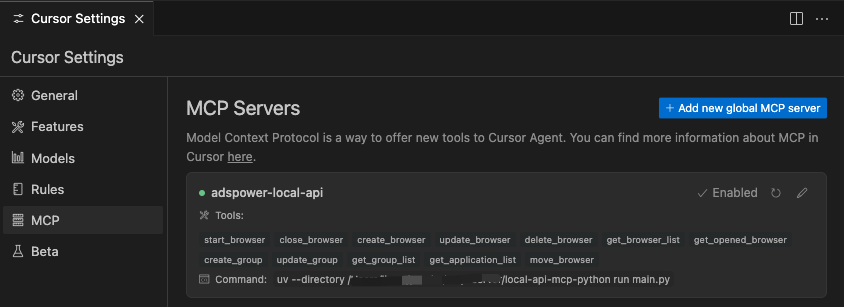
Usage width Cursor
System requirements
- AdsPower
- Python 3.10 or higher installed.
Set up your environment, install uv
First, let’s install uv and set up our Python project and environment:
MacOS / Linux
curl -LsSf https://astral.sh/uv/install.sh | sh
Windows
powershell -ExecutionPolicy ByPass -c "irm https://astral.sh/uv/install.ps1 | iex"
Development
# git clone
git clone https://github.com/AdsPower/local-api-mcp-python.git

# cd
cd local-api-mcp-python

# venv
uv venv
source .venv/bin/activate

# Install dependencies
uv pip install .
To use with Claude Desktop, add the server config:
On macOS: ~/Library/Application Support/Claude/claude_desktop_config.json On Windows: %APPDATA%/Claude/claude_desktop_config.json
# Add the server to your claude_desktop_config.json
{
    "mcpServers": {
        "adspower-local-api": {
        "command": "uv",
        "args": [
            "--directory",
            "<Replace Your Project Path>/local-api-mcp-python",
            "run",
            "main.py"
        ]
        }
    }
}
Dev Tools Supporting MCP
The following are the main code editors that support the Model Context Protocol. Click the link to visit the official website for more information.







