
Mastra Playwright Mcp With Aws
What is Mastra Playwright Mcp With Aws
Mastra-playwright-mcp-with-aws is an AWS CDK project designed to run the Mastra Agent using Amazon ECS and Amazon Bedrock to interact with the MCP Server. It serves as an example implementation utilizing the Playwright MCP server.
Use cases
Use cases include automated testing of web applications using Playwright, deploying AI-driven applications that require real-time interaction with the MCP Server, and developing scalable solutions for web automation in cloud environments.
How to use
To use mastra-playwright-mcp-with-aws, ensure you have Node.js, AWS CDK, and Docker installed. Set up your AWS credentials and configure the necessary environment variables in the .env.development file. Then, deploy the application using AWS CDK commands.
Key features
Key features include integration with Amazon ECS for container orchestration, utilization of Amazon Bedrock for AI model interactions, and a structured project architecture that separates application and infrastructure code.
Where to use
Mastra-playwright-mcp-with-aws can be used in fields such as software testing, automated browser interactions, and cloud-based AI applications where interaction with MCP Server is required.
Clients Supporting MCP
The following are the main client software that supports the Model Context Protocol. Click the link to visit the official website for more information.





Overview
What is Mastra Playwright Mcp With Aws
Mastra-playwright-mcp-with-aws is an AWS CDK project designed to run the Mastra Agent using Amazon ECS and Amazon Bedrock to interact with the MCP Server. It serves as an example implementation utilizing the Playwright MCP server.
Use cases
Use cases include automated testing of web applications using Playwright, deploying AI-driven applications that require real-time interaction with the MCP Server, and developing scalable solutions for web automation in cloud environments.
How to use
To use mastra-playwright-mcp-with-aws, ensure you have Node.js, AWS CDK, and Docker installed. Set up your AWS credentials and configure the necessary environment variables in the .env.development file. Then, deploy the application using AWS CDK commands.
Key features
Key features include integration with Amazon ECS for container orchestration, utilization of Amazon Bedrock for AI model interactions, and a structured project architecture that separates application and infrastructure code.
Where to use
Mastra-playwright-mcp-with-aws can be used in fields such as software testing, automated browser interactions, and cloud-based AI applications where interaction with MCP Server is required.
Clients Supporting MCP
The following are the main client software that supports the Model Context Protocol. Click the link to visit the official website for more information.
Content
Mastra Playwright MCP with AWS
AWS CDK project for running Mastra Agent with Amazon ECS and Amazon Bedrock to interact with MCP Server.
As an example, this project uses Playwright MCP server.
Prerequisites
- Node.js: v20 or higher
- AWS CDK: v2 or higher
- Docker: v20 or higher
- AWS Credentials: Access Key / Secret Key / Session Token
Architecture
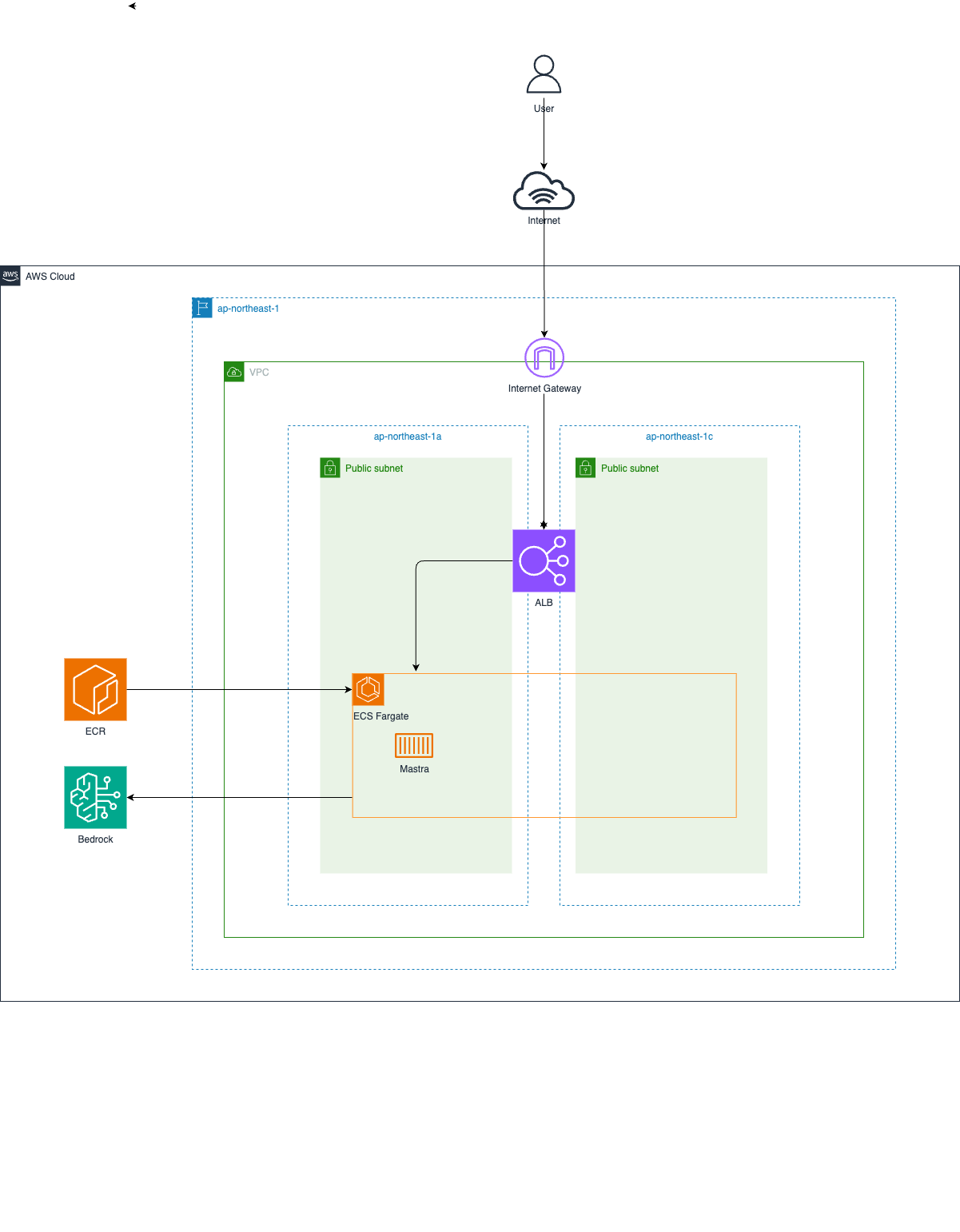
Project Structure
.
├── app/                    # Application root directory
│   ├── src/               # Application source code
│   │   └── mastra/        # Mastra application root directory
│   │       ├── index.ts   # Mastra instance configuration
│   │       ├── agents/    # Agent definitions
│   │       └── mcp/       # MCP configuration
│   ├── .env.development   # Environment variables for development
│   ├── Dockerfile         # Container image definition
│   ├── package.json       # Application dependencies
│   └── tsconfig.json      # TypeScript configuration for app
├── infra/                 # Infrastructure as Code directory
│   ├── bin/              # CDK application entry point
│   ├── lib/              # CDK stack definitions
│   ├── test/             # Infrastructure test files
│   ├── cdk.json          # CDK configuration
│   ├── package.json      # Infrastructure dependencies
│   └── tsconfig.json     # TypeScript configuration for infra
├── image/                 # Architecture diagrams and images
├── package.json          # Root project dependencies
└── tsconfig.json         # Root TypeScript configuration
Environment Variables
The following environment variables need to be set in the .env.development file.
| Name | Description |
|---|---|
| REGION | Region of AWS. Default is “us-east-1” |
| BEDROCK_MODEL | Model id of Amazon Bedrock. Bedrock model must be enabled in AWS Console beforehand. Default is “amazon.nova-pro-v1:0”. |
| ACCESS_KEY_ID | Access key id of AWS. Required only for local development. |
| SECRET_ACCESS_KEY | Secret Access Key of AWS. Required only for local development. |
| SESSION_TOKEN | Session Token of AWS. Required only for local development. |
Getting Started
All commands should be executed at the repository root.
First, install dependencies for the root project.
npm ci
Next, set up environment variables by creating .env.development file.
cat << EOF > app/.env.development
REGION=us-east-1
BEDROCK_MODEL=amazon.nova-pro-v1:0
ACCESS_KEY_ID=XXXXXXXXXXXXXXXXXXXX
SECRET_ACCESS_KEY=XXXXXXXXXXXXXXXXXXXX
SESSION_TOKEN=XXXXXXXXXXXXXXXXXXXX
EOF
To start local development server, run the following command.
npm run mastra:dev
If you’ve never used CDK before, you need to Bootstrap for the first time only. The following command is unnecessary if your environment is already bootstrapped.
npx -w infra cdk bootstrap
To deploy the application to AWS, run the following command.
npm run cdk:deploy
To remove the application from AWS, run the following command.
npm run cdk:destroy
Dev Tools Supporting MCP
The following are the main code editors that support the Model Context Protocol. Click the link to visit the official website for more information.







