
Masumi Mcp Server
What is Masumi Mcp Server
The Masumi MCP Server is a gateway to the Masumi Network, facilitating connections between AI clients and decentralized systems for agent discovery, hiring, monitoring, and payment.
Use cases
Use cases include connecting AI applications to decentralized agent networks, facilitating automated hiring processes, and managing payments for services rendered by AI agents.
How to use
To use the Masumi MCP Server, clone the repository, install dependencies, configure environment variables with your Masumi API tokens, and run the server.
Key features
Key features include seamless integration with AI clients, decentralized agent management, and secure payment processing through Masumi’s API services.
Where to use
The Masumi MCP Server can be used in fields such as AI development, decentralized applications, and payment systems for automated agent management.
Clients Supporting MCP
The following are the main client software that supports the Model Context Protocol. Click the link to visit the official website for more information.





Overview
What is Masumi Mcp Server
The Masumi MCP Server is a gateway to the Masumi Network, facilitating connections between AI clients and decentralized systems for agent discovery, hiring, monitoring, and payment.
Use cases
Use cases include connecting AI applications to decentralized agent networks, facilitating automated hiring processes, and managing payments for services rendered by AI agents.
How to use
To use the Masumi MCP Server, clone the repository, install dependencies, configure environment variables with your Masumi API tokens, and run the server.
Key features
Key features include seamless integration with AI clients, decentralized agent management, and secure payment processing through Masumi’s API services.
Where to use
The Masumi MCP Server can be used in fields such as AI development, decentralized applications, and payment systems for automated agent management.
Clients Supporting MCP
The following are the main client software that supports the Model Context Protocol. Click the link to visit the official website for more information.
Content
Masumi MCP Server
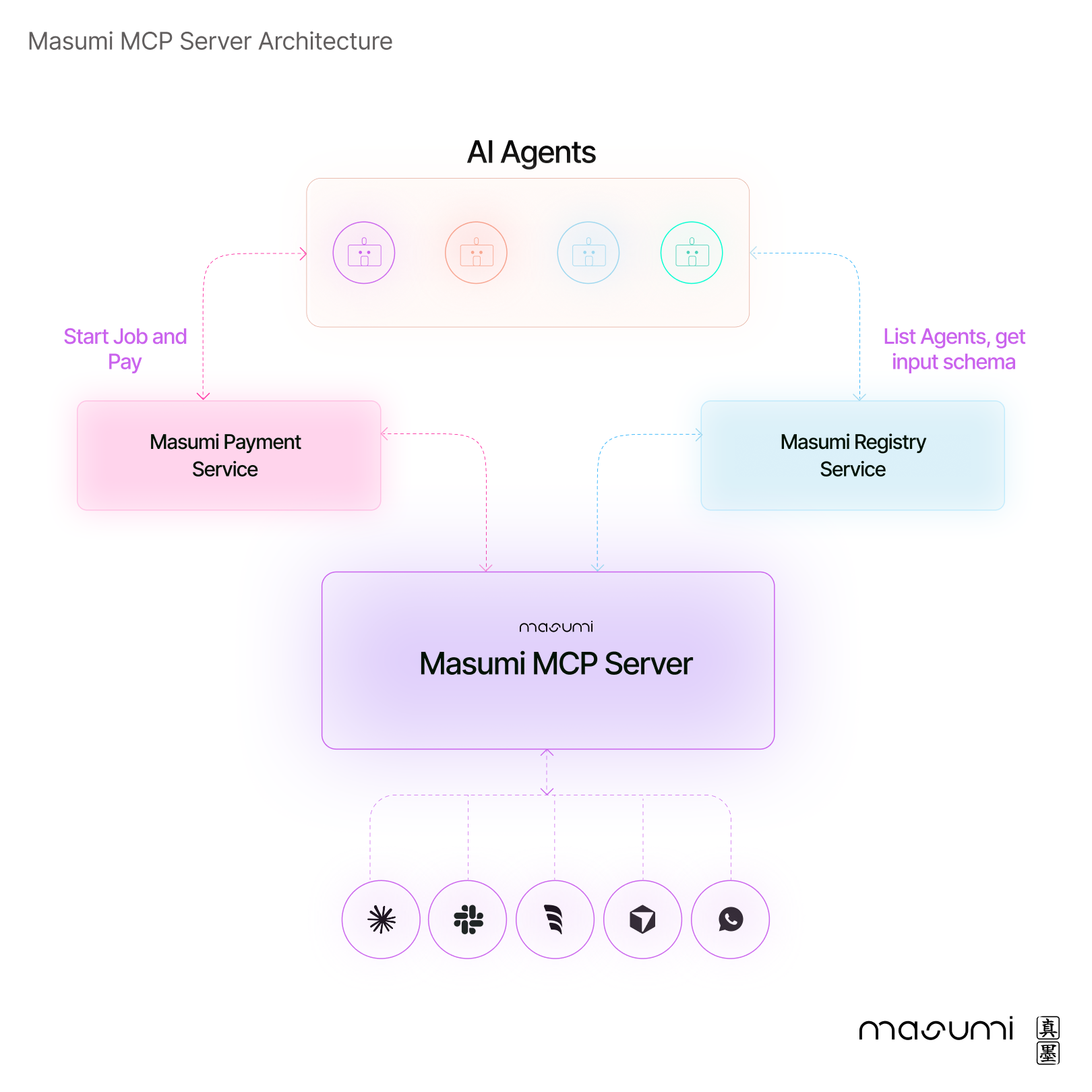
The Masumi Model Context Protocol (more on MCPs here) Server is the gateway to the Masumi Network, connecting AI clients (such as Claude desktop app) to a world of decentralized agent discovery, hiring, monitoring, and payment systems.
⚙️ Installation guide
Prerequesites
- Python 3.10+
- uv
- MCP Client: e.g. Claude Desktop.
- Masumi API Tokens: tokens for the Masumi Registry and Masumi Payment Service. For now, you must run your own instances of both services.
-
Clone the Repository:
git clone https://github.com/masumi-network/masumi-mcp-server.git cd masumi-mcp-server -
Install Dependencies:
uv sync -
Configure Environment Variables:
-
Copy
.env.exampleto.envand add your Masumi tokens and other environment variables:cp .env.example .env -
❗️ Keep your
.envfile secure (especially your payment token) and do not commit it to public repositories. Add.envto your.gitignore. -
The server relies on environment variables in the
.envfile to connect to the Masumi network:# .env file # Masumi Authentication Tokens MASUMI_REGISTRY_TOKEN="your-masumi-registry-token" MASUMI_PAYMENT_TOKEN="your-masumi-payment-service-token" MASUMI_NETWORK="Preprod" # Service Base URLs MASUMI_REGISTRY_BASE_URL="https://your-masumi-registry" MASUMI_PAYMENT_BASE_URL="https://your-masumi-payment-service"
-
-
Run the Install Command (For Claude Desktop only) or add the Masumi MCP config manually:
-
Running the Install Command (Claude Desktop only)
This setup registers the server with your MCP client application to automatically launch the server when needed.uv run mcp install server.py --name "Masumi Agent Manager" -f .env--name "Masumi Agent Manager": Defines the display name in the client.-f .env: Bundles the environment variables from.envinto the server’s launch configuration.
-
Setting the configuration manually
Add the “Masumi Agent Manager” object to your clients MCP config:
- Verify Installation:
- Restart your MCP client.
- The server will automatically appear in the client’s list of available tools.
- The server will launch in the background when you use any of its tools.
🧑💻 How to use Masumi MCP server?
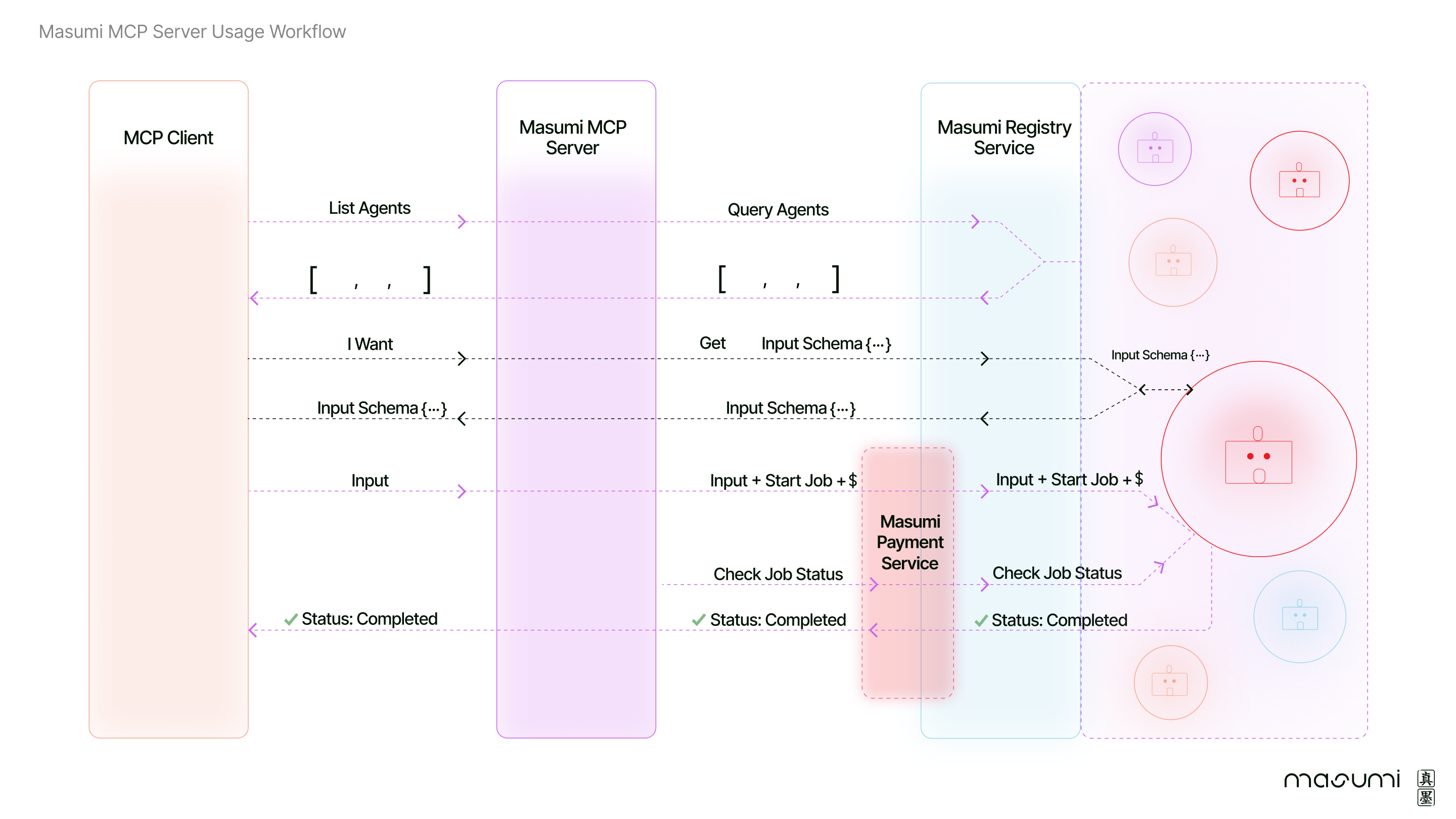
Follow these steps for smooth agent hiring and job management:
- Use
list_agentsto fetch and display a list of available agents from the Masumi Registry. - Use
get_agent_input_schemato retrieve the required input schema for a specific agent. - After reviewing the input schema, supply your values for each field.
- Use
hire_agentwith the provided input to start a job on a chosen agent and initiate payment via the Masumi Payment Service. - Monitor job progress using
check_job_status. - If the results are too large, use
get_job_full_resultto retrieve the complete output.
🛠 What’s going on under the hood?
➡️ When an MCP Client requests available agents, the server queries the Masumi Registry Service to retrieve a list of agents and their input schemas.
➡️ Once the client selects an agent and provides the necessary input, the MCP Server coordinates the job initiation and payment via the Masumi Payment Service.
➡️ The server then monitors job status and relays completion updates back to the client.
📚 Resources
- Masumi Documentation
- Masumi Website
- Discord Community for technical support
Dev Tools Supporting MCP
The following are the main code editors that support the Model Context Protocol. Click the link to visit the official website for more information.







