
Mcp Api Client
What is Mcp Api Client
The mcp-api-client is a Model Context Protocol (MCP) server that allows users to call APIs using simple YAML configuration files, making it accessible for those without advanced programming skills.
Use cases
Use cases include connecting AI models to APIs quickly, creating data pipelines without extensive coding, and enabling automation for lazy programmers or makers who prefer a simpler approach.
How to use
To use mcp-api-client, you simply create a YAML configuration file that defines your API endpoints and parameters. Once configured, the server can automatically handle API calls based on this configuration.
Key features
Key features include support for multiple API endpoints, automatic MCP tool and fetch API creation from YAML, support for all HTTP methods, setting API headers and tokens, environment variable interpolation, and automatic detection of path and query parameters.
Where to use
mcp-api-client can be used in various fields such as automation, rapid prototyping, AI integration, data pipelines, and as an API gateway for low-code or no-code solutions.
Clients Supporting MCP
The following are the main client software that supports the Model Context Protocol. Click the link to visit the official website for more information.





Overview
What is Mcp Api Client
The mcp-api-client is a Model Context Protocol (MCP) server that allows users to call APIs using simple YAML configuration files, making it accessible for those without advanced programming skills.
Use cases
Use cases include connecting AI models to APIs quickly, creating data pipelines without extensive coding, and enabling automation for lazy programmers or makers who prefer a simpler approach.
How to use
To use mcp-api-client, you simply create a YAML configuration file that defines your API endpoints and parameters. Once configured, the server can automatically handle API calls based on this configuration.
Key features
Key features include support for multiple API endpoints, automatic MCP tool and fetch API creation from YAML, support for all HTTP methods, setting API headers and tokens, environment variable interpolation, and automatic detection of path and query parameters.
Where to use
mcp-api-client can be used in various fields such as automation, rapid prototyping, AI integration, data pipelines, and as an API gateway for low-code or no-code solutions.
Clients Supporting MCP
The following are the main client software that supports the Model Context Protocol. Click the link to visit the official website for more information.
Content
MCP API Client (Beta)
A Model Context Protocol (MCP) server that call APIs using YAML config files.
This server allows you connect to APIs using simple a config YAML file! 🤩
Ideal for: #lazy-programmers #nocode #lowcode #ai-integrators #automation #api-gateway #data-pipelines #rapid-prototyping #llm-integration #makers
If you don’t have advance APIs call skills using a programming language or you just want a fast way to connect your AI model with an API using MCP, you will LOVE 💖 this MCP.
🎬▶️ Example Video😉✨
Check this video using included Test Server and Claude
Support with your Click!
Make a reaction and give me a motivational comment on mcp.so repository

… and yes! A donation to help cover my coffee and rent would be amazing! 🙏🙏

Features
- Configure multiple API endpoints using YAML
- Automatic MCP tool creation from YAML config file.
- Automatic MCP fetch API creation from YAML config file.
- Supports all HTTP methods (GET, POST, PATCH, PUT, DELETE) [✨PARTIAL✨]
- [✅] GET API without parameters
- [✅] GET API with query parameters
- [✅] GET API with path parameters
- [✅] POST API
- [✅] PATCH API with path parameters
- [✅] PUT API with
- [✅] DELETE API with path parameters
- Set API Headers [✨WORKING✨]
- Set API Token [✨ 🫣🔴COMMING SOON✨]
- Environment variable interpolation for sensitive data [✨ 🫣🔴COMMING SOON✨]
- Automatic PATH parameter detection from URL (like
/users/{id})[✨WORKING✨] - Automatic QUERY parameter detection from URL (like
/users?page={page}&limit={limit}) [✨WORKING✨] - Reduce Prompt tokens used setting up certain APIs for your project
- …and best of all, SAVE COUNTLESS HOURS FOR HUMANITY 👏😎😉 by connecting your LLM to any API.
Use cases
- Connect to N8N, Make.com or Zapier webhook: Make actions in other platforms connecting to automations or integration tools.
- AI Model Integration: Quickly connect LLMs or other AI models to external APIs for data retrieval, enrichment, or action execution without custom code.
- Rapid Prototyping: Build and test API workflows using YAML configuration, ideal for hackathons, demos, or proof-of-concept projects.
- No-Code/Low-Code Automation: Enable non-developers to define and call APIs securely using simple YAML files and environment variables.
- Data Pipelines: Orchestrate API calls as part of ETL or data processing pipelines, leveraging MCP tools for modularity and reuse.
- API Gateway: Expose multiple backend APIs through a unified MCP interface, simplifying integration for downstream consumers.
- Secure API Access: Manage secrets and tokens via environment variables, keeping sensitive data out of source code and YAML files.
Getting started
- Get a copy of default
api.yaml.
npx -y mcp-api-client --init
- You can test default api.yaml with express test server test/server.js. Execute in other terminal.
npx -y mcp-api-client --test-server
- Add MCP to your agent config file.
- Example for
Claude Clientsettings file:
- Example for
Visual Studio Codesettings file:
- Just Ask!
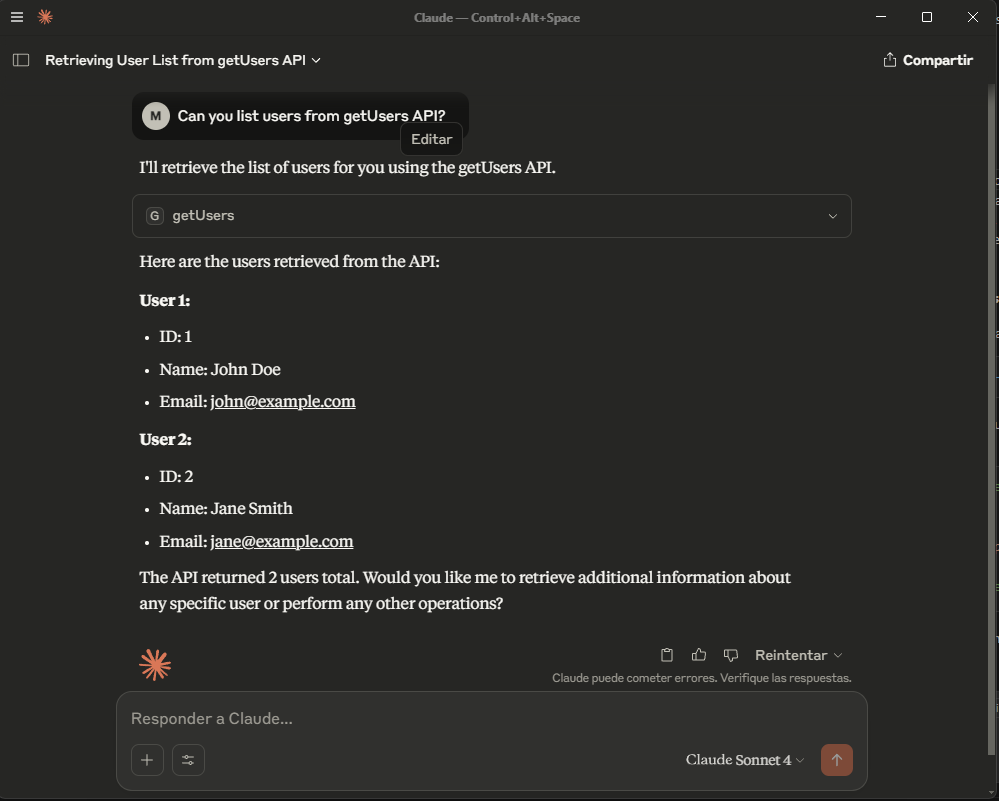
YAML Configuration File
Each API YAML file can include global metadata with MCP information:
metadata: General information about the API set
and a list of API endpoint definitions:
apis: A list of API endpoint definitions. Each endpoint should have
Example API YAML config file example
metadata:
  name: API Examples
  version: 1.0.0
  description: This file contains examples of various API endpoints for testing purposes.

apis:
  - name: getUser
    url: https://api.example.com/users/{id}
    method: GET
    content:
      headers:
        Accept: application/json

  - name: createUser
    url: https://api.example.com/users
    method: POST
    api-token: ${API_TOKEN}
    content:
      headers:
        Content-Type: application/json
      body:
        name: string
        email: string
  ...
See public/apis.yaml for a complete example with metadata and all HTTP methods and parameter types.
API_TOKEN from .env (Not tested yet!)
Create a .env file for your API tokens:
API_TOKEN=your_api_token_here
Bugs and Requests
https://github.com/molavec/mcp-api-client/issues
Contributing
- Fork the repository
- Create your feature branch
- Commit your changes
- Push to the branch
- Create a new Pull Request
License
MIT
Dev Tools Supporting MCP
The following are the main code editors that support the Model Context Protocol. Click the link to visit the official website for more information.







