
Mcp Azresource
What is Mcp Azresource
mcp-azresource is an MCP server that provides tools for listing and querying Azure resources directly from any MCP client, enabling efficient browsing of Azure infrastructure and cost analysis.
Use cases
Use cases include listing all Azure resources for inventory management, filtering resources for specific projects, analyzing costs for budgeting, and ensuring compliance with resource usage.
How to use
To use mcp-azresource, set up an Azure service principal for authentication and utilize the provided tools such as ‘list_azure_resources’ to list resources and ‘get_azure_costs_rest’ to analyze costs.
Key features
Key features include resource discovery across Azure subscriptions, filtering by resource group name, cost analysis for subscriptions, secure authentication using Azure service principal credentials, and detailed views of resources including locations, types, and tags.
Where to use
mcp-azresource can be used in cloud management, cost optimization, and resource tracking within organizations that utilize Azure services.
Clients Supporting MCP
The following are the main client software that supports the Model Context Protocol. Click the link to visit the official website for more information.





Overview
What is Mcp Azresource
mcp-azresource is an MCP server that provides tools for listing and querying Azure resources directly from any MCP client, enabling efficient browsing of Azure infrastructure and cost analysis.
Use cases
Use cases include listing all Azure resources for inventory management, filtering resources for specific projects, analyzing costs for budgeting, and ensuring compliance with resource usage.
How to use
To use mcp-azresource, set up an Azure service principal for authentication and utilize the provided tools such as ‘list_azure_resources’ to list resources and ‘get_azure_costs_rest’ to analyze costs.
Key features
Key features include resource discovery across Azure subscriptions, filtering by resource group name, cost analysis for subscriptions, secure authentication using Azure service principal credentials, and detailed views of resources including locations, types, and tags.
Where to use
mcp-azresource can be used in cloud management, cost optimization, and resource tracking within organizations that utilize Azure services.
Clients Supporting MCP
The following are the main client software that supports the Model Context Protocol. Click the link to visit the official website for more information.
Content
Azure Resource MCP Server
This MCP server provides tools for listing and querying Azure resources directly from any MCP client, allowing you to efficiently browse your Azure infrastructure and analyze costs without leaving your workflow.
This is an example of how to query Azure resources:
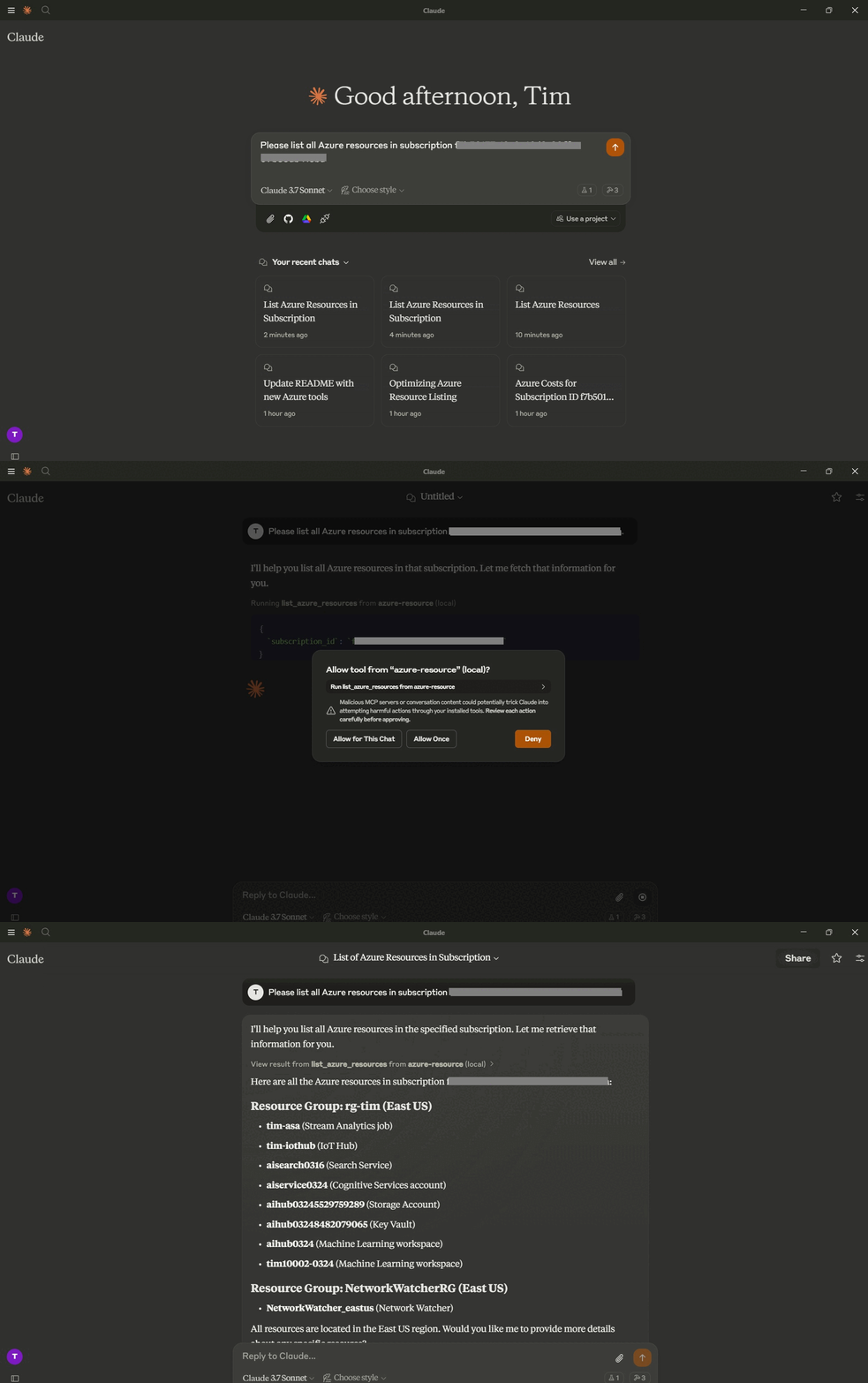
This is an example of how to query Azure cost:
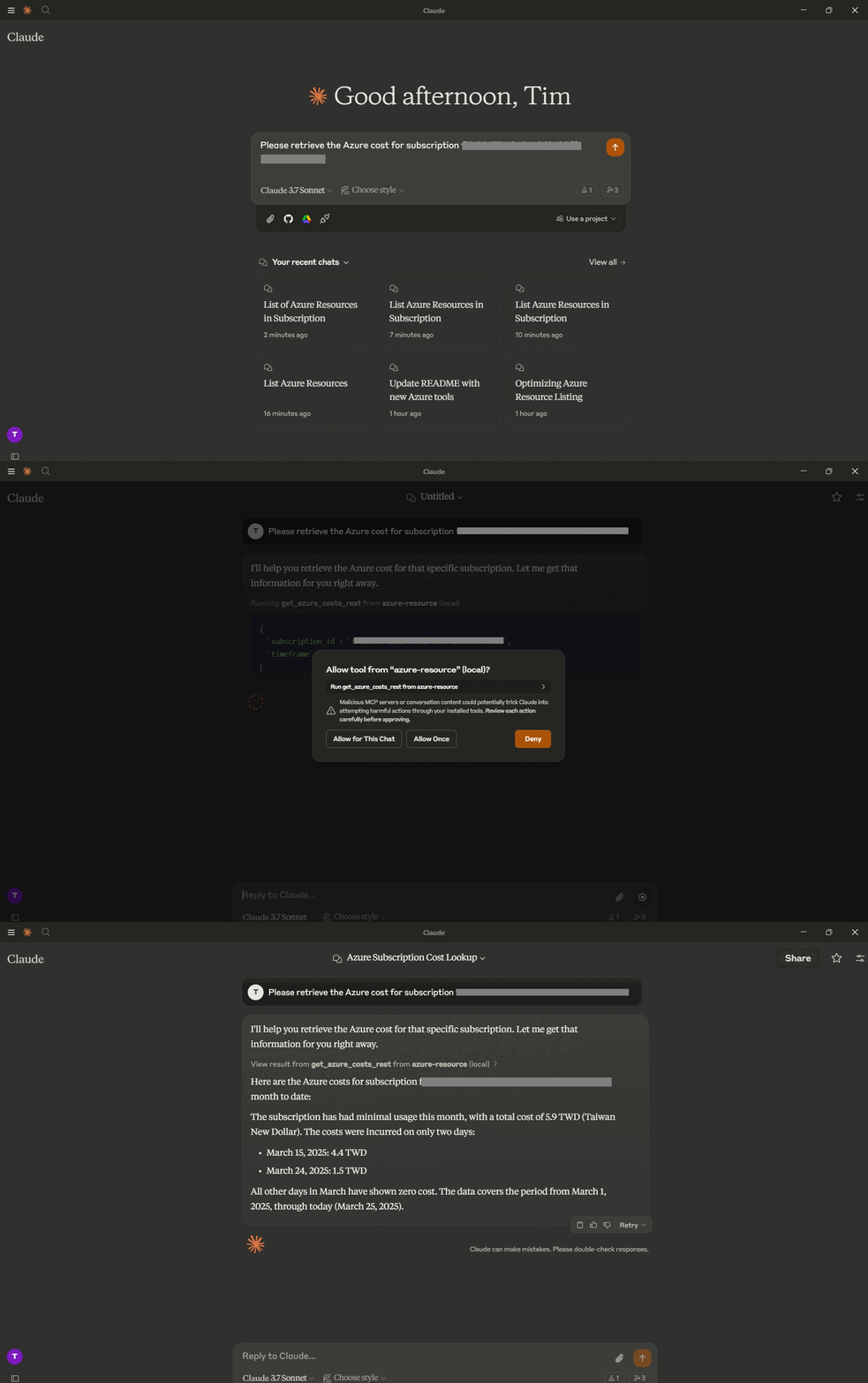
Features
- 📊 Resource Discovery - List all resources across your Azure subscriptions
- 🔍 Filtering - Filter resources by resource group name
- 💰 Cost Analysis - Retrieve cost information for your Azure subscriptions
- 🔐 Secure - Uses your Azure service principal credentials
- 🏷️ Detailed View - See locations, types, and tags for all your resources
Tools
-
list_azure_resources
- List Azure resource groups and resources using service principal authentication
- Inputs:
subscription_id(string, optional): Specific subscription ID to query. If not provided, uses the default subscription from environment variables.resource_group_filter(string, optional): Filter resource groups by name (case-insensitive contains match).
- Returns: Formatted markdown list of resource groups and their resources with details such as location, type, and tags.
-
get_azure_costs_rest
- Get cost analysis data for an Azure subscription using the REST API
- Inputs:
subscription_id(string, optional): Specific subscription ID to query. If not provided, uses the default subscription from environment variables.timeframe(string, optional): Time period for cost analysis. Default is “MonthToDate”.
- Returns: Formatted markdown with cost analysis data, including daily costs and totals.
Configuration
Setting up Azure
- Create an Azure service principal for authentication:
az ad sp create-for-rbac --name {service principal name}
- Assign appropriate reader permissions to the service principal
- Note your Azure subscription ID, tenant ID, client ID, and client secret
- Set up the required environment variables
Environment Variables
This server requires the following environment variables:
# Required Azure authentication
AZURE_TENANT_ID=your-tenant-id
AZURE_CLIENT_ID=your-client-id
AZURE_CLIENT_SECRET=your-client-secret
AZURE_SUBSCRIPTION_ID=your-subscription-id
Installation
Prerequisites
- Python 3.10+
- Azure subscription with appropriate permissions
- Service principal with reader access to resources
Setup
If you prefer using uv:
# Setup environment with uv
uv venv
.venv\Scripts\activate  # On Windows
source .venv/bin/activate  # On macOS/Linux

# Install dependencies
uv add mcp[cli] azure-identity python-dotenv azure-mgmt-resource aiohttp

# Run server
uv run -m azure_resource_mcp_server
Usage with Claude Desktop
To use with Claude Desktop, add the following to your configuration file:
{
  "mcpServers": {
    "azure-resource": {
      "command": "uv",
      "args": [
        "--directory",
        "/ABSOLUTE/PATH/TO/PARENT/FOLDER",
        "run",
        "-m",
        "azure_resource_mcp_server"
      ],
      "env": {
        "AZURE_TENANT_ID": "your-tenant-id",
        "AZURE_CLIENT_ID": "your-client-id",
        "AZURE_CLIENT_SECRET": "your-client-secret",
        "AZURE_SUBSCRIPTION_ID": "your-subscription-id"
      }
    }
  }
}
Dev Tools Supporting MCP
The following are the main code editors that support the Model Context Protocol. Click the link to visit the official website for more information.







