
Mcp Client Bedrock
What is Mcp Client Bedrock
mcp-client-bedrock is a standalone client that utilizes Amazon Bedrock Models through the Model Context Protocol (MCP) to facilitate interaction with AI models in various environments.
Use cases
Use cases for mcp-client-bedrock include building chatbots for customer support, developing intelligent virtual assistants, creating applications that require multi-turn conversations, and integrating AI capabilities into existing software solutions.
How to use
To use mcp-client-bedrock, developers can implement the provided Python SDK to build custom applications, utilizing both the command-line interface (CLI) and web interface for interactive use, as well as a programmable API for deeper integration.
Key features
Key features include the ability to connect to multiple model servers, discover tools and capabilities, execute tool calls across services, and maintain conversation context, all while simplifying the development process through a unified API.
Where to use
mcp-client-bedrock can be used in various fields such as AI application development, conversational agents, customer service automation, and any domain requiring interaction with large language models.
Clients Supporting MCP
The following are the main client software that supports the Model Context Protocol. Click the link to visit the official website for more information.





Overview
What is Mcp Client Bedrock
mcp-client-bedrock is a standalone client that utilizes Amazon Bedrock Models through the Model Context Protocol (MCP) to facilitate interaction with AI models in various environments.
Use cases
Use cases for mcp-client-bedrock include building chatbots for customer support, developing intelligent virtual assistants, creating applications that require multi-turn conversations, and integrating AI capabilities into existing software solutions.
How to use
To use mcp-client-bedrock, developers can implement the provided Python SDK to build custom applications, utilizing both the command-line interface (CLI) and web interface for interactive use, as well as a programmable API for deeper integration.
Key features
Key features include the ability to connect to multiple model servers, discover tools and capabilities, execute tool calls across services, and maintain conversation context, all while simplifying the development process through a unified API.
Where to use
mcp-client-bedrock can be used in various fields such as AI application development, conversational agents, customer service automation, and any domain requiring interaction with large language models.
Clients Supporting MCP
The following are the main client software that supports the Model Context Protocol. Click the link to visit the official website for more information.
Content
Building Custom Client Applications with Amazon Bedrock and Model Context Protocol (MCP)
In today’s rapidly evolving AI landscape, developers need flexible ways to interact with large language models (LLMs) while maintaining control over their applications. The Model Context Protocol (MCP) provides a standardized way for applications to communicate with AI models, and when combined with Amazon Bedrock’s powerful foundation models, it creates a robust platform for building intelligent applications. In this post, we’ll explore how to build custom client applications using the MCP client SDK and Amazon Bedrock Tool use.
What is the Model Context Protocol (MCP)?
The Model Context Protocol (MCP) is a standardized interface that allows applications to communicate with AI models through a consistent API. It enables developers to:
- Connect to multiple model servers simultaneously
- Discover available tools and capabilities
- Execute tool calls across different services
- Maintain conversation context and history
When paired with Amazon Bedrock’s extensive model catalog, MCP provides a powerful framework for building AI-powered applications.
Introducing the Project
The Custom MCP Client using Amazon Bedrock is a Python-based implementation that combines Amazon Bedrock’s foundation models with MCP servers. It provides both a CLI and Web interface for interactive use and a programmable API for integration into custom applications. Leveraging the Converse API, this solution offers a consistent and unified way to interact with various Bedrock models, eliminating the need to manage model-specific differences. The Converse API streamlines multi-turn conversations, enables tool use (function calling), and reduces code complexity by allowing developers to write code once and use it seamlessly across supported models. This simplifies integration, accelerates development, and enhances flexibility for building advanced conversational AI solutions.
The project consists of two main components:
- CLI Client: A command-line interface for interacting with MCP servers using Amazon Bedrock models
- Web UI: A browser-based interface built with FastAPI for a more visual interaction experience
⚠️ Disclaimer
EXPERIMENTAL: This project is experimental and provided as a demonstration of what’s possible with MCP and PostgreSQL. All recommendations and code should be carefully reviewed before implementation in any production environment.
NOT OFFICIAL: This is a personal project and not affiliated with, endorsed by, or representative of any organization I work for or contribute to. All opinions and approaches are my own.
NO LIABILITY: This tool is provided “as is” without warranty of any kind. Use at your own risk. The author is not liable for any damages or issues arising from the use of this software.
Key Features
- Multi-server support: Connect to multiple MCP servers simultaneously
- Model selection: Choose from a wide range of Amazon Bedrock models including Claude, Llama, Mistral, and more
- Tool discovery: Automatically discover and use tools available on connected servers
- Conversation memory: Maintain context across multiple interactions
- Rate limiting: Built-in protection against API throttling
- Caching: Response caching to improve performance and reduce costs
- Web interface: User-friendly browser-based UI for non-technical users
Architecture Overview
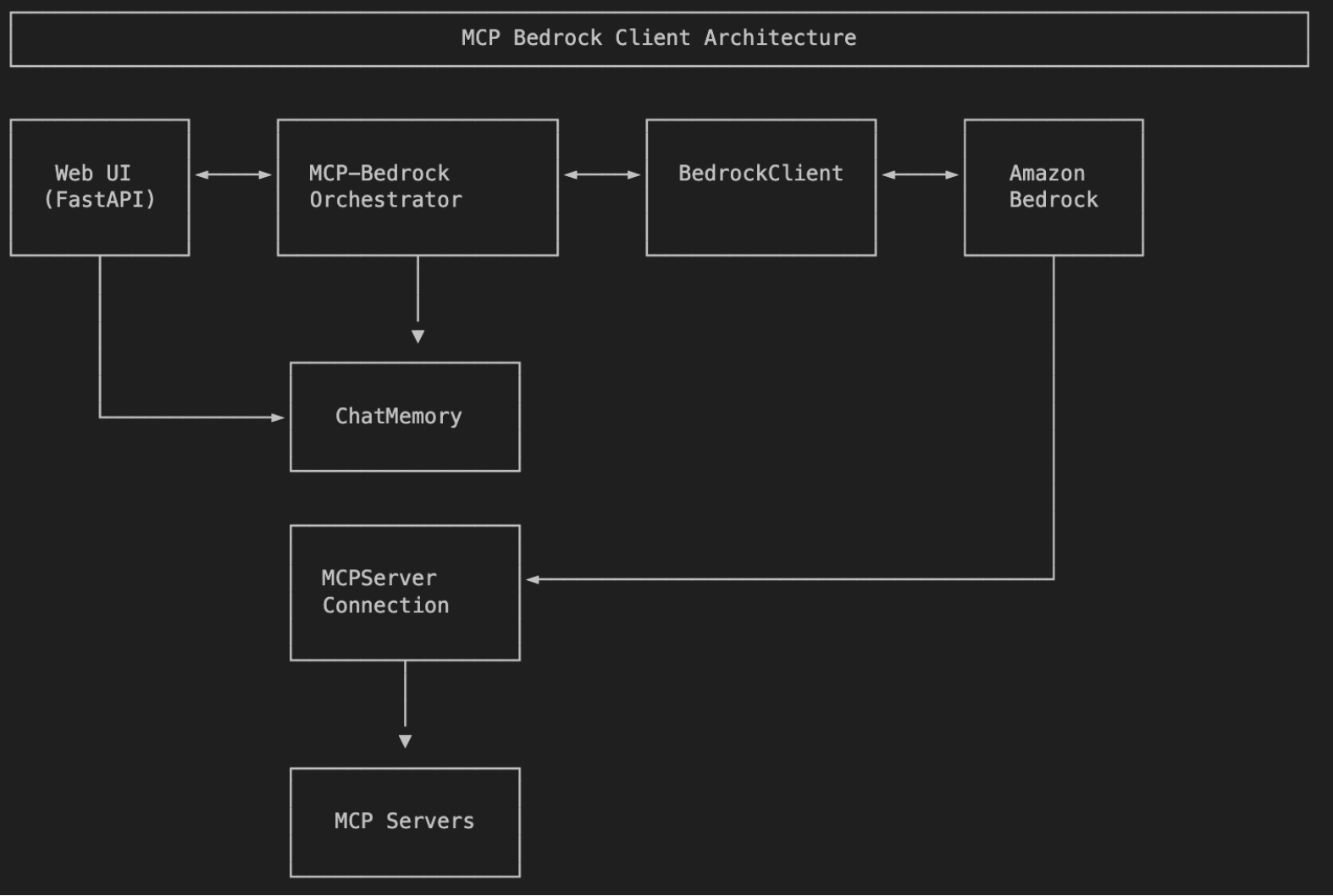
The project follows a modular architecture with several key components:
- BedrockClient: Handles communication with Amazon Bedrock’s API
- MCPServerConnection: Manages connections to individual MCP servers
- MCP-BedrockOrchestrator : Orchestrates interactions between Bedrock and MCP servers
- ChatMemory: Maintains conversation history and context
- API: FastAPI-based web interface for browser access
Getting Started
Prerequisites
- Python 3.12 or higher
- AWS credentials with access to Amazon Bedrock
- Access to one or more MCP servers
Installation
Clone the repository
git clone [email protected]:vgodwin/mcp-remote-client.git
Create a virtual environment
python3.12 -m venv venvsource venv/bin/activate
Install dependencies
pip install -r requirements.txt
Configuration
The client uses a configuration file mcp.json file to store server information. Here’s an example configuration:
"mcpServers": {
    "postgresql": {
        "command": "npx",
        "args": [
            "mcp-remote",
            "https://mcp-pg.agentic-ai-aws.com/sse",
            "--transport",
            "sse-only"]
                  }
             }
}
You can add additional servers by editing this file or using the client’s API.
Using the CLI Client
The CLI client provides an interactive interface for working with MCP servers:
Start the client with default settings
python3 -m bedrock_mcp_postgres --region us-west-2
Connect to specific servers
python3 -m bedrock_mcp_postgres --servers <MCP Server1>,<MCP Server1> --region <AWS Region>
Once connected, you can:
Query: tools
to command to list available tools
Using the Web Interface
The project also includes a web interface built with FastAPI:
Start the web server
uvicorn api:app --reload
Then open your browser to http://localhost:8000 to access the interface, which provides:
- A form to connect to MCP servers
- Model selection from available Bedrock models
- A chat interface for interacting with the models
- Response history and context management
Building Custom Applications
The modular design makes it easy to integrate the client into your own applications:
from bedrock_mcp_postgres import GeneralMCPBedrockClientimport asyncio
async def run_client():
    # Initialize the client with your preferred region
    client = GeneralMCPBedrockClient(region_name="us-west-2")

    try:
        # Connect to servers (or specific ones)
        connected_servers = await client.connect_to_servers(["postgresql"])
        print(f"Connected to: {connected_servers}")

        # Process a query
        response = await client.process_query("What tools are available?")
        print(response)

        # Call a specific tool
        result = await client.call_tool("postgresql", "query_database", {
            "query": "SELECT * FROM users LIMIT 5"
        })
        print(result)

    finally:
        # Clean up resources
await client.cleanup()
if __name__ == "__main__":
    asyncio.run(run_client())
Advanced Features
Tool Mapping and Discovery
The client automatically maps tools from MCP servers to a format compatible with Bedrock models:
Get all tools from connected servers
tools = await client.list_tools()
Format tools for Bedrock
bedrock_tools, tool_mapping = client.bedrock_client.format_tools_for_bedrock(server_tools)
Conversation Memory Management
The client maintains conversation history and can generate summaries:
Add messages to memory
client.memory.add_user_message("Any slow queries in database?")
client.memory.add_assistant_message("Yes, generate_ticket_activity function experincing delays while batch inserting the data into tickets table.")
#Get conversation summary
summary = client.memory.summary
Rate Limiting and Error Handling
Built-in rate limiting protects against API throttling:
The client automatically handles rate limiting with exponential backoff and jitter
response = await client.process_query("Complex query requiring multiple tool calls")
Supported Models
The client supports a wide range of Amazon Bedrock models, including:
- Anthropic Claude 3, 3.5, and 3.7 (Opus, Sonnet, Haiku)
- Amazon Nova (Pro, Lite, Micro)
- Meta Llama 3.1 and 3.2
- Mistral (Large, Small)
- and more
Each model is available in multiple AWS regions, making it easy to choose the right model for your specific needs.
Use Cases
The Custom MCP Client for Amazon Bedrock is versatile and can be used for various applications:
- Database Interaction: Connect to PostgreSQL databases through MCP and use natural language to query data
- Document Analysis: Process and analyze documents using specialized MCP tools
- Multi-agent Systems: Create systems where multiple specialized agents collaborate
- Interactive Chatbots: Build chatbots that can access external tools and data sources
- Data Processing Pipelines: Create workflows that combine AI with data processing tools
Conclusion
The Custom MCP Client provides a powerful foundation for building custom applications that leverage Amazon Bedrock’s foundation models and the flexibility of the Model Context Protocol. By combining these technologies, developers can create sophisticated AI applications that can interact with multiple services, maintain context, and provide rich user experiences.
Whether you’re building a simple CLI tool or a complex web application, the modular architecture and comprehensive feature set make it easy to get started and scale as your needs grow.
Dev Tools Supporting MCP
The following are the main code editors that support the Model Context Protocol. Click the link to visit the official website for more information.







