
Mcp Command Proxy
What is Mcp Command Proxy
mcp-command-proxy is an MCP (Model Context Protocol) server that serves as a proxy for CLI commands, primarily designed for Expo development but can be adapted for any command-line application.
Use cases
Use cases for mcp-command-proxy include running CLI commands in real-time, capturing logs from processes, sending key presses to running applications, and integrating with AI assistants for enhanced command execution.
How to use
To use mcp-command-proxy, navigate to your Expo project directory and run the command: npx mcp-command-proxy --prefix 'ExpoServer' --command 'expo start' --port 8383. Then, configure the MCP server in Cursor settings with the appropriate name, type, and URL.
Key features
Key features of mcp-command-proxy include command proxying, log collection, key press forwarding, a transparent user experience, support for interactive commands, and easy integration with MCP SDK.
Where to use
mcp-command-proxy can be used in software development environments, particularly for projects that require command-line interactions, such as web and mobile application development.
Clients Supporting MCP
The following are the main client software that supports the Model Context Protocol. Click the link to visit the official website for more information.





Overview
What is Mcp Command Proxy
mcp-command-proxy is an MCP (Model Context Protocol) server that serves as a proxy for CLI commands, primarily designed for Expo development but can be adapted for any command-line application.
Use cases
Use cases for mcp-command-proxy include running CLI commands in real-time, capturing logs from processes, sending key presses to running applications, and integrating with AI assistants for enhanced command execution.
How to use
To use mcp-command-proxy, navigate to your Expo project directory and run the command: npx mcp-command-proxy --prefix 'ExpoServer' --command 'expo start' --port 8383. Then, configure the MCP server in Cursor settings with the appropriate name, type, and URL.
Key features
Key features of mcp-command-proxy include command proxying, log collection, key press forwarding, a transparent user experience, support for interactive commands, and easy integration with MCP SDK.
Where to use
mcp-command-proxy can be used in software development environments, particularly for projects that require command-line interactions, such as web and mobile application development.
Clients Supporting MCP
The following are the main client software that supports the Model Context Protocol. Click the link to visit the official website for more information.
Content
MCP Command Proxy
An MCP (Model Context Protocol) server that acts as a proxy for CLI commands, specifically designed for Expo development but adaptable for any command-line application.
How to use in Cursor (Expo example)
- Go to the directory of your Expo project
- Run
npx mcp-command-proxy --prefix "ExpoServer" --command "expo start" --port 8383 - Go to Cursor settings -> MCP -> +Add new MCP server, like this:
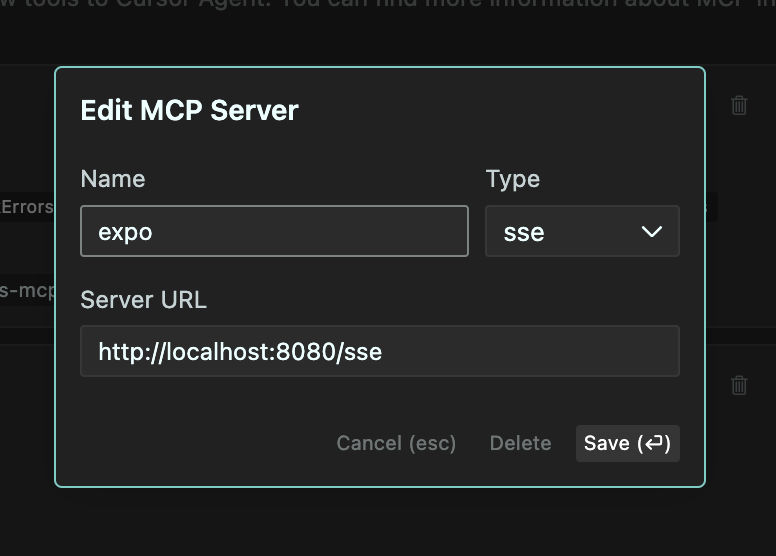
- Set the name to “ExpoServer”, Type to “SSE”, URL to
http://localhost:8383/sse - Click “Save” and you should now be able to use the MCP server in Cursor. Like this:
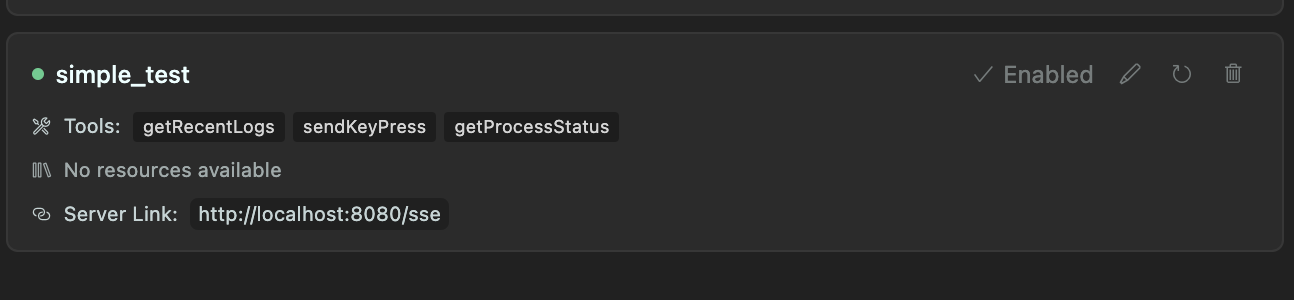
Recommended to use the --port 8383 flag to avoid conflicts with other servers.
Also, you can add following instruction to .cursorrules file:
You can use MCP getRecentLogs tool to get the most recent logs from Expo server. And if needed, you can send key presses to the running process using sendKeyPress tool.
Features
- Command Proxying: Run any CLI command through the MCP server
- Log Collection: Capture and store logs from running processes (configurable buffer size)
- Key Press Forwarding: Forward key presses from client to the running process
- Transparent Experience: The end user sees the command output exactly as if they ran it directly
- Interactive Commands: Works with interactive CLI tools like Expo
- MCP Integration: Built using the MCP SDK for easy integration with Claude and other MCP-enabled AI assistants
How It Works
- The server starts a specified command in a pseudo-terminal (PTY)
- All stdout/stderr output is:
- Streamed to the client in real-time
- Stored in a circular buffer (configurable size, default 300 lines)
- Key presses from the client are forwarded to the running process
- The server provides tools to:
- View collected logs
- Send key presses to the process
- Get the current state of the process
Use Cases
- Expo Development: Run
expo startand interact with it while collecting logs - Build Processes: Monitor build processes and analyze logs
- Long-running Services: Monitor services and keep recent log history
- Remote Command Execution: Execute and monitor commands from remote clients
Requirements
- Node.js 18+
- TypeScript
- pnpm (recommended) or npm
Installation
# Install dependencies
pnpm install

# Build the project
pnpm build

# Run directly
pnpm start -- --prefix "MyServer" --command "expo start"

# Or install globally
pnpm install -g
mcp-command-proxy --prefix "MyServer" --command "expo start"
Usage
Basic Usage
# Using the CLI
mcp-command-proxy --prefix "ExpoServer" --command "expo start"

# Or programmatically
import { createServer } from 'mcp-command-proxy';

const server = await createServer({
  prefix: 'ExpoServer',
  command: 'expo start',
  bufferSize: 500,
  port: 8080
});

// To stop the server later
server.stop();
Options
--prefix, -p: Name/prefix for the server (default: “CommandProxy”)--command, -c: Command to run (required)--buffer-size, -b: Number of log lines to keep in memory (default: 300)--port: Port for HTTP server (default: 8080)--help, -h: Show help
MCP Integration
This server implements the following MCP tools:
-
getRecentLogs: Returns the most recent logs from the buffer- Parameters:
limit(optional): Number of logs to return (default: 100)types(optional): Types of logs to include (stdout, stderr, system) (default: all)
- Parameters:
-
sendKeyPress: Sends a key press to the running process- Parameters:
key: Key to send (e.g. “enter”, “a”, “1”, “space”)
- Parameters:
-
getProcessStatus: Returns the current status of the process- Parameters: None
Examples
Running Expo Start
mcp-command-proxy -p "ExpoServer" -c "expo start" -b 500
Using with Claude
- Configure Claude to connect to this MCP server (SSE endpoint: http://localhost:8080/sse)
- Ask Claude to run Expo or other commands
- Claude can analyze logs and help troubleshoot issues
Development
# Clone the repository
git clone https://github.com/hormold/mcp-command-proxy.git
cd mcp-command-proxy

# Install dependencies
pnpm install

# Build the project
pnpm build

# Run in development mode
pnpm dev
License
MIT
Dev Tools Supporting MCP
The following are the main code editors that support the Model Context Protocol. Click the link to visit the official website for more information.







