
Mcp Csharp Hello World
What is Mcp Csharp Hello World
mcp-csharp-hello-world is an example implementation of a Model Context Protocol (MCP) server written in C#. It demonstrates how to connect language models with external data sources to create context-aware AI applications.
Use cases
Use cases include building chatbots that require contextual understanding, developing AI-driven applications that pull data from various sources, and creating tools for data analysis that leverage language models.
How to use
To use mcp-csharp-hello-world, create a new console project using the .NET SDK, add the necessary dependencies, and run the project. Then, start the MCP server and use the MCP Inspector to interact with it by sending requests and receiving responses.
Key features
Key features include a streamlined API for managing MCP servers, integration with external data sources, and the ability to test server functionality using the MCP Inspector.
Where to use
mcp-csharp-hello-world can be used in fields such as AI development, data integration, and any application requiring context-aware interactions between language models and data sources.
Clients Supporting MCP
The following are the main client software that supports the Model Context Protocol. Click the link to visit the official website for more information.





Overview
What is Mcp Csharp Hello World
mcp-csharp-hello-world is an example implementation of a Model Context Protocol (MCP) server written in C#. It demonstrates how to connect language models with external data sources to create context-aware AI applications.
Use cases
Use cases include building chatbots that require contextual understanding, developing AI-driven applications that pull data from various sources, and creating tools for data analysis that leverage language models.
How to use
To use mcp-csharp-hello-world, create a new console project using the .NET SDK, add the necessary dependencies, and run the project. Then, start the MCP server and use the MCP Inspector to interact with it by sending requests and receiving responses.
Key features
Key features include a streamlined API for managing MCP servers, integration with external data sources, and the ability to test server functionality using the MCP Inspector.
Where to use
mcp-csharp-hello-world can be used in fields such as AI development, data integration, and any application requiring context-aware interactions between language models and data sources.
Clients Supporting MCP
The following are the main client software that supports the Model Context Protocol. Click the link to visit the official website for more information.
Content
Model Context Protocol (MCP) Server in C#
Hello World Example
The Model Context Protocol (MCP) is an open standard for building context-aware AI applications by connecting language models with external data sources. This example demonstrates how to implement a basic MCP server in C# using the modelcontextprotocol/csharp-sdk library, which provides a streamlined API for creating and managing MCP servers.
Prerequisites
- .NET SDK version 9.0
- npx (Node.js package runner) installed
- Visual Studio Code or any IDE
Create a New Console Project
If you want to create the project from scratch, you can use the following commands to create a new console application and add the necessary dependencies.
dotnet new console -n MCPServer
cd MCPServer

dotnet add package ModelContextProtocol --version 0.1.0-preview.1.25171.12

dotnet add package Microsoft.Extensions.Hosting

# Add the MCPServer/Program.cs file to the location where you created the project.
Trying out the MCP Server
First, build the project using the following command:
dotnet run
Then start the MCP server by running the following command in a separate terminal:
npx @modelcontextprotocol/inspector dotnet run
This command will start the MCP Inspector, which allows you to interact with the MCP server and test its functionality. You can use the Inspector to send requests to the server and receive responses based on the defined context.
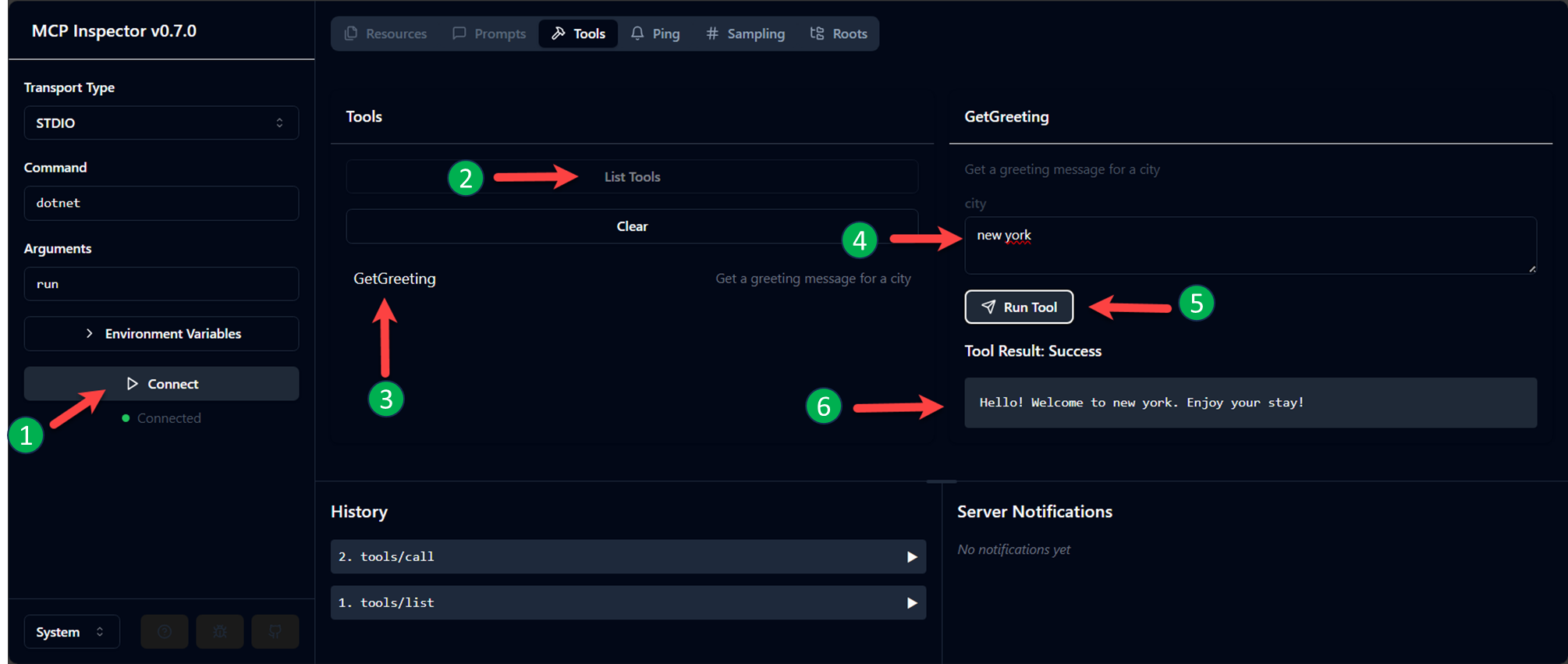
- Click on the “Connect” button to establish a connection with the MCP server.
- Once connected, click list tools.
- You should see the method name from the MCP server in the list of available tools.
- Add a value for the argument
- Click “Run Tool”.
- The result will be displayed in the Inspector.
Dev Tools Supporting MCP
The following are the main code editors that support the Model Context Protocol. Click the link to visit the official website for more information.







