
Mcp D365 Connector
What is Mcp D365 Connector
mcp-d365-connector is a custom Model Context Protocol (MCP) server designed to integrate Azure OpenAI with Dynamics 365 Finance & Operations (D365 F&O). It allows users to input natural language queries, which are then transformed into valid OData queries to fetch data from D365.
Use cases
Use cases for mcp-d365-connector include generating reports, querying customer information, and automating data retrieval processes based on user-defined natural language requests.
How to use
To use mcp-d365-connector, users send natural language queries to the MCP Server, which parses the input and generates OData queries using Azure OpenAI. The server then retrieves the relevant data from D365 and processes the results for the user.
Key features
Key features of mcp-d365-connector include natural language processing for query generation, integration with Azure OpenAI, secure access to D365 using OAuth2, and the ability to return cleaned and focused data.
Where to use
mcp-d365-connector can be used in various fields such as finance, operations, and customer relationship management where Dynamics 365 F&O is implemented, enabling users to interact with business data more intuitively.
Clients Supporting MCP
The following are the main client software that supports the Model Context Protocol. Click the link to visit the official website for more information.





Overview
What is Mcp D365 Connector
mcp-d365-connector is a custom Model Context Protocol (MCP) server designed to integrate Azure OpenAI with Dynamics 365 Finance & Operations (D365 F&O). It allows users to input natural language queries, which are then transformed into valid OData queries to fetch data from D365.
Use cases
Use cases for mcp-d365-connector include generating reports, querying customer information, and automating data retrieval processes based on user-defined natural language requests.
How to use
To use mcp-d365-connector, users send natural language queries to the MCP Server, which parses the input and generates OData queries using Azure OpenAI. The server then retrieves the relevant data from D365 and processes the results for the user.
Key features
Key features of mcp-d365-connector include natural language processing for query generation, integration with Azure OpenAI, secure access to D365 using OAuth2, and the ability to return cleaned and focused data.
Where to use
mcp-d365-connector can be used in various fields such as finance, operations, and customer relationship management where Dynamics 365 F&O is implemented, enabling users to interact with business data more intuitively.
Clients Supporting MCP
The following are the main client software that supports the Model Context Protocol. Click the link to visit the official website for more information.
Content
MCP Server for Dynamics 365 Finance & Operations
This project demonstrates how to build a custom Model Context Protocol (MCP) server that integrates Azure OpenAI with Dynamics 365 Finance & Operations (D365 F&O). The server leverages natural language input to generate valid OData queries, fetch data from D365, and process results using a Large Language Model (LLM).
🔧 Architecture Overview
![Architecture Diagram]
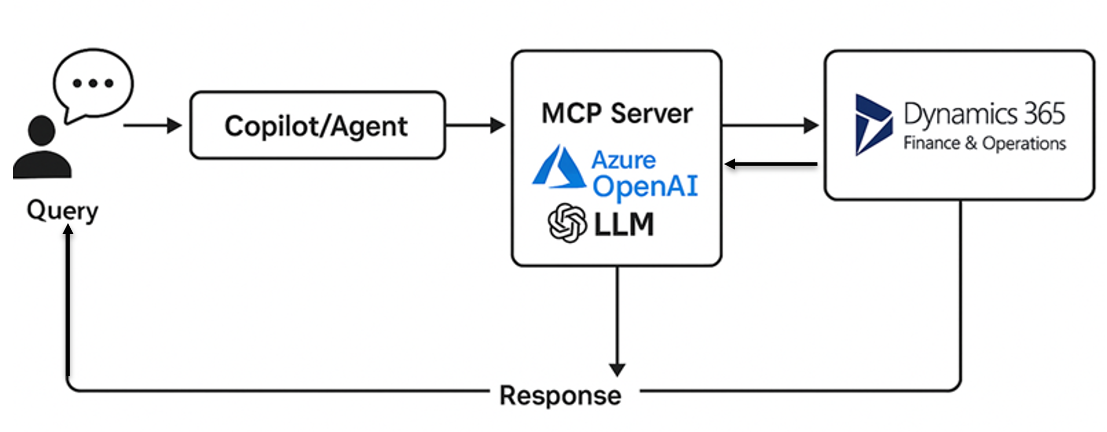
Components:
- Client (User): Sends natural language queries.
- MCP Server (FastAPI): Parses the input, uses Azure OpenAI to generate an OData query.
- D365 F&O: Returns matching business data using OData.
- Azure OpenAI: Used twice — once to generate the OData query, and again to post-process the response.
- Output: Cleaned and focused data returned to the calling system.
📦 Technology Stack
- Python 3.10+
- FastAPI
- Azure OpenAI (
openaiPython SDK) - Requests (for HTTP calls)
- OAuth2 for secure access to D365 F&O
🛠 SDKs Used
- OpenAI SDK – For communicating with Azure OpenAI deployments.
- Requests – For REST API calls to D365 and token endpoints.
- Pydantic + FastAPI – For building the RESTful MCP interface.
🌐 Public MCP Servers (Non-Microsoft)
While this implementation is custom-built for D365 F&O, several public MCP servers exist in the ecosystem — especially for open-source or OSS-focused LLM projects:
- LangChain MCP Examples
- Haystack LLM Agent Servers
- DSPy Agent Context Servers
- AutoGen Frameworks with context protocol layers
These are usually used for document retrieval, QA systems, and autonomous agents.
📘 Example Scenario
“Show me top 10 customers from California with credit limit over $10,000”
How It Works:
- User sends a natural language request.
- MCP Server uses LLM to generate this OData query:
CustomersV3?$filter=State eq 'CA' and CreditLimit gt 10000&$top=10
- MCP Server calls the D365 F&O endpoint with this query.
- Response is then passed back to the LLM for post-processing to extract just the Customer Name and ID.
- Final cleaned output is returned to the caller.
💡 LLM Prompting Strategy
Two distinct prompts are used:
- Prompt #1 (Generate OData Query) – Guides the LLM to only return a valid OData URL fragment.
- Prompt #2 (Refine Response) – Extracts only
CustomerAccountandCustomerNamefrom the raw OData response.
📂 Getting Started
- Clone the repo.
- Copy
.env.sampleto.envand fill in your keys. - Run the server:
uvicorn main:app --reload
🔐 Security
Make sure .env is added to .gitignore. Do not commit your credentials or secrets.
Testing
Use CURL or tools like PostMan to send API call:
Invoke-RestMethod -Uri http://127.0.0.1:8000/api/mcp -Method POST
-Body ‘{“name”:“Test”,“context”:“Get Customers and first only”}’ `
-ContentType “application/json”
📄 License
MIT License
Dev Tools Supporting MCP
The following are the main code editors that support the Model Context Protocol. Click the link to visit the official website for more information.







