
Mcp Data Handles
What is Mcp Data Handles
mcp-data-handles is a demonstration project for building MCP servers that manage pandas DataFrames using handles (UUID strings) instead of returning large datasets directly to the LLM. The handles allow for efficient data management and operations.
Use cases
Use cases include basic data manipulation tasks, executing arbitrary pandas code, querying user and order data from a sample database, and scenarios where controlled access to DataFrame operations is necessary.
How to use
To use mcp-data-handles, you can interact with the MCP server by querying data tables, which will return handles. These handles can then be passed to various tools for operations or materialized into the model context as needed.
Key features
Key features include a simplified interface for common DataFrame operations, a generic pandas code execution capability, in-memory data storage for handles, and the ability to pass handles between tools for various operations.
Where to use
mcp-data-handles can be used in data analysis, machine learning applications, and any scenario where efficient management of large datasets is required without overloading the system with data transfers.
Clients Supporting MCP
The following are the main client software that supports the Model Context Protocol. Click the link to visit the official website for more information.





Overview
What is Mcp Data Handles
mcp-data-handles is a demonstration project for building MCP servers that manage pandas DataFrames using handles (UUID strings) instead of returning large datasets directly to the LLM. The handles allow for efficient data management and operations.
Use cases
Use cases include basic data manipulation tasks, executing arbitrary pandas code, querying user and order data from a sample database, and scenarios where controlled access to DataFrame operations is necessary.
How to use
To use mcp-data-handles, you can interact with the MCP server by querying data tables, which will return handles. These handles can then be passed to various tools for operations or materialized into the model context as needed.
Key features
Key features include a simplified interface for common DataFrame operations, a generic pandas code execution capability, in-memory data storage for handles, and the ability to pass handles between tools for various operations.
Where to use
mcp-data-handles can be used in data analysis, machine learning applications, and any scenario where efficient management of large datasets is required without overloading the system with data transfers.
Clients Supporting MCP
The following are the main client software that supports the Model Context Protocol. Click the link to visit the official website for more information.
Content
MCP Data Handles Demo
A demonstration project showing how to build MCP servers that manage pandas DataFrames through handles:
- Rather than returning (potentially large amounts of data) to the LLM, the tools return and accept a handle (UUID string) to the underlying data
- The handle and its data is stored in the memory of the MCP server
- The handle can be passed to other tools to run different operations (which may return new handles)
- The handle data can also be “materialized” into the model context using the appropriate tool
This project then provides two different approaches for working with the handle data:
- limited scope MCP tools for common Pandas operations
- generic pandas code execution capability
Overview of Tool Approaches
This project implements a simple in-memory “database” (dict) with sample user and order data, exposing DataFrame operations through two different MCP interfaces:
-
Simplified DataFrame Abstractions (
df_abstractions.py)- Pre-defined set of common DataFrame operations
- Safe, controlled interface with specific functionality
- Ideal for basic data manipulation tasks
- Perfect for when you want to limit operations to a known set
-
Generic Pandas Operations (
pandas_generic.py)- Allows execution of arbitrary pandas code
- Full access to pandas functionality
- More flexible but requires careful security consideration
- Better when you need the complete pandas API
Sample Database Schema
Users Table
user_id(int): Primary key (1-5)name(str): User’s namecity(str): User’s city
Orders Table
order_id(int): Primary key (101-106)user_id(int): Foreign key referencing users.user_idproduct(str): Name of the purchased productamount(float): Price of the product in dollars
Available Operations
DataFrame Abstractions API
-
query_database(table_name: str) -> str- Query a table from the sample database
- Returns a handle for further operations
-
combine_columns(handle: str, col1_name: str, col2_name: str, new_col_name: str, sep: str = " ") -> str- Combines two columns into a new column
- Modifies the DataFrame in place
-
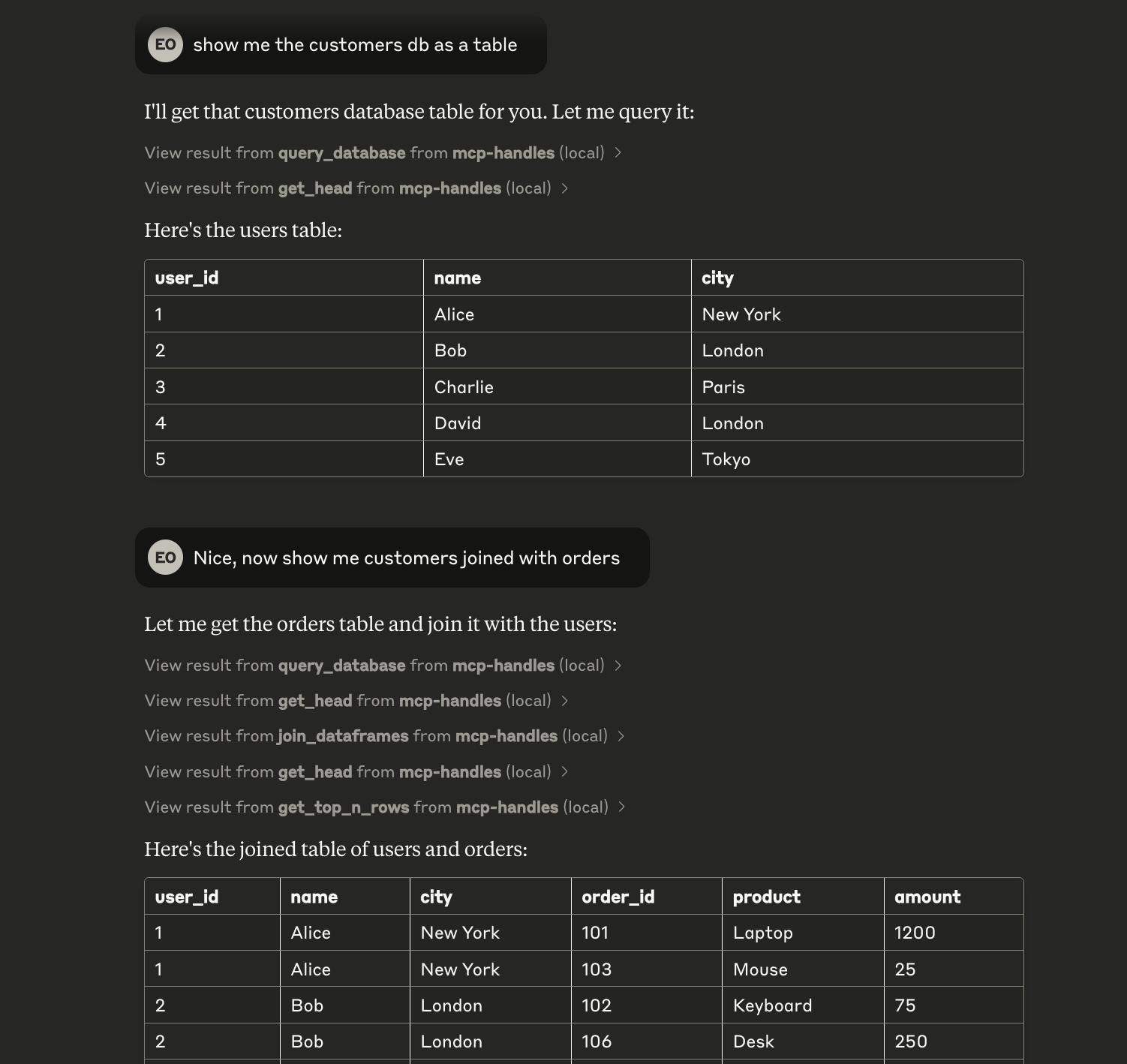
join_dataframes(handle1: str, handle2: str, on_column: str, how: str = 'inner') -> str- Joins two DataFrames on a common column
- Returns a new handle for the joined DataFrame
-
get_shape(handle: str) -> str- Returns the dimensions of the DataFrame
-
get_head(handle: str) -> str- Returns the first 5 rows of the DataFrame
-
get_top_n_rows(handle: str, n: int) -> str- Returns the first N rows of the DataFrame
Generic Pandas API
-
query_database(table_name: str) -> str- Same as above, loads initial data
-
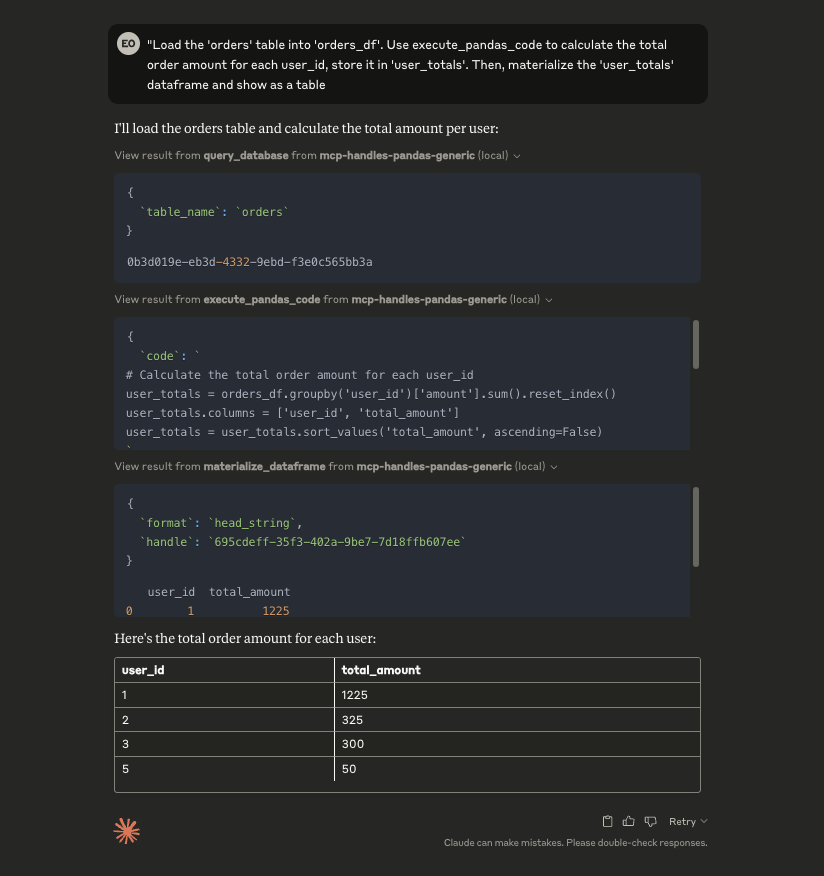
execute_pandas_code(code: str, input_handles: Dict[str, str], output_aliases: List[str]) -> Dict[str, str]- Executes arbitrary pandas code on the referenced DataFrames
- Returns new handles for the resulting DataFrames
- ⚠️ Warning: Uses exec(), not safe for production without proper sandboxing
-
materialize_dataframe(handle: str, format: str = "head_string", n: int = 5) -> str- Retrieves DataFrame data in various formats:
- head/tail/sample as string
- full DataFrame as string
- JSON (records or split orientation)
- CSV
- Retrieves DataFrame data in various formats:
-
get_shape(handle: str) -> str- Returns DataFrame dimensions
Example Usage
MCP Inspector
The easiest way to try out the tools is to use the MCP Inspector tool:
npx @modelcontextprotocol/inspector uv run -m mcp_handles.df_abstractions
npx @modelcontextprotocol/inspector uv run -m mcp_handles.pandas_generic
Claude Desktop
You can also add these to Claude Desktop with the following configuration:
{
  "globalShortcut": "",
  "mcpServers": {
    "generic-pandas-handler-demo": {
      "command": "uv",
      "args": [
        "--directory",
        "/path/to/mcp-data-handles-demo",
        "run",
        "-m",
        "mcp_handles.pandas_generic"
      ]
    },
    "df-abstractions-handler-demo": {
      "command": "uv",
      "args": [
        "--directory",
        "/path/to/mcp-data-handles-demo",
        "run",
        "-m",
        "mcp_handles.df_abstractions"
      ]
    }
  }
}
Claude Calling Generic Pandas Server
Claude Calling DF Abstractions Server
OpenAI Agents SDK
To use the OpenAI agents sdk client, run the following:
uv run -m mcp_handles_client.openai_sdk "<query>"
Security Note
The Generic Pandas API uses exec() to run arbitrary Python code. This is extremely dangerous and should NOT be used in production without proper sandboxing and security reviews. The DataFrame Abstractions API is much safer as it only exposes specific, controlled operations.
Dev Tools Supporting MCP
The following are the main code editors that support the Model Context Protocol. Click the link to visit the official website for more information.







