
Mcp Demo
What is Mcp Demo
mcp-demo is a conversational book recommendation application that utilizes Azure OpenAI (GPT-4o) and Elastic with MCP to provide users with natural language search capabilities over a book database.
Use cases
Use cases for mcp-demo include providing personalized book recommendations in libraries, enhancing educational tools with conversational interfaces, and creating interactive book club experiences.
How to use
To use mcp-demo, clone the repository, set up the Python backend with required dependencies, configure your credentials in the .env file, and run the data ingestion script to populate your Elasticsearch cluster with book data.
Key features
Key features include natural language search over books, response generation using GPT-4o, clear summaries of books, chat history memory, and a clean, responsive user interface.
Where to use
mcp-demo can be used in various fields such as education, libraries, and any platform that requires book recommendations or literary discussions.
Clients Supporting MCP
The following are the main client software that supports the Model Context Protocol. Click the link to visit the official website for more information.





Overview
What is Mcp Demo
mcp-demo is a conversational book recommendation application that utilizes Azure OpenAI (GPT-4o) and Elastic with MCP to provide users with natural language search capabilities over a book database.
Use cases
Use cases for mcp-demo include providing personalized book recommendations in libraries, enhancing educational tools with conversational interfaces, and creating interactive book club experiences.
How to use
To use mcp-demo, clone the repository, set up the Python backend with required dependencies, configure your credentials in the .env file, and run the data ingestion script to populate your Elasticsearch cluster with book data.
Key features
Key features include natural language search over books, response generation using GPT-4o, clear summaries of books, chat history memory, and a clean, responsive user interface.
Where to use
mcp-demo can be used in various fields such as education, libraries, and any platform that requires book recommendations or literary discussions.
Clients Supporting MCP
The following are the main client software that supports the Model Context Protocol. Click the link to visit the official website for more information.
Content
Elastic Book Chat
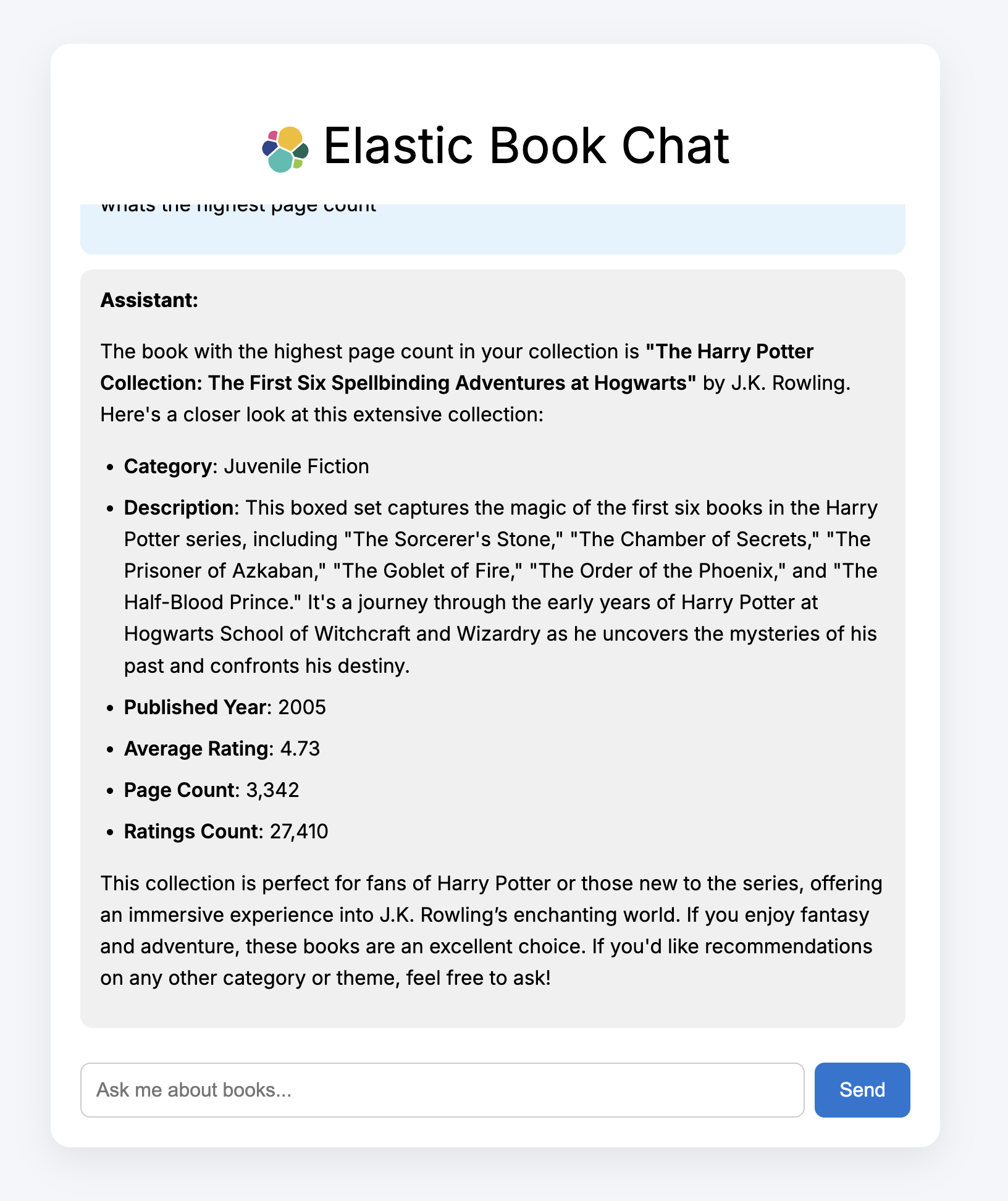
The book chat app is a conversational book recommendation demo incorporating:
- Azure OpenAI (GPT-4o)
- Elastic with MCP (https://github.com/elastic/mcp-server-elasticsearch?tab=readme-ov-file)
- FastAPI backend
- Vite + React frontend
The app allows users to query a book database in natural language and receive helpful, librarian-style responses powered by real search results.
Features
- Natural language search over books via Elastic MCP
- GPT-4o used for response generation and formatting
- Clear, human-readable summaries of books
- Remembers recent chat history
- Clean, responsive user interface
Tech Stack
| Component | Technology |
|---|---|
| Frontend | React |
| Backend | FastAPI (Python 3.11) |
| Search | Elastic MCP + Elastics |
| LLM | Azure OpenAI (GPT-4o) |
| Agent Engine | LangChain MCPAgent |
Getting Started
Pre-reqs:
- Elasticsearch cluster
- Python 3.11
- Kaggle API key (optional - see below)
- Azure openAI key
Set Up/Data Ingest
- Clone down the repository and navigate to the mcp-demo folder:
git https://github.com/camillegeorgiou/mcp-demo
cd mcp-demo
- Set up the Python backend:
python -m venv .venv
source .venv/bin/activate
pip install -r requirements.txt
- Modify the .env file to include your credentials:
AZURE_OPENAI_API_KEY=your_azure_openai_key
ES_URL=your_elastic_url
ES_API_KEY=elastic_api
- Navigate to kaggle, spin up an account and download an API key:
- Add the downloaded kaggle.json file to
.kaggle
**Alternatiely, you can download the books.csv and modify the script to push the dataset to Elastic.
- Run the books.py script and confirm data has made it into your cluster:
python books.py
Backend
- Configure the mcp server in:
backend/elasticsearch_mcp.jsonand establish the connection to your Azure endpoint:
- Modify elasticsearch_mcp to include your ES credentials. The API key should have relevant permissions. See: https://github.com/elastic/mcp-server-elasticsearch?tab=readme-ov-file
- Modify the following to reflect your Azure OpenAI deployment settings in server.py:
llm = AzureChatOpenAI(
        openai_api_version="2025-01-01-preview",
        azure_deployment="gpt-4o",
        azure_endpoint="https://",
- Start the backend
uvicorn backend.server:app --reload or .venv/bin/uvicorn server:app --reload
- You should see the following output (or similar):
INFO:     Uvicorn running on http://127.0.0.1:8000 (Press CTRL+C to quit)
INFO:     Started reloader process [15448] using StatReload
INFO:     Started server process [15450]
INFO:     Waiting for application startup.
INFO:     Application startup complete.
Frontend
- In a separate terminal, set up the frontend app:
cd bookchat-frontend
npm install
npm run dev
- Your bookchat app should be available at http://localhost:5173.
Sample Queries
What are the best books on computing?
Which books have the highest rating?
Any good biographies for young readers?
Which book is the longest?
Dev Tools Supporting MCP
The following are the main code editors that support the Model Context Protocol. Click the link to visit the official website for more information.







