
Mcp Dndzgz
What is Mcp Dndzgz
mcp-dndzgz is an MCP Server that provides real-time information about the Zaragoza tram system, including tram arrival estimations and station details through the DNDzgz API.
Use cases
Use cases include developing mobile apps for tram users, integrating tram data into city transport dashboards, and providing real-time updates for travelers in Zaragoza.
How to use
To use mcp-dndzgz, clone the repository from GitHub, install the necessary dependencies using npm, and start the server with the command ‘npm start’. You can then access tram estimations and station information via the provided tools.
Key features
Key features include real-time tram arrival estimations for specific stations and a comprehensive list of all tram stations in Zaragoza, both accessible via JSON responses.
Where to use
mcp-dndzgz can be used in transportation applications, urban planning tools, and any service that requires real-time public transport information, specifically for the Zaragoza tram system.
Clients Supporting MCP
The following are the main client software that supports the Model Context Protocol. Click the link to visit the official website for more information.





Overview
What is Mcp Dndzgz
mcp-dndzgz is an MCP Server that provides real-time information about the Zaragoza tram system, including tram arrival estimations and station details through the DNDzgz API.
Use cases
Use cases include developing mobile apps for tram users, integrating tram data into city transport dashboards, and providing real-time updates for travelers in Zaragoza.
How to use
To use mcp-dndzgz, clone the repository from GitHub, install the necessary dependencies using npm, and start the server with the command ‘npm start’. You can then access tram estimations and station information via the provided tools.
Key features
Key features include real-time tram arrival estimations for specific stations and a comprehensive list of all tram stations in Zaragoza, both accessible via JSON responses.
Where to use
mcp-dndzgz can be used in transportation applications, urban planning tools, and any service that requires real-time public transport information, specifically for the Zaragoza tram system.
Clients Supporting MCP
The following are the main client software that supports the Model Context Protocol. Click the link to visit the official website for more information.
Content
DNDzgz MCP Server
This is an MCP (Model Context Protocol) server that provides information about the Zaragoza tram system, including real-time tram arrival estimations and station information using the DNDzgz API.
Installation
- Clone the repository:
git clone https://github.com/danilat/mcp-dndzgz.git
cd mcp-dndzgz
- Install dependencies:
npm install
Running the Application
Add a the environment variable with a valid google maps api key and run it with the http transport
GOOGLE_MAPS_API_KEY=your-api-key npm start:http
The server will start you should configure yout MCP client to connect.
Or start the server using stdio trasport:
Configure in your MCP client using npx, for example:
{
  "mcpServers": {
    "dndzgz": {
      "command": "npx @dndzgz/mcp",
      "env": {
        "GOOGLE_MAPS_API_KEY": "your-api-key"
      }
    }
  }
}
The server will start and connect to the MCP server.
Available Tools
The server provides the following tools:
-
zaragoza-tram-estimations: Get real-time arrival estimations for a specific tram station- Parameters:
station(number): ID of the tram station
- Returns: JSON with estimated arrival times for both directions
- Parameters:
-
zaragoza-tram-stations: Get a list of all tram stations in Zaragoza- Parameters:
latitude(number): Latitude to sort stations by proximitylongitude(number): Longitude to sort stations by proximity
- Returns: JSON with station information including location, name, and ID
- Parameters:
-
zaragoza-bus-stops: Get all bus stops in Zaragoza- Parameters:
latitude(number): Latitude to sort stops by proximitylongitude(number): Longitude to sort stops by proximity
- Returns: JSON with bus stop locations, names, IDs, and lines
- Parameters:
-
zaragoza-bus-estimations: Get real-time arrival estimations for a specific bus stop- Parameters:
stop(number): ID of the bus stop
- Returns: JSON with estimated arrival times for each line serving that stop
- Parameters:
-
zaragoza-bizi-stations: Get all Bizi stations in Zaragoza (public bicycle rental service)- Parameters:
latitude(number): Latitude to sort stations by proximitylongitude(number): Longitude to sort stations by proximity
- Returns: JSON with Bizi station locations, names, and IDs
- Parameters:
-
zaragoza-bizi-estimations: Get real-time availability of bikes and free slots in a Bizi station- Parameters:
station(number): ID of the Bizi station
- Returns: JSON with bikes and parking slot availability
- Parameters:
-
google-maps-link: Get a Google Maps link for a specific location- Parameters:
latitude(number): Latitude of the locationlongitude(number): Longitude of the location
- Returns: Google Maps URL showing the specified location
- Parameters:
-
geolocation-from-address: Get the geolocation (latitude and longitude) from an address and the formatted address that was found- Parameters:
address(string): The address to geolocate (e.g., “Plaza de San Francisco, Zaragoza, Spain”)
- Returns: JSON with latitude, longitude, confidence level, and formatted address
- Parameters:
Dependencies
- @modelcontextprotocol/sdk: ^1.9.0
Example
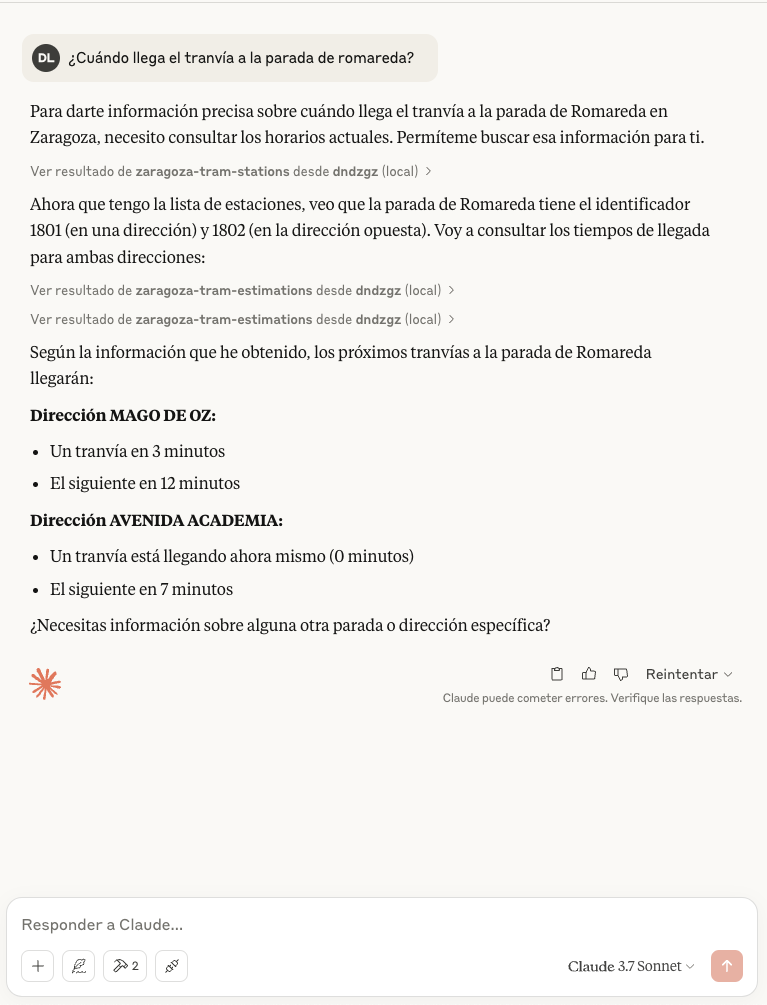
There is an screenshot with example using Claude Desktop
Dev Tools Supporting MCP
The following are the main code editors that support the Model Context Protocol. Click the link to visit the official website for more information.







