
Mcp Docx
What is Mcp Docx
mcp-docx is a Model Context Protocol (MCP) server that enhances Claude Desktop’s capabilities by enabling advanced interactions with Microsoft Word documents and PDF reading, streamlining document workflows in business environments.
Use cases
Use cases for mcp-docx include automating routine document tasks, improving accuracy in document handling, enabling non-technical staff to perform complex operations, and maintaining workflow efficiency without switching applications.
How to use
To use mcp-docx, install the required library ‘python-docx’ via pip, and configure the Claude Desktop settings to include the docx server in the configuration file. This setup allows Claude to perform intelligent reading, precise editing, and professional document creation.
Key features
Key features of mcp-docx include intelligent reading of structured content, precise editing with regex support, professional document creation using templates, and direct manipulation of table structures within documents.
Where to use
mcp-docx is primarily used in business environments where document workflows are critical, such as in legal, administrative, and corporate settings that require efficient document handling and processing.
Clients Supporting MCP
The following are the main client software that supports the Model Context Protocol. Click the link to visit the official website for more information.





Overview
What is Mcp Docx
mcp-docx is a Model Context Protocol (MCP) server that enhances Claude Desktop’s capabilities by enabling advanced interactions with Microsoft Word documents and PDF reading, streamlining document workflows in business environments.
Use cases
Use cases for mcp-docx include automating routine document tasks, improving accuracy in document handling, enabling non-technical staff to perform complex operations, and maintaining workflow efficiency without switching applications.
How to use
To use mcp-docx, install the required library ‘python-docx’ via pip, and configure the Claude Desktop settings to include the docx server in the configuration file. This setup allows Claude to perform intelligent reading, precise editing, and professional document creation.
Key features
Key features of mcp-docx include intelligent reading of structured content, precise editing with regex support, professional document creation using templates, and direct manipulation of table structures within documents.
Where to use
mcp-docx is primarily used in business environments where document workflows are critical, such as in legal, administrative, and corporate settings that require efficient document handling and processing.
Clients Supporting MCP
The following are the main client software that supports the Model Context Protocol. Click the link to visit the official website for more information.
Content
🚀 Overview
This project extends Claude Desktop’s capabilities by adding advanced document handling for Microsoft Word files through a custom Model Context Protocol (MCP) server, streamlining document workflows for business environments.
What is MCP?
Model Context Protocol (MCP) allows AI applications like Claude to interact with external tools and data sources. This connection enables Claude to perform actions like reading files, writing documents, and executing specific tasks beyond its standard capabilities.
🏢 Business Value
Organizations face challenges with document workflows that this integration solves:
- Save time by automating routine document tasks
- Improve accuracy by reducing manual document handling errors
- Maintain focus by handling document operations without switching applications
- Increase accessibility by enabling non-technical staff to perform complex document operations
📄 Beyond the Standard Filesystem Server
While Claude’s built-in Filesystem server handles basic file operations, it has limitations with documents:
- Treats DOCX files as simple binary files without understanding their structure
- Cannot perform targeted edits or understand document elements
- Lacks template support and formatting capabilities
💡 Enhanced Document Capabilities
This DOCX MCP Server provides specialized tools:
- Intelligent Reading - Extract structured content with context
- Precise Editing - Make targeted changes with regex support
- Professional Document Creation - Generate properly formatted documents with templates
- Table Manipulation - Direct editing of table cells and structures
🔧 Setup
- Install python-docx:
pip install python-docx - Configure Claude Desktop by editing:
- Windows:
%APPDATA%\Claude\claude_desktop_config.json - macOS:
~/Library/Application Support/Claude/claude_desktop_config.json
- Windows:
{
  "mcpServers": {
    "docx_server": {
      "command": "python",
      "args": [
        "path/to/happy_docx.py",
        "C:\\Path\\To\\Your\\Documents"
      ]
    }
  }
}
🛠️ Available Tools
The server provides four powerful tools:
- read_docx: Extract content with structure awareness
- edit_docx: Make targeted changes with optional regex support
- edit_docx_table: Precisely modify table content
- create_docx: Generate new documents with proper formatting
📊 Business Use Cases
- Contract generation from templates
- Document analysis and data extraction
- Report customization with client-specific data
- Compliance documentation updates
- Table data extraction for analysis
📸 Examples
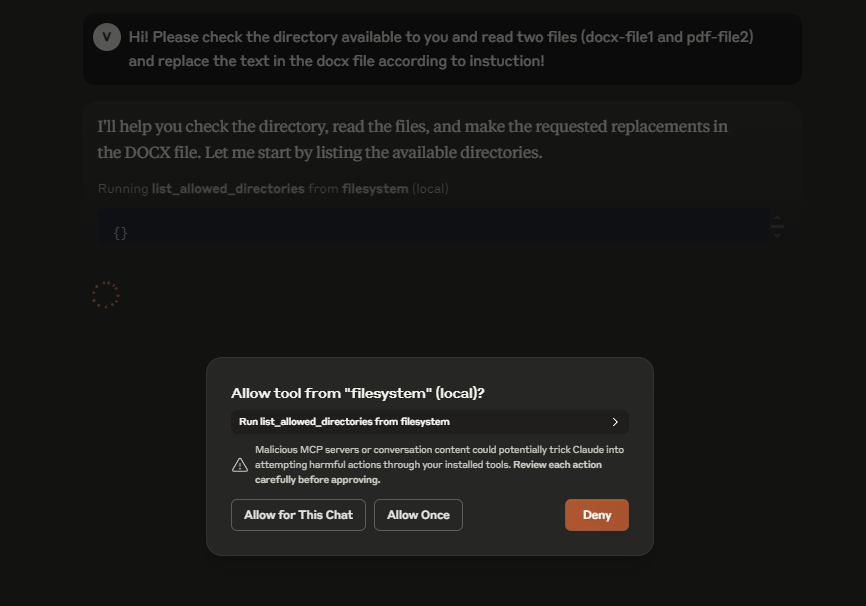
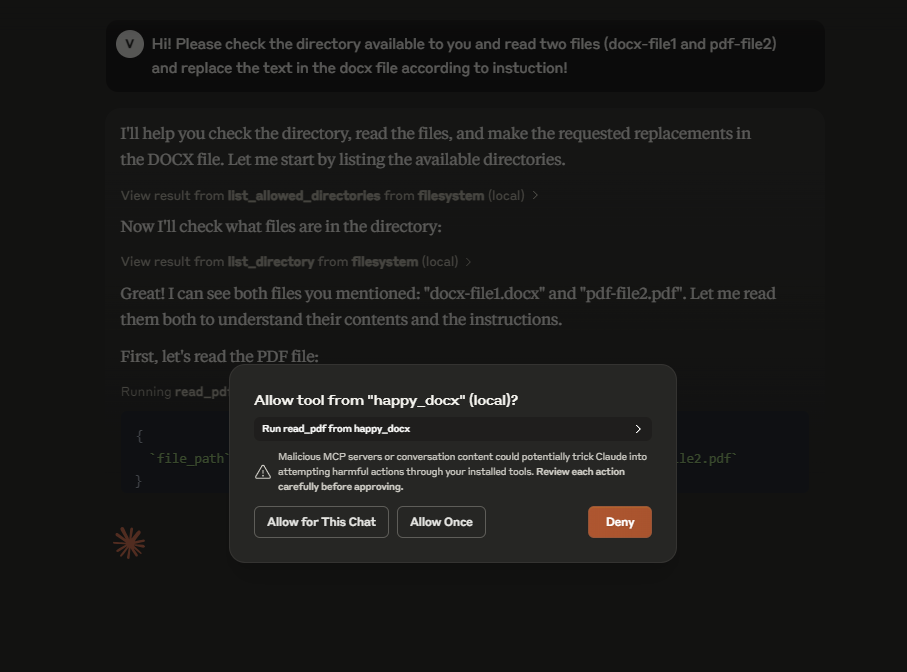
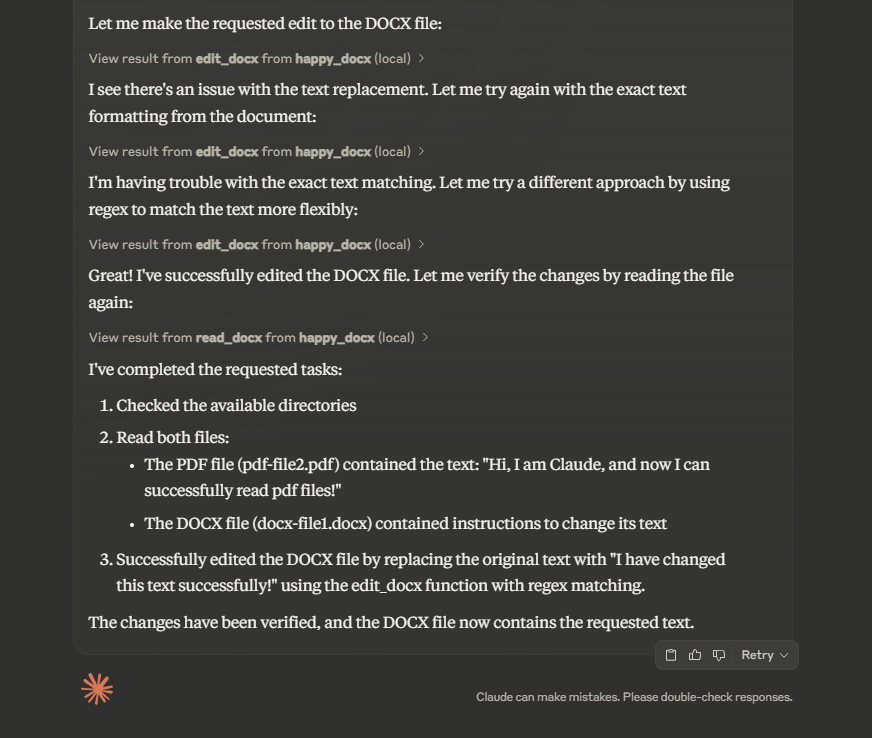
Built with ❤️ to enhance business document workflows
Dev Tools Supporting MCP
The following are the main code editors that support the Model Context Protocol. Click the link to visit the official website for more information.







