
Mcp Fast Deploy
What is Mcp Fast Deploy
mcp-fast-deploy is a Serverless Devs application that enables one-click deployment of STDIO MCP services as SSE remote services using Function Compute (FC).
Use cases
Use cases include transforming existing STDIO MCP services into serverless applications, deploying mapping services like Amap, and providing backend services that require quick initialization and deployment.
How to use
To use mcp-fast-deploy, it is recommended to initialize the application using the command ‘s init ${template_name}’ instead of directly cloning the repository or copying the s.yaml file. Detailed instructions can be found in the deployment and experience section.
Key features
Key features include one-click deployment of STDIO MCP services, support for various programming environments like Node.js and Python, and integration with Function Compute for serverless architecture.
Where to use
mcp-fast-deploy can be used in cloud-native application development, particularly in scenarios requiring rapid deployment and scaling of microservices.
Clients Supporting MCP
The following are the main client software that supports the Model Context Protocol. Click the link to visit the official website for more information.





Overview
What is Mcp Fast Deploy
mcp-fast-deploy is a Serverless Devs application that enables one-click deployment of STDIO MCP services as SSE remote services using Function Compute (FC).
Use cases
Use cases include transforming existing STDIO MCP services into serverless applications, deploying mapping services like Amap, and providing backend services that require quick initialization and deployment.
How to use
To use mcp-fast-deploy, it is recommended to initialize the application using the command ‘s init ${template_name}’ instead of directly cloning the repository or copying the s.yaml file. Detailed instructions can be found in the deployment and experience section.
Key features
Key features include one-click deployment of STDIO MCP services, support for various programming environments like Node.js and Python, and integration with Function Compute for serverless architecture.
Where to use
mcp-fast-deploy can be used in cloud-native application development, particularly in scenarios requiring rapid deployment and scaling of microservices.
Clients Supporting MCP
The following are the main client software that supports the Model Context Protocol. Click the link to visit the official website for more information.
Content
注:当前项目为 Serverless Devs 应用,由于应用中会存在需要初始化才可运行的变量(例如应用部署地区、函数名等等),所以不推荐直接 Clone 本仓库到本地进行部署或直接复制 s.yaml 使用,强烈推荐通过
s init ${模版名称}的方法或应用中心进行初始化,详情可参考部署 & 体验 。
start-mcp-fast-deploy 帮助文档
STDIO MCP服务通过函数计算 FC 一键部署转型为 SSE 远程服务
资源准备
使用该项目,您需要有开通以下服务并拥有对应权限:
| 服务/业务 | 权限 | 相关文档 |
|---|---|---|
| 函数计算 | AliyunFCFullAccess | 帮助文档 计费文档 |
| 日志服务 | AliyunFCServerlessDevsRolePolicy | 帮助文档 计费文档 |
部署 & 体验
- :fire: 通过 云原生应用开发平台 CAP ,
 该应用。
该应用。
案例介绍
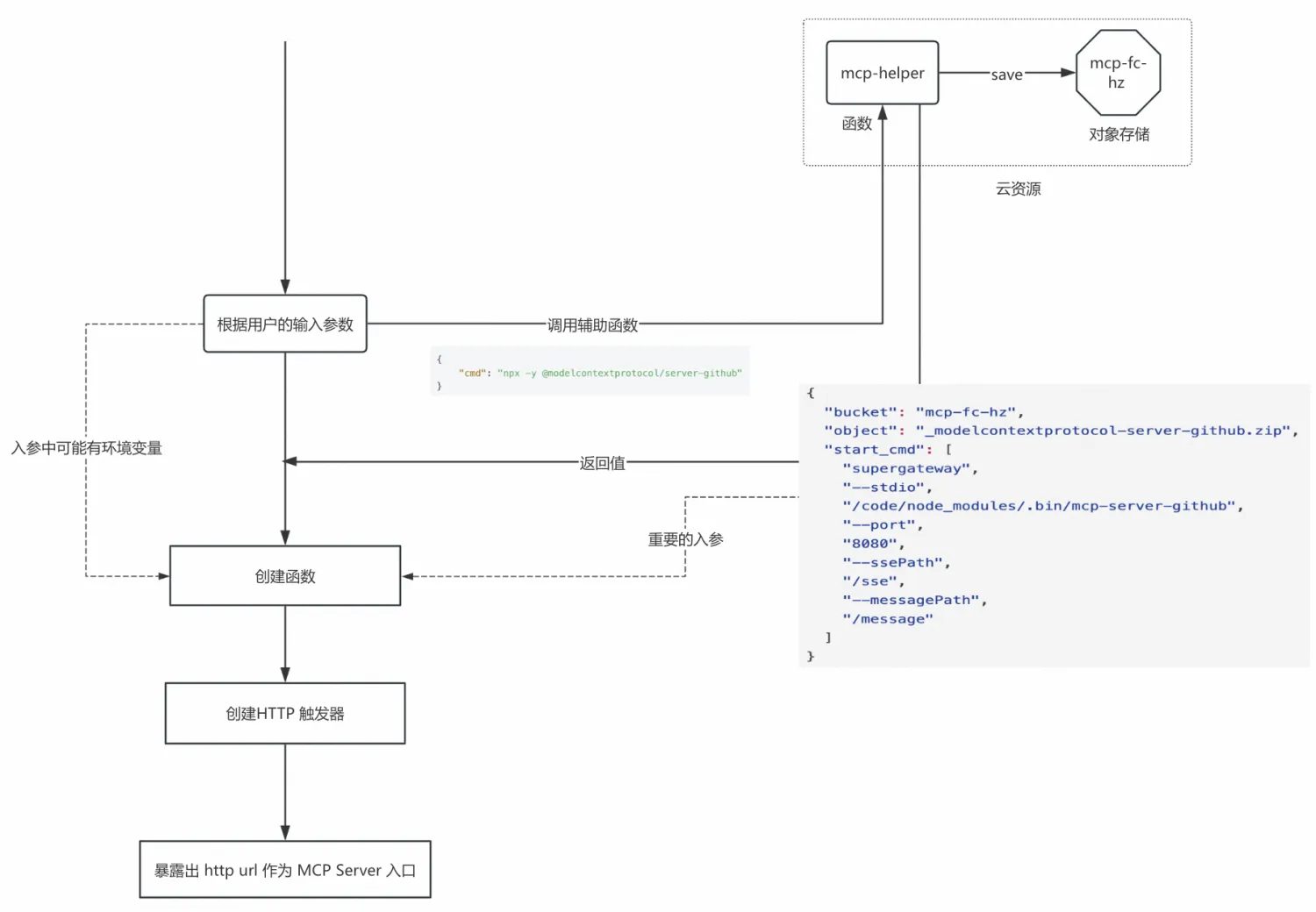
在当前市面已经公开的各种 MCP Server, 基本都是基于 STDIO 的实现,并且打包为独立的二进制可执行文件进行分发。其中 Node.js 和 python 占据了绝大多数,Node.js 生态通常通过 npx 提供,例如 “npx -y @amap/amap-maps-mcp-server”, Python 生态则以 uvx 提供, 例如 “uvx mcp-server-time --local-timezone=Asia/Shanghai”, 因此,将社区主流 STDIO MCP Server 一键转为自己 的 MCP Server 是一个非常有价值的事情, 本案例展示STDIO MCP服务通过函数计算 FC 一键部署转型为 SSE 远程服务。
架构图
使用流程
部署成功后:
-
打开这个 web 应用,可以选择 npx 或者 uvx 部署,
a. 我们以 高德地图@amap/amap-maps-mcp-server 为例
b. 填写完毕,点击 “提交部署” 按钮, 等待一会, 会显示部署成功,并会显示部署成功以后保留的 mcp 服务 url 和支持这个 MCP 服务计算资源的函数 ARN
-
直接使用 “npx @modelcontextprotocol/inspector” 调试器调试部署成功的 MCP SSE 服务
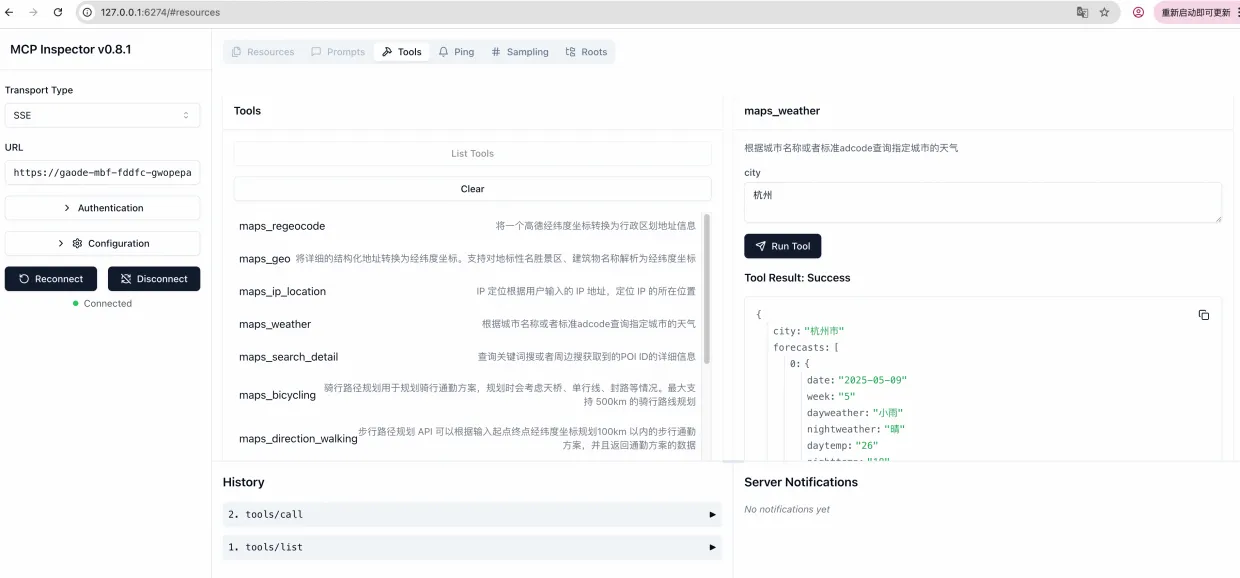
-
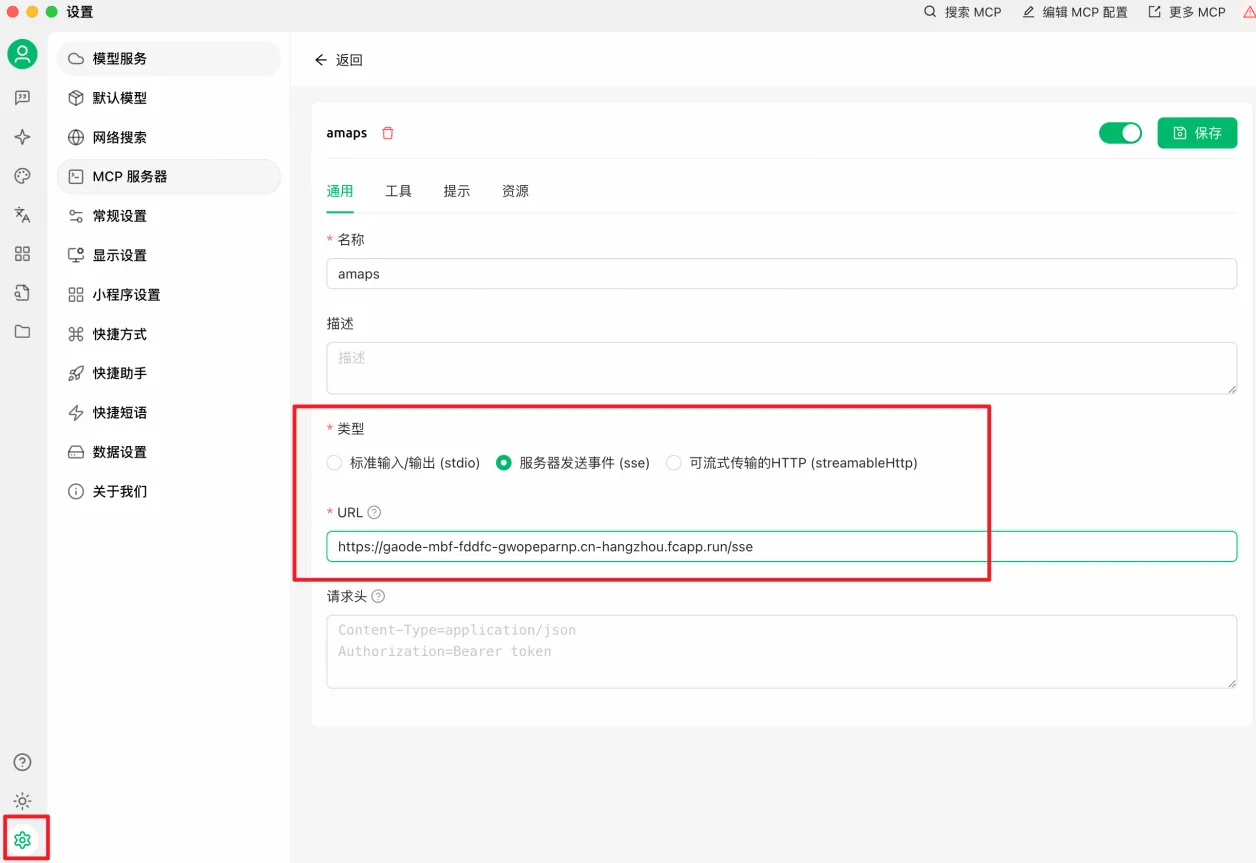
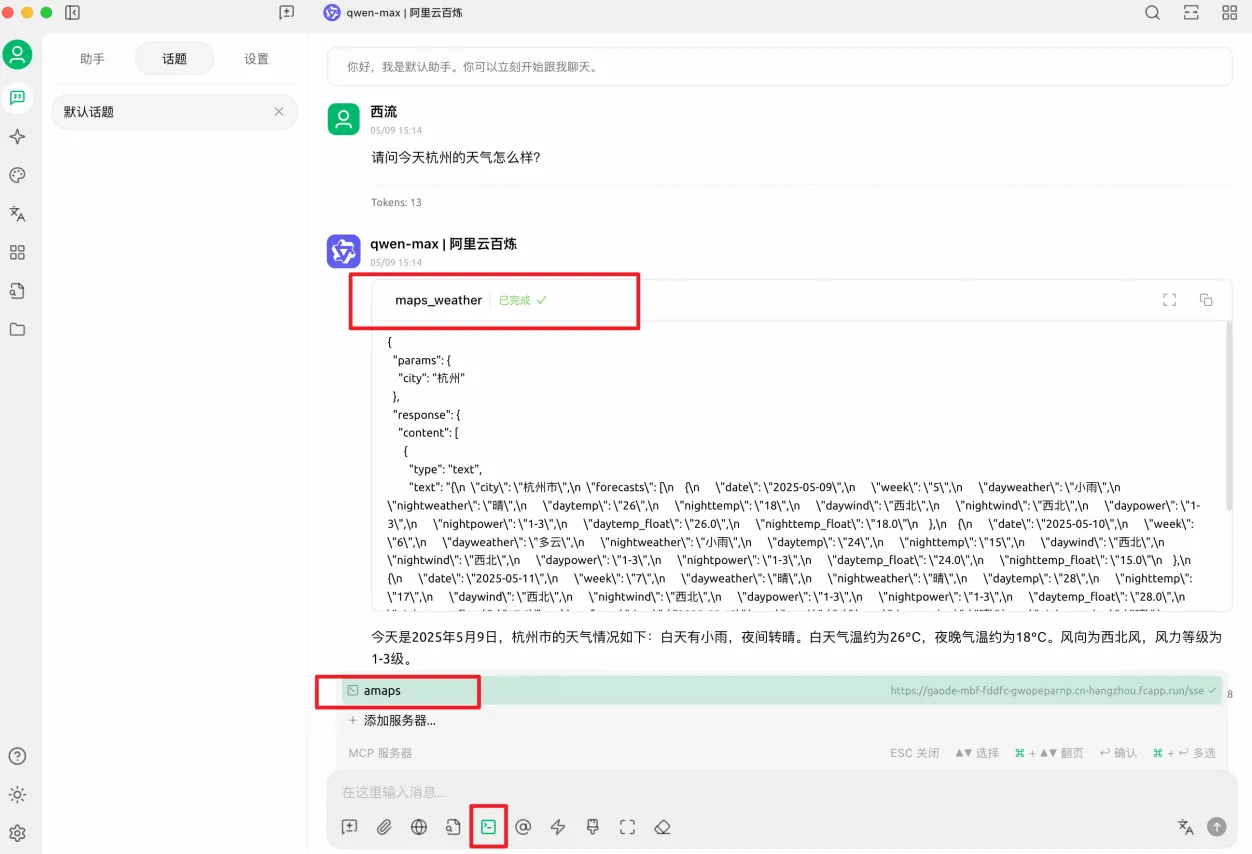
之后,就可以把这个 url 注册到各种 Agent 客户端去消费, 比如百练、 Cherry Studio 等, 以 Cherry Studio 为例
二次开发指南
您可以根据您的需求基于 https://github.com/devsapp/mcp-fast-deploy 进行二次开发
Dev Tools Supporting MCP
The following are the main code editors that support the Model Context Protocol. Click the link to visit the official website for more information.







