
Mcp Fastapi Ping Pong
What is Mcp Fastapi Ping Pong
mcp-fastapi-ping-pong is an experimental and educational application that serves as a Ping-Pong server, demonstrating the use of Model Context Protocol (MCP) calls through FastAPI.
Use cases
Use cases for mcp-fastapi-ping-pong include teaching programming concepts, demonstrating API functionalities, and experimenting with server responses in a controlled environment.
How to use
To use mcp-fastapi-ping-pong, first install the dependencies using ‘poetry install’. Then, run the server with ‘python mcp-api-server.py’, which will start the server at http://localhost:8080. You can interact with the server via the provided API endpoints or the UI in ‘mcp-client.html’.
Key features
Key features include a FastAPI backend for high-performance API endpoints, MCP integration for efficient command handling, and thread-safe session management.
Where to use
mcp-fastapi-ping-pong can be used in educational environments for learning about API development, server-client interactions, and the implementation of the Model Context Protocol.
Clients Supporting MCP
The following are the main client software that supports the Model Context Protocol. Click the link to visit the official website for more information.





Overview
What is Mcp Fastapi Ping Pong
mcp-fastapi-ping-pong is an experimental and educational application that serves as a Ping-Pong server, demonstrating the use of Model Context Protocol (MCP) calls through FastAPI.
Use cases
Use cases for mcp-fastapi-ping-pong include teaching programming concepts, demonstrating API functionalities, and experimenting with server responses in a controlled environment.
How to use
To use mcp-fastapi-ping-pong, first install the dependencies using ‘poetry install’. Then, run the server with ‘python mcp-api-server.py’, which will start the server at http://localhost:8080. You can interact with the server via the provided API endpoints or the UI in ‘mcp-client.html’.
Key features
Key features include a FastAPI backend for high-performance API endpoints, MCP integration for efficient command handling, and thread-safe session management.
Where to use
mcp-fastapi-ping-pong can be used in educational environments for learning about API development, server-client interactions, and the implementation of the Model Context Protocol.
Clients Supporting MCP
The following are the main client software that supports the Model Context Protocol. Click the link to visit the official website for more information.
Content
🏓 MCP Ping-Pong Server by Remote Call
An experimental and educational Ping-Pong server demonstrating MCP (Model Context Protocol) calls via FastAPI.
Features
- ✅ FastAPI/FastMCP backend for remote MCP calls through API endpoints or SSE
- 🔄 MCP integration for command handling
- 🔐 Thread-safe session management
Quick Start
Installation
To install the dependencies, run:
poetry install
1. Call MCP Tool through API
Run the Server
Start the FastAPI server with:
python mcp-api-server.py
The server will start at http://localhost:8080.
UI
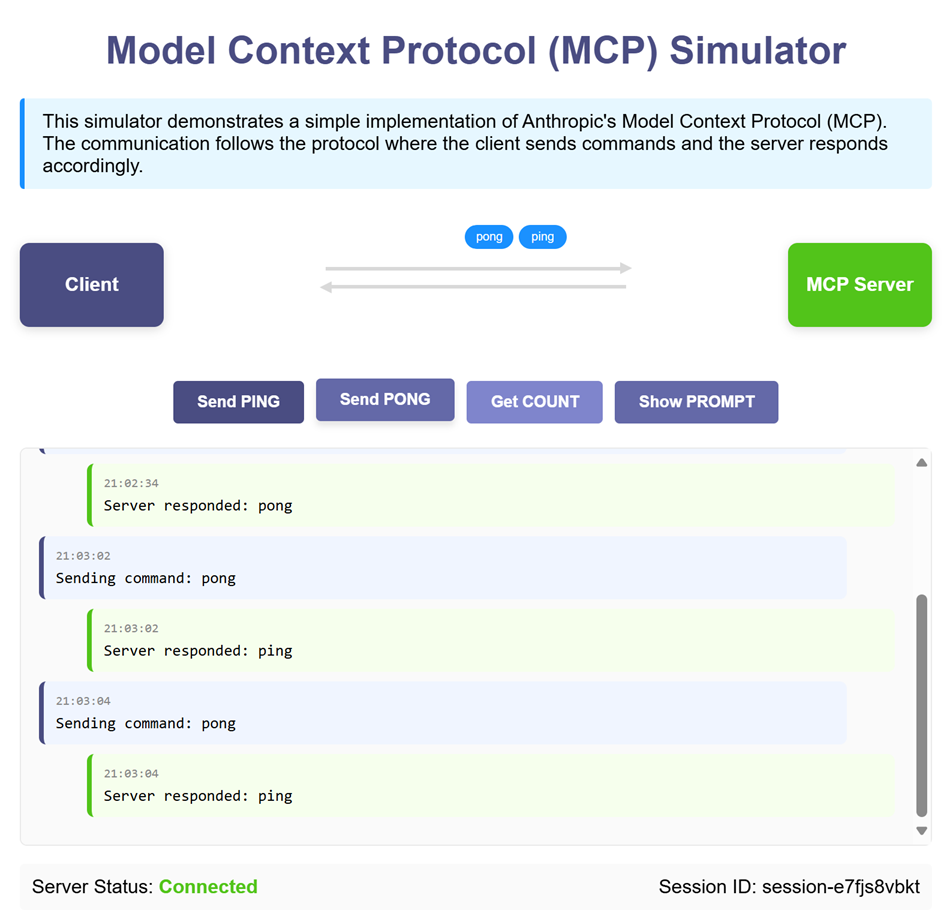
Open mcp-api-client.html in a browser to interact with the UI.
API Endpoints
GET /ping-pong?prompt_name=<prompt_name>: Retrieves the specified prompt.POST /ping-pong: Invokes MCP tool commands (ping,pong,count).
2. Call MCP Tool through SSE transport
The following example demonstrates using Server-Sent Events (SSE) for communication with the MCP server.
Run the SSE Server
python mcp-sse-server.py
Run the SSE Client
python mcp-sse-client.py
Sample Output
Type a command (e.g., 'ping', 'pong', 'count') or 'exit' to quit:
>>> ping
Sending command: ping
Result: pong
>>> pong
Sending command: pong
Result: ping
>>> count
Sending command: count
Result: 2
References
📄 License
MIT
Dev Tools Supporting MCP
The following are the main code editors that support the Model Context Protocol. Click the link to visit the official website for more information.







