
Mcp Figma
What is Mcp Figma
mcp-figma is a Figma API server implementation based on the Model Context Protocol (MCP), designed to facilitate integration with Figma plugins and widgets.
Use cases
Use cases include automating Figma file operations, managing comments, manipulating design nodes, and exporting images from Figma files.
How to use
To use mcp-figma, clone the repository, install dependencies, configure environment variables, build the project, and run the development server using command line arguments.
Key features
Key features include interaction with the Figma API through MCP, a WebSocket server for plugin communication, support for widget development, environment variable configuration, and a rich set of Figma operation tools.
Where to use
mcp-figma can be used in design and development environments where Figma is utilized, particularly for creating plugins and widgets that enhance Figma’s functionality.
Clients Supporting MCP
The following are the main client software that supports the Model Context Protocol. Click the link to visit the official website for more information.





Overview
What is Mcp Figma
mcp-figma is a Figma API server implementation based on the Model Context Protocol (MCP), designed to facilitate integration with Figma plugins and widgets.
Use cases
Use cases include automating Figma file operations, managing comments, manipulating design nodes, and exporting images from Figma files.
How to use
To use mcp-figma, clone the repository, install dependencies, configure environment variables, build the project, and run the development server using command line arguments.
Key features
Key features include interaction with the Figma API through MCP, a WebSocket server for plugin communication, support for widget development, environment variable configuration, and a rich set of Figma operation tools.
Where to use
mcp-figma can be used in design and development environments where Figma is utilized, particularly for creating plugins and widgets that enhance Figma’s functionality.
Clients Supporting MCP
The following are the main client software that supports the Model Context Protocol. Click the link to visit the official website for more information.
Content
Figma MCP Server
A Figma API server implementation based on Model Context Protocol (MCP), supporting Figma plugin and widget integration.
Features
- Interact with Figma API through MCP
- WebSocket server for Figma plugin communication
- Support for Figma widget development
- Environment variable configuration via command line arguments
- Rich set of Figma operation tools
Installation
- Clone the repository:
git clone <repository-url>
cd figma-mcp
- Install dependencies:
bun install
Configuration
Environment Variables
Create a .env file and set the following environment variables:
FIGMA_PERSONAL_ACCESS_TOKEN=your_figma_token
PORT=3001
NODE_ENV=development
Getting a Figma Access Token
- Log in to Figma
- Go to Account Settings > Personal Access Tokens
- Create a new access token
- Copy the token to your
.envfile or pass it via command line arguments
Usage
Build the Project
bun run build
Run the Development Server
bun run dev
Using Command Line Arguments
Support for setting environment variables via the -e parameter:
bun --watch src/index.ts -e FIGMA_PERSONAL_ACCESS_TOKEN=your_token -e PORT=6000
You can also use a dedicated token parameter:
bun --watch src/index.ts --token your_token
Or its shorthand:
bun --watch src/index.ts -t your_token
Configuring MCP in Cursor
Add to the .cursor/mcp.json file:
{
  "Figma MCP": {
    "command": "bun",
    "args": [
      "--watch",
      "/path/to/figma-mcp/src/index.ts",
      "-e",
      "FIGMA_PERSONAL_ACCESS_TOKEN=your_token_here",
      "-e",
      "PORT=6000"
    ]
  }
}
Available Tools
The server provides the following Figma operation tools:
- File operations: Get files, versions, etc.
- Node operations: Get and manipulate Figma nodes
- Comment operations: Manage comments in Figma files
- Image operations: Export Figma elements as images
- Search functionality: Search content in Figma files
- Component operations: Manage Figma components
- Canvas operations: Create rectangles, circles, text, etc.
- Widget operations: Manage Figma widgets
Figma Plugin Development
Plugin Introduction
Figma plugins are customized tools that extend Figma’s functionality, enabling workflow automation, adding new features, or integrating with external services. This MCP server provides a convenient way to develop, test, and deploy Figma plugins.
Building and Testing
Build the plugin:
bun run build:plugin
Run in development mode:
bun run dev:plugin
Loading the Plugin in Figma
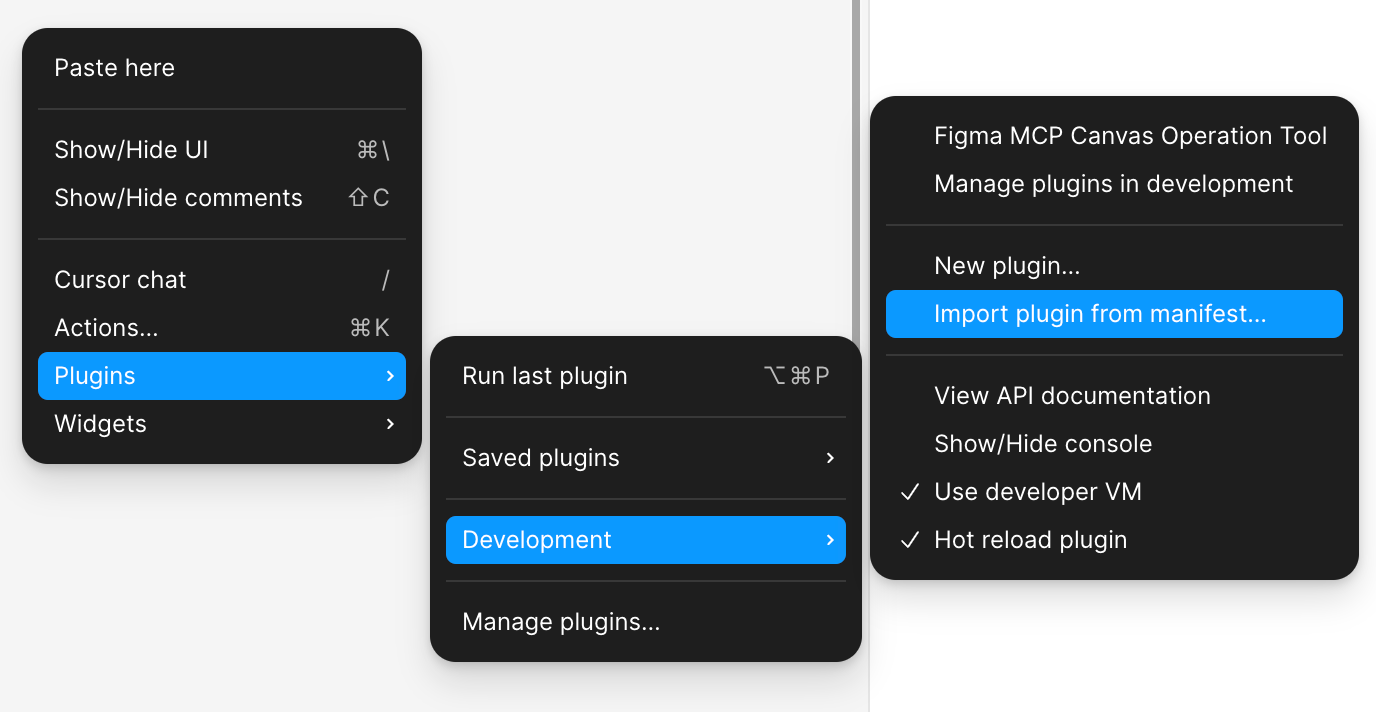
- Right-click in Figma to open the menu -> Plugins -> Development -> Import plugin from manifest…
- Select the plugin’s
manifest.jsonfile - Your plugin will now appear in Figma’s plugin menu
Plugin Interaction with MCP Server
Plugins can communicate with the MCP server via WebSocket to achieve:
- Complex data processing
- External API integration
- Cross-session data persistence
- AI functionality integration
Development
Build Widget
bun run build:widget
Build Plugin
bun run build:plugin
Development Mode
bun run dev:widget  # Widget development mode
bun run dev:plugin  # Plugin development mode
License
MIT
Dev Tools Supporting MCP
The following are the main code editors that support the Model Context Protocol. Click the link to visit the official website for more information.







