
Mcp Fmi
What is Mcp Fmi
MCP-FMI stands for Model Context Protocol - Functional Mock-up Interface. It allows simulation models to be utilized as tools for LLM-based agents, enhancing their capabilities.
Use cases
Use cases for MCP-FMI include querying available simulation models, retrieving information about model inputs and outputs, simulating models with specific input changes, and integrating simulation capabilities into applications.
How to use
To use MCP-FMI, ensure you have Python 3.11 or higher and the uv package manager installed. Configure the ‘claude_desktop_config.json’ file to integrate the MCP-FMI server with Claude Desktop, specifying the command and arguments for your FMU directory.
Key features
Key features of MCP-FMI include integration of FMU simulation models, support for various queries related to simulation models, and the ability to simulate models with generated inputs.
Where to use
MCP-FMI can be used in fields such as simulation modeling, artificial intelligence, and systems engineering, particularly where LLM-based agents are employed.
Clients Supporting MCP
The following are the main client software that supports the Model Context Protocol. Click the link to visit the official website for more information.





Overview
What is Mcp Fmi
MCP-FMI stands for Model Context Protocol - Functional Mock-up Interface. It allows simulation models to be utilized as tools for LLM-based agents, enhancing their capabilities.
Use cases
Use cases for MCP-FMI include querying available simulation models, retrieving information about model inputs and outputs, simulating models with specific input changes, and integrating simulation capabilities into applications.
How to use
To use MCP-FMI, ensure you have Python 3.11 or higher and the uv package manager installed. Configure the ‘claude_desktop_config.json’ file to integrate the MCP-FMI server with Claude Desktop, specifying the command and arguments for your FMU directory.
Key features
Key features of MCP-FMI include integration of FMU simulation models, support for various queries related to simulation models, and the ability to simulate models with generated inputs.
Where to use
MCP-FMI can be used in fields such as simulation modeling, artificial intelligence, and systems engineering, particularly where LLM-based agents are employed.
Clients Supporting MCP
The following are the main client software that supports the Model Context Protocol. Click the link to visit the official website for more information.
Content

Model Context Protocol - Functional Mock-up Interface
Makes your simulation models available as tools for LLM-based agents.
Novia UAS | Research Project | Contact



MCP-FMI
This is an unofficial MCP-integration of the FMPy package.
Table of Content
- Overview
1.1 Features
1.2 Implemented Tools
1.3 Standards - Prerequisites
- Claude Desktop Integration
- For Developers
- Example Usage
- Future Work
- Citation
- Acknowledgements
- License
Overview
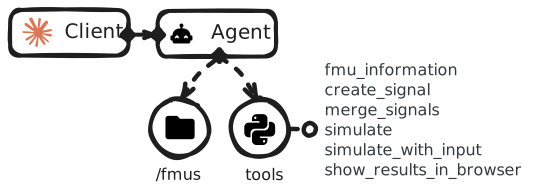
This package integrates FMU simulation models as tools for LLM-based agents through the MCP. By allowing simulation models to be accessed and orchestrated directly from chat interfaces, simulation models become accessible to virtually anyone. This means simulation capabilities can be shared across teams and organizations, including with non-experts, bringing the benefits of simulation to everyone you collaborate with.
Features
- 💬 Manage simulations from chat interfaces.
- 🛠️ Use simulation models as tools for LLM-based agents.
- 📈 Generate input signals for simulations from natural language.
- 📊 Visualize simulation results in browser.
Implemented tools
fmu_information_toolretrieves information about the available FMU models.simulate_toolsimulates a single FMU model with default prameters and input signals. Returns the simulated outputs.simulate_with_input_toolsimulates a single FMU model with the specified input signals. Returns the simulated outputs.create_signal_toolgenerates an input-sequence object for a single input.merge_signals_toolmerges multiple signel objects that can be used as an input for a simulation.show_results_in_browser_toolvisualizes simulation results in browser.
Standards
This package bridges two standards:
The Model Context Protocol (MCP) is an open protocol that standardizes how applications can provide context to Large Language Models (LLMs). MCP helps when integrating data and tools to LLM-based agents.
The Functional Mockup Interface (FMI) is a free standard that defines a container and interface to exchange dynamic simulation models across simulation platforms. A Functional Mockup Unit (FMU) is a file containing a simulation model that adheres to the FMI standard.
Prerequisites
- Python 3.11 or higher
- uv package manager
- Claude Desktop (for desktop integration)
Usage with Claude Desktop
Update the claude_desktop_config.json file with:
For developers
Intructions how to run the package in editable mode: CONTRIBUTING.md.
Example usage
Example natural-language queries:
- What simulation models do you have available?
- Please provide information about the model and its signals.
- Who created the model, and when was it last updated?
- Make a step change in the input
input_nameat 60s. Keep the other inputs constant with their default values. - Simulate
model_namewith the generated inputs.
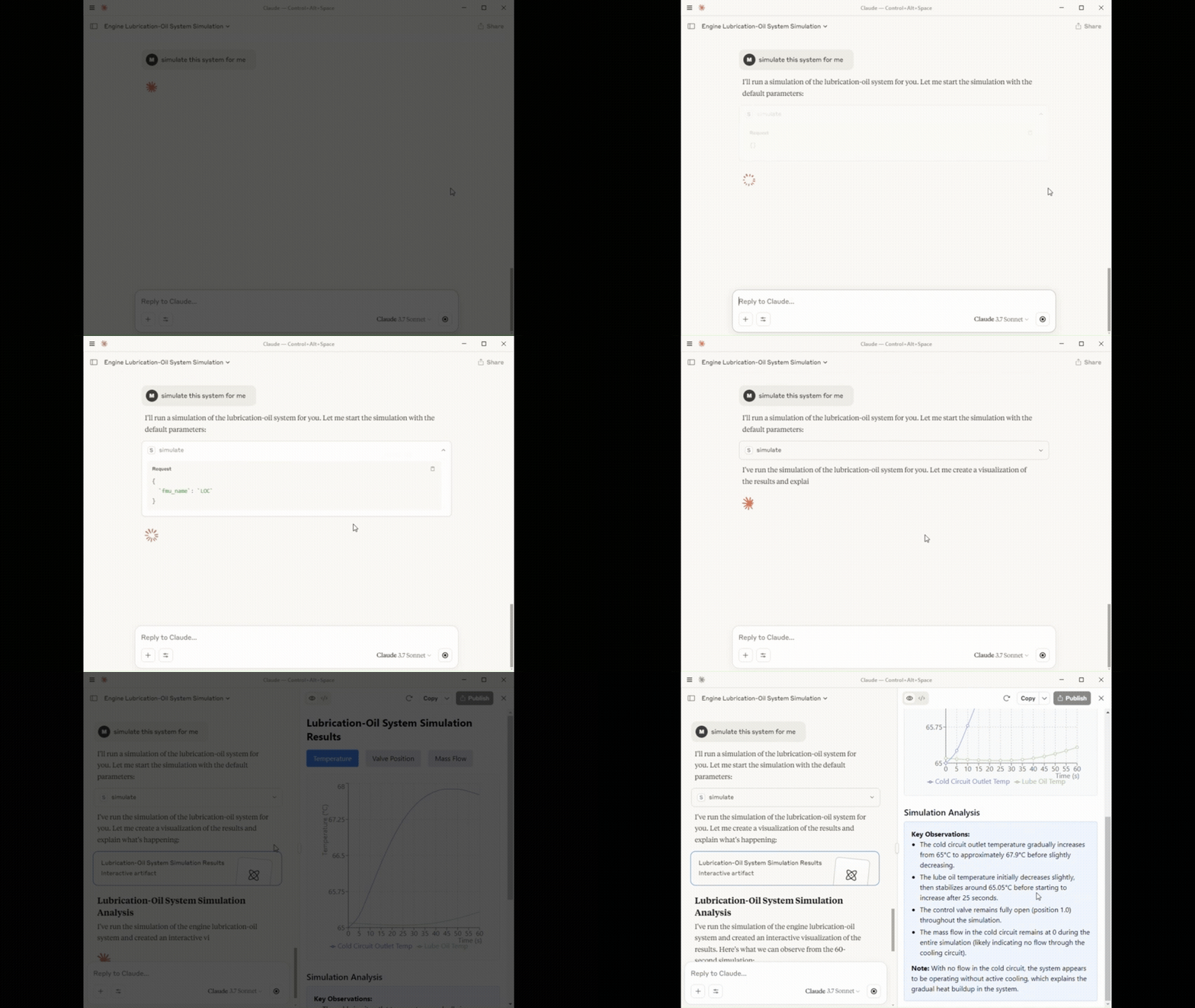
Short demonstration in Claude Desktop:
Future work
List of features to be implemented:
- Better support for Windows/Linux/MacOS FMU models.
co_simulate_toolco-simulates multiple FMU models.- Integration for OpenWebUI.
show_results_as_artifact_toolreturn simulation results as interractive artifacts.- Features for exporting results.
Citation
If you use this package in your research, please cite it using the following BibTeX entry:
@misc{MCP-FMI,
  author = {Mikael Manngård, Christoffer Björkskog},
  title = {MCP-FMI: MCP Server for the Functional Mock-Up Interface},
  year = {2025},
  howpublished = {\url{https://github.com/Novia-RDI-Seafaring/mcp-fmi}},
}
Acknowledgements
This work was done in the Business Finland funded project Virtual Sea Trial
License
This package is licensed under the MIT License license. See the LICENSE file for more details.
Dev Tools Supporting MCP
The following are the main code editors that support the Model Context Protocol. Click the link to visit the official website for more information.







