
Mcp Gateway Example
What is Mcp Gateway Example
mcp-gateway-example is a demonstration project that showcases the integration of Spring AI MCP Client, Spring Cloud MCP Server using Spring Cloud Gateway, and a Restful API provider.
Use cases
Use cases include building scalable microservices, implementing API gateways for routing and load balancing, and creating a centralized service management platform.
How to use
To use mcp-gateway-example, first configure Nacos by downloading it and initializing the database. Modify the application properties for database connection and authentication settings. Then, start the mcp-restful and mcp-server modules to access the Restful API and gateway proxy respectively.
Key features
Key features include a Spring AI MCP Client for client-side interactions, a Spring Cloud MCP Server that leverages Spring Cloud Gateway for routing, and a Restful API provider for service exposure.
Where to use
mcp-gateway-example can be used in microservices architecture, cloud-native applications, and any system requiring a gateway for service management and API exposure.
Clients Supporting MCP
The following are the main client software that supports the Model Context Protocol. Click the link to visit the official website for more information.





Overview
What is Mcp Gateway Example
mcp-gateway-example is a demonstration project that showcases the integration of Spring AI MCP Client, Spring Cloud MCP Server using Spring Cloud Gateway, and a Restful API provider.
Use cases
Use cases include building scalable microservices, implementing API gateways for routing and load balancing, and creating a centralized service management platform.
How to use
To use mcp-gateway-example, first configure Nacos by downloading it and initializing the database. Modify the application properties for database connection and authentication settings. Then, start the mcp-restful and mcp-server modules to access the Restful API and gateway proxy respectively.
Key features
Key features include a Spring AI MCP Client for client-side interactions, a Spring Cloud MCP Server that leverages Spring Cloud Gateway for routing, and a Restful API provider for service exposure.
Where to use
mcp-gateway-example can be used in microservices architecture, cloud-native applications, and any system requiring a gateway for service management and API exposure.
Clients Supporting MCP
The following are the main client software that supports the Model Context Protocol. Click the link to visit the official website for more information.
Content
方案
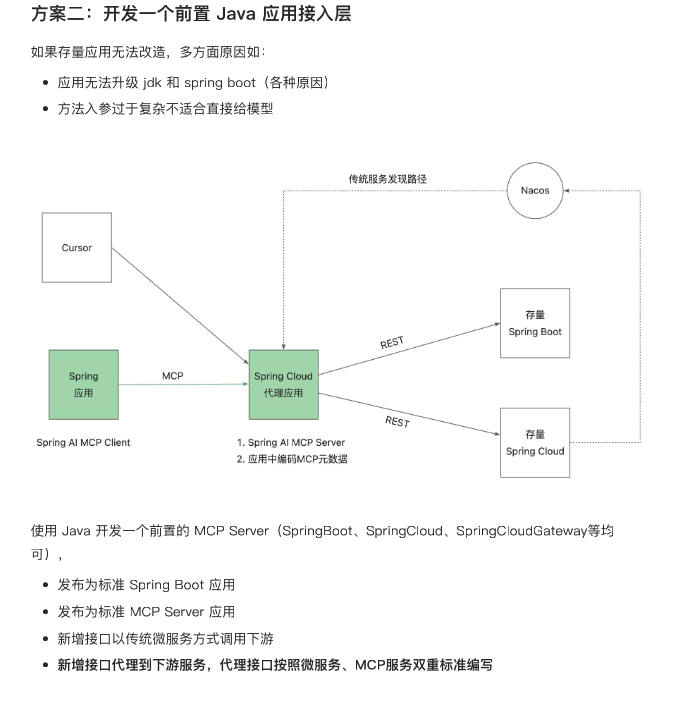
方案详解文档:MCP Gateway
模块讲解
- Restful API提供者
- mcp-restful:提供时间接口
- mcp-restful-second:提供天气预测接口
- mcp-restful-threed:提供天气质量接口
- MCP Server
- mcp-server: 连接了两个服务:mcp-restful和mcp-restful-second
- mcp-server-second:连接了1个服务:mcp-restful-threed
- MCP Client
- mcp-client: 连接了两个服务:mcp-server和mcp-server-second
快速启动
配置nacos
- 下载nacos:Nacos Server 下载页,这里以2.4.2版本为例
- 初始化数据库表文件:conf\mysql-schema.sql
- nacos配置文件修改:conf\application.properties
#*************** Config Module Related Configurations ***************#
### If use MySQL as datasource:
spring.datasource.platform=mysql

### Count of DB:
db.num=1

### Connect URL of DB:
db.url.0=jdbc:mysql://127.0.0.1:3306/nacos?characterEncoding=utf8&connectTimeout=1000&socketTimeout=3000&autoReconnect=true&useUnicode=true&useSSL=false&serverTimezone=UTC&allowPublicKeyRetrieval=true
db.user.0=root
db.password.0=root

### Connection pool configuration: hikariCP
db.pool.config.connectionTimeout=30000
db.pool.config.validationTimeout=10000
db.pool.config.maximumPoolSize=20
db.pool.config.minimumIdle=2
注意:不开启在 2.4.2 中会出现登陆失败异常!
### The auth system to use, currently only 'nacos' and 'ldap' is supported:
nacos.core.auth.system.type=nacos

### If turn on auth system:
nacos.core.auth.enabled=true
设置服务端验证 key
nacos.core.auth.server.identity.key=test
nacos.core.auth.server.identity.value=test
设置默认 token
### The default token (Base64 String):
nacos.core.auth.plugin.nacos.token.secret.key=SecretKey012345678901234567890123456789012345678901234567890123456789
mcp-restful启动
提供了restfule接口服务:http://localhost:18086/echo/nacos
mcp-server启动
Dev Tools Supporting MCP
The following are the main code editors that support the Model Context Protocol. Click the link to visit the official website for more information.







