
Mcp Gateway Registry
What is Mcp Gateway Registry
mcp-gateway-registry is a unified platform that combines centralized access control with intelligent tool discovery for the Model Context Protocol (MCP), enabling AI models to connect with external systems, tools, and data sources.
Use cases
Use cases include building smarter AI agents that can autonomously discover and utilize tools, facilitating service discovery for developers, and providing centralized access control for enterprises.
How to use
To use mcp-gateway-registry, developers can explore available MCP servers and tools through its visual and programmatic interfaces. It is recommended to pin to specific versions for production use due to its active development status.
Key features
Key features include secure, governed access to curated MCP servers, dynamic tool discovery for agents, and a combination of visual and programmatic interfaces for easy exploration of available resources.
Where to use
mcp-gateway-registry can be used in various fields such as AI development, enterprise software integration, and any domain requiring secure access to multiple data sources and tools.
Clients Supporting MCP
The following are the main client software that supports the Model Context Protocol. Click the link to visit the official website for more information.





Overview
What is Mcp Gateway Registry
mcp-gateway-registry is a unified platform that combines centralized access control with intelligent tool discovery for the Model Context Protocol (MCP), enabling AI models to connect with external systems, tools, and data sources.
Use cases
Use cases include building smarter AI agents that can autonomously discover and utilize tools, facilitating service discovery for developers, and providing centralized access control for enterprises.
How to use
To use mcp-gateway-registry, developers can explore available MCP servers and tools through its visual and programmatic interfaces. It is recommended to pin to specific versions for production use due to its active development status.
Key features
Key features include secure, governed access to curated MCP servers, dynamic tool discovery for agents, and a combination of visual and programmatic interfaces for easy exploration of available resources.
Where to use
mcp-gateway-registry can be used in various fields such as AI development, enterprise software integration, and any domain requiring secure access to multiple data sources and tools.
Clients Supporting MCP
The following are the main client software that supports the Model Context Protocol. Click the link to visit the official website for more information.
Content







MCP Gateway & Registry
Model Context Protocol (MCP) is an open standard protocol that allows AI Models to connect with external systems, tools, and data sources. While MCP simplifies tool access for Agents and solves data access and internal/external API connectivity challenges, several critical obstacles remain before enterprises can fully realize MCP’s promise.
Discovery & Access Challenges:
- Service Discovery: How do developers find and access approved MCP servers?
- Governed Access: How do enterprises provide secure, centralized access to curated MCP servers?
- Tool Selection: With hundreds of enterprise MCP servers, how do developers identify the right tools for their specific agents?
- Dynamic Discovery: How can agents dynamically find and use new tools for tasks they weren’t originally designed for?
The MCP Gateway & Registry solves these challenges by providing a unified platform that combines centralized access control with intelligent tool discovery. The Registry offers both visual and programmatic interfaces for exploring available MCP servers and tools, while the Gateway ensures secure, governed access to all services. This enables developers to programmatically build smarter agents and allows agents to autonomously discover and execute tools beyond their initial capabilities.
| Resource | Link |
|---|---|
| Demo Video | Dynamic Tool Discovery and Invocation |
| Blog Post | How the MCP Gateway Centralizes Your AI Model’s Tools |
You can deploy the gateway and registry on Amazon EC2 or Amazon EKS for production environments. Jump to installation on EC2 or installation on EKS for deployment instructions.
Table of Contents
- What’s New
- Architecture
- Features
- Prerequisites
- Installation
- Using the Gateway and Registry with AI Agents
- Usage
- Documentation
- Roadmap
- License
What’s New
- IdP Integration with Amazon Cognito: Complete identity provider integration supporting both user identity and agent identity modes. See detailed Cognito setup guide for configuration instructions.
- Fine-Grained Access Control (FGAC) for MCP servers and tools: Granular permissions system allowing precise control over which agents can access specific servers and tools. See detailed FGAC documentation for scope configuration and access control setup.
- Integration with Strands Agents: Enhanced agent capabilities with the Strands SDK
- Dynamic tool discovery and invocation: AI agents can autonomously discover and execute specialized tools beyond their initial capabilities using semantic search with FAISS indexing and sentence transformers. This breakthrough feature enables agents to handle tasks they weren’t originally designed for by intelligently matching natural language queries to the most relevant MCP tools across all registered servers. Learn more about Dynamic Tool Discovery →
- Installation on EKS: Deploy on Kubernetes for production environments
Architecture
The Gateway works by using an Nginx server as a reverse proxy, where each MCP server is handled as a different path and the Nginx reverse proxy sitting between the MCP clients (contained in AI Agents for example) and backend server forwards client requests to appropriate backend servers and returns the responses back to clients. The requested resources are then returned to the client.
The MCP Gateway provides a single endpoint to access multiple MCP servers and the Registry provides discoverability and management functionality for the MCP servers that an enterprise wants to use. An AI Agent written in any framework can connect to multiple MCP servers via this gateway, for example to access two MCP servers one called weather, and another one called currenttime and agent would create an MCP client pointing https://my-mcp-gateway.enterprise.net/weather/ and another one pointing to https://my-mcp-gateway.enterprise.net/currenttime/. This technique is able to support both SSE and Streamable HTTP transports.
flowchart TB
    subgraph Human_Users["Human Users"]
        User1["Human User 1"]
        User2["Human User 2"]
        UserN["Human User N"]
    end

    subgraph AI_Agents["AI Agents"]
        Agent1["AI Agent 1"]
        Agent2["AI Agent 2"]
        Agent3["AI Agent 3"]
        AgentN["AI Agent N"]
    end

    subgraph EC2_Gateway["<b>MCP Gateway & Registry</b> (Amazon EC2 Instance)"]
        subgraph NGINX["NGINX Reverse Proxy"]
            RP["Reverse Proxy Router"]
        end

        subgraph AuthRegistry["Authentication & Registry Services"]
            AuthServer["Auth Server<br/>(Dual Auth)"]
            Registry["Registry<br/>Web UI"]
            RegistryMCP["Registry<br/>MCP Server"]
        end

        subgraph LocalMCPServers["Local MCP Servers"]
            MCP_Local1["MCP Server 1"]
            MCP_Local2["MCP Server 2"]
        end
    end

    %% Identity Provider
    IdP[Identity Provider<br/>Amazon Cognito]

    subgraph EKS_Cluster["Amazon EKS/EC2 Cluster"]
        MCP_EKS1["MCP Server 3"]
        MCP_EKS2["MCP Server 4"]
    end

    subgraph APIGW_Lambda["Amazon API Gateway + AWS Lambda"]
        API_GW["Amazon API Gateway"]
        Lambda1["AWS Lambda Function 1"]
        Lambda2["AWS Lambda Function 2"]
    end

    subgraph External_Systems["External Data Sources & APIs"]
        DB1[(Database 1)]
        DB2[(Database 2)]
        API1["External API 1"]
        API2["External API 2"]
        API3["External API 3"]
    end

    %% Connections from Human Users
    User1 -->|Web Browser<br>Authentication| IdP
    User2 -->|Web Browser<br>Authentication| IdP
    UserN -->|Web Browser<br>Authentication| IdP
    User1 -->|Web Browser<br>HTTPS| Registry
    User2 -->|Web Browser<br>HTTPS| Registry
    UserN -->|Web Browser<br>HTTPS| Registry

    %% Connections from Agents to Gateway
    Agent1 -->|MCP Protocol<br>SSE with Auth| RP
    Agent2 -->|MCP Protocol<br>SSE with Auth| RP
    Agent3 -->|MCP Protocol<br>Streamable HTTP with Auth| RP
    AgentN -->|MCP Protocol<br>Streamable HTTP with Auth| RP

    %% Auth flow connections
    RP -->|Auth validation| AuthServer
    AuthServer -.->|Validate credentials| IdP
    Registry -.->|User authentication| IdP
    RP -->|Tool discovery| RegistryMCP
    RP -->|Web UI access| Registry

    %% Connections from Gateway to MCP Servers
    RP -->|SSE| MCP_Local1
    RP -->|SSE| MCP_Local2
    RP -->|SSE| MCP_EKS1
    RP -->|SSE| MCP_EKS2
    RP -->|Streamable HTTP| API_GW

    %% Connections within API GW + Lambda
    API_GW --> Lambda1
    API_GW --> Lambda2

    %% Connections to External Systems
    MCP_Local1 -->|Tool Connection| DB1
    MCP_Local2 -->|Tool Connection| DB2
    MCP_EKS1 -->|Tool Connection| API1
    MCP_EKS2 -->|Tool Connection| API2
    Lambda1 -->|Tool Connection| API3

    %% Style definitions
    classDef user fill:#fff9c4,stroke:#f57f17,stroke-width:2px
    classDef agent fill:#e1f5fe,stroke:#29b6f6,stroke-width:2px
    classDef gateway fill:#e8f5e9,stroke:#66bb6a,stroke-width:2px
    classDef nginx fill:#f3e5f5,stroke:#ab47bc,stroke-width:2px
    classDef mcpServer fill:#fff3e0,stroke:#ffa726,stroke-width:2px
    classDef eks fill:#ede7f6,stroke:#7e57c2,stroke-width:2px
    classDef apiGw fill:#fce4ec,stroke:#ec407a,stroke-width:2px
    classDef lambda fill:#ffebee,stroke:#ef5350,stroke-width:2px
    classDef dataSource fill:#e3f2fd,stroke:#2196f3,stroke-width:2px

    %% Apply styles
    class User1,User2,UserN user
    class Agent1,Agent2,Agent3,AgentN agent
    class EC2_Gateway,NGINX gateway
    class RP nginx
    class AuthServer,Registry,RegistryMCP gateway
    class IdP apiGw
    class MCP_Local1,MCP_Local2 mcpServer
    class EKS_Cluster,MCP_EKS1,MCP_EKS2 eks
    class API_GW apiGw
    class Lambda1,Lambda2 lambda
    class DB1,DB2,API1,API2,API3 dataSource
Authentication and Authorization
Authentication and authorization are very key aspects of this solution. The MCP Gateway & Registry supports both:
- On-behalf-of (User) Flows: Where AI agents act on behalf of authenticated users using OAuth 2.0 PKCE flow
- AI Agents with Their Own Identity Flows: Where agents use their own Machine-to-Machine credentials for autonomous operation
These authentication patterns are discussed in detail in docs/auth.md. An Amazon Cognito-based implementation with step-by-step setup details is provided in docs/cognito.md.
Features
- MCP Tool Discovery: Enables automatic tool discovery by AI Agents and Agent developers. Fetches and displays the list of tools (name, description, schema) based on natural language queries (e.g. do I have tools to get stock information?).
- Unified access to a governed list of MCP servers: Access multiple MCP servers through a common MCP gateway, enabling AI Agents to dynamically discover and execute MCP tools.
- Service Registration: Register MCP services via JSON files or the web UI/API.
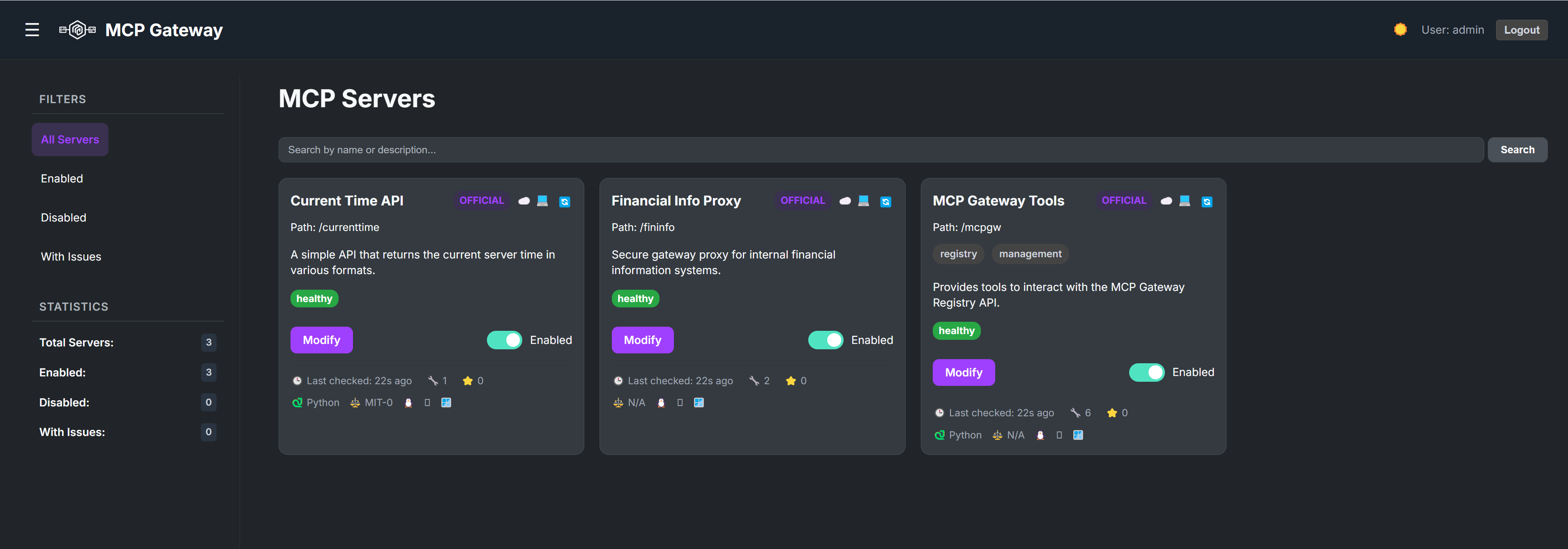
- Web UI: Manage services, view status, and monitor health through a web interface.
- Authentication: Secure login system for the web UI and API access.
- Health Checks:
- Periodic background checks for enabled services (checks
/sseendpoint). - Manual refresh trigger via UI button or API endpoint.
- Periodic background checks for enabled services (checks
- Real-time UI Updates: Uses WebSockets to push health status, tool counts, and last-checked times to all connected clients.
- Dynamic Nginx Configuration: Generates an Nginx reverse proxy configuration file (
registry/nginx_mcp_revproxy.conf) based on registered services and their enabled/disabled state. - Service Management:
- Enable/Disable services directly from the UI.
- Edit service details (name, description, URL, tags, etc.).
- Filtering & Statistics: Filter the service list in the UI (All, Enabled, Disabled, Issues) and view basic statistics.
- UI Customization:
- Dark/Light theme toggle (persisted in local storage).
- Collapsible sidebar (state persisted in local storage).
- State Persistence: Enabled/Disabled state is saved to
registry/server_state.json(and ignored by Git).
Prerequisites
-
Amazon EC2 Instance: An Amazon EC2 machine (
ml.t3.2xlarge) with a standard Ubuntu AMI for running this solution. -
SSL Certificate Options:
- Production Deployments: SSL certificate is preferred for secure communication to the Gateway
- Testing/Development: Can use localhost when running on EC2, or EC2 domain name for testing
- Default Configuration: Gateway is available over HTTP for development
-
Security Group Configuration: Configure your EC2 security group based on your deployment scenario:
- HTTPS with SSL certificate: Port 8080, 443 need to be opened
- HTTP with EC2 domain name: Port 8080, 80 need to be opened
- HTTP with localhost (port forwarding): Ports 80, 7860, and 8080 need to be opened
-
External API Keys (Optional): The Financial Info MCP server requires Polygon API keys for stock ticker data. Configure client-specific API keys using the
.keys.ymlfile in theservers/fininfodirectory. See the Financial Info Secrets Configuration for detailed setup instructions. -
Authentication Setup: Setup authentication using Amazon Cognito as per instructions here. For detailed Cognito configuration, see the Cognito setup guide. For Fine-Grained Access Control (FGAC) configuration, see the scopes documentation.
Installation
Installation on EC2
The Gateway and Registry are deployed using Docker Compose with separate containers for each service, providing a scalable and maintainable architecture.
Docker Compose Architecture
The deployment includes these containers:
- Nginx Reverse Proxy: Routes requests to appropriate services and handles SSL termination
- Auth Server: Handles authentication with Amazon Cognito and GitHub OAuth
- Registry MCP Server: Provides service discovery, management, and the web UI
- Example MCP Servers:
- Current Time server (port 8000)
- Financial Info server (port 8001)
- Real Server Fake Tools server (port 8002)
- MCP Gateway server (port 8003)
Quick Start Installation
-
Clone the repository:
git clone https://github.com/agentic-community/mcp-gateway-registry.git cd mcp-gateway-registry -
Create local directories for saving MCP server logs and run-time data:
sudo mkdir -p /opt/mcp-gateway/servers sudo cp -r registry/servers /opt/mcp-gateway/ sudo mkdir -p /opt/mcp-gateway/auth_server sudo cp auth_server/scopes.yml /opt/mcp-gateway/auth_server/scopes.yml sudo mkdir -p /opt/mcp-gateway/secrets/ sudo cp servers/fininfo/.keys.yml* /opt/mcp-gateway/secrets/ sudo mkdir /var/log/mcp-gateway -
Configure environment variables:
# Copy the template and edit with your values
cp .env.template .env
nano .env  # or use your preferred editor
Required configuration in
.env:ADMIN_PASSWORD: Set to a secure password (replace “your-secure-password-here”)COGNITO_USER_POOL_ID: Your AWS Cognito User Pool IDCOGNITO_CLIENT_ID: Your Cognito App Client IDCOGNITO_CLIENT_SECRET: Your Cognito App Client SecretAWS_REGION: AWS region where your Cognito User Pool is located
Optional configuration:
SECRET_KEY: Auto-generated by build script if not provided
Financial Data Configuration:
- For Polygon API keys, refer to the Financial Info Secrets Configuration
- Configure client-specific API keys in
servers/fininfo/.keys.yml
-
Install prerequisites (uv and Docker):
# Install uv curl -LsSf https://astral.sh/uv/install.sh | sh source $HOME/.local/bin/env uv venv --python 3.12 && source .venv/bin/activate && uv pip install --requirement pyproject.toml # Install Docker and Docker Compose sudo apt-get update sudo apt-get install --reinstall docker.io -y sudo apt-get install -y docker-compose sudo usermod -a -G docker $USER newgrp docker -
Deploy with the build and run script:
./build_and_run.shThe script will:
- Validate your
.envconfiguration - Generate
SECRET_KEYif not provided - Build all Docker images using Docker Compose
- Start all services in the correct order
- Verify service health and display status
- Validate your
-
Access the Registry:
Navigate tohttp://localhost:7860and you will have two authentication options:Option 1 - Amazon Cognito (Recommended for Production):
- Click “Login with Cognito” to authenticate via your configured Cognito User Pool
- Access permissions will be based on the Cognito group you are a member of
- Provides fine-grained access control based on your organizational roles
- For detailed Cognito setup instructions, see docs/cognito.md
- For Fine-Grained Access Control (FGAC) configuration and scope management, see docs/scopes.md
Option 2 - Username/Password (Testing Only):
- Use the traditional login with:
- Username: Value of
ADMIN_USER(default: admin) - Password: Value of
ADMIN_PASSWORDfrom your.envfile
- Username: Value of
- Provides admin access by default
- Note: This approach should only be used for testing and will soon require setting
ENABLE_DEV_MODE=truein your.envfile
Post-Installation
-
View logs from all services:
# View logs from all services docker-compose logs -f # View logs from a specific service docker-compose logs -f registry docker-compose logs -f auth-server -
View MCP server metadata:
Metadata about all MCP servers is available in/opt/mcp-gateway/serversdirectory. The metadata includes information gathered fromListToolsas well as information provided during server registration.
Running the Gateway over HTTPS
For production deployments with SSL certificates:
-
Configure Security Group: Enable access to TCP port 443 from the IP addresses of your MCP clients in the inbound rules of your EC2 instance’s security group.
-
Prepare SSL Certificates: You need an HTTPS certificate and private key for your domain. For example, if you use
your-mcp-gateway.comas the domain, you’ll need an SSL certificate foryour-mcp-gateway.com. MCP servers behind the Gateway will be accessible ashttps://your-mcp-gateway.com/mcp-server-name/sse. -
Place SSL Certificates: Copy your SSL certificates to
/home/ubuntu/ssl_data/on your EC2 instance:sudo mkdir -p /home/ubuntu/ssl_data/certs sudo mkdir -p /home/ubuntu/ssl_data/private # Copy your certificate and private key files to these directories # Important: Name your files as follows: # - Certificate file: fullchain.pem (goes in /home/ubuntu/ssl_data/certs/) # - Private key file: privkey.pem (goes in /home/ubuntu/ssl_data/private/) -
Deploy with HTTPS: Run the deployment script as normal:
./build_and_run.shThe Docker Compose configuration automatically mounts the SSL certificates from
/home/ubuntu/ssl_datato the appropriate container paths. -
Access via HTTPS: Your services will be available at:
- Main interface:
https://your-domain.com - Registry API:
https://your-domain.com:7860(if port 7860 is opened in security group) - MCP servers:
https://your-domain.com/server-name/sse
- Main interface:
Using the Gateway and Registry with AI Agents
Run Agent with User Identity
-
Configure environment for user authentication:
Copy the template and configure the environment variables:cp agents/.env.template agents/.env.user # Edit agents/.env.user with your Cognito configuration # See [`docs/cognito.md`](https://github.com/agentic-community/mcp-gateway-registry/blob/master/docs/cognito.md) for detailed Cognito setup instructions -
Authenticate with user identity:
Run the CLI user authentication script which will prompt you to open a browser window to authenticate with Cognito:python agents/cli_user_auth.pyThis will save a cookie locally in
/home/ubuntu/.mcpand this cookie will be used when you run the agent. -
Run the agent with session cookie:
# your_registry_url would typically be http://localhost/mcpgw/sse or https://mymcpgateway.mycorp.com/mcpgw/sse
python agents/agent.py --use-session-cookie --mcp-registry-url your_registry_url --message "what is the current time in clarksburg, md"
Run Agent with Its Own Agentic Identity
-
Configure environment for agent authentication:
Copy the template and configure the environment variables:cp agents/.env.template agents/.env.agent # Edit agents/.env.agent with your Cognito configuration # See docs/cognito.md for detailed Cognito setup instructions -
Run the agent with agentic identity:
The agent will communicate with Cognito to obtain a JWT token which will include information about the groups it is part of. This information is then used by the Auth server for authorization decisions.# your_registry_url would typically be http://localhost/mcpgw/sse or https://mymcpgateway.mycorp.com/mcpgw/sse python agents/agent.py --mcp-registry-url your_registry_url --message "what is the current time in clarksburg, md"
Installation on EKS
For production deployments you might want to run this solution on EKS, the Distributed Training and Inference on EKS repo contains the helm chart for running the gateway and registry on an EKS cluster. Refer to Serve MCP Gateway Registry README for step by step instructions.
Usage
The MCP Gateway & Registry can be used in multiple ways depending on your needs:
Web Interface Usage
- Login: Use the
ADMIN_USERandADMIN_PASSWORDspecified while starting the Gateway container. - Manage Services:
- Toggle the Enabled/Disabled switch. The Nginx config automatically comments/uncomments the relevant
locationblock. - Click “Modify” to edit service details.
- Click the refresh icon (🔄) in the card header to manually trigger a health check and tool list update for enabled services.
- Toggle the Enabled/Disabled switch. The Nginx config automatically comments/uncomments the relevant
- View Tools: Click the tool count icon (🔧) in the card footer to open a modal displaying discovered tools and their schemas for healthy services.
- Filter: Use the sidebar links to filter the displayed services.
MCP Client Integration
The MCP Registry provides an API that is also exposed as an MCP server, allowing you to manage the MCP Registry programmatically. Any MCP client that supports remote MCP servers over SSE can connect to the registry.
Note: Using the MCP Gateway with remote clients requires HTTPS. See instructions here for setting up SSL certificates.
Programmatic Access
Once connected, your MCP client can:
- Discover available tools through natural language queries
- Register new MCP servers programmatically
- Manage server configurations
- Monitor server health and status
Integration Example
Python MCP Client:
import mcp
from mcp.client.sse import sse_client

# Connect to the MCP Gateway with authentication
headers = {
    'Authorization': f'Bearer {auth_token}',
    'X-User-Pool-Id': user_pool_id,
    'X-Client-Id': client_id,
    'X-Region': region
}

async with sse_client(server_url, headers=headers) as (read, write):
    async with mcp.ClientSession(read, write) as session:
        # Initialize the connection
        await session.initialize()

        # Call a tool with arguments
        result = await session.call_tool(tool_name, arguments=arguments)

        # Process the result
        response = ""
        for r in result.content:
            response += r.text + "\n"
Adding New MCP Servers to the Registry
Option 1 - Via MCP Registry UI:
Click the “Register Server” button on the top right corner of the Registry web interface and follow the instructions. You’ll need to provide the following parameters:
- Server Name: Display name for the server
- Path: Unique URL path prefix for the server (e.g., ‘/my-service’). Must start with ‘/’
- Proxy Pass URL: The internal or external URL where the MCP server is running (e.g., ‘http://localhost:8001’)
- Description: Description of the server (optional)
- Tags: List of tags for categorization (optional)
- Number of Tools: Number of tools provided by the server (optional)
- Number of Stars: Rating for the server (optional)
- Is Python: Whether the server is implemented in Python (optional)
- License: License information for the server (optional)
Option 2 - Via MCP Host:
Coming soon - Use MCP Host applications such as VSCode-insiders or Cursor to register servers directly through their MCP client interfaces.
Documentation
For comprehensive information about using the MCP Gateway & Registry, see our detailed documentation:
- Frequently Asked Questions (FAQ) - Common questions and answers for developers and platform engineers
- Authentication Guide - Detailed authentication and authorization patterns
- Cognito Setup Guide - Step-by-step Amazon Cognito configuration
- Fine-Grained Access Control - Scope configuration and access control setup
- Dynamic Tool Discovery - AI agent autonomous tool discovery capabilities
Roadmap
The following GitHub issues represent our current development roadmap and planned features:
🚀 Major Features
-
#37 - Multi-Level Registry Support
Add support for federated registries that can connect to other registries, enabling hierarchical MCP infrastructure with cross-IdP authentication. -
#38 - Usage Metrics and Analytics System
Implement comprehensive usage tracking across user and agent identities, with metrics emission from auth server, registry, and intelligent tool finder. -
#39 - Tool Popularity Scoring and Rating System
Enhance tool discovery with popularity scores and star ratings based on usage patterns and agent feedback. Depends on #38.
🔐 Authentication & Identity
-
#18 - Add Token Vending Capability to Auth Server
Extend the auth server to provide token vending capabilities for enhanced authentication workflows. -
#5 - Add Support for KeyCloak as IdP Provider
Add KeyCloak integration as an alternative Identity Provider alongside Amazon Cognito.
📋 View All Issues
For the complete list of open issues, feature requests, and bug reports, visit our GitHub Issues page.
License
This project is licensed under the Apache-2.0 License.
Dev Tools Supporting MCP
The following are the main code editors that support the Model Context Protocol. Click the link to visit the official website for more information.







