
Mcp Geo Pub
What is Mcp Geo Pub
mcp-geo-pub is an MCP service designed to retrieve user geolocation information, integrating it with large language models through the Model Context Protocol (MCP).
Use cases
Use cases include personalized content delivery based on user location, location-aware chatbots, and analytics for understanding user demographics and behavior.
How to use
To use mcp-geo-pub, deploy the service using EdgeOne Pages, configure the MCP server with the necessary parameters, and utilize the get_geolocation tool in your AI models to access geolocation data.
Key features
Key features include the ability to access user geolocation data via EdgeOne Pages Functions, returning location information in JSON format, and seamless integration with large language models through the MCP.
Where to use
mcp-geo-pub can be used in various fields such as web applications, location-based services, and AI-driven applications that require user location data for enhanced functionality.
Clients Supporting MCP
The following are the main client software that supports the Model Context Protocol. Click the link to visit the official website for more information.





Overview
What is Mcp Geo Pub
mcp-geo-pub is an MCP service designed to retrieve user geolocation information, integrating it with large language models through the Model Context Protocol (MCP).
Use cases
Use cases include personalized content delivery based on user location, location-aware chatbots, and analytics for understanding user demographics and behavior.
How to use
To use mcp-geo-pub, deploy the service using EdgeOne Pages, configure the MCP server with the necessary parameters, and utilize the get_geolocation tool in your AI models to access geolocation data.
Key features
Key features include the ability to access user geolocation data via EdgeOne Pages Functions, returning location information in JSON format, and seamless integration with large language models through the MCP.
Where to use
mcp-geo-pub can be used in various fields such as web applications, location-based services, and AI-driven applications that require user location data for enhanced functionality.
Clients Supporting MCP
The following are the main client software that supports the Model Context Protocol. Click the link to visit the official website for more information.
Content
MCP with Pages Functions :Geo Location Demo
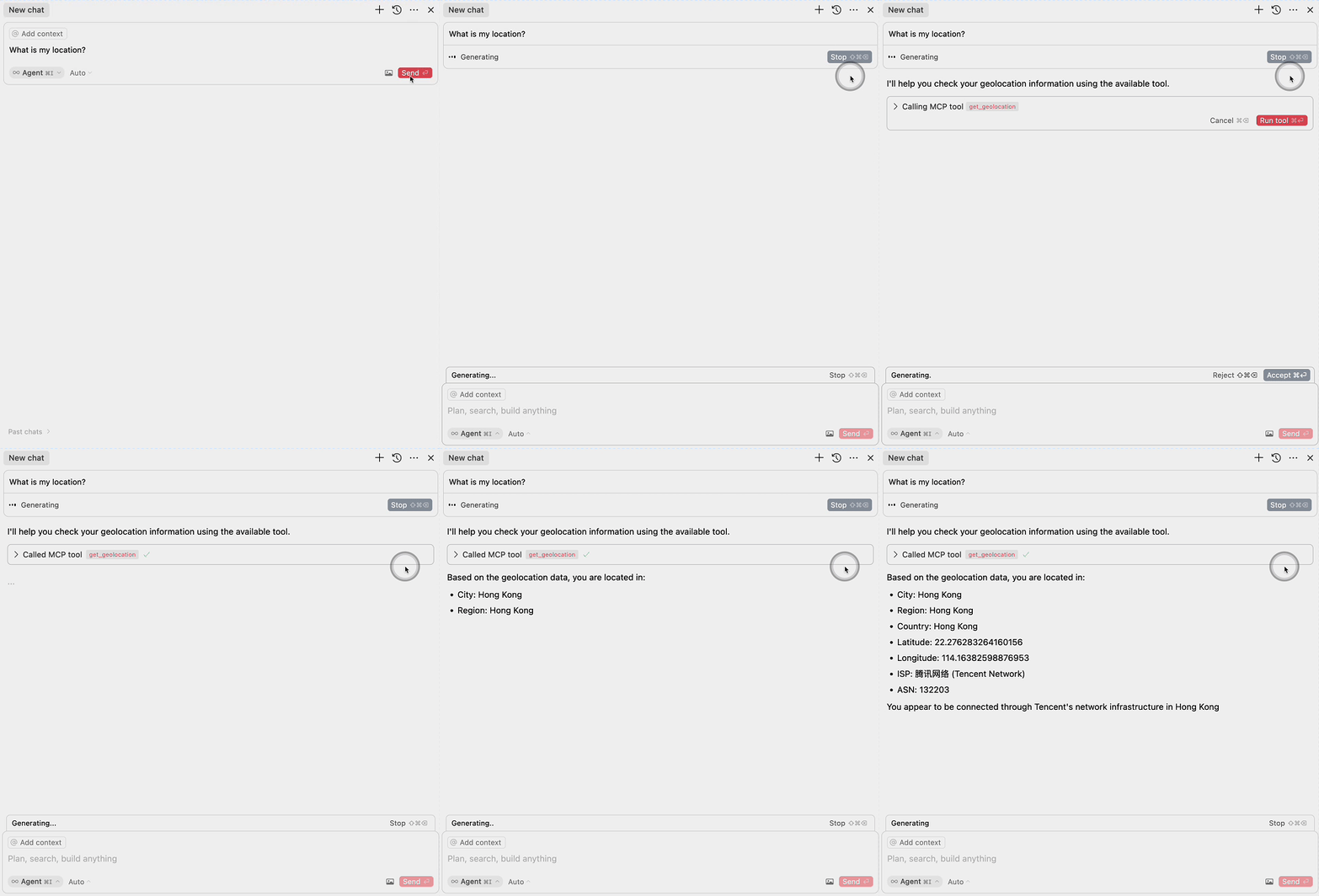
This project demonstrates how to use EdgeOne Pages Functions to retrieve user geolocation information and integrate it with large language models through MCP (Model Context Protocol).
Demo
Deploy

More Templates: EdgeOne Pages
Components
1. EdgeOne Pages Functions: Geolocation
The project includes an EdgeOne Pages Function that retrieves user geolocation information:
- Uses the EdgeOne request context to access geolocation data
- Returns location information in a JSON format
- Located in
functions/get_geo.ts
2. MCP Server Integration
The MCP server component provides an interface for large language models to access geolocation data:
- Implements the Model Context Protocol (MCP)
- Exposes a
get_geolocationtool that can be used by AI models - Uses the EdgeOne Pages Function to fetch geolocation data
- Located in
mcp-server/index.ts
MCP Configuration
To use the MCP server with large language models, add the following configuration:
{
  "mcpServers": {
    "edgeone-geo-mcp-server": {
      "command": "tsx",
      "args": [
        "path/to/mcp-server/index.ts"
      ]
    }
  }
}
Learn More
- EdgeOne Pages
- EdgeOne Pages Functions documentation
- Model Context Protocol (MCP) - Learn about integrating AI models with external tools and services
Dev Tools Supporting MCP
The following are the main code editors that support the Model Context Protocol. Click the link to visit the official website for more information.







