
Mcp Gomamayo
What is Mcp Gomamayo
mcp-gomamayo is an MCP server designed to check the syntax of ‘ゴママヨ’ (Gomamayo) in text, utilizing the Model Context Protocol (MCP).
Use cases
Use cases for mcp-gomamayo include checking the correctness of Gomamayo syntax in written content, assisting writers and students in learning the Gomamayo structure, and enhancing text analysis tools.
How to use
To use mcp-gomamayo, clone the repository from GitHub, build the project, and configure the MCP server settings in the ‘claude_desktop_config.json’ file. After saving the configuration, restart Claude Desktop to enable the ‘gomamayo-checker’.
Key features
Key features of mcp-gomamayo include syntax checking for Gomamayo text, integration with Claude Desktop, and ease of setup through Git and task automation.
Where to use
mcp-gomamayo can be used in text processing applications, language learning tools, and any platform that requires Gomamayo syntax validation.
Clients Supporting MCP
The following are the main client software that supports the Model Context Protocol. Click the link to visit the official website for more information.





Overview
What is Mcp Gomamayo
mcp-gomamayo is an MCP server designed to check the syntax of ‘ゴママヨ’ (Gomamayo) in text, utilizing the Model Context Protocol (MCP).
Use cases
Use cases for mcp-gomamayo include checking the correctness of Gomamayo syntax in written content, assisting writers and students in learning the Gomamayo structure, and enhancing text analysis tools.
How to use
To use mcp-gomamayo, clone the repository from GitHub, build the project, and configure the MCP server settings in the ‘claude_desktop_config.json’ file. After saving the configuration, restart Claude Desktop to enable the ‘gomamayo-checker’.
Key features
Key features of mcp-gomamayo include syntax checking for Gomamayo text, integration with Claude Desktop, and ease of setup through Git and task automation.
Where to use
mcp-gomamayo can be used in text processing applications, language learning tools, and any platform that requires Gomamayo syntax validation.
Clients Supporting MCP
The following are the main client software that supports the Model Context Protocol. Click the link to visit the official website for more information.
Content
mcp-gomamayo


テキスト中の「ゴママヨ」構文をチェックするための Model Context Protocol (MCP) サーバーです。
目次
セットアップ
git clone https://github.com/mizakahk/mcp-gomamayo.git
cd mcp-gomamayo
task build
Claude Desktop での利用
MCPサーバー設定
claude_desktop_config.json に以下の設定を追加します
- WSL上で起動:
{
  "mcpServers": {
    "mcp-gomamayo": {
      "command": "wsl",
      "args": [
        "bash",
        "-ic",
        "~/mcp-gomamayo/bin/mcp-gomamayo"
      ],
      "env": {}
    }
  }
}
設定ファイルを保存した後、Claude Desktop を再起動すると、gomamayo-checker が利用可能になります。
使い方
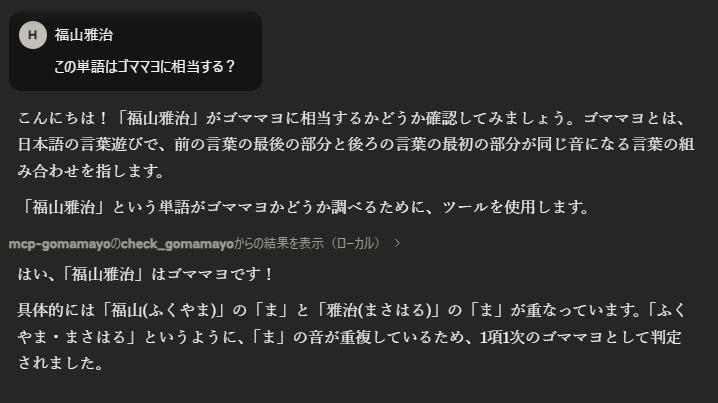
MCP サーバーが Claude Desktop で有効になると、check_gomamayo ツールを使用してテキストのゴママヨ構文をチェックできます。
例 「福山雅治」の判定:
Dev Tools Supporting MCP
The following are the main code editors that support the Model Context Protocol. Click the link to visit the official website for more information.







