
Mcp Google Sheets
What is Mcp Google Sheets
mcp-google-sheets is a Model Context Protocol (MCP) server that facilitates reading and writing data to Google Sheets using the Google Sheets API. It provides tools for data synchronization between applications and spreadsheets.
Use cases
Use cases for mcp-google-sheets include automating data entry into Google Sheets, synchronizing data between applications and spreadsheets, and generating reports directly from spreadsheet data.
How to use
To use mcp-google-sheets, first ensure you have Node.js (version 23 or higher) and Google Sheets API credentials. Clone the repository, install dependencies with ‘npm install’, and configure your Google Sheets API credentials. You can then use the provided tools to read from and write to Google Sheets.
Key features
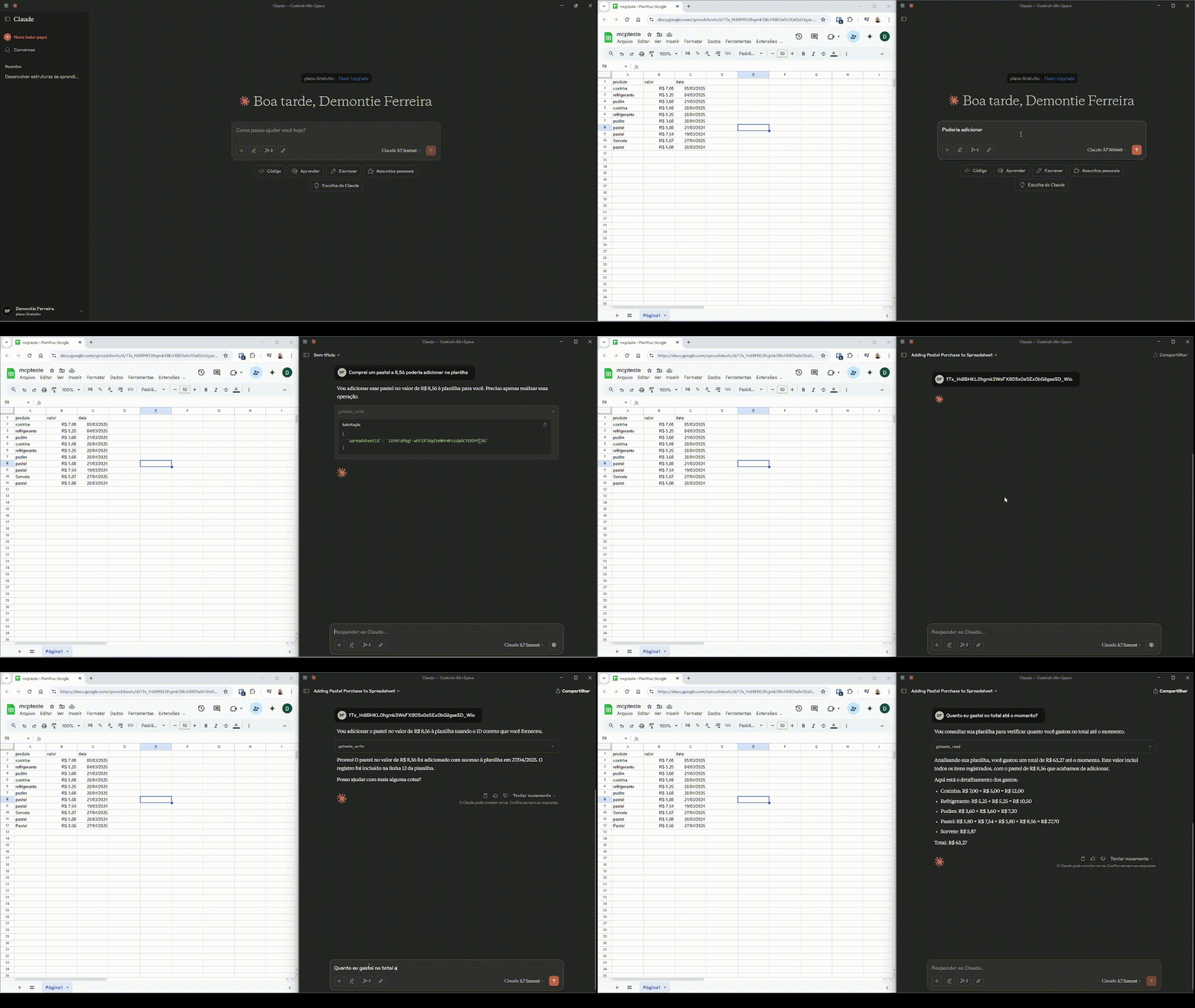
Key features include ‘gsheets_read’ for reading data from a specified range in a Google Sheet and ‘gsheets_write’ for writing data to a Google Sheet, including product details and entry dates.
Where to use
mcp-google-sheets can be used in various fields such as data analysis, reporting, project management, and any application requiring integration with Google Sheets for data handling.
Clients Supporting MCP
The following are the main client software that supports the Model Context Protocol. Click the link to visit the official website for more information.





Overview
What is Mcp Google Sheets
mcp-google-sheets is a Model Context Protocol (MCP) server that facilitates reading and writing data to Google Sheets using the Google Sheets API. It provides tools for data synchronization between applications and spreadsheets.
Use cases
Use cases for mcp-google-sheets include automating data entry into Google Sheets, synchronizing data between applications and spreadsheets, and generating reports directly from spreadsheet data.
How to use
To use mcp-google-sheets, first ensure you have Node.js (version 23 or higher) and Google Sheets API credentials. Clone the repository, install dependencies with ‘npm install’, and configure your Google Sheets API credentials. You can then use the provided tools to read from and write to Google Sheets.
Key features
Key features include ‘gsheets_read’ for reading data from a specified range in a Google Sheet and ‘gsheets_write’ for writing data to a Google Sheet, including product details and entry dates.
Where to use
mcp-google-sheets can be used in various fields such as data analysis, reporting, project management, and any application requiring integration with Google Sheets for data handling.
Clients Supporting MCP
The following are the main client software that supports the Model Context Protocol. Click the link to visit the official website for more information.
Content
MCP Google Sheets Integration
This project provides a Model Context Protocol (MCP) server that enables reading and writing data to Google Sheets. It uses the Google Sheets API to interact with spreadsheets and provides tools for data synchronization.
Table of Contents
Features
Google Sheets Tools
-
gsheets_read
- Description: Read data from a Google Sheet
- Parameters:
spreadsheetId(string, required): The ID of the spreadsheet to readrange(string, optional, default: “Página1”): The range of cells to read
- Returns: The data from the specified range in the spreadsheet
-
gsheets_write
- Description: Write data to a Google Sheet
- Parameters:
spreadsheetId(string, required): The ID of the spreadsheet to write tovalues(object, required): The data to write, containing:product(string): Product namevalue(string): Product valuedate(string): Date of the entry
range(string, optional, default: “Página1”): The range where to write the data
- Returns: Confirmation of the write operation
Installation and Usage
Prerequisites
- Node.js (version 23 or higher)
- Google Sheets API credentials
- Cursor IDE
Setup
- Clone the repository
- Install dependencies:
npm install - Configure your Google Sheets API credentials
- Cursor Configuration
Configure your Google Sheets API credentials
- Go to the Google Cloud Console
- Create a new project or select an existing one
- Enable the Google Sheets API:
- In the left sidebar, click on “APIs & Services” > “Library”
- Search for “Google Sheets API”
- Click on it and then click “Enable”
- Create credentials:
- In the left sidebar, click on “APIs & Services” > “Credentials”
- Click “Create Credentials” and select “Service Account”
- Fill in the service account details and click “Create and Continue”
- For the role, select “Editor” or “Owner” depending on your needs
- Click “Done”
- Generate and download the JSON key:
- In the service account list, click on the newly created account
- Go to the “Keys” tab
- Click “Add Key” > “Create new key”
- Choose JSON format and click “Create”
- The key file will be downloaded automatically
- Share your Google Sheet:
- Open your Google Sheet
- Click the “Share” button
- Add the service account email (found in the JSON key file) as an editor
- Add credentials.json to the project root
Cursor Configuration
To configure this MCP server with Cursor:
- Open Cursor
- Press:
- Windows/Linux:
Ctrl + Shift + P - macOS:
Cmd + Shift + P
- Windows/Linux:
- Type “Configure MCP Server” and select it
- Add the appropriate configuration based on your setup:
For Windows (without WSL) or Linux:
{
  "mcpServers": {
    "google-sheets": {
      "command": "node",
      "args": [
        "ABSOLUTE_PATH_TO_PROJECT/src/index.ts"
      ]
    }
  }
}
For WSL Users:
{
  "mcpServers": {
    "google-sheets": {
      "command": "wsl.exe",
      "args": [
        "-e",
        "ABSOLUTE_PATH_TO_NODE/.nvm/versions/node/v22.15.2/bin/node",
        "ABSOLUTE_PATH_TO_PROJECT/src/index.ts"
      ]
    }
  }
}
Demo
License
This project is licensed under the ISC License.
Dev Tools Supporting MCP
The following are the main code editors that support the Model Context Protocol. Click the link to visit the official website for more information.







