
Mcp Hsm
What is Mcp Hsm
mcp-hsm is a cryptographic suite based on the MCP protocol, designed to provide efficient cryptographic support for AI applications. It supports SM2, SM3, and SM4 algorithms, optimizing performance through hardware module acceleration and offering secure key storage and management.
Use cases
Use cases for mcp-hsm include symmetric encryption of random data using SM4 in ECB mode, secure key management for sensitive information, and integration into AI systems that require robust cryptographic capabilities.
How to use
To use mcp-hsm, clone the repository from GitHub, set up a virtual environment, and run the server. Configure the cryptographic device interface library according to the GM/T 0018 standard, and set the necessary API provider information in the Roo Code settings.
Key features
Key features of mcp-hsm include: compliance with the standard MCP protocol for easy integration, support for SM2/SM3/SM4 algorithms to meet domestic cryptographic standards, hardware module acceleration for performance optimization, secure HSM key management, and adherence to GM/T 0018 standards.
Where to use
mcp-hsm can be used in various fields such as AI applications requiring cryptographic support, secure data transmission, and environments that demand compliance with national cryptographic standards.
Clients Supporting MCP
The following are the main client software that supports the Model Context Protocol. Click the link to visit the official website for more information.





Overview
What is Mcp Hsm
mcp-hsm is a cryptographic suite based on the MCP protocol, designed to provide efficient cryptographic support for AI applications. It supports SM2, SM3, and SM4 algorithms, optimizing performance through hardware module acceleration and offering secure key storage and management.
Use cases
Use cases for mcp-hsm include symmetric encryption of random data using SM4 in ECB mode, secure key management for sensitive information, and integration into AI systems that require robust cryptographic capabilities.
How to use
To use mcp-hsm, clone the repository from GitHub, set up a virtual environment, and run the server. Configure the cryptographic device interface library according to the GM/T 0018 standard, and set the necessary API provider information in the Roo Code settings.
Key features
Key features of mcp-hsm include: compliance with the standard MCP protocol for easy integration, support for SM2/SM3/SM4 algorithms to meet domestic cryptographic standards, hardware module acceleration for performance optimization, secure HSM key management, and adherence to GM/T 0018 standards.
Where to use
mcp-hsm can be used in various fields such as AI applications requiring cryptographic support, secure data transmission, and environments that demand compliance with national cryptographic standards.
Clients Supporting MCP
The following are the main client software that supports the Model Context Protocol. Click the link to visit the official website for more information.
Content
MCP协议密码套件 (mcp-hsm) English Version

简介
MCP-HSM是一个基于MCP协议的密码套件,旨在为AI应用提供高效的密码学支持。它全面支持国产密码算法,符合密码行业标准规范,采用硬件安全模块提供密钥管理与密码运算服务。
功能特点
- 使用自然语言实现密码运算
- 满足标准MCP协议:方便AI应用集成
- 支持国产密码算法:支持SM2/SM3/SM4密码算法
- 符合密码行业标准:符合《GM/T 0018 密码设备应用接口规范》等标准
- 采用硬件安全模块:提供更安全的密钥管理与密码运算操作
架构概述
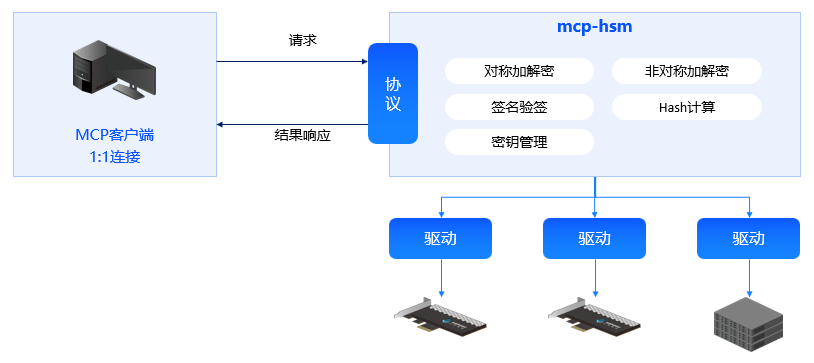
- MCP客户端:采用标准输入输出(stdio)方式与MCP-HSM进行通信;
- MCP-HSM:MCP服务器,为MCP客户端提供各种密码运算与密钥管理工具;
- 硬件驱动:支持多种硬件安全模块,提供更快速的安全服务;
安装与使用(以Windows环境为例)
安装
# 下载源代码到本地
git clone https://github.com/sansec-ai/mcp-hsm.git
cd mcp-hsm
# 安装Python包管理工具uv
pip install uv
# 创建虚拟环境
uv venv
配置MCP-HSM
MCP-HSM符合标准的MCP协议,可以使用任何MCP客户端调用本密码套件。
本示例采用VS Code中的Roo Code插件作为MCP客户端,使用本套件前应在Roo Code插件中选择可用的API提供商,输入正确的API密钥或基础URL,以及选择模型。在Roo Code的MCP服务管理菜单中,点击编辑项目配置,在创建的mcp.json文件中写入以下内容:
{
  "mcpServers": {
    "mcp-hsm": {
      "command": "uv",
      "args": [
        "--directory",
        ".",
        "run",
        "server.py"
      ],
      "env": {
        "LIBHSM_PATH": ".\\lib\\hsm_0018.dll"
      }
    }
  }
}
保存文件,点击重新连接,确保MCP服务已连接。
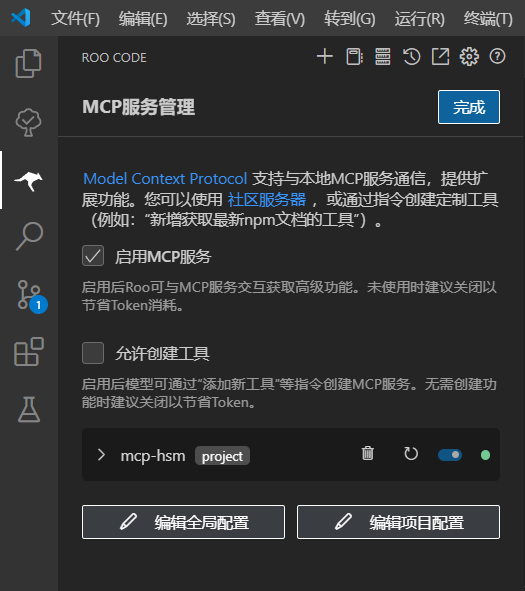
新建lib目录,将符合《GM/T 0018 密码设备应用接口规范》的接口库重命名为hsm_0018.dll后放入其中。若接口库包含其他依赖库,则需要一同放入该目录。若接口库依赖其他配置文件,请按照接口库提供商的建议放入指定目录中。
使用
以使用SM2密钥生成工具为例,在Roo Code对话框中输入”生成SM2密钥对“,发送任务。
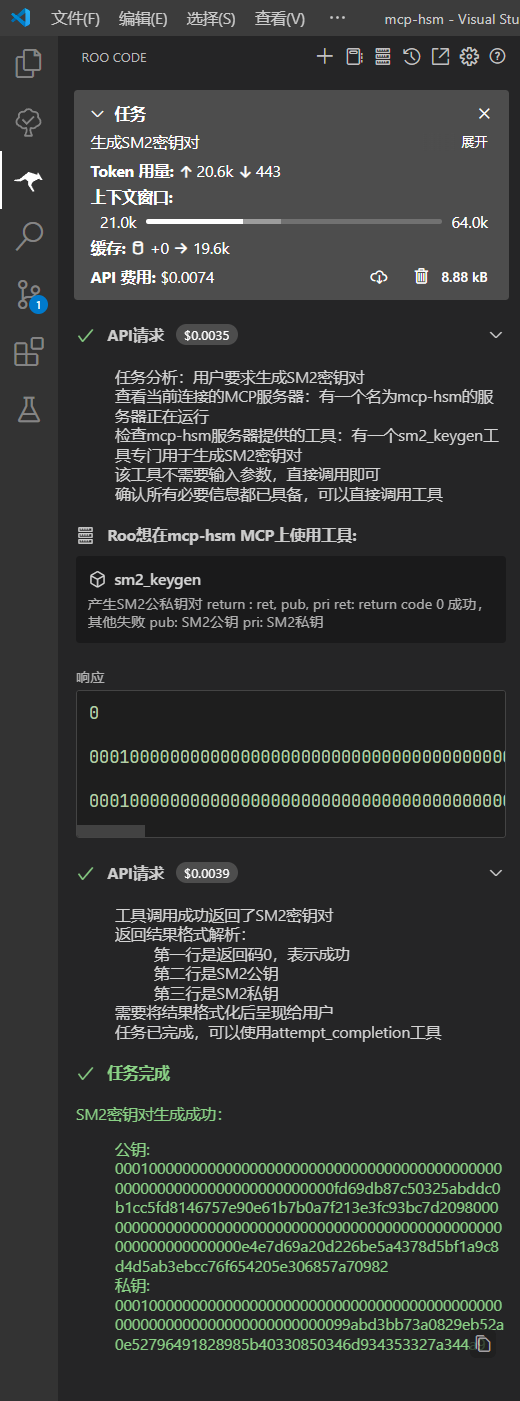
如图所示,MCP-HSM能够自动调用HSM模块的接口,生成符合国密规范的SM2密钥对。
贡献指南
欢迎贡献代码或提出改进建议!请参考贡献指南了解如何参与项目。
许可证
MCP-HSM遵循Apache License 2.0协议,允许自由使用、修改和分发。
联系我们
如需进一步了解或技术支持,请访问GitHub项目页面或联系项目维护者。
Dev Tools Supporting MCP
The following are the main code editors that support the Model Context Protocol. Click the link to visit the official website for more information.







