
Mcp Image Placeholder
What is Mcp Image Placeholder
mcp-image-placeholder is a lightweight MCP server designed to generate placeholder images from multiple providers, offering a simple and efficient way to obtain image URLs for various applications.
Use cases
Use cases include web development for generating placeholder images during design, testing applications that require image inputs, and creating mockups for presentations.
How to use
To use mcp-image-placeholder, clone the repository and set up the configuration for the MCP server. You can generate placeholder images by calling the ‘image_placeholder’ tool with parameters specifying the image provider, width, and height.
Key features
Key features include support for two image providers (placehold and lorem-picsum), input parameter validation, and immediate return of image URLs.
Where to use
undefined
Clients Supporting MCP
The following are the main client software that supports the Model Context Protocol. Click the link to visit the official website for more information.





Overview
What is Mcp Image Placeholder
mcp-image-placeholder is a lightweight MCP server designed to generate placeholder images from multiple providers, offering a simple and efficient way to obtain image URLs for various applications.
Use cases
Use cases include web development for generating placeholder images during design, testing applications that require image inputs, and creating mockups for presentations.
How to use
To use mcp-image-placeholder, clone the repository and set up the configuration for the MCP server. You can generate placeholder images by calling the ‘image_placeholder’ tool with parameters specifying the image provider, width, and height.
Key features
Key features include support for two image providers (placehold and lorem-picsum), input parameter validation, and immediate return of image URLs.
Where to use
undefined
Clients Supporting MCP
The following are the main client software that supports the Model Context Protocol. Click the link to visit the official website for more information.
Content
MCP Image Placeholder Server
This is a Model Context Protocol (MCP) server that provides a tool for generating placeholder images from different providers.
Features
- Generates placeholder images from supported providers
- Supports two image providers:
placehold: Provides simple placeholder imageslorem-picsum: Provides real images as placeholder images
- Validates input parameters
- Returns image URLs for immediate use
Requirements
- Python 3.9+
uvpackage manager
Installation
- Clone this repository
- Set up the configuration for MCP server
Usage
The server exposes one tool:
image_placeholder
Generate a placeholder image URL based on specified parameters.
Parameters:
provider: The image provider to use (placeholdorlorem-picsum)width: The width of the image (1-10000)height: The height of the image (1-10000)
Returns:
- URL string of the generated image
Example Usage:
# Generate a 300x200 placeholder image
url = image_placeholder(provider="placehold", width=300, height=200)

# Generate a 500px square lorem-picsum image
url = image_placeholder(provider="lorem-picsum", width=500)
Configuration
To connect this server to Claude for Desktop:
- Add the following to your
claude_desktop_config.json:{ "mcpServers": { "image-placeholder": { "command": "uv", "args": [ "--directory", "/ABSOLUTE/PATH/TO/PROJECT", "run", "main.py" ] } } } - Restart Claude for Desktop
To connect this server to Cursor:
- Open Cursor Settings
- Head to the
Featuressection - Scroll down to the
MCP Serverssection - Click on the
Add new MCP serverbutton - Enter the following information:
- Name:
image-placeholder - Type:
command - Server URL:
uv --directory /ABSOLUTE/PATH/TO/PROJECT run main.py
- Name:
- Click on the
Add ↵button
Troubleshooting
If the tool is not detected, use absolute path of the uv command, e.g.
/ABSOLUTE/PATH/TO/uv --directory /ABSOLUTE/PATH/TO/PROJECT run main.py
Example Usage and Output (Cursor)
Prompt:
Create a new directory named "example" and a file named output.html.

Then create a single modern looking page using tailwindcss: https://unpkg.com/@tailwindcss/browser@4

Show a nice header, content, and footer, showing a photo gallery.

Save this into output.html
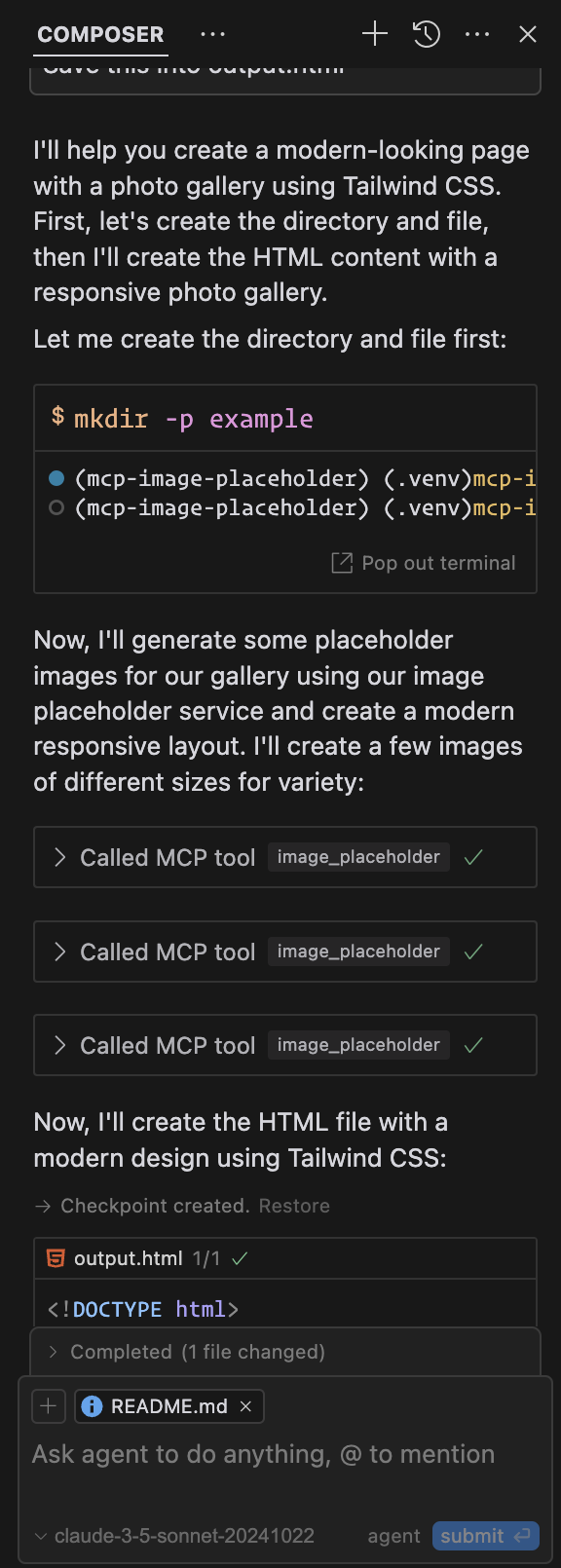
Output:
Example Output (Cursor)
License
Dev Tools Supporting MCP
The following are the main code editors that support the Model Context Protocol. Click the link to visit the official website for more information.







