
Mcp Image Processor
What is Mcp Image Processor
mcp-image-processor is a high-performance image processing server based on the Model Context Protocol (MCP). It offers a variety of image processing functionalities such as format conversion, resizing, and compression optimization.
Use cases
Use cases include converting images to different formats for web use, resizing images for mobile applications, optimizing images for faster loading times, and applying filters or adjustments for graphic design projects.
How to use
To use mcp-image-processor, clone the repository, install the dependencies, configure the MCP Server according to your environment, and then start the server. You can interact with the server by describing the image operations you want to perform along with the absolute paths of the images.
Key features
Key features include support for multiple image format conversions (JPEG, PNG, WebP, TIFF, GIF, AVIF, HEIF), flexible cropping and resizing options, image quality compression, metadata removal, various scaling modes, rotation, flipping, and adjustments for brightness, contrast, saturation, blur, and sharpening.
Where to use
mcp-image-processor can be used in various fields such as web development, digital media processing, graphic design, and any application requiring automated image manipulation and optimization.
Clients Supporting MCP
The following are the main client software that supports the Model Context Protocol. Click the link to visit the official website for more information.





Overview
What is Mcp Image Processor
mcp-image-processor is a high-performance image processing server based on the Model Context Protocol (MCP). It offers a variety of image processing functionalities such as format conversion, resizing, and compression optimization.
Use cases
Use cases include converting images to different formats for web use, resizing images for mobile applications, optimizing images for faster loading times, and applying filters or adjustments for graphic design projects.
How to use
To use mcp-image-processor, clone the repository, install the dependencies, configure the MCP Server according to your environment, and then start the server. You can interact with the server by describing the image operations you want to perform along with the absolute paths of the images.
Key features
Key features include support for multiple image format conversions (JPEG, PNG, WebP, TIFF, GIF, AVIF, HEIF), flexible cropping and resizing options, image quality compression, metadata removal, various scaling modes, rotation, flipping, and adjustments for brightness, contrast, saturation, blur, and sharpening.
Where to use
mcp-image-processor can be used in various fields such as web development, digital media processing, graphic design, and any application requiring automated image manipulation and optimization.
Clients Supporting MCP
The following are the main client software that supports the Model Context Protocol. Click the link to visit the official website for more information.
Content
MCP 图像处理服务器


基于 Model Context Protocol (MCP) 的高性能图像处理服务器,提供格式转换、尺寸调整、压缩优化等丰富的图像处理功能。
功能概览
- 支持多种图像格式转换:JPEG、PNG、WebP、TIFF、GIF、AVIF、HEIF
- 灵活的图像裁剪与尺寸调整
- 图像质量压缩与元数据移除优化
- 多种缩放模式,支持保持或调整宽高比
- 旋转角度及水平/垂直翻转
- 亮度、对比度、饱和度调整及模糊、锐化后处理
系统要求
- Node.js 18 及以上版本
- TypeScript 5 及以上版本
- 支持
sharp原生模块的运行环境
安装与快速开始
1. 克隆仓库
git clone https://github.com/HYPERVAPOR/mcp-image-processor.git
cd mcp-image-processor
2. 安装依赖
npm install
3. (可选)修改代码
如果需要自定义 MCP Server 逻辑,请编辑 src/index.ts,修改完成后执行:
npm run build
4. 配置 MCP Server
以 cline 客户端为例,其他客户端(如 cursor, cherryStudio)配置类似:
{
  "mcpServers": {
    "image-processor": {
      "autoApprove": [],
      "disabled": false,
      "timeout": 60,
      "command": "C:\\Program Files\\nodejs\\node.exe",
      "args": [
        "C:\\projs\\mcp-image-processor\\dist\\index.js"
      ],
      "transportType": "stdio"
    }
  }
}注意:请将
command和args替换为你本地的真实路径。
5. 启动使用
确保 MCP Server 已启用:
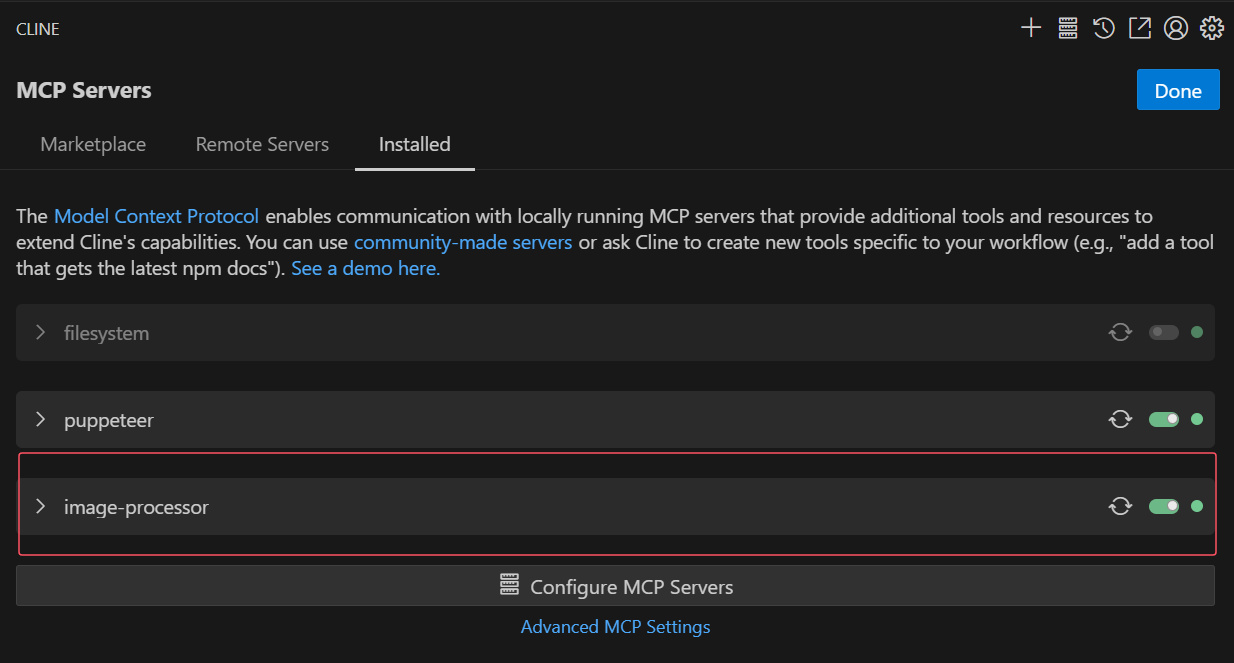
只需向 LLM 描述你想对图片执行的操作,并提供一个或多个图片的绝对路径,例如:
请你将此图片转换为黑白色调,图片位于 "C:\projs\MCP-image-server\assets\test\climbing.png"
效果演示: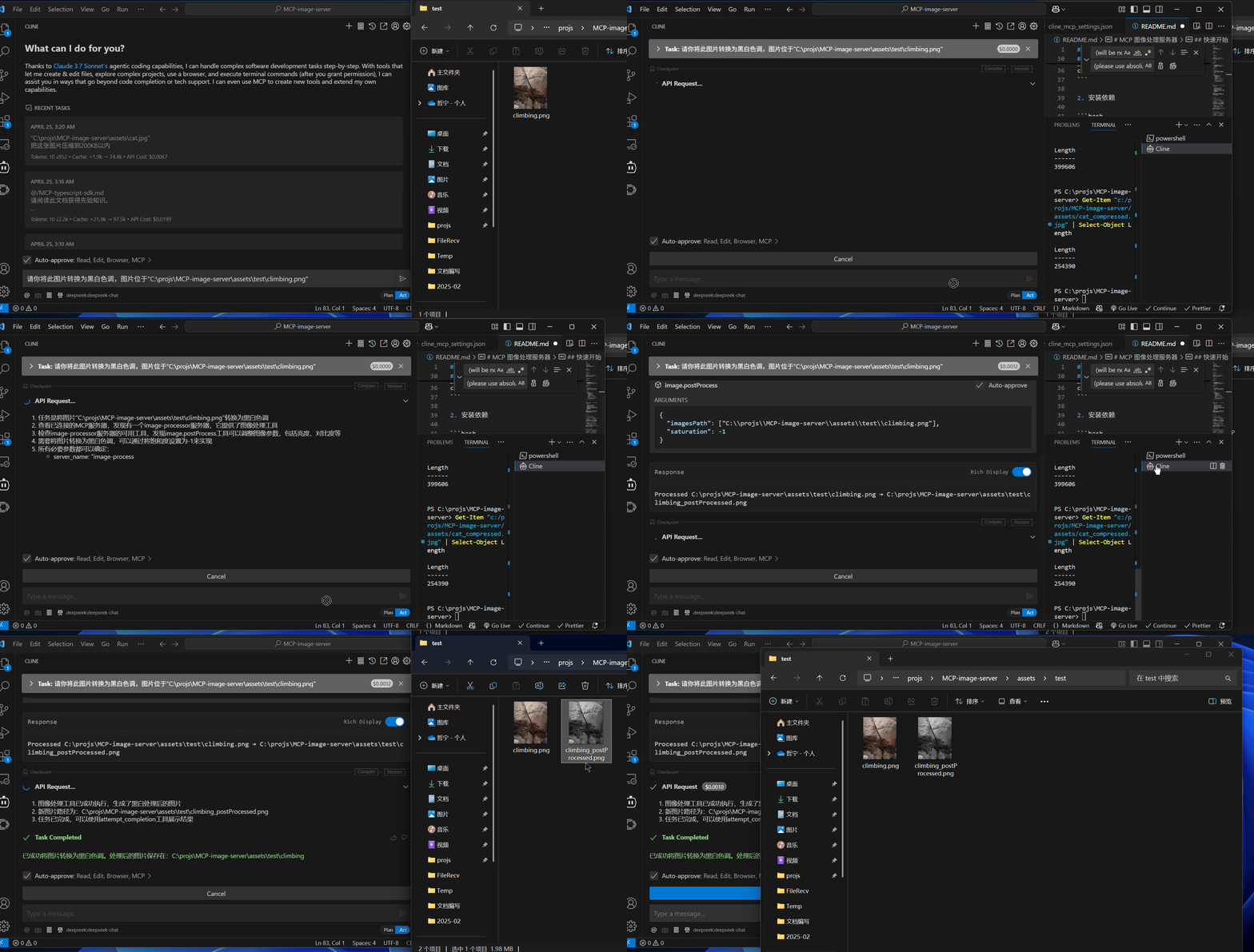
可用工具接口说明
1. image.convertFormat — 格式转换
-
参数:
imagesPath: 绝对路径数组outputFormat: 目标格式(jpeg、png、webp、tiff、gif、avif、heif)formatParams(可选):quality: 输出质量(0-100)compressionLevel: 压缩级别(0-9,9 为最高)
-
功能:将图片转换为指定格式,支持质量与压缩级别调整。
2. image.cropResize — 裁剪与尺寸调整
-
参数:
imagesPath: 绝对路径数组width: 目标宽度(像素,可选)height: 目标高度(像素,可选)resizeMode: 调整模式(contain、cover、fill、inside、outside)maintainRatio: 是否保持宽高比(默认true)rotate: 旋转角度(-360 到 360 度,可选)flip: 是否垂直翻转(可选)mirror: 是否水平翻转(可选)
-
功能:裁剪、缩放、旋转和翻转图片,支持多种尺寸调整策略。
3. image.compressOptimize — 压缩与优化
-
参数:
imagesPath: 绝对路径数组quality: 输出质量(0-100,可选)stripMetadata: 是否移除 EXIF 等元数据(默认true)progressive: 是否启用渐进式渲染(JPEG/PNG,可选)
-
功能:压缩图片,去除元数据,支持渐进式渲染。
4. image.resize — 图像缩放
-
参数:
imagesPath: 绝对路径数组width: 目标宽度(像素,可选)height: 目标高度(像素,可选)maintainRatio: 是否保持宽高比(默认true)fitMode: 缩放模式(contain、cover、fill、inside、outside,可选)
-
功能:缩放图片,支持保持比例或指定缩放模式。若开启保持比例且目标宽高比与原图不符,将返回错误。
5. image.rotateFlip — 旋转与翻转
-
参数:
imagesPath: 绝对路径数组rotateAngle: 旋转角度(-360 到 360 度,可选)flipHorizontal: 是否水平翻转(镜像效果,可选)flipVertical: 是否垂直翻转(可选)
-
功能:旋转及水平/垂直翻转图片。
6. image.postProcess — 图像后处理
-
参数:
imagesPath: 绝对路径数组brightness: 亮度调整(-1 到 1,可选)contrast: 对比度调整(-1 到 1,可选)saturation: 饱和度调整(-1 到 1,可选)blur: 模糊半径(像素,可选)sharpen: 锐化强度(0-100,可选)
-
功能:调整亮度、对比度、饱和度,支持模糊与锐化处理。
项目结构
MCP-image-server/
├── src/                # TypeScript 源代码
│   └── index.ts        # 主入口文件
├── dist/               # 编译输出目录
│   └── index.js        # 编译后的主入口文件
├── test/               # 测试脚本目录
├── package.json        # 项目配置及依赖
└── tsconfig.json       # TypeScript 编译配置
许可证
MIT © 2025
感谢您使用 MCP 图像处理服务器,欢迎贡献与反馈!
Dev Tools Supporting MCP
The following are the main code editors that support the Model Context Protocol. Click the link to visit the official website for more information.







