
Mcp Knowledge Base
What is Mcp Knowledge Base
The MCP Knowledge Base is a repository designed for building a private LLM agent that connects to an MCP client and server. The MCP server, named knowledge-vault, interacts with a personal Obsidian knowledge base organized through Markdown files, enabling users to manage and retrieve knowledge resources efficiently.
Use cases
This knowledge base is ideal for individuals or teams looking to leverage AI for knowledge management. Use cases include personal note-taking, building a structured knowledge repository, and enhancing productivity through AI-driven insights. It is particularly useful for users of Obsidian who want to integrate AI capabilities into their workflow.
How to use
To use the MCP Knowledge Base, set up the MCP server (knowledge-vault) to manage your Markdown files and create an LLM agent using the MCP client. Users can interact through a chat interface built with Streamlit, allowing seamless communication with the LLM agent. The system includes functions to list and retrieve knowledge notes.
Key features
Key features of the MCP Knowledge Base include the ability to list all knowledge notes, retrieve specific knowledge by URI, and integrate with the Llama 3.2 model to enhance information retrieval. The prototype chat interface provides an interactive experience for users looking to access their knowledge base rapidly.
Where to use
This system can be utilized in personal or collaborative environments where knowledge management is essential. It is particularly beneficial for researchers, students, and professionals using Obsidian as their primary knowledge management tool, as it allows for direct AI interaction with their organized content.
Clients Supporting MCP
The following are the main client software that supports the Model Context Protocol. Click the link to visit the official website for more information.





Overview
What is Mcp Knowledge Base
The MCP Knowledge Base is a repository designed for building a private LLM agent that connects to an MCP client and server. The MCP server, named knowledge-vault, interacts with a personal Obsidian knowledge base organized through Markdown files, enabling users to manage and retrieve knowledge resources efficiently.
Use cases
This knowledge base is ideal for individuals or teams looking to leverage AI for knowledge management. Use cases include personal note-taking, building a structured knowledge repository, and enhancing productivity through AI-driven insights. It is particularly useful for users of Obsidian who want to integrate AI capabilities into their workflow.
How to use
To use the MCP Knowledge Base, set up the MCP server (knowledge-vault) to manage your Markdown files and create an LLM agent using the MCP client. Users can interact through a chat interface built with Streamlit, allowing seamless communication with the LLM agent. The system includes functions to list and retrieve knowledge notes.
Key features
Key features of the MCP Knowledge Base include the ability to list all knowledge notes, retrieve specific knowledge by URI, and integrate with the Llama 3.2 model to enhance information retrieval. The prototype chat interface provides an interactive experience for users looking to access their knowledge base rapidly.
Where to use
This system can be utilized in personal or collaborative environments where knowledge management is essential. It is particularly beneficial for researchers, students, and professionals using Obsidian as their primary knowledge management tool, as it allows for direct AI interaction with their organized content.
Clients Supporting MCP
The following are the main client software that supports the Model Context Protocol. Click the link to visit the official website for more information.
Content
MCP Knowledge Base
Introduction
This repository is for building a private LLM agent that interfaces with an MCP client and server.
The MCP server is designed to connect only to my private Obsidian knowledge base, which is organized using Markdown files.
For more details, please refer to this Medium Article (How I built a local MCP server to connect Obsidian with AI).
For the details of building sLLM agent and MCP client, please check this Medium Article (How I built a Tool-calling Llama Agent with a Custom MCP Server).
This repository includes the following components:
- MCP Client
- MCP Server
- LLM Agent
Components

MCP Server (knowledge-vault)
The MCP server, named knowledge-vault, manages Markdown files that serve as topic-specific knowledge notes. It provides the following tools:
list_knowledges(): list the names and URIs of all knowledges written in the the vaultget_knowledge_by_uri(uri:str): get contents of the knowledge resource by uri
Agent / MCP Client
This repository also contains a simple LLM agent implementation. It currently uses the Llama 3.2 model and leverages the MCP client to retrieve relevant knowledge context.
Chat Interface
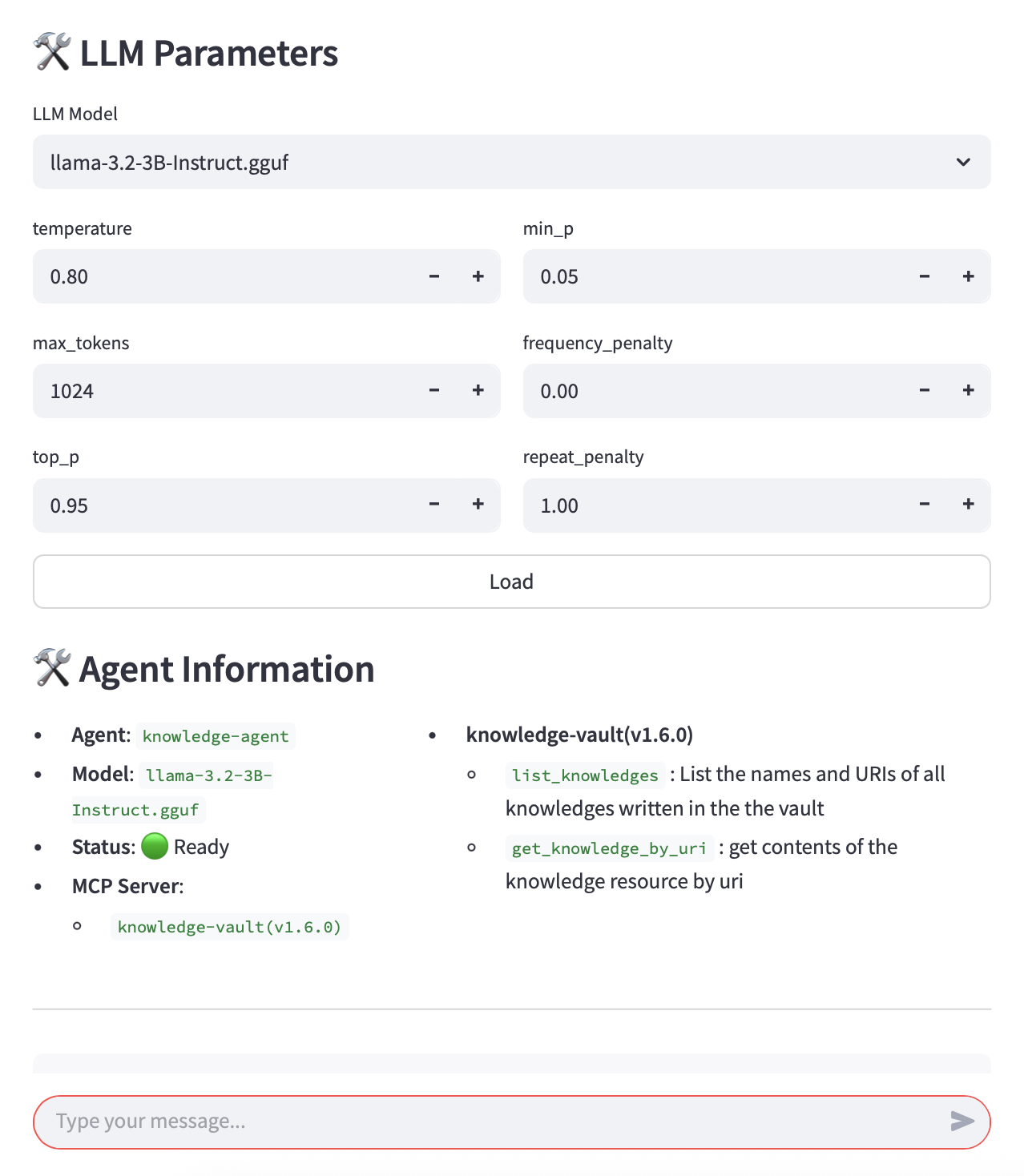
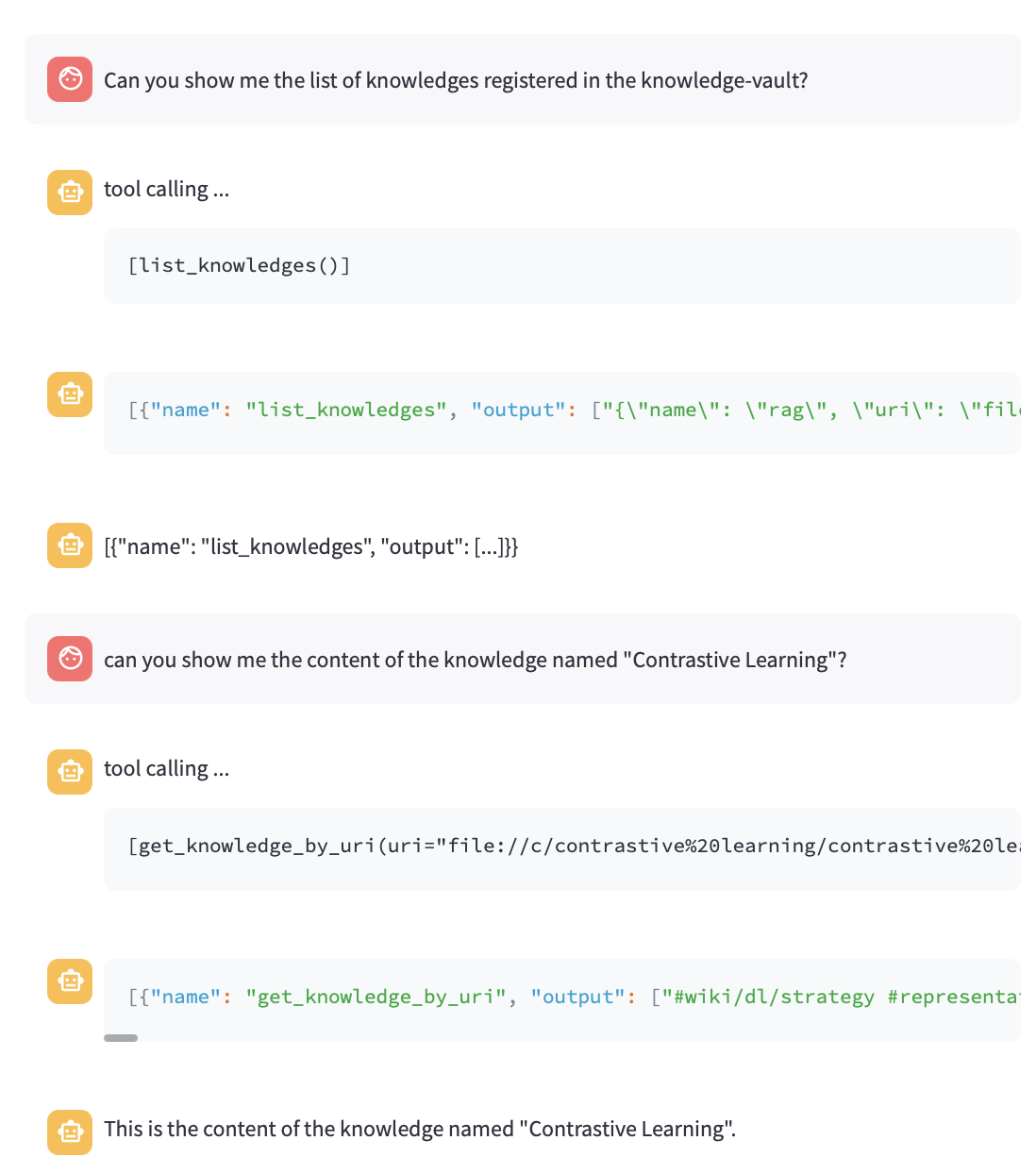
The agent can be used via a chat interface built with Streamlit. Please note that it is a prototype and may contain bugs.
below screenshots are showing LLM loading and parameter settings and the interactive chat view.
Dev Tools Supporting MCP
The following are the main code editors that support the Model Context Protocol. Click the link to visit the official website for more information.







