
Mcp Kubernetes
What is Mcp Kubernetes
mcp-kubernetes is a Model Context Protocol (MCP) server that facilitates interaction between AI assistants and Kubernetes clusters. It acts as a bridge, translating natural language requests into Kubernetes operations and providing results in a format that AI tools can understand.
Use cases
Use cases for mcp-kubernetes include automating Kubernetes management tasks through AI assistants, simplifying resource queries, and enhancing the user experience in managing Kubernetes clusters using natural language.
How to use
To use mcp-kubernetes, install it via Docker or locally. For Docker, run a command that mounts your kubeconfig file. For local installation, ensure kubectl and helm are installed and configured properly. Then, set up your MCP servers in compatible AI tools like Claude, Cursor, or ChatGPT Copilot.
Key features
Key features of mcp-kubernetes include the ability to query Kubernetes resources, execute kubectl commands, manage Kubernetes clusters through natural language interactions, and diagnose the states of Kubernetes resources.
Where to use
mcp-kubernetes can be used in various fields such as DevOps, cloud computing, and AI development, where Kubernetes orchestration and AI tool integration are required.
Clients Supporting MCP
The following are the main client software that supports the Model Context Protocol. Click the link to visit the official website for more information.





Overview
What is Mcp Kubernetes
mcp-kubernetes is a Model Context Protocol (MCP) server that facilitates interaction between AI assistants and Kubernetes clusters. It acts as a bridge, translating natural language requests into Kubernetes operations and providing results in a format that AI tools can understand.
Use cases
Use cases for mcp-kubernetes include automating Kubernetes management tasks through AI assistants, simplifying resource queries, and enhancing the user experience in managing Kubernetes clusters using natural language.
How to use
To use mcp-kubernetes, install it via Docker or locally. For Docker, run a command that mounts your kubeconfig file. For local installation, ensure kubectl and helm are installed and configured properly. Then, set up your MCP servers in compatible AI tools like Claude, Cursor, or ChatGPT Copilot.
Key features
Key features of mcp-kubernetes include the ability to query Kubernetes resources, execute kubectl commands, manage Kubernetes clusters through natural language interactions, and diagnose the states of Kubernetes resources.
Where to use
mcp-kubernetes can be used in various fields such as DevOps, cloud computing, and AI development, where Kubernetes orchestration and AI tool integration are required.
Clients Supporting MCP
The following are the main client software that supports the Model Context Protocol. Click the link to visit the official website for more information.
Content
mcp-kubernetes
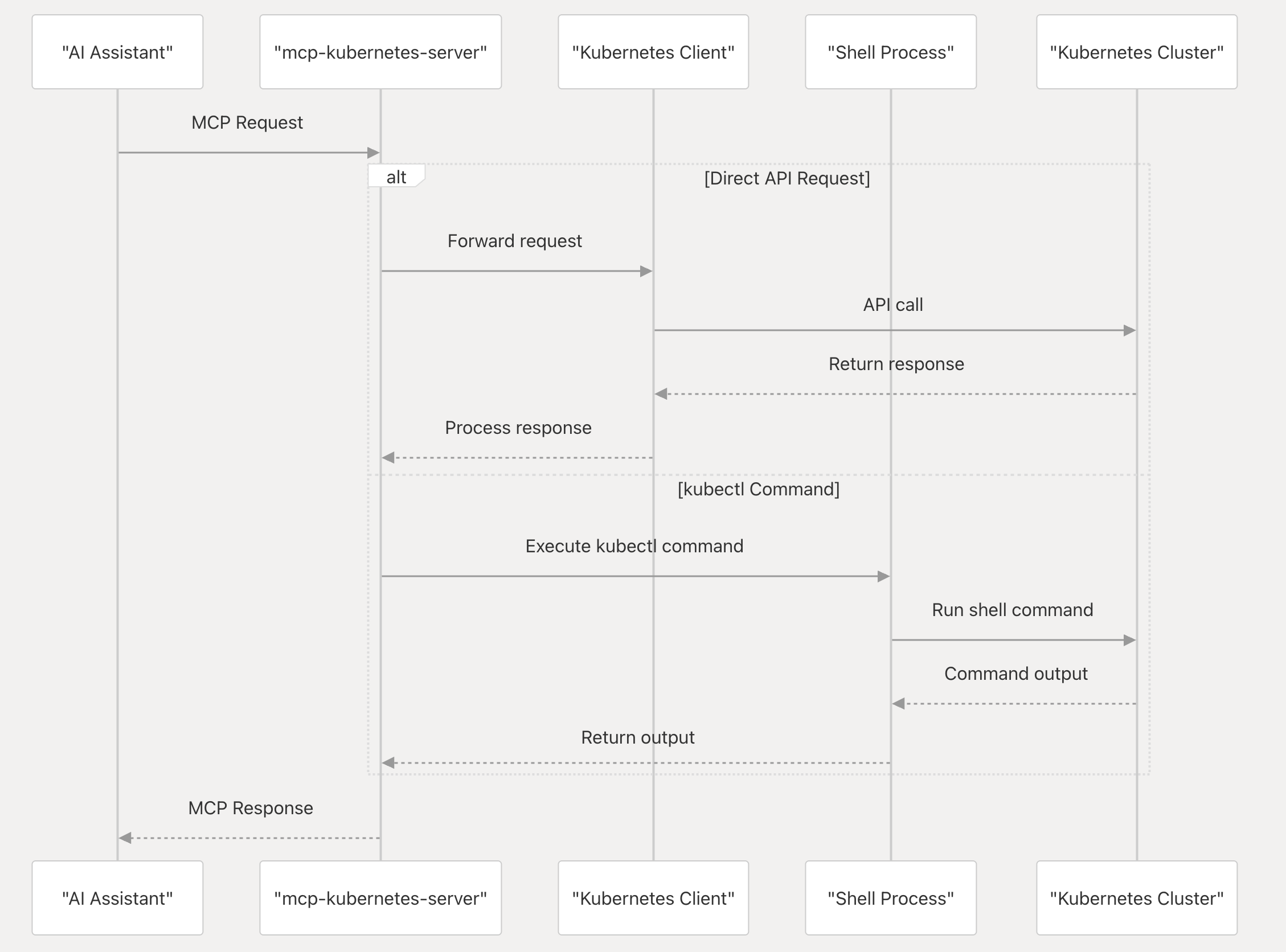
The mcp-kubernetes is a Model Context Protocol (MCP) server that enables AI assistants to interact with Kubernetes clusters. It serves as a bridge between AI tools (like Claude, Cursor, and GitHub Copilot) and Kubernetes, translating natural language requests into Kubernetes operations and returning the results in a format the AI tools can understand.
It allows AI tools to:
- Query Kubernetes resources
- Execute kubectl commands
- Manage Kubernetes clusters through natural language interactions
- Diagnose and interpret the states of Kubernetes resources
How it works
How to install
Docker
Get your kubeconfig file for your Kubernetes cluster and setup in the mcpServers (replace src path with your kubeconfig path):
{
  "mcpServers": {
    "kubernetes": {
      "command": "docker",
      "args": [
        "run",
        "-i",
        "--rm",
        "--mount",
        "type=bind,src=/home/username/.kube/config,dst=/home/mcp/.kube/config",
        "ghcr.io/azure/mcp-kubernetes"
      ]
    }
  }
}
Local
Install kubectl
Install kubectl if it’s not installed yet and add it to your PATH, e.g.
# For Linux
curl -LO "https://dl.k8s.io/release/$(curl -L -s https://dl.k8s.io/release/stable.txt)/bin/linux/amd64/kubectl"

# For MacOS
curl -LO "https://dl.k8s.io/release/$(curl -L -s https://dl.k8s.io/release/stable.txt)/bin/darwin/arm64/kubectl"
Install helm
Install helm if it’s not installed yet and add it to your PATH, e.g.
curl -sSL https://raw.githubusercontent.com/helm/helm/main/scripts/get-helm-3 | bash
Config your MCP servers in Claude Desktop, Cursor, ChatGPT Copilot, Github Copilot and other supported AI clients, e.g.
{
  "mcpServers": {
    "kubernetes": {
      "command": "<path of binary 'mcp-kubernetes'>",
      "args": [
        "--transport",
        "stdio"
      ],
      "env": {
        "KUBECONFIG": "<your-kubeconfig-path>"
      }
    }
  }
}
Options
Environment variables:
KUBECONFIG: Path to your kubeconfig file, e.g./home/<username>/.kube/config.
Command line arguments:
Usage of ./mcp-kubernetes:
      --additional-tools string   Comma-separated list of additional tools to support (kubectl is always enabled). Available: helm,cilium
      --allow-namespaces string   Comma-separated list of namespaces to allow (empty means all allowed)
      --host string               Host to listen for the server (only used with transport sse or streamable-http) (default "127.0.0.1")
      --port int                  Port to listen for the server (only used with transport sse or streamable-http) (default 8000)
      --readonly                  Enable read-only mode (prevents write operations)
      --timeout int               Timeout for command execution in seconds, default is 60s (default 60)
      --transport string          Transport mechanism to use (stdio, sse or streamable-http) (default "stdio")
Usage
Ask any questions about Kubernetes cluster in your AI client, e.g.
What is the status of my Kubernetes cluster?

What is wrong with my nginx pod?
Available Tools
The mcp-kubernetes server provides the following tools for interacting with Kubernetes clusters:
Read-Only Tools
Read-Only Tools
kubectl_get: Get Kubernetes resourceskubectl_describe: Show detailed information about Kubernetes resourceskubectl_explain: Get documentation for Kubernetes resourceskubectl_logs: Print logs from containers in podskubectl_api_resources: List available API resourceskubectl_api_versions: List available API versionskubectl_diff: Show differences between current state and applied changeskubectl_cluster_info: Display cluster informationkubectl_top: Display resource usage (CPU/Memory)kubectl_events: List events in the clusterkubectl_auth: Inspect authorization settings
Read-Write Tools
Read-Write Tools
kubectl_create: Create Kubernetes resourceskubectl_delete: Delete Kubernetes resourceskubectl_apply: Apply configurations to resourceskubectl_expose: Expose a resource as a new Kubernetes servicekubectl_run: Run a particular image in the clusterkubectl_set: Set specific features on objectskubectl_rollout: Manage rollouts of deploymentskubectl_scale: Scale deployments, statefulsets, and replicasetskubectl_autoscale: Auto-scale deployments, statefulsets, and replicasetskubectl_label: Update labels on resourceskubectl_annotate: Update annotations on resourceskubectl_patch: Update fields of resources using strategic merge patchkubectl_replace: Replace existing resourceskubectl_cp: Copy files between containers and local filesystemskubectl_exec: Execute commands in containers
Admin Tools
Admin Tools
kubectl_cordon: Mark node as unschedulablekubectl_uncordon: Mark node as schedulablekubectl_drain: Drain node for maintenancekubectl_taint: Update taints on nodeskubectl_certificate: Modify certificate resources
Helm Tools
Helm Tools
- Run-helm-command: Run helm commands and get results
Note: Read-write and admin tools are only available when the server is not run in read-only mode.
Development
How to inspect MCP server requests and responses:
npx @modelcontextprotocol/inspector <path of binary 'mcp-kubernetes'>
Contributing
This project welcomes contributions and suggestions. Most contributions require you to agree to a
Contributor License Agreement (CLA) declaring that you have the right to, and actually do, grant us
the rights to use your contribution. For details, visit https://cla.opensource.microsoft.com.
When you submit a pull request, a CLA bot will automatically determine whether you need to provide
a CLA and decorate the PR appropriately (e.g., status check, comment). Simply follow the instructions
provided by the bot. You will only need to do this once across all repos using our CLA.
This project has adopted the Microsoft Open Source Code of Conduct.
For more information see the Code of Conduct FAQ or
contact [email protected] with any additional questions or comments.
Trademarks
This project may contain trademarks or logos for projects, products, or services. Authorized use of Microsoft
trademarks or logos is subject to and must follow
Microsoft’s Trademark & Brand Guidelines.
Use of Microsoft trademarks or logos in modified versions of this project must not cause confusion or imply Microsoft sponsorship.
Any use of third-party trademarks or logos are subject to those third-party’s policies.
Dev Tools Supporting MCP
The following are the main code editors that support the Model Context Protocol. Click the link to visit the official website for more information.







