
Mcp Log Proxy
What is Mcp Log Proxy
mcp-log-proxy is a web logging proxy designed for monitoring the communication between MCP clients and MCP servers. It provides a web interface to view messages exchanged during this interaction.
Use cases
Use cases for mcp-log-proxy include monitoring real-time interactions between MCP clients and servers, debugging communication issues, and analyzing message flows during development and testing phases.
How to use
To use mcp-log-proxy, you need to install it using the command ‘go install github.com/emicklei/mcp-log-proxy@latest’. Start the proxy by providing the ‘-command’ argument with the full command line for the MCP server. For example: ‘mcp-log-proxy -command melrose-mcp’. Optionally, you can specify a log file location with ‘-log’. Once started, messages can be viewed at ‘http://localhost:5656’.
Key features
Key features of mcp-log-proxy include a web interface for real-time message monitoring, support for STDIO interface, customizable log file location, and the ability to specify a different port for the web interface.
Where to use
mcp-log-proxy can be used in software development environments, particularly for debugging and monitoring MCP client-server communications. It is useful for developers working with MCP protocols and applications.
Clients Supporting MCP
The following are the main client software that supports the Model Context Protocol. Click the link to visit the official website for more information.





Overview
What is Mcp Log Proxy
mcp-log-proxy is a web logging proxy designed for monitoring the communication between MCP clients and MCP servers. It provides a web interface to view messages exchanged during this interaction.
Use cases
Use cases for mcp-log-proxy include monitoring real-time interactions between MCP clients and servers, debugging communication issues, and analyzing message flows during development and testing phases.
How to use
To use mcp-log-proxy, you need to install it using the command ‘go install github.com/emicklei/mcp-log-proxy@latest’. Start the proxy by providing the ‘-command’ argument with the full command line for the MCP server. For example: ‘mcp-log-proxy -command melrose-mcp’. Optionally, you can specify a log file location with ‘-log’. Once started, messages can be viewed at ‘http://localhost:5656’.
Key features
Key features of mcp-log-proxy include a web interface for real-time message monitoring, support for STDIO interface, customizable log file location, and the ability to specify a different port for the web interface.
Where to use
mcp-log-proxy can be used in software development environments, particularly for debugging and monitoring MCP client-server communications. It is useful for developers working with MCP protocols and applications.
Clients Supporting MCP
The following are the main client software that supports the Model Context Protocol. Click the link to visit the official website for more information.
Content
mcp-log-proxy
mcp-log-proxy can be used to see the messages to and from a MCP client and a MCP server using a Web interface.
Currently, it only supports the STDIO interface.
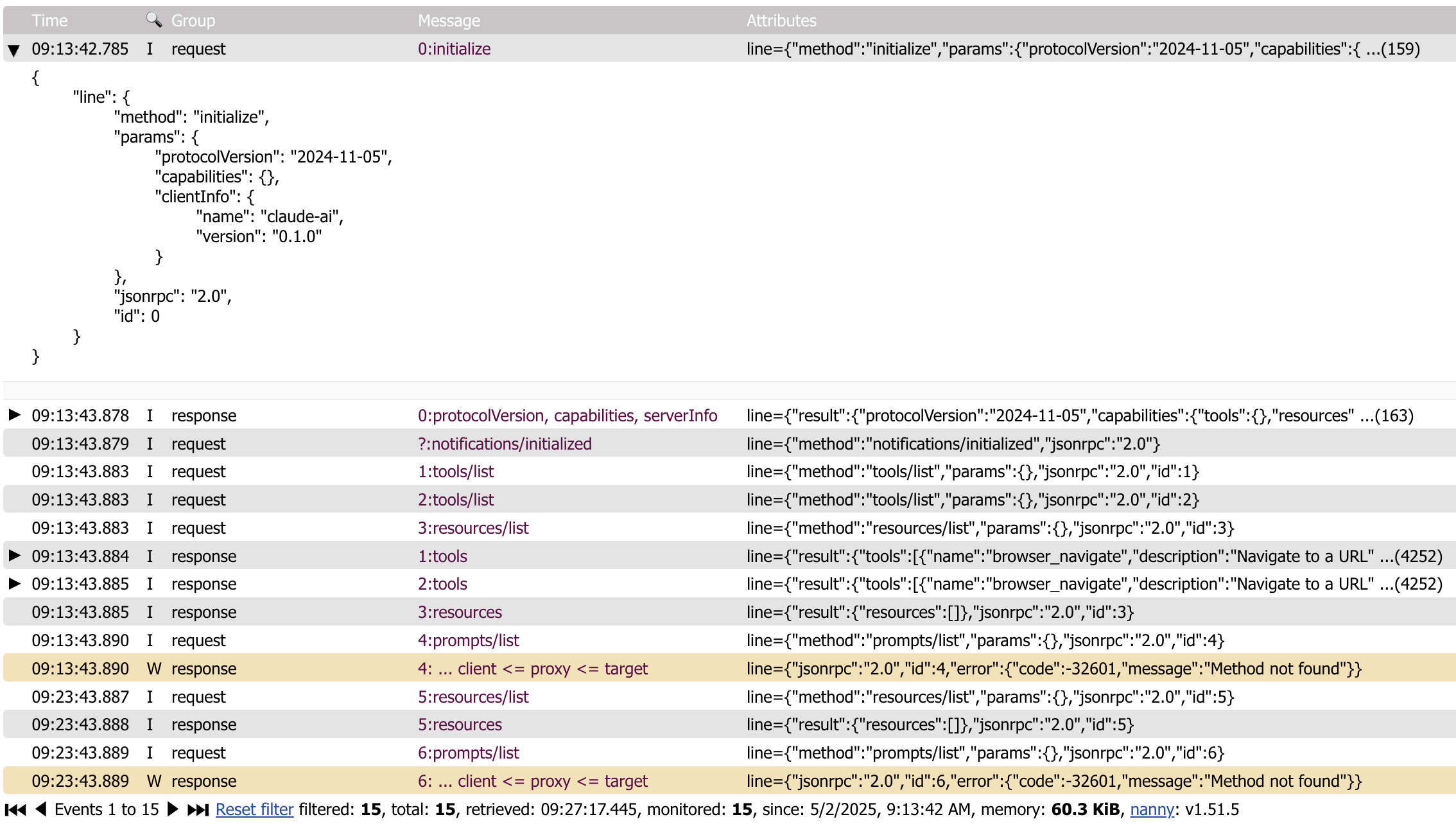
Multiple proxies
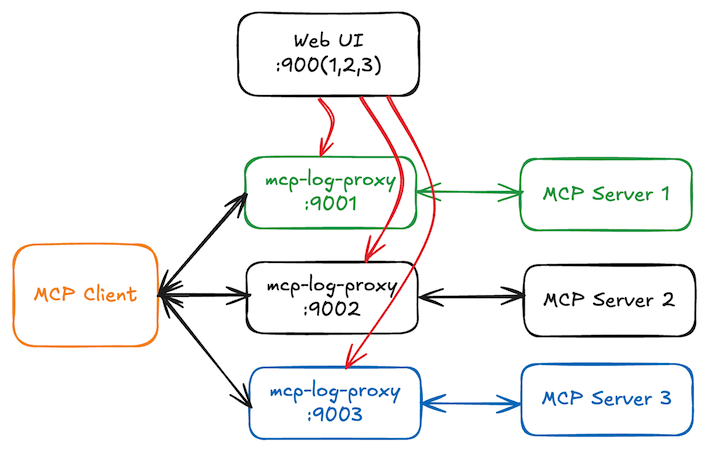
All running mcp-log-proxy processes will register themselves in .mcp-log-proxy-instances.json located in your home directory. On the web page, you can use the selector to switch to another proxy instance.
install
brew tap "emicklei/tap"
and then
brew install emicklei/tap/mcp-log-proxy
or via Go
go install github.com/emicklei/mcp-log-proxy@latest
usage
mcp-log-proxy requires one argument -command that contains the full command line for starting the MCP server.
For example, to proxy traffic to the melrose-mcp server, the full command is:
mcp-log-proxy -command melrose-mcp
This example assumes that both tools are available on your execution PATH.
Once the proxy is started, messages can be viewed on http:/localhost:5656.
optional flags
You can override the Web page title using the title flag:
mcp-log-proxy -command melrose-mcp -title "Melrōse (proxy)"
You can override the HTTP port(default 5656) using the port flag:
mcp-log-proxy -command melrose-mcp -port 9999
When running multiple proxies, the mcp-log-proxy will detect whether a HTTP port is taken and choose a different port instead. Using the Web UI you can select any of the other running proxies.
You can override the log file location of the proxy that captures errors in the proxy itself using the log flag:
mcp-log-proxy -command melrose-mcp -log /your/logs/mcp-log-proxy.log
Claude examples
This example proxies the use of the melrose-mcp server.
Locate the binaries to get the correct paths.
"melrōse": {
  "command": "/Users/SOME-USER/go/bin/mcp-log-proxy",
  "args": [
    "-command",
    "/Users/SOME-USER/go/bin/melrose-mcp -log /Users/SOME-USER/Library/Logs/claude-melrose.log",
    "-log",
    "/Users/SOME-USER/Library/Logs/claude-melrose-proxy.log",
    "-port",
    "7788",
    "-title",
    "Claude Melrose MCP"
  ]
},
Proxying the browsermcp server.
"browsermcp": {
  "command": "/Users/SOME-USER/go/bin/mcp-log-proxy",
  "args": [
    "-command",
    "npx @browsermcp/mcp@latest",
    "-log",
    "/Users/SOME-USER/Library/Logs/claude-browsermcp-proxy.log",
    "-port",
    "7799",
    "-title",
    "Claude Browser MCP"
  ]
}
Goose Example
This example proxies the use of the melrose-mcp server.
Locate the binaries to get the correct paths.
/Users/SOME-USER/go/bin/mcp-log-proxy -command /Users/SOME-USER/go/bin/melrose-mcp -log /Users/SOME-USER/Library/Logs/goose-melrose.log -port 8888 -title Melrose-MCP
Error information
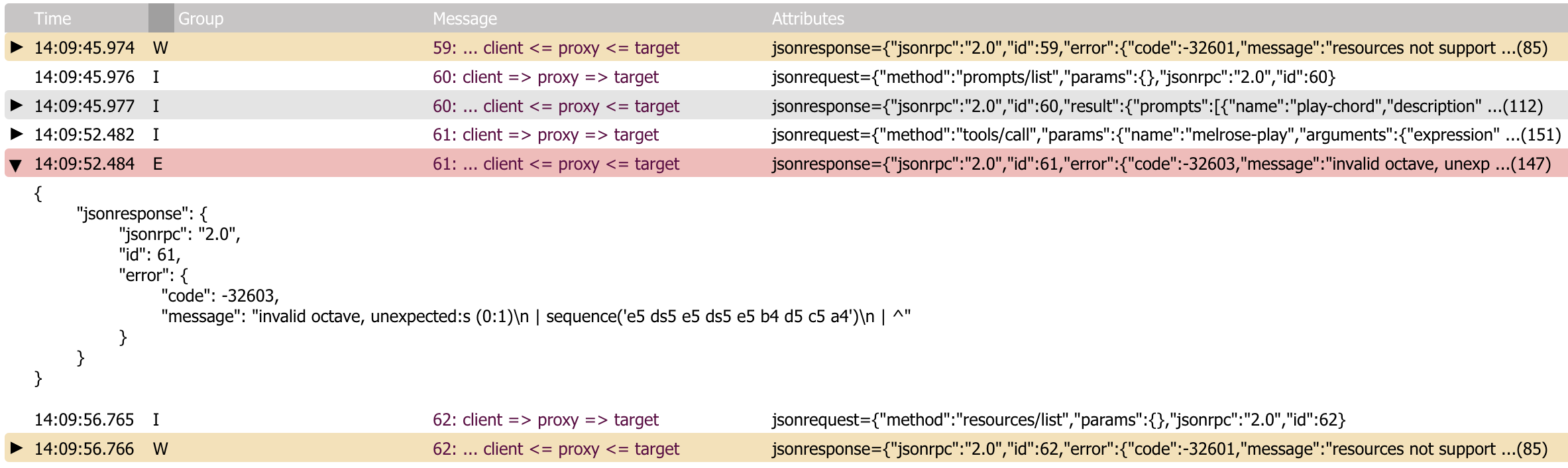
© 2025, https://ernestmicklei.com. MIT License.
Dev Tools Supporting MCP
The following are the main code editors that support the Model Context Protocol. Click the link to visit the official website for more information.







