
Mcp Mcp
What is Mcp Mcp
MCP-MCP is an AI agent that controls Minecraft using the Model Context Protocol (MCP). It allows AI built with Strands Agents to build and operate within the Minecraft world.
Use cases
Use cases for MCP-MCP include automated building in Minecraft, creating interactive learning experiences, developing AI-driven gameplay mechanics, and conducting experiments in AI behavior within a game context.
How to use
To use MCP-MCP, install the required tools such as AWS CLI and uv, configure AWS credentials for Amazon Bedrock API, clone the repository, and set up both server-side and client-side dependencies. Finally, prepare the Minecraft Pi Edition to start a new game.
Key features
Key features of MCP-MCP include the ability to control Minecraft through AI agents, integration with the Model Context Protocol, and compatibility with Raspberry Pi 4 Model B and Minecraft Pi Edition.
Where to use
MCP-MCP can be used in educational settings for teaching programming and AI concepts, in game development for creating intelligent NPCs, and in research for exploring AI interactions in virtual environments.
Clients Supporting MCP
The following are the main client software that supports the Model Context Protocol. Click the link to visit the official website for more information.





Overview
What is Mcp Mcp
MCP-MCP is an AI agent that controls Minecraft using the Model Context Protocol (MCP). It allows AI built with Strands Agents to build and operate within the Minecraft world.
Use cases
Use cases for MCP-MCP include automated building in Minecraft, creating interactive learning experiences, developing AI-driven gameplay mechanics, and conducting experiments in AI behavior within a game context.
How to use
To use MCP-MCP, install the required tools such as AWS CLI and uv, configure AWS credentials for Amazon Bedrock API, clone the repository, and set up both server-side and client-side dependencies. Finally, prepare the Minecraft Pi Edition to start a new game.
Key features
Key features of MCP-MCP include the ability to control Minecraft through AI agents, integration with the Model Context Protocol, and compatibility with Raspberry Pi 4 Model B and Minecraft Pi Edition.
Where to use
MCP-MCP can be used in educational settings for teaching programming and AI concepts, in game development for creating intelligent NPCs, and in research for exploring AI interactions in virtual environments.
Clients Supporting MCP
The following are the main client software that supports the Model Context Protocol. Click the link to visit the official website for more information.
Content
MCP(Model Context Protocol)-MCP(Minecraft Play)
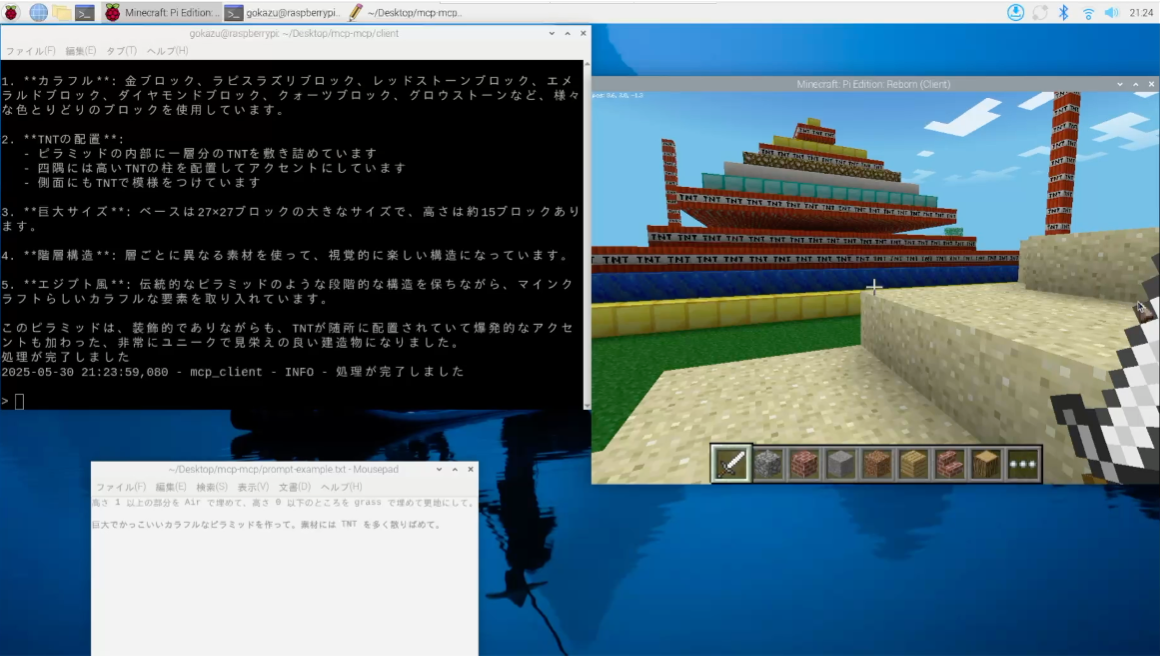
MCP-MCP は、Model Context Protocol (MCP) を使用して Minecraft を操作する AI エージェントです。
Strands Agents でビルドした AI が Minecraft の世界で建築や操作を行うことができます。
MCP-MCP is an AI agent that controls Minecraft using the Model Context Protocol (MCP).
AI built with Strands Agents can build and operate in the Minecraft world.
必要条件 / Requirements
システム要件 / System Requirements
- Raspberry Pi 4 Model B (動作確認済 / tested and confirmed)
- Minecraft Pi Edition
構成 / Architecture

セットアップ手順 / Setup Instructions
※詳細記事は 2025/7 公開の Builders Flash に掲載予定
※Detailed article will be published in Builders Flash in July 2025
1. 必要なツールのインストール / Installing Required Tools
# AWS CLIのインストール / Install AWS CLI
sudo apt install awscli -y

# uvのインストール / Install uv
curl -LsSf https://astral.sh/uv/install.sh | sh
2. AWS認証情報の設定 / Configure AWS Credentials
Amazon Bedrock APIを使用するため、AWS認証情報を設定します
Configure AWS credentials to use the Amazon Bedrock API
aws configure
プロンプトに従って、以下の情報を入力してください:
Follow the prompts to enter the following information:
- AWS Access Key ID
- AWS Secret Access Key
- Default region name
- Default output format
※ 設定する IAM ユーザーに AmazonBedrockFullAccess がアタッチされていることを前提とします
※ Assumes that the IAM user being configured has AmazonBedrockFullAccess attached
3. リポジトリのセットアップ / Repository Setup
# リポジトリのクローン / Clone the repository
git clone https://github.com/yourusername/mcp-mcp.git
cd mcp-mcp/basic
4. Minecraft Pi Editionの準備 / Preparing Minecraft Pi Edition
Minecraft Pi Edition を起動し、新しいゲームを開始してください。
Launch Minecraft Pi Edition and start a new game.
使用方法 / Usage
1. クライアントの起動 / Starting the Client
事前に ./basic/server/mcp.json の "/path/to/clone/directory/mcp-mcp/server" の部分を実際の絶対パスに修正します
Before starting, modify the "/path/to/clone/directory/mcp-mcp/server" part in ./basic/server/mcp.json to the actual absolute path
例/example: /home/pi/Desktop/mcp-mcp/server/basic
以下のコマンドでAIエージェントクライアントを起動します:
Start the AI agent client with the following command:
cd client
uv run client.py --mcp ../server/mcp.json
このコマンドは以下の処理を行います:
This command performs the following:
../server/mcp.jsonの設定に基づいてMCPサーバーを起動 / Starts the MCP server based on the settings in../server/mcp.json- Minecraftとの接続を確立 / Establishes a connection with Minecraft
- AIエージェントを初期化 / Initializes the AI agent
- インタラクティブチャットインターフェースを開始 / Starts the interactive chat interface
2. インタラクティブチャット機能 / Interactive Chat Features
- 起動後、コマンドラインでMinecraftに関する指示を入力できます / After startup, you can enter Minecraft-related instructions in the command line
- 例/example:「石のタワーを作って」「木の家を建てて」など / “Build a stone tower”, “Build a wooden house”, etc.
- AIエージェントはリアルタイムでツール使用状況と生成テキストを表示します / The AI agent displays tool usage status and generated text in real-time
- 「exit」または「quit」と入力すると終了します / Enter “exit” or “quit” to terminate
利用可能なツール / Available Tools
AIエージェントは以下のツールを使用してMinecraftを操作できます:
The AI agent can use the following tools to control Minecraft:
capture- Minecraftのスクリーンショットを撮影し、状況を確認 / Takes a screenshot of Minecraft to check the situationgetBlock- 指定座標のブロックタイプを取得(ブロックIDを返す) / Gets the block type at specified coordinates (returns block ID)setBlock- 指定座標にブロックを設置(ブロックIDを指定) / Places a block at specified coordinates (specify block ID)getPlayerPos- プレイヤーの現在位置を取得(x, y, z座標) / Gets the player’s current position (x, y, z coordinates)setPlayerPos- プレイヤーの位置を設定(x, y, z座標) / Sets the player’s position (x, y, z coordinates)setBlocks- 指定範囲にブロックを一括設置(立方体領域を指定) / Places blocks in bulk within a specified range (specify cubic area)postToChat- チャットにメッセージを送信(ゲーム内通知) / Sends a message to chat (in-game notification)getHeight- 指定座標の最高ブロック高さを取得(地形の高さ) / Gets the highest block height at specified coordinates (terrain height)
トラブルシューティング / Troubleshooting
一般的な問題 / Common Issues
- 接続エラー / Connection Error: Minecraftサーバーが実行中であることを確認してください / Ensure the Minecraft server is running
- AWS認証エラー / AWS Authentication Error:
aws configureで認証情報が正しく設定されているか確認してください / Verify that credentials are correctly configured withaws configure - Python環境エラー / Python Environment Error: uv の install 及び
uv syncの実行をしたかの確認をしてください / Ensure if uv has been installed and ifuv synchas been executed
ログの確認 / Checking Logs
エラーが発生した場合は、以下のログファイルを確認してください:
If errors occur, check the following log files:
- クライアントログ / Client logs:
client/logs/ - サーバーログ / Server logs:
server/logs/
注意事項 / Notes
- Raspberry Pi はサンドボックス環境で業務利用していないものであることを前提とします
- The Raspberry Pi should be in a sandbox environment and not used for business purposes
Dev Tools Supporting MCP
The following are the main code editors that support the Model Context Protocol. Click the link to visit the official website for more information.







