
Mcp Mma Docs
What is Mcp Mma Docs
mcp-mma-docs is an MCP server designed for checking Mathematica code through a local installation of the Mathematica software (MMA).
Use cases
Use cases include generating documentation for Mathematica functions, exploring package symbols, and integrating Mathematica capabilities into other applications or workflows.
How to use
To use mcp-mma-docs, install the required packages using ‘pip install -r requirements.txt’ and ensure Mathematica is installed. Initialize the server with ‘mcp dev path/to/mcp-mma-doc.py’ and install it to Claude using the provided JSON configuration.
Key features
Key features include commands like ‘get_docs’ for retrieving documentation on functions and ‘list_package_symbols’ for listing all symbols in a package. It supports both factory functions and addon functions.
Where to use
mcp-mma-docs can be used in educational settings, research environments, and software development where Mathematica is utilized for mathematical computations and documentation.
Clients Supporting MCP
The following are the main client software that supports the Model Context Protocol. Click the link to visit the official website for more information.





Overview
What is Mcp Mma Docs
mcp-mma-docs is an MCP server designed for checking Mathematica code through a local installation of the Mathematica software (MMA).
Use cases
Use cases include generating documentation for Mathematica functions, exploring package symbols, and integrating Mathematica capabilities into other applications or workflows.
How to use
To use mcp-mma-docs, install the required packages using ‘pip install -r requirements.txt’ and ensure Mathematica is installed. Initialize the server with ‘mcp dev path/to/mcp-mma-doc.py’ and install it to Claude using the provided JSON configuration.
Key features
Key features include commands like ‘get_docs’ for retrieving documentation on functions and ‘list_package_symbols’ for listing all symbols in a package. It supports both factory functions and addon functions.
Where to use
mcp-mma-docs can be used in educational settings, research environments, and software development where Mathematica is utilized for mathematical computations and documentation.
Clients Supporting MCP
The following are the main client software that supports the Model Context Protocol. Click the link to visit the official website for more information.
Content
Mathematica Documentation MCP server
General & Usage
Made with mcp-python-sdk
[!IMPORTANT]
if you are still using FastMCP version of this mcp server, please consider pull this repo again and update to newer versions as FastMCP is already deprecated.
Requirements: pip install -r requirements.txt and have Mathematica installed (or at least wolframscript callable from terminal, e.g. via free wolfram engine for developers).
Run mcp dev path/to/mcp-mma-doc.py to initialize the server.
Run mcp install path/to/mcp-mma-doc.py to install to claude or add following to claude/cline config:
[!NOTE]
Currently usinguvwithmcpseems to break certain Linux/macOS version of Claude-desktop, you might need to set as:instead, with
/path/to/mcpgot from runningwhich mcpin terminal
Custom wolframscript install path
If you need custom path to wolframscript, or it is not in system path, you can set via environmental variable by
export WOLFRAMSCRIPT_PATH="/usr/bin/wolframscript"
or set as an env key in mcp config
Tools
The plugin provides the following commands:
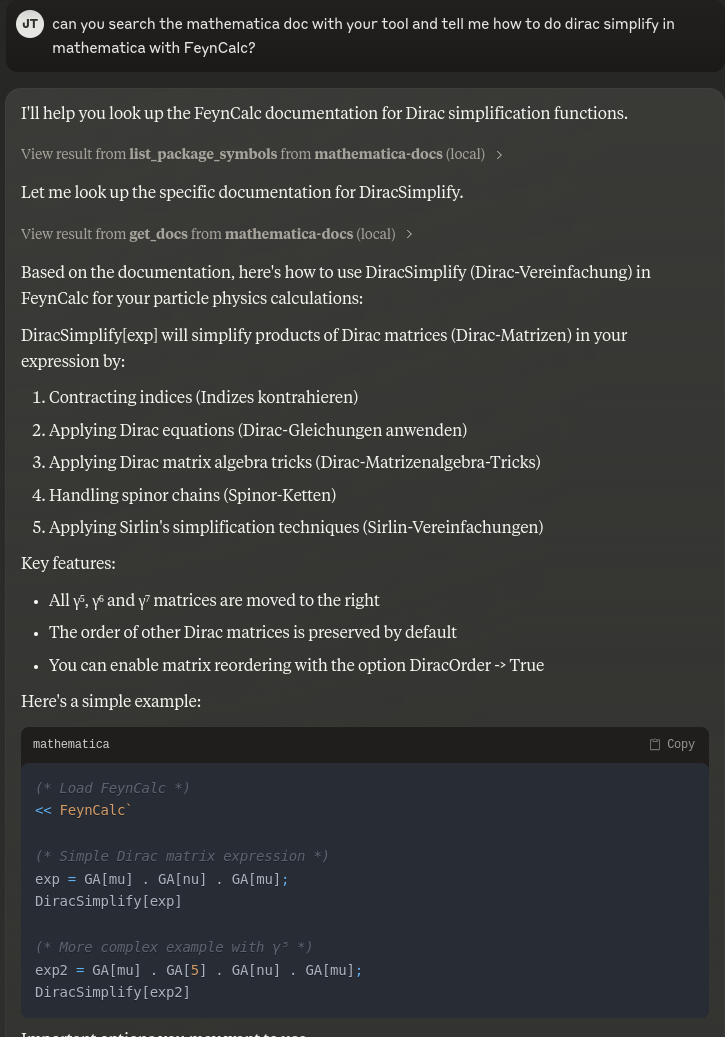
- get_docs: support factory functions, function via an addon, and function via a package.
- Basic usage: get_docs(“Plot”)
- With package: get_docs(“WeightSystem”, packages=[“LieART”])
- With addon: get_docs(“FCFeynmanParametrize”, packages=[“FeynCalc”], load_addons=[“FeynArts”])
- list_package_symbols: list all symbols/functions in a package.
- Basic usage: list_package_symbols(“FeynCalc”)
Known issues
- If you see things like
INFO Processing request of type __init__.py:431 ListToolsRequestin cline, you can ignore them as this will not affect it from working, this is because cline parse tool list together with console debug infos, and current python-sdk cannot disable console messages. This will not affect any function calling part other than seeing this warning. - Some MMA docs may contain complex styling format, and is not easy to remove with simple regex, your llm may be influenced by this, please instruct it to ignore the styling format and write in InputForm only.
Screenshots
Dev Tools Supporting MCP
The following are the main code editors that support the Model Context Protocol. Click the link to visit the official website for more information.







