
Mcp Network Assistant
What is Mcp Network Assistant
mcp-network-assistant is an MCP server designed specifically for network engineers, enabling access to structured knowledge about network configurations, routing policies, and device health through AI agents like Claude.
Use cases
Use cases include retrieving device status for troubleshooting, accessing network standards for compliance, and managing routing policies efficiently.
How to use
To use mcp-network-assistant, set up your environment by installing the required dependencies, initialize your project with ‘uv init’, activate the virtual environment, and run the server using ‘python network-assistant.py’. Configure the MCP server in the Claude for Desktop app to connect.
Key features
Key features include the ability to access network standards and device status through specific tools, integration with Claude for Desktop, and structured knowledge retrieval about network configurations.
Where to use
mcp-network-assistant can be used in various fields related to network engineering, including IT infrastructure management, network monitoring, and troubleshooting.
Clients Supporting MCP
The following are the main client software that supports the Model Context Protocol. Click the link to visit the official website for more information.





Overview
What is Mcp Network Assistant
mcp-network-assistant is an MCP server designed specifically for network engineers, enabling access to structured knowledge about network configurations, routing policies, and device health through AI agents like Claude.
Use cases
Use cases include retrieving device status for troubleshooting, accessing network standards for compliance, and managing routing policies efficiently.
How to use
To use mcp-network-assistant, set up your environment by installing the required dependencies, initialize your project with ‘uv init’, activate the virtual environment, and run the server using ‘python network-assistant.py’. Configure the MCP server in the Claude for Desktop app to connect.
Key features
Key features include the ability to access network standards and device status through specific tools, integration with Claude for Desktop, and structured knowledge retrieval about network configurations.
Where to use
mcp-network-assistant can be used in various fields related to network engineering, including IT infrastructure management, network monitoring, and troubleshooting.
Clients Supporting MCP
The following are the main client software that supports the Model Context Protocol. Click the link to visit the official website for more information.
Content
Network Assistant — MCP Server for Network Engineers
This project sets up a Model Context Protocol (MCP) server designed specifically for network engineers.
It allows Claude for Desktop (or other LLM clients) to access structured knowledge about your network — such as routing policies and device health — via the tools primitive.
🧠 Prerequisite Knowledge
This quickstart assumes you’re familiar with:
- Python
- LLMs like Claude
💻 System Requirements
- Python 3.10 or higher
- MCP Python SDK v1.2.0 or newer
⚙️ Set Up Your Environment
1. Install uv
MacOS/Linux:
brew install uv
🔁 Restart your terminal to ensure the
uvcommand is available.
2. Set Up Your Project
uv init

uv venv
source .venv/bin/activate # or .venv\Scripts\activate on Windows

uv add "mcp[cli]"
▶️ Run Your Server
python network-assistant.py
This launches your MCP server over stdio, ready to connect to Claude.
🧪 Test with Claude for Desktop
Claude for Desktop is currently only available on macOS and Windows.
- Download Claude for Desktop from here.
- Open your Claude Desktop app.
- Configure the MCP server in:
~/Library/Application Support/Claude/claude_desktop_config.json(macOS)C:\Users\<YOU>\AppData\Roaming\Claude\claude_desktop_config.json(Windows)
Example config:
{
  "mcpServers": {
    "network": {
      "command": "uv",
      "args": [
        "--directory",
        "/ABSOLUTE/PATH/TO/network-assistant",
        "run",
        "network_assistant.py"
      ]
    }
  }
}
Use
which uv(macOS/Linux) orwhere uv(Windows) to get the path touvif needed.
Restart Claude Desktop after saving the config file.
🔨 Tools Available in Claude
Click the 🛠 hammer icon in Claude. You should see:
get_network_standards()get_device_status(device_name)
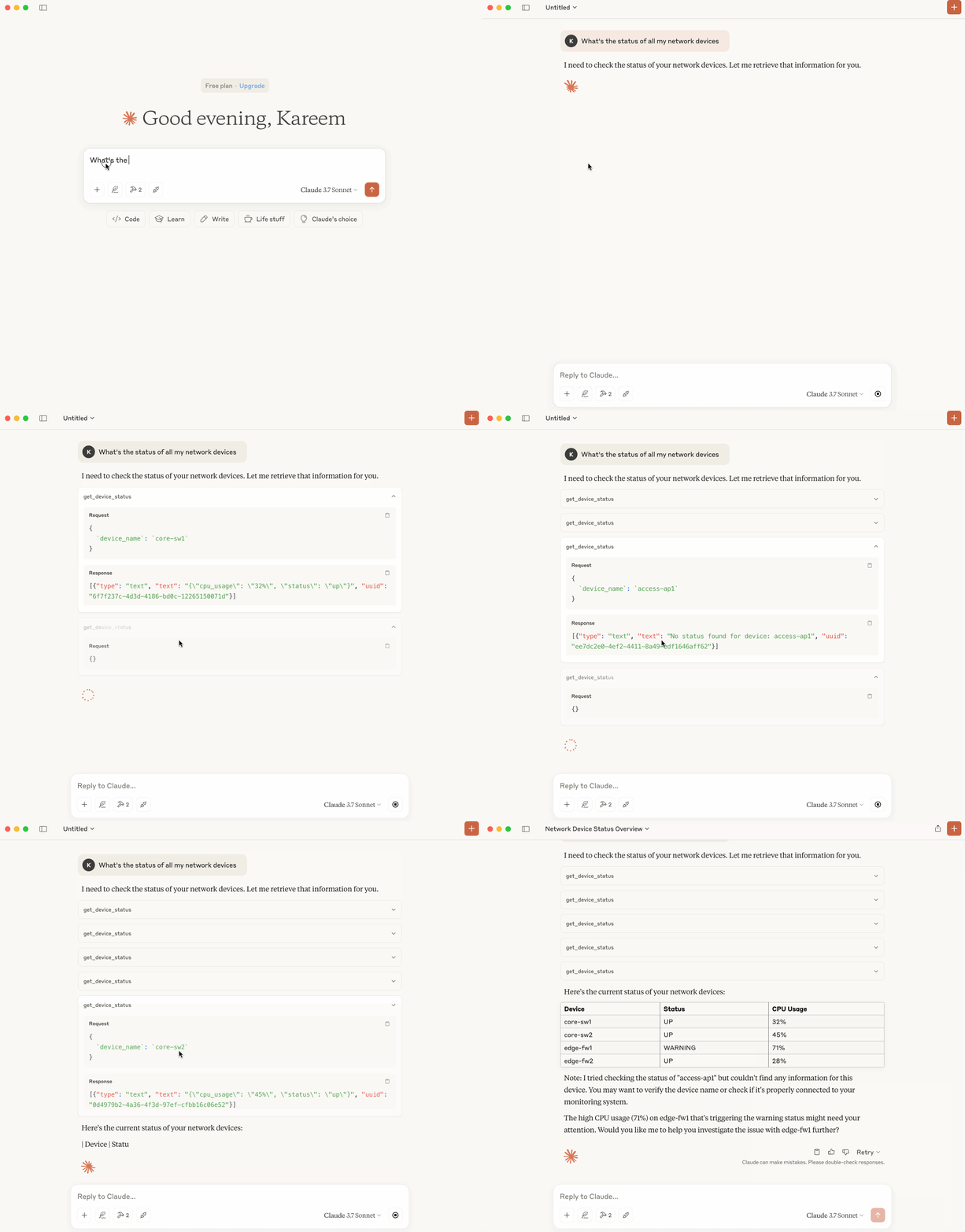
Now ask Claude:
- What routing protocols do we use in our network?
- What is the current status of my network devices?
- What is the status of all devices in the network?
🔍 What’s Happening Behind the Scenes?
- Claude parses your prompt and finds relevant tools.
- It calls
get_network_standards()orget_device_status()over MCP. - Your server executes the tool logic and returns structured data.
- Claude responds using your actual context
Dev Tools Supporting MCP
The following are the main code editors that support the Model Context Protocol. Click the link to visit the official website for more information.







