
Mcp Outline
What is Mcp Outline
mcp-outline is a Model Context Protocol (MCP) server that facilitates interaction between AI assistants and Outline documentation services, enabling natural language queries and document management.
Use cases
Use cases include searching for specific documents, managing collections of documents, reading and exporting document content, collaborating through comments, and creating or editing documents within Outline.
How to use
To use mcp-outline, set up the server by installing the necessary dependencies, configuring your Outline API key, and running the server. You can then interact with the server using commands to search for documents, manage collections, and edit documents.
Key features
Key features include document search by keywords, collection management, document reading and exporting, comment management, document creation and editing, and backlink management.
Where to use
mcp-outline can be used in various fields where documentation management is crucial, such as project management, software development, and knowledge management.
Clients Supporting MCP
The following are the main client software that supports the Model Context Protocol. Click the link to visit the official website for more information.





Overview
What is Mcp Outline
mcp-outline is a Model Context Protocol (MCP) server that facilitates interaction between AI assistants and Outline documentation services, enabling natural language queries and document management.
Use cases
Use cases include searching for specific documents, managing collections of documents, reading and exporting document content, collaborating through comments, and creating or editing documents within Outline.
How to use
To use mcp-outline, set up the server by installing the necessary dependencies, configuring your Outline API key, and running the server. You can then interact with the server using commands to search for documents, manage collections, and edit documents.
Key features
Key features include document search by keywords, collection management, document reading and exporting, comment management, document creation and editing, and backlink management.
Where to use
mcp-outline can be used in various fields where documentation management is crucial, such as project management, software development, and knowledge management.
Clients Supporting MCP
The following are the main client software that supports the Model Context Protocol. Click the link to visit the official website for more information.
Content
MCP Outline Server
A Model Context Protocol (MCP) server enabling AI assistants to interact with Outline (https://www.getoutline.com)
Overview
This project implements a Model Context Protocol (MCP) server that allows AI assistants (like Claude) to interact with Outline document services, providing a bridge between natural language interactions and Outline’s document management capabilities.
Features
Currently implemented:
- Document Search: Search for documents by keywords
- Collection Management: List collections and view document structure
- Document Reading: Read document content, export as markdown
- Comment Management: View and add comments on documents
- Document Creation: Create new documents in collections
- Document Editing: Update document content and move documents
- Backlink Management: View documents that link to a specific document
Add to Cursor with Docker
We recommend running this python MCP server using Docker to avoid having to install dependencies on your machine.
- Install and run Docker (or Docker Desktop)
- Build the Docker image
docker buildx build -t mcp-outline . - In Cursor, go to the “MCP Servers” tab and click “Add Server”
{
  "mcpServers": {
    "mcp-outline": {
      "command": "docker",
      "args": [
        "run",
        "-i",
        "--rm",
        "--init",
        "-e",
        "DOCKER_CONTAINER=true",
        "-e",
        "OUTLINE_API_KEY",
        "-e",
        "OUTLINE_API_URL",
        "mcp-outline"
      ],
      "env": {
        "OUTLINE_API_KEY": "<YOUR_OUTLINE_API_KEY>",
        "OUTLINE_API_URL": "<YOUR_OUTLINE_API_URL>"
      }
    }
  }
}
OUTLINE_API_URL is optional, defaulting to https://app.getoutline.com/api
- Debug the docker image by using MCP inspector and passing the docker image to it:
npx @modelcontextprotocol/inspector docker run -i --rm --init -e DOCKER_CONTAINER=true --env-file .env mcp-outline
Development
Prerequisites
- Python 3.10+
- Outline account with API access
- Outline API key (get this from your Outline account settings)
Installation
# Clone the repository
git clone https://github.com/Vortiago/mcp-outline.git
cd mcp-outline

# Install in development mode
uv pip install -e ".[dev]"
Configuration
Create a .env file in the project root with the following variables:
# Outline API Configuration
OUTLINE_API_KEY=your_outline_api_key_here

# For cloud-hosted Outline (default)
# OUTLINE_API_URL=https://app.getoutline.com/api

# For self-hosted Outline
# OUTLINE_API_URL=https://your-outline-instance.example.com/api
Running the Server
# Development mode with the MCP Inspector
mcp dev src/mcp_outline/server.py

# Or use the provided script
./start_server.sh

# Install in Claude Desktop (if available)
mcp install src/mcp_outline/server.py --name "Document Outline Assistant"
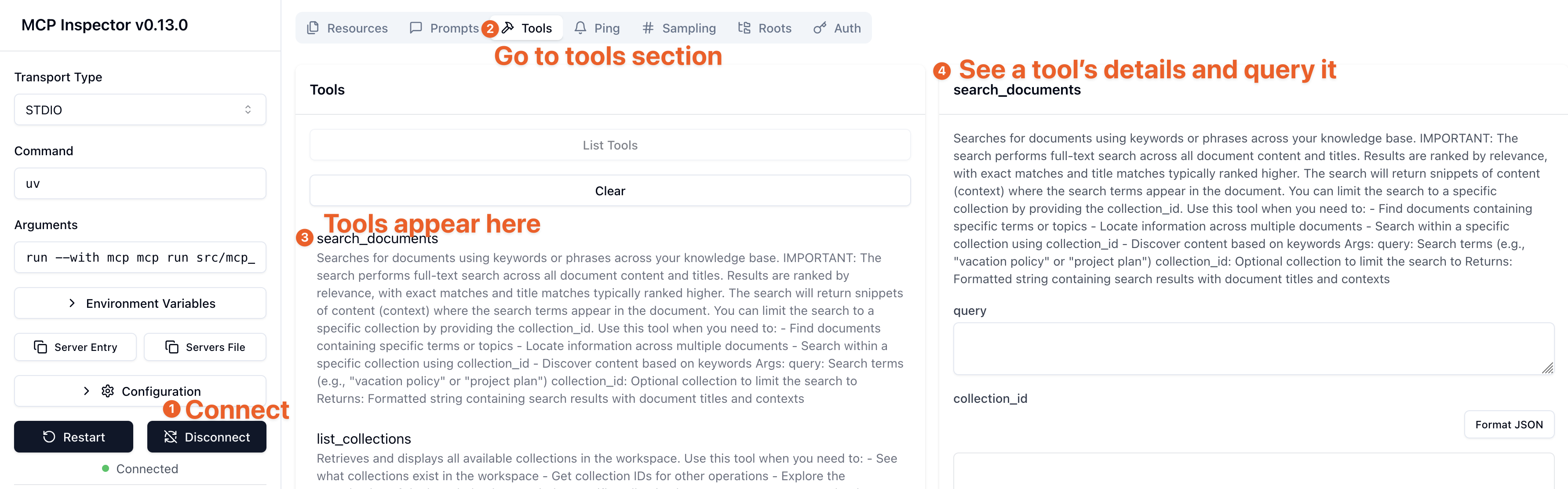
When running the MCP Inspector, go to Tools > Click on a tool > it appears on the right side so that you can query it.
Usage Examples
Search for Documents
Search for documents containing "project planning"
List Collections
Show me all available collections
Read a Document
Get the content of document with ID "docId123"
Create a New Document
Create a new document titled "Research Report" in collection "colId456" with content "# Introduction\n\nThis is a research report..."
Add a Comment
Add a comment to document "docId123" saying "This looks great, but we should add more details to the methodology section."
Move a Document
Move document "docId123" to collection "colId789"
Contributing
Contributions are welcome! Please feel free to submit a Pull Request.
Development
# Run tests
uv run pytest tests/

# Format code
uv run ruff format .
License
This project is licensed under the MIT License - see the LICENSE file for details.
Acknowledgments
- Built with MCP Python SDK
- Uses Outline API for document management
Dev Tools Supporting MCP
The following are the main code editors that support the Model Context Protocol. Click the link to visit the official website for more information.







